Most people start a job hunt the same way. They open a job board, upload an old resume, and send it to fifty listings. Then they wait. Replies are slow, and many never come. This guide shows how to use AI tools for job search in a way that fixes that, step by step, from finding the right roles to the salary talk.
We have used these AI tools in real searches, our own and those of people we helped, and we learned what works and what wastes an evening. Some steps save hours. Others look clever and change nothing. We will tell you which is which.
You do not need a paid plan or any technical skill. A free AI chatbot and a clear routine are enough to start. The order of the steps matters more than the AI tool you pick, so read the sections in sequence the first time.
What AI Tools for Job Search Actually Do
AI tools for job search are apps and chatbots that handle the repetitive parts of a hunt: reading job descriptions, rewriting a resume, drafting messages, and practicing interview answers. Some are built only for this work. Others, like a general chatbot, do it when you give them the right instructions.
We split them into groups, because mixing them up is the first mistake most people make. A resume checker does not find jobs. A chatbot does not track your applications. An auto-apply bot does not prepare you for a call. Each group does one job, and your job search needs all of them at different moments. Every AI job search tool fits one of these groups, so decide what you need before you test any of them. That is the simplest way to learn how to use AI for job search without paying for five apps.
The four stages: discovery, matching, applying, tracking
Every job search moves through the same four stages, with or without AI. Knowing them helps you pick one AI tool per stage instead of ten tools for everything.
- Discovery: finding open roles. This is where AI job alerts and AI job recommendations help.
- Matching: comparing a role with your background and deciding if it is worth the effort.
- Applying: tailoring the resume, writing the cover letter, and sending the application.
- Tracking: keeping a record of what you sent, when, and what happened next.
Most of the time you lose sits in matching and applying. Those are also the stages where AI gives the clearest gain, so we spend most of this guide there.
Why Use AI Tools for Job Search in 2026
The honest reason to use AI tools for job search is time. A careful application, with a tailored resume and a real cover letter, takes a long evening when you do it by hand. With the right setup it takes a fraction of that, and the quality stays the same or improves. That lets you apply to fewer roles with more care, which is the approach that works better than sending volume.
The second reason is the applicant tracking system, usually called ATS. Many companies run applications through software that sorts and ranks them before a person reads anything. A resume that does not match the wording of the job description can sit at the bottom of the pile. AI tools read both documents and show you the gap in seconds.
Where AI saves the most time
- Reading a long job description and pulling out what the employer really wants.
- Rewriting resume bullets to match a role without changing the facts.
- Drafting a first version of a cover letter, an outreach message, or a follow-up email.
- Playing the interviewer so you can practice answers out loud.
- Keeping a clean record of every application and its status.
Where AI falls short
AI does not know your life. It will invent a number, an AI tool, or a job title if you leave a gap in the prompt. It writes in a flat, polite voice that sounds like everyone else. It cannot judge whether a company is a good place to work. And it cannot replace a conversation with a real person who can say your name to a hiring manager.
We treat the output as a first draft every time. If you remember one rule from this guide, make it that one.
How to Use AI Tools for Job Search Step by Step
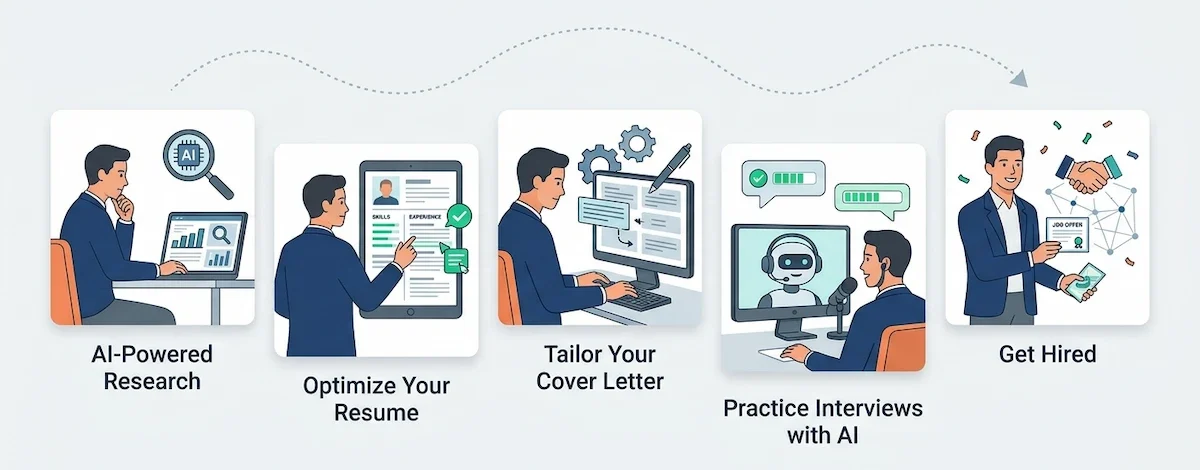
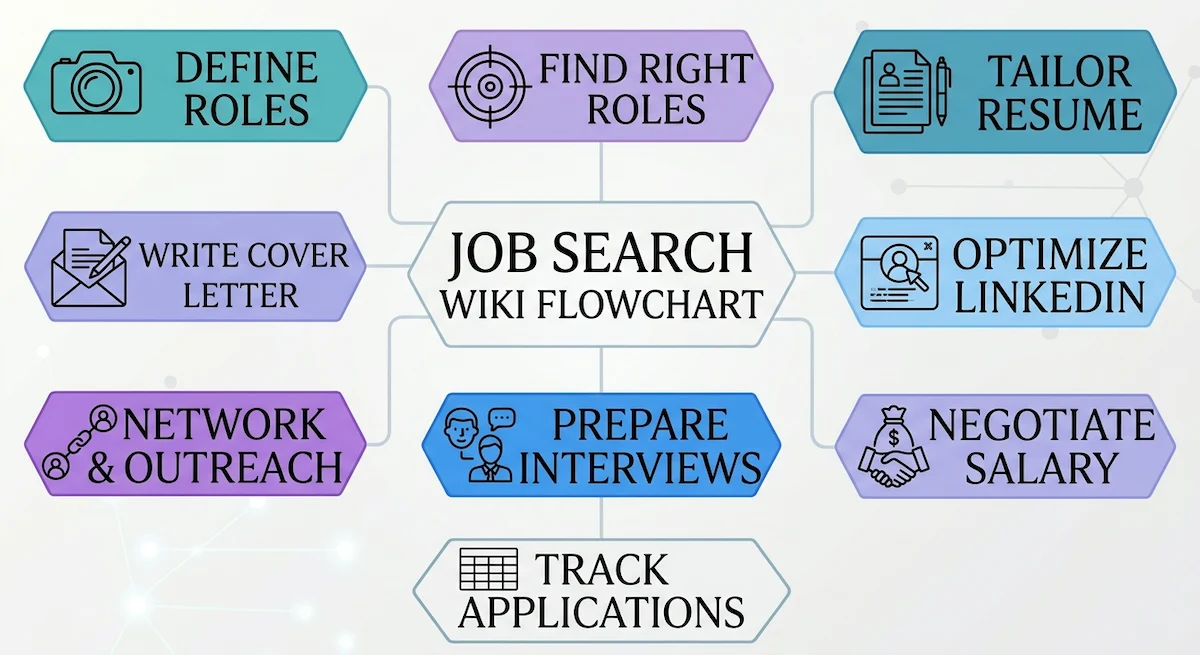
Here is the full AI job search workflow in nine steps, and the short answer to how to use AI for job search without losing a week to trial and error. You can do them in a weekend for the first round, and after that each new application takes much less time because the base documents already exist.
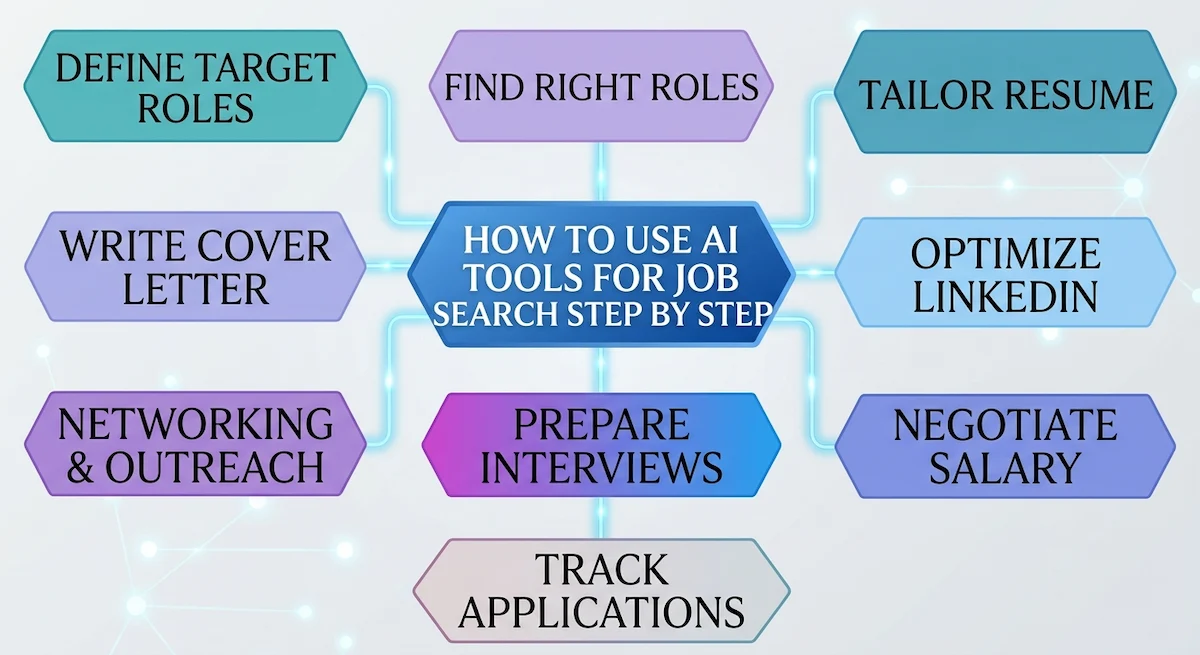
Step 1: Define your target roles and skill gaps
Before you open any job board, tell an AI chatbot who you are. Paste your resume, add a few lines about what you want next, and ask it to suggest five job titles that fit. Then ask which skills those roles ask for that your resume does not show.
This is the quick version of an AI skill gap analysis, and it works well for people changing fields. We have seen it turn a vague idea like “something in operations” into three clear titles and a short list of skills to add. If you plan an AI career pivot, repeat the exercise with the new field and look at the overlap.
If you are starting after a layoff, keep the first week simple. Update the master resume while the details are fresh, and ask the AI chatbot to turn each role into three bullets that end in a result. Then write down the roles you would take and the ones you would refuse. A clear list makes every later decision faster and keeps you from applying to whatever lands in your inbox.
Step 2: Find the right roles with AI job alerts
Most job boards now offer AI job recommendations based on what you click and save. Give them good signals. Save ten roles you like, skip the ones you do not, and set alerts with the exact titles from Step 1. The recommendations improve fast when you feed them clean choices.
For company research, a job search-based assistant such as Perplexity works better than a plain chatbot, because it shows where each answer comes from. Ask it what the company sells, how it makes money, what happened in the last year, and what people say about working there. Five minutes of this before applying saves you from roles that were never a fit.
Step 3: Tailor your resume with AI for ATS
This is the step where AI pays off most. The method we trust has four parts.
- Build one master resume that lists every job, project, number, and tool you can claim. It can be long. Nobody sends it.
- Paste the job description and ask the AI chatbot to list the ten most important requirements in order.
- Ask it to tailor the resume to the job description using only facts from your master resume, and to flag anything it cannot support.
- Read the result line by line and fix every claim that is stretched or wrong.
That last line matters. When you ask AI to tailor a resume, it will sometimes add a skill you never had because the job description mentions it. Catch it. An ATS-friendly resume that lies gets exposed in the first interview.
Do not stuff keywords. When an AI chatbot sees a list of requirements, it tends to repeat them on every line, and the resume starts to read like a checklist. Use each important term once or twice, in a sentence that shows you did the work. An ATS reads context better than most people think, and a human reader will notice the repetition at once.
Keep the layout plain. One column, standard section names, no text boxes or icons. Many ATS tools read those badly. A checker like Jobscan compares your resume with a job description and shows the missing keywords, which is useful as a second opinion after the AI chatbot pass.
Step 4: Write a cover letter that does not sound like AI
An AI cover letter fails in one place: the first line. Openers like “I am excited to apply for the position of” are what an AI chatbot writes by default, and readers spot them at once. So we never use the first line the AI tool gives us.
Here is what works instead. Write two or three sentences yourself about why this company and this role. Mention one real thing you found in your research. Then ask the AI chatbot to build the rest of the letter around those sentences, in your tone, in under 250 words. Finally, read it aloud. Anything you would never say in a conversation gets cut.
We call this the voice-match fix. Paste two or three paragraphs you wrote years ago, before AI was common, and tell the AI tool to copy that style. The result still needs editing, but it stops sounding like a brochure.
Step 5: Optimize your LinkedIn profile with AI
Recruiters search LinkedIn with keywords, so your headline and summary work like a second resume. Paste your profile into an AI chatbot and ask for three headline options that include the job title you want and two skills from your target listings.
Use AI for LinkedIn in small pieces: the headline, the first two lines of the summary, and the bullet points under each role. Do not paste a full generated profile. We tried it, and the result read like a template. Keep one or two details that only you could write.
Step 6: Use AI for networking and outreach
Applying through a form is the weakest route to an interview. A short message to a real person is stronger, and AI makes it easy to send ten of them without sounding rushed.
Find someone who works at the company, ideally in the team you want. Give the AI chatbot their role, the company, and one thing you have in common. Ask the AI chatbot for a message under 80 words that asks one clear question. These AI networking messages work only when they are specific, so edit until the message could not be sent to anyone else. For the wording of short outreach emails, our guide to writing emails with AI shows the same logic.
Cold outreach gets a reply less often than a warm introduction, but it costs nothing. We keep a short list of people to message each week, and we send the follow-up after seven days if nothing comes back.
Step 7: Prepare for interviews with AI
AI interview practice is the best use of an AI chatbot after resume work. Paste the job description and ask it to act as the interviewer. Tell it to ask one question at a time, wait for your answer, and then give feedback on what was missing.
For behavioral questions, use the STAR method: situation, task, action, result. Give the AI tool your rough notes about a past project and ask it to shape them into a STAR answer. Then practice saying it out loud, because an answer that reads well often sounds stiff when spoken.
Dedicated apps add voice and video. An AI mock interview tool records your answers and points out filler words, pace, and long pauses. Google offers a free one called Interview Warmup, which is a decent place to start.
Technical and case interviews need a different kind of practice. Ask the AI chatbot for three problems at the level of the role, solve them in writing without help, and only then ask for feedback on your method and your gaps. If you jump to the answer too early, you learn nothing.
You can also record practice calls with a friend and paste the transcript into the AI chatbot. Ask where your answers ran long, where you dodged the question, and which story worked best. Get permission before you record anyone, and never record a real interview without it.
You will also find real-time interview copilots that listen during a live call and show answers on screen. We do not recommend them. They are risky if the employer forbids outside help, and they tend to make answers sound read from a script. Use AI to prepare, not to perform.
Step 8: Negotiate your salary with AI
This is the most underrated use. Before any offer call, ask the AI chatbot to help you build a salary range for the role, city, and level. Then check that range against a pay database, because chatbots can be off by a wide margin.
Next, ask it to play the recruiter. Practice saying your number without apologizing, and practice the answer to “What are your salary expectations?” AI salary negotiation practice will not get you a raise by itself, but it removes the shaky first minute, which is where many people give up money.
When two offers arrive, ask the AI chatbot to compare them on pay, growth, workload, and risk, and tell it to ask you questions first. The tool does not decide for you. It forces you to say what matters, which is most of the work. Then check the final list with a person you trust.
Step 9: Follow up and track every application
Open a spreadsheet or a free job application tracker and log each role: company, date, link, version of the resume, contact name, and status. Without this, by the third week you will not remember what you sent where.
Use ChatGPT or another AI chatbot for the follow-up email. Give it the interview notes and ask for three short lines: a thank you, one point you want to stress, and a clear next step. An AI follow-up email takes a minute to draft and often decides whether you stay in the manager’s mind.
How Companies Use AI to Screen Applications
Knowing what happens on the other side makes every earlier step of an AI-assisted job search easier. Most mid-size and large employers receive far more applications than a team can read. The applicant tracking system collects them, reads each resume into fields such as job titles, dates, and skills, and lets recruiters search and filter. Some systems also rank candidates by how closely the resume matches the job description.
That ranking is why wording matters. If the posting says “project management” and your resume says “ran projects,” a keyword filter can miss the link even when you are a strong fit. Use the language of the posting wherever it is true.
Many forms also ask knockout questions about work authorization, location, or required experience. A wrong answer ends the application at once, so answer these yourself and never leave them to an auto-apply tool.
One more point is worth knowing. An ATS does not reject a resume because AI helped write it. It reacts to formatting it cannot read and to missing keywords. Fix those two things and the screening stage gets much easier.
ChatGPT Prompts for Job Search That Work
ChatGPT for job search works well when the prompt has three things: your real background, the job description, and a clear limit on what the AI tool may do. Most weak results come from a short prompt such as “write me a cover letter.” Our prompt engineering guide explains why detail changes the result, and the table below shows the prompts we reuse most.
| Task | Prompt to try | What you get |
|---|---|---|
| Tailor a resume | Here is my master resume and a job description. Rewrite the summary and the top five bullets to match the role. Use only facts from my resume and flag anything you cannot support. | A targeted resume without invented claims |
| Decode a job description | List the ten most important requirements in this posting in order, and tell me which ones my resume does not show. | A clear gap list before you apply |
| Research a company | What does this company sell, who are its main competitors, and what changed in the last year? Give sources. | Talking points for the interview |
| Practice interviews | Act as the hiring manager for this role. Ask one question at a time and critique each answer. | Live practice with feedback |
| Build STAR answers | Turn these notes about a past project into a STAR answer under 150 words. | A clean story you can say aloud |
| Write a follow-up | Draft a thank-you email of four sentences using these interview notes. | A short email you can edit |
| Prepare salary talk | Act as a recruiter. I will state my number and you push back twice. | Practice for the hardest minute |
| Compare two offers | Compare these two offers on pay, growth, workload, and risk. Ask me questions before you answer. | A structured decision |
One habit improves every prompt in this table: ask the AI tool to question you first. When we add “Ask me three questions before you start,” the answers get more specific, because the AI chatbot stops guessing about the parts you left out.
Best AI Job Search Tools by Task
You do not need all of these. Pick one AI tool per task and stay with it for a few weeks before you judge it. If you want a wider list, we keep a page of the best AI tools to apply for jobs that goes deeper into each option. Here is the short version, grouped by the job each one does.
| Task | Tools worth a look | Cost |
|---|---|---|
| Writing and tailoring | ChatGPT, Claude, Gemini | Free tier available |
| ATS keyword check | Jobscan, Rezi | Free scans, paid plans |
| Resume building | Kickresume, Teal | Free tier, paid upgrade |
| Application tracking | Teal, Huntr, Simplify | Mostly free |
| Company research | Perplexity | Free tier available |
| Interview practice | Interview Warmup, Yoodli | Free or low cost |
| Salary data | Levels.fyi, Payscale | Free with paid extras |
| Auto-apply | LoopCV, Sonara, LazyApply | Paid plans |
Practice apps differ a lot: some record video, and some only use voice. A general chatbot is enough for the writing steps.
How to choose AI job search tools
Before you add any AI job search tool to your routine, run it through four questions. We use the same checklist every time.
- Does it solve one stage? A good AI tool for job search does one thing well. Avoid apps that promise every stage in one click.
- Can you check its work? Choose AI job search tools that show their sources or let you edit every line.
- What does it do with your data? Read the privacy page before you upload a resume to any AI tool.
- Is the free tier usable? If the AI tool cannot finish a real task without payment, move on.
Test each new AI tool on one real application. If it saves time and the result needs only light edits, keep it. If you spend longer fixing the AI output than writing it yourself, drop it.
Free, mid-range, and premium AI job search stacks
Money is not the main limit here. A free setup covers most of what you need.
- Free: one chatbot, one free resume checker, a spreadsheet tracker, and Interview Warmup. This is enough for a full job search.
- Mid-range: add a paid plan for one resume tool or a premium chatbot tier, plus a tracker with extra features.
- Premium: add auto-apply or live coaching AI tools. We rarely see these pay back unless you apply at high volume in a narrow field.
Before you subscribe to anything, look at what AI tools cost in practice. Many plans bill monthly, and it is easy to forget an AI tool you used for two weeks. Cancel when the job search ends.
AI Auto-Apply Tools: When They Help and When They Hurt
AI auto-apply tools fill in forms and submit applications for you, sometimes hundreds a week. The pitch is simple: more applications, more interviews. In our experience the result is more noise than signal.
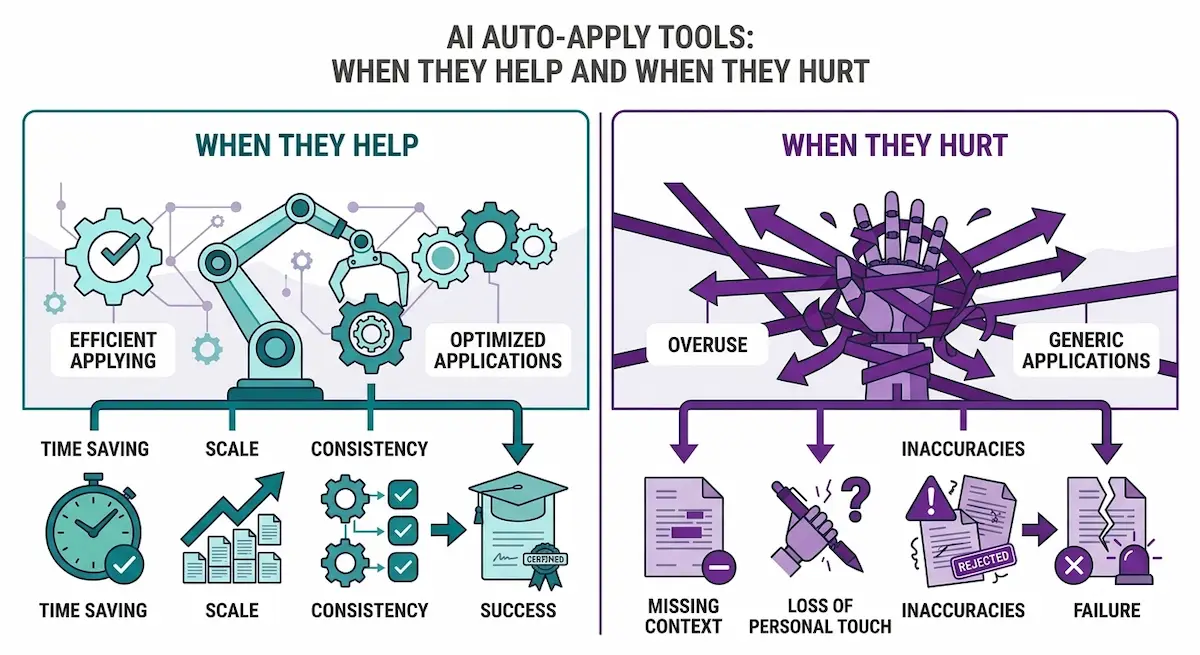
The problem is quality. These AI tools send the same resume to many roles, answer screening questions with generic text, and sometimes apply to jobs that do not fit you. Employers receive the same flood from everyone using them, and many systems filter duplicate or low-effort applications out. You also lose control over what is said in your name.
When auto-apply makes sense
There are narrow cases where it helps. If you apply to a large number of nearly identical roles, such as warehouse, retail, or entry-level support jobs, the form-filling saves real time. Some AI tools only autofill and leave the final click to you, which is a safer middle path.
For professional roles, we skip full auto-apply and use AI for the parts that need effort: the tailored resume, the research, and the message to a person. That is slower per application and faster per interview.
Will Recruiters Know You Used AI?
This is the question most readers worry about, so we will answer it plainly. Recruiters rarely run your documents through a detector. What they notice is sameness. After reading dozens of cover letters in a day, they know the stock phrases, the smooth tone, and the lack of detail that come with default AI output.
AI detectors are also unreliable. They flag real human writing and miss edited machine text. So a detector is not what puts you at risk. A generic application is. Whether AI wrote it matters less than whether it sounds like a specific person who wants a specific job.
The AI tells to strip before you submit
- Opening lines that praise the company in broad terms.
- Sentences that could appear in any letter for any job.
- Long lists of adjectives with no example behind them.
- Resume bullets that all follow the same pattern and length.
- Claims with no number, name, or result attached.
The three-question test and the voice-match fix
Before you send anything, ask three questions. Could this sentence appear in anyone else’s application? Does it contain a detail only I would know? Would I say this out loud in an interview? If the answer to the first is yes, or to the others is no, rewrite it.
Then apply the voice-match fix from Step 4. Add one real detail per paragraph: a project name, a number, a place, a result. Those details are what make a document read as human.
Skip AI humanizer tools
Some AI job search tools promise to rewrite AI text so detectors cannot flag it. We do not use them. They swap words for odd synonyms, remove detail, and often make the text worse for a human reader, who is the one that matters. Fixing the substance works better. Add a real example, cut the filler, and shorten long sentences. That does more to make text read as human than any rewriting app.
Should you tell an employer that you used AI?
No rule says you must, unless the application form asks. If it asks, answer honestly and briefly. Most employers care about whether the content is true and whether you can speak to it. If you can explain every line in the interview, you used the AI tool well. If you cannot, that is what gets noticed.
What You Should Never Paste Into a Public AI Tool
A resume contains your name, phone, address, work history, and sometimes more. Before you paste it into ChatGPT or any other AI chatbot, check the privacy settings and decide what to remove. Our guide to AI data privacy explains how these AI tools handle stored text, and the same logic applies to a personal search.
- Remove your home address, ID numbers, and date of birth.
- Do not paste confidential documents from a current employer, such as client lists, internal plans, or code.
- Do not paste references’ private contact details without asking them.
- Turn off chat history or training use where the AI tool allows it.
A good habit is to keep a clean version of your resume just for AI work, with the contact block removed. You add the details back after the edits are done.
When Not to Rely on AI
AI is a poor fit for some parts of a search, and knowing them saves you from avoidable trouble.
- Skills tests and live assessments. Employers often ban outside help. Read the rules in the invitation before you open any tool.
- Facts about you. The AI chatbot cannot know your dates, titles, or results, so you supply and check every one.
- Sensitive answers. Why you left a job or why there is a gap in your history should be written in your own words.
- Company rules. If you already have a job, check what your employer allows before you use AI at work to prepare an application. Our guide to AI in the workplace shows what those policies usually cover.
A good test is simple. If getting caught using the AI tool would cost you the job, do not use it for that step.
AI Job Search vs Traditional Job Search
The comparison is not a contest. The best searches mix both, with AI handling the heavy reading and writing, and people handling the relationships. This table shows where each approach is stronger.
| Factor | Traditional search | AI-assisted search |
|---|---|---|
| Time per application | Long, mostly manual rewriting | Much shorter once the master resume exists |
| Quality of tailoring | Depends on energy and time | Consistent, if you check the facts |
| Interview practice | Needs a friend or a coach | Available at any hour |
| Risk of errors | Typos, missed keywords | Invented claims, generic tone |
| Networking | Slow to start, strong results | Faster drafts, same need for real replies |
| Cost | Mostly your time | Free to low monthly fees |
The return on a paid tool is easy to judge. Ask yourself whether it saved you time or got you a reply you would not have had. If neither, cancel it.
Your Weekly AI Job Search Workflow
A routine beats a burst of effort. This is the weekly rhythm we use and suggest, and you can adjust the days to your own schedule.
- Monday: review alerts, pick five roles worth applying to, and research each company for ten minutes.
- Tuesday and Wednesday: tailor the resume, write the cover letters, and submit the applications.
- Thursday: send five outreach messages to people at target companies.
- Friday: follow up on last week’s applications, update the tracker, and practice one interview round.
Notice how little of the week goes to scrolling job boards. Quality time goes to the few roles that matter, and AI shortens each of those tasks instead of replacing them.
Where human effort matters and where AI should take over
Split the work on purpose. Let AI handle reading postings, first drafts, formatting, practice questions, and tracker updates. Keep for yourself the choice of roles, the fact check, the first line of every letter, the messages to real people, the interviews, and the final decision. When we mix these up, results get worse: either the application sounds generic, or we spend hours on tasks an AI tool could finish in minutes.
Metrics worth tracking
Track four numbers every week: applications sent, replies received, interviews booked, and hours spent. If replies stay low after twenty applications, the problem is probably the resume or the target roles, not the AI tool. Change one thing at a time so you can see what worked.
How many applications to send per week
There is no magic number, but a pattern held for us. Five to ten tailored applications a week, plus five messages to people, beat fifty rushed forms. Raise the number only if each application stays good. If replies are low, send fewer and improve the documents before you add more.
Common AI Job Search Mistakes
These are the AI job search mistakes we see most often, and each one is easy to avoid once you know it.
- Sending raw output. Every generated line needs your edit and a fact check.
- Letting the AI tool invent experience. If it adds a skill you do not have, delete it before it follows you into the interview.
- Using auto-apply blindly. A flood of weak applications hurts more than it helps.
- Using too many tools. Five apps with overlapping features waste time. Choose one per task.
- Skipping people. A referral still beats a form, and no tool replaces a conversation.
- Pasting private data. Strip contact details and anything confidential first.
If your workflow grows beyond a personal search, our guide on building an AI tool stack explains how to keep a set of tools small and useful.
The Future of AI in Job Search
Employers are adding AI on their side as well: automated screening questions, recorded video answers, and chat assistants that schedule interviews. Expect more of this. At some companies you will meet an AI before you meet a person, so practice answering clearly to a camera and a text box.
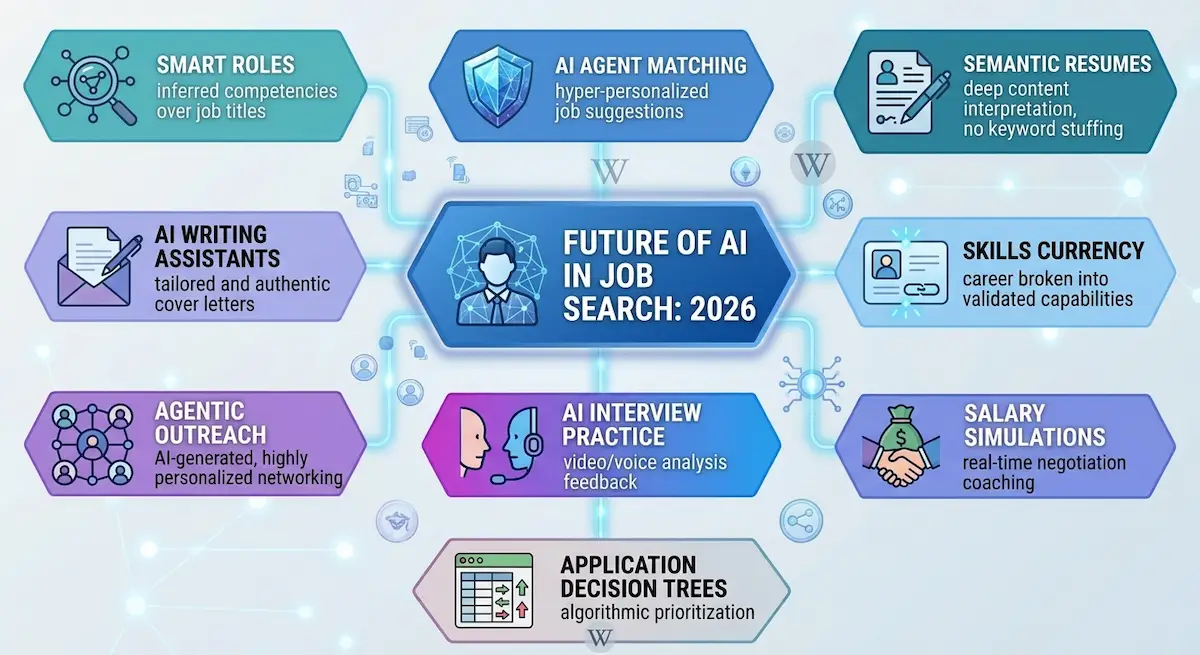
AI job search tools will keep changing, but the gap between a generic application and a specific one will stay, because specifics come from you. Learn the habits in this guide now, and you can switch tools later without changing your method.
Conclusion
Now you know how to use AI tools for job search from the first role you pick to the last salary question. The AI tools are fast, but the results depend on the order you use them in and the facts you put into them. Start with one master resume and one AI chatbot. Tailor, check, send, and track, then repeat each week.
The people who get the most out of AI are the ones who still do the human parts: they write the first line, they send the message, and they answer the question in the room. The best AI job search tools only work when you give them honest input and check every line they return. Pick one step from this guide today and finish it before you close the page. To stay current as new AI tools appear, see how to keep up with AI tools without spending hours on it.
FAQ
Is it OK to use AI for job applications?
Yes. Using AI to draft, edit, and practice is common and accepted. The line is honesty: every claim in your resume and letter must be true, and you must be able to talk about it. Using the AI tool to polish your own facts is fine, and using it to invent facts is not.
Can recruiters tell if I used AI?
They cannot prove it, and detectors are unreliable. What they can see is a generic tone and missing detail. Add specific names, numbers, and results from your own work, and read the text aloud before you send it. If it sounds like you, the question rarely comes up.
What is the best AI tool for job search?
There is no single best one, because the tools do different jobs. A general AI chatbot covers writing and AI interview practice. A resume checker such as Jobscan covers ATS keywords. A tracker such as Teal or Huntr covers organization. Start with one of each and drop what you do not use.
Do I need to pay for AI job search tools?
No. A free chatbot, a free resume check, a spreadsheet, and a free interview practice app cover a full job search. If you hit a usage limit, try one of the free ChatGPT alternatives. Paid plans add convenience, not a different outcome. We suggest you test the free versions for two weeks and pay only if a real limit slows you down.
Can AI apply to jobs for me?
Yes, auto-apply tools can submit forms on your behalf, but we do not recommend them for professional roles. They send generic applications at volume, and many employers filter those out. A smaller number of tailored applications, plus a few messages to real people, usually gets more replies.