AI in the workplace has moved from a side experiment to a daily habit. Gallup reports that 66% of employees in remote-capable roles used AI at work in 2025, with 40% using it frequently and 19% every day.
That shift is changing how people write, search for information, schedule meetings, analyze data, and answer customers. It also changes what managers expect from a team and how companies judge productivity. Results from AI adoption are uneven, though. Some businesses report clear time savings, while others bought tools that few people open after the first month.
This article explains where businesses already use AI in the workplace, which benefits and risks show up most often, how roles are changing, and what a company should settle before it rolls out any tool. It draws on research from Gallup, McKinsey, IBM, the OECD, and the Bipartisan Policy Center, and it closes with answers to the questions managers ask most.
What is AI in the workplace?
AI in the workplace means software that uses machine learning and natural language processing to carry out tasks that used to need a person, such as drafting text, sorting requests, reading documents, or finding patterns in data. IBM describes it as a group of technologies that can analyze data, recognize patterns, learn from experience, and adjust over time. Companies mostly use it to speed up operations, cut repetitive work, and support decisions.
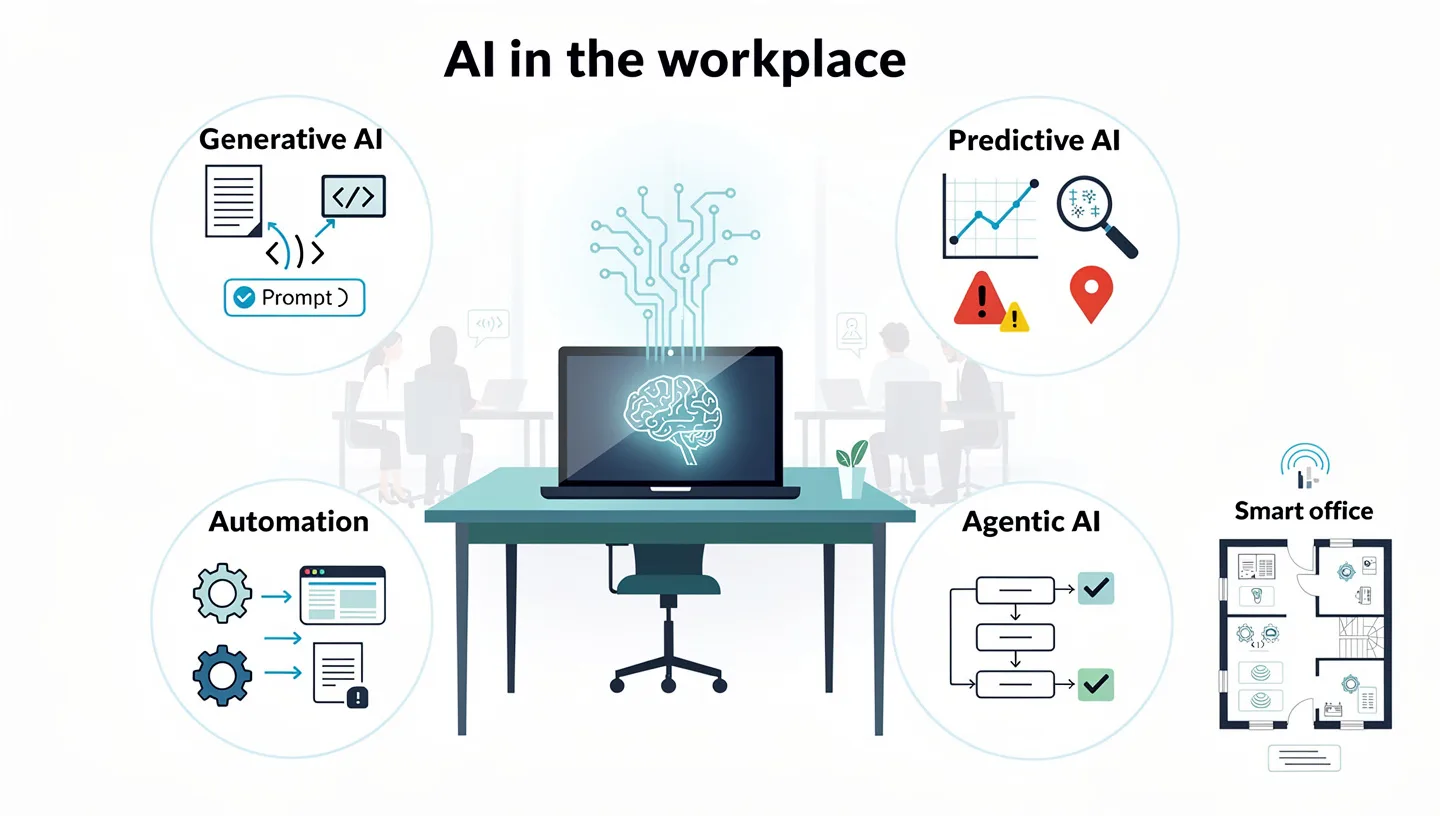
Most workplace tools fall into four groups. Generative AI produces drafts, summaries, code, and images from a written prompt. Predictive tools forecast demand, flag fraud, or estimate which sales leads are most likely to buy. Automation tools, including robotic process automation (RPA), move data between systems and handle invoices or onboarding paperwork. Agentic tools plan several steps toward a goal and carry them out with limited supervision. A single product often combines more than one of these.
Generative AI reached the mainstream in late 2022, and the definition has widened since then from chat tools that write text to systems that complete tasks across several applications. Artificial intelligence in the workplace is also not limited to software on a laptop. Office sensors that track occupancy depend on AI to turn raw readings into reports about which rooms and desks people actually use, and OfficeSpace points out that companies use this data to adjust layouts and plan real estate.
AI assistants, copilots, and agents: what is the difference?
Vendors mix these terms when they describe AI in the workplace, so a plain comparison helps. The main difference is who starts the action and how far the tool can go without a person.
| Type | How it works | Example |
|---|---|---|
| Single-task tool | Responds once to a request and has no wider context | Meeting transcription or document summary |
| Copilot | Works inside one application and suggests the next step | Microsoft Copilot in Outlook, GitHub Copilot in a code editor |
| Assistant | Works across several applications and builds context over time | Search across email, chat, and documents |
| Agent | Receives a goal, plans the steps, and acts with limited supervision | Matching invoices to purchase orders and flagging exceptions |
The gap between a copilot and an agent matters for budgets and for risk. An agent can change records, send messages, or approve payments, so it needs clear limits on what it may touch and a person who reviews exceptions. Businesses weighing that step can read this explainer on AI agents for business before they run a pilot.
How is AI used in the workplace?
Writing, coding, and research account for most of the activity. The Bipartisan Policy Center, which reviewed usage data published by OpenAI and Anthropic, reports that workers turn to these tools mainly for writing, editing, research, coding, and generating ideas. The same review finds that most use of AI in the workplace is slightly closer to augmentation than to automation, at least for now: people stay in the loop and the tool speeds up part of the task.
Writing, coding, and research
Employees use AI to turn rough notes into a first draft, summarize a long report before a meeting, and compare sources on an unfamiliar topic. Developers ask it to write functions, generate tests, and explain old code. Marketing teams produce several versions of one message for different audiences. In every case the output still needs a human check, since the tools can give confident answers that are wrong.
Customer service
Chatbots answer routine questions at any hour, and assistants suggest replies to human agents during live conversations. IBM adds that newer tools can process returns or guide a customer through troubleshooting without handing the case to a person, and that language models can summarize complaints collected from reviews and social media. Companies that want to see how these setups work can read this overview of AI for customer service.
HR and hiring
HR teams use AI to screen resumes, schedule interviews, draft job descriptions, and build onboarding plans for new hires. The internal assistant at IBM, called AskHR, automates more than 80 tasks and handles over 2.1 million employee conversations each year. Brightmine lists further uses: matching employees with mentors, suggesting internal projects based on skills, and spotting where turnover or burnout is starting. Of all the uses of AI in the workplace, hiring is the one where bias does the most damage, which the risks section below covers.
Finance and operations
Finance departments use AI to read invoices, match them to purchase orders, detect unusual transactions, and update forecasts as new figures arrive. In operations, the common uses are demand forecasting, inventory planning, and predictive maintenance in manufacturing. Studies cited by OfficeSpace report that predictive maintenance can cut downtime by up to 50% and breakdowns by up to 70%.
IT, sales, and marketing
IT teams use agents to run diagnostics, sort support tickets, and watch network data for suspicious activity. Sales teams apply predictive analytics to customer data to see which leads are most likely to convert, and some hand routine conversations to an agent that passes difficult ones to a person. Marketing teams segment audiences, personalize messages, and review ad campaigns while they run.
Knowledge management and search
Companies keep a large share of what they know in meeting recordings, email threads, chat history, and old wikis. Assistants that index these sources let an employee ask a plain question, such as why a pricing policy changed last year, and get an answer together with the discussions and approvals behind it. Automation Anywhere calls this a living wiki, and Read AI reports that new hires reach proficiency faster when they can search account history instead of asking colleagues.
Examples of AI in the workplace
Company case studies of AI in the workplace show what these tools do in practice. The figures below come from the companies and vendors that published them, so treat them as examples of what is possible, not as guaranteed results.
- Walmart uses machine learning to tell employees when shelves need restocking (reported by OfficeSpace, citing the Associated Press).
- General Motors uses generative design to develop lighter vehicle parts.
- AT&T uses AI for cybersecurity.
- UPS and Grover: an automated warehouse system built by UPS helped its customer Grover process goods 225% faster and reach 99% on-time order accuracy (Microsoft case study).
- Walgreens Boots Alliance cut store visit time by 75% and reduced app development time by 50% to 80% with Microsoft AI technology, so employee apps were ready in weeks instead of months.
- SmartPM made customer meetings, emails, and CRM activity searchable with Read AI, and reports that executive preparation time fell 30% and post-meeting admin fell 70% (vendor case study).
Inside a company, the use differs by department:
| Team | Typical use |
|---|---|
| Sales | Call notes, CRM updates, and deal insights drawn from conversations |
| Customer success | Searchable history of every customer interaction |
| Product and research | Tagging themes across customer interviews and usability tests |
| Engineering | Code suggestions, test generation, and documentation of old code |
| Design and marketing | Concept variations, copy for different audiences, campaign analysis |
| Project management | Action item tracking and automatic status reports |
| Distributed teams | Short summaries so colleagues in other time zones catch up without another meeting |
AI in the workplace statistics: who uses it and how much
McKinsey surveyed 3,613 employees and 238 C-level executives in late 2024 and found that leaders underestimate their own staff. C-suite respondents estimated that 4% of employees use generative AI for at least 30% of their daily work, while 13% of employees said they do. The main figures on AI in the workplace from current research are listed below.
- 92% of companies plan to raise their AI investment over the next three years, yet only 1% of leaders call their rollout mature (McKinsey).
- 47% of C-suite leaders say their company releases AI tools too slowly, and talent skill gaps are the most common reason (McKinsey).
- 41% of enterprise data is usable by AI on average, which limits what many deployments can deliver (IBM).
- 79% of surveyed executives expect AI to contribute significantly to revenue by 2030 (IBM).
- Roughly 1 in 5 businesses with fewer than 100 employees report using AI (Bipartisan Policy Center).
Attitudes matter as much as access. McKinsey groups employees into four types: 39% are Bloomers, optimists who want to build responsible solutions together with their company, 37% are Gloomers, who are skeptical and want stricter rules, 20% are Zoomers, who want fast deployment with few limits, and 4% are Doomers, who view AI mostly in a negative light. Even among Gloomers, 94% say they know gen AI tools, so skepticism rarely means unfamiliarity.
AI adoption also differs sharply by industry. The Bipartisan Policy Center, drawing on the Business Trends and Outlook Survey from the Census Bureau, shows that firms in knowledge-based sectors use AI far more often than firms where most work is physical.
| Sector | Share of firms using AI |
|---|---|
| Information | 42% |
| Professional, scientific, and technical services | 37% |
| Accommodation and food services | 8% |
| Agriculture | 4% |
Gallup reaches the same conclusion from the employee side: white-collar workers use AI more often than blue-collar workers.
How AI is changing the way people work
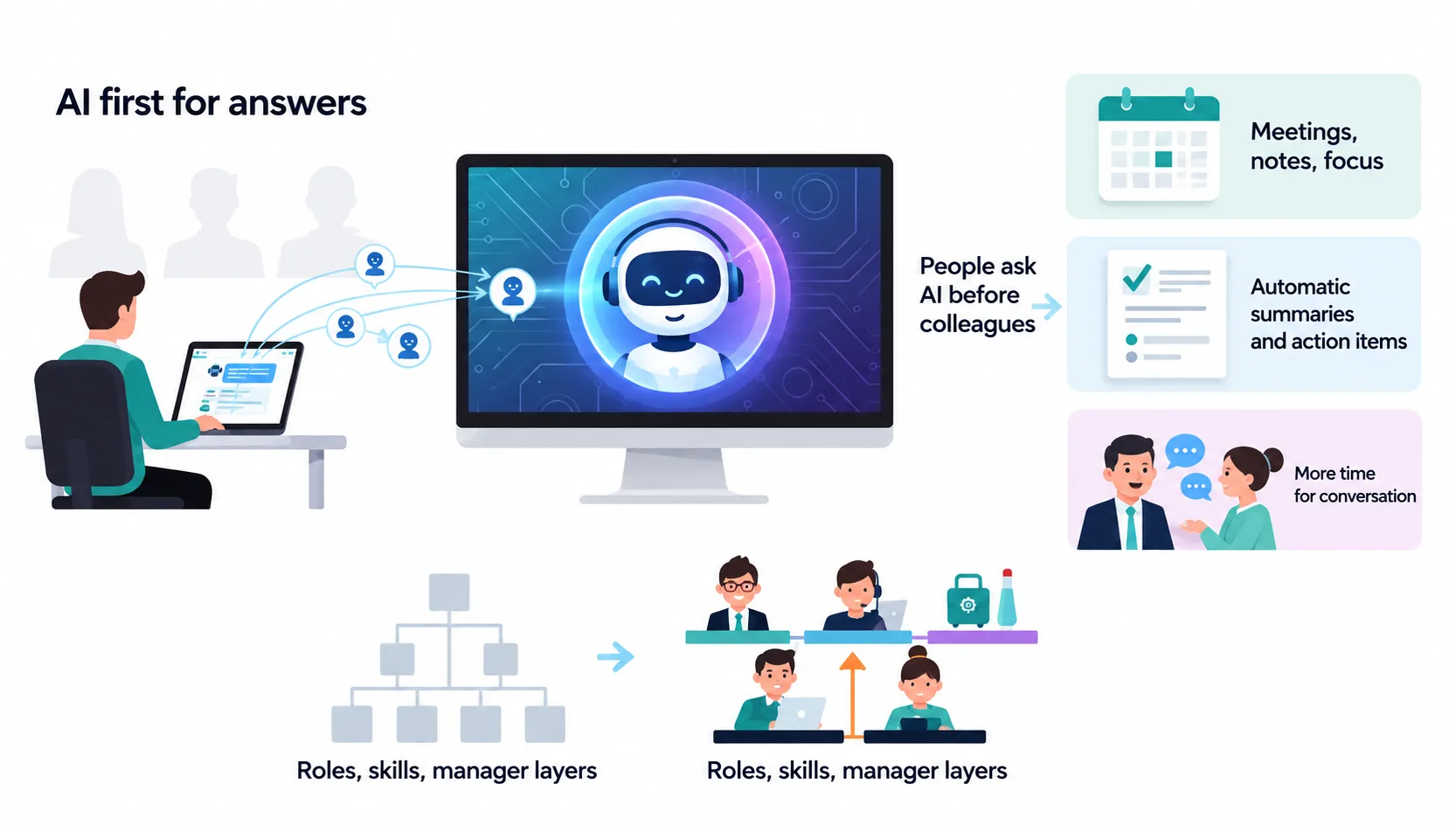
The research on AI in the workplace points to changes in three areas: where people look for answers, how meetings and documentation work, and how roles and management layers are organized. The change people notice first with AI at work is fewer small tasks competing for their attention, and each of the three areas follows from that.
People ask AI before they ask a colleague
Read AI observes that many employees now turn to an assistant first instead of interrupting a coworker. That removes waiting time and spares long-tenured staff from answering the same questions again and again. It also raises the cost of poor documentation, since an assistant can only find what has been written down in documents, meeting notes, and chat history. Knowledge becomes reachable for everyone, so influence shifts from knowing where things are toward making good use of what is known.
Meetings, notes, and documentation
Research from Read AI covering more than 5 million meetings shows that people who use AI have moved shared time to the middle of the week and keep Mondays and Fridays for focused work. Automatic summaries make this possible, because someone who misses a meeting can read a short recap and a list of their own action items instead of asking for a replay.
There is a downside. When an assistant answers every question and writes every recap, a remote employee may go weeks without a real conversation with a teammate. Managers who want the benefits of workplace AI without isolation need to protect time for work that gains from talking, such as planning, feedback, and onboarding.
Roles, skills, and manager layers
Automation Anywhere cites Deloitte research showing that 20% of companies intend to use AI to flatten their organization chart, since reporting, scheduling, and performance tracking can be partly automated. Brightmine, citing research published in Management Science, lists writing, software development, and engineering among the most exposed occupations, while jobs that call for data analysis and critical thinking are growing. Some employers are changing how they hire: IBM reports that it tripled its entry-level headcount and now looks for analysis and problem-solving ability over skills that software handles easily.
Managers who want to plan how AI in the workplace will change their own team can start with this how-to on using AI in business, then decide which routine tasks move first and which skills the team needs to build so that productivity holds up during the change.
Benefits of AI in the workplace for businesses
The benefits of AI in the workplace are easiest to see in tasks that repeat every day. Workplace AI pays off in productivity gains when it removes steps from work people already do, and the gains shrink when a company buys the tool first and picks the use case later.
Less time on routine tasks
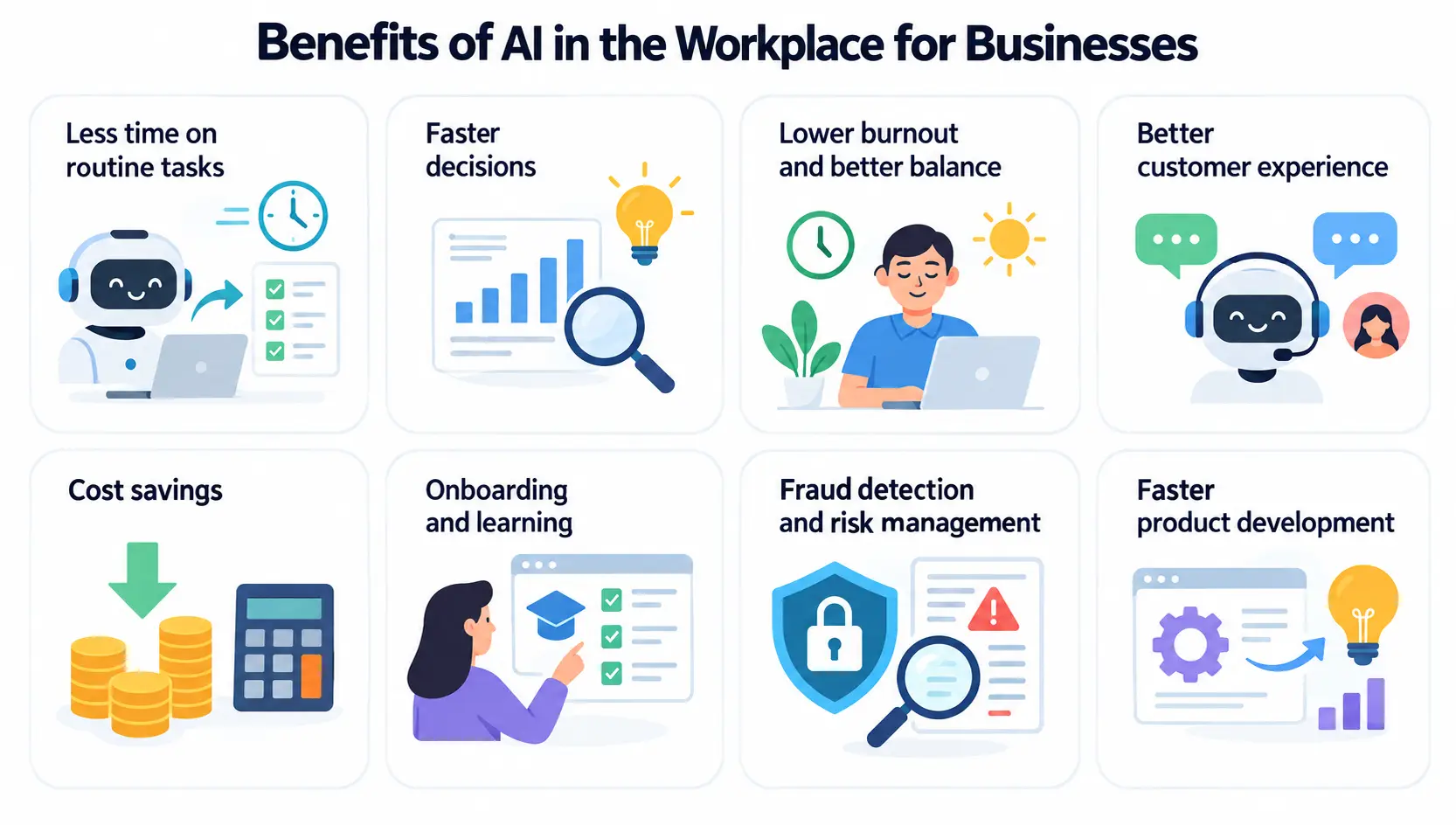
Knowledge workers spend a large share of the week on note-taking, updating records, compiling status reports, and searching for information across applications. Read AI gives a typical case: after a customer call, the conversation is captured and the CRM is updated automatically, so the sales rep goes straight to the next call instead of spending fifteen minutes on data entry. Microsoft describes the result as more time for planning, problem solving, and customer conversations.
Faster decisions
AI can read large datasets, summarize what changed since the last report, and propose options, which shortens the time between a question and an answer. Finance leaders see this when forecasts update daily instead of monthly. The limit is data quality. With only 41% of enterprise data usable by AI, according to IBM, many companies need to clean and connect their data before decision support delivers much.
Lower burnout and better work-life balance
In OECD surveys of employers and workers, four in five workers said AI improved their performance and three in five said it increased their enjoyment of work. Removing repetitive administrative tasks is the most common reason. People Insight adds that scheduling tools and workload insights help employees spend working hours on priority tasks and keep personal time free from work stress.
Better customer experience
Chatbots offer round-the-clock service, which shortens response times and reduces the workload of support agents, according to Microsoft. AI also analyzes customer behavior to offer personalized recommendations and messages, and IBM links this to stronger customer loyalty.
Cost savings
Evidence on cost is mixed. Brightmine cites a 2025 State of AI report from McKinsey in which most respondents using generative AI reported cost reductions in some business functions, with HR seeing the largest. In the separate Superagency survey of executives, only 23% reported a favorable change in costs, and 36% saw no change in revenue. Savings from AI in the workplace seem to come from specific, measured use cases, not from general rollouts.
Onboarding and learning
AI platforms can identify skill gaps and recommend training that fits an individual role and career goal, instead of sending everyone to the same course. People Insight lists personalized learning and development as a main driver of employee engagement, and OfficeSpace and Brightmine both mention personalized onboarding for new hires.
Fraud detection and risk management
Models that scan transactions as they happen can spot patterns typical of fraud and flag them before money leaves an account. Microsoft adds that AI tools can predict risks in operations, supply chains, and financial portfolios, and IBM describes cybersecurity teams using them to watch network data for suspicious behavior.
Faster product development
Analysis of customer feedback and market trends helps product teams decide which features to test, and first drafts of designs, copy, and code arrive in minutes. The time saved goes to refinement, which Teamland describes as the stage where human judgment matters most.
Risks of AI in the workplace
The risks of AI in the workplace come from the tools, from the way people use them, and from how companies communicate about them. Four of them come up in almost every source reviewed for this article.
Wrong answers and over-reliance
Many tools used for AI in the workplace can give answers that sound confident and are wrong. About half of the employees in the McKinsey survey (50%) worry about inaccuracy, and Teamland warns that teams who accept generated content without review risk errors and inconsistencies. Reasonable safeguards are simple: a person checks anything that goes to a customer or regulator, and no automated output is the only basis for a hiring, pay, or credit decision. People Insight also flags dependency, since operations have to continue when a system fails.
Data leaks and shadow AI
Shadow AI means employees using AI tools that the company has not approved, often through free personal accounts. Customer records, contracts, or financial figures pasted into such a tool leave company control, and IT loses sight of where data flows (Teamland). Cybersecurity risk (51%) and personal privacy (43%) are two of the top concerns among employees in the McKinsey survey. Setting AI governance rules for data comes before banning anything, and this guide to AI data privacy for business is a good next read.
Data ownership and intellectual property
A separate concern is intellectual property. Companies want to be sure that proprietary data is not used to train public models, which is why Automation Anywhere advises running AI in a private environment, with strict access controls and vendors that guarantee data isolation. Intellectual property infringement worries 40% of employees in the McKinsey survey, so the contract with each vendor should say who owns inputs and outputs and if either is used for training.
Bias and legal exposure
Models can repeat bias found in their training data, which matters most in hiring, promotions, and performance reviews. Law firms that advise employers, such as Witan Solicitors, list data protection, discrimination, and accountability as the main legal issues and recommend regular audits and openness with staff about how AI is used. Rules on automated decisions differ by country and keep changing, so a company should check employment and data protection law where it operates before it uses AI to rank or screen people.
Employee worry and trust
Pew Research found that 52% of workers feel worried about the future impact of AI at work. The OECD adds concerns about higher work intensity, data collection, and inequality. Trust is not lost everywhere, though: 71% of employees in the McKinsey survey trust their employer to act ethically in developing AI. Companies keep that trust by saying plainly what a tool does, what data it sees, and which decisions stay with people.
What is responsible AI in the workplace?
Responsible AI in the workplace is the set of practices that keep tools fair, transparent, and accountable. Microsoft lists six parts:
- Fairness: test for bias in hiring, promotion, and performance decisions, and keep monitoring outcomes.
- Human collaboration: use AI to add to what people can do, and train staff to work with it.
- Privacy and law: follow data protection rules, collect only what is needed, and explain how data is used.
- Transparency and accountability: tell employees what a tool is for and what data it uses, and give them a way to contest decisions made with it.
- Continuous monitoring: audit systems on a schedule so they stay accurate and unbiased as rules and conditions change.
- Ethical guidelines: write down what AI may and may not be used for.
Pros and cons of AI in the workplace
The sections above fit into a short comparison. The balance depends on how a tool is introduced, since the same technology that removes dull work can also cause worry when employees hear about it late.
| Pros | Cons |
|---|---|
| Less time spent on repetitive tasks | Fear of job loss |
| Faster, data-based decisions | Less human contact when overused |
| Personalized training and onboarding | Privacy and ethical concerns |
| Better workload management and work-life balance | Dependence on technology |
| Faster customer support | Training needs and skills gaps |
Which jobs are affected by AI?
Estimates of how AI in the workplace affects jobs vary by source. The OECD estimates that occupations at highest risk of automation account for about 27% of employment in its member countries. A separate PwC analysis cited by Brightmine found 27% lower hiring growth in roles most exposed to AI, so the pressure shows up in hiring before it shows up in layoffs.
The longer-term forecast is less bleak. The World Economic Forum expects 92 million jobs to be displaced by 2030 and 170 million new ones to be created, a net gain of 78 million. The catch is skills: new roles often need data analysis, critical thinking, and the ability to supervise AI systems, which is why upskilling appears in nearly every source. Customer service, writing, software development, and engineering will see the largest changes in daily tasks. In most cases the first change is that routine work moves to the tool while people handle the difficult cases, and that division of labor is what shapes the future of work for those roles.
What businesses should know before adopting AI
Companies that report good results from AI in the workplace tend to follow the same order: define a problem, prepare data, set rules, train people, test with one team, measure, and scale. The steps below follow the best practices that IBM, Teamland, and McKinsey describe.
Start with a problem, not a tool
A goal such as cutting the hours spent on weekly reporting is easier to measure than a goal of using AI. Map the workflows where staff lose the most time to manual data entry, repeated decisions, or frequent errors, and pick one. Only then compare products, which is easier with a checklist like the one in this guide on how to choose AI tools for business.
Make sure your data is ready
AI tools are only as reliable as the data behind them. IBM recommends evaluating what data exists, where it sits, and who owns it, and building data governance rules for transparency and security before deployment. A company with scattered files and no clear owners will get weak answers from even a good tool.
Write an AI usage policy
A short written policy on AI in the workplace prevents most shadow AI problems, and an AI policy that people can read in five minutes gets followed more often than a long one. Teamland suggests it should cover:
- which AI tools and platforms are approved
- which data may and may not be shared with them
- when AI-generated content must be disclosed
- who reviews and approves each type of use
Review the policy on a fixed schedule, for example every quarter, because tools and features change often.
Train people before rolling out tools
In the McKinsey survey, 48% of employees said formal training would raise their use of AI more than any other step, yet 22% reported minimal or no support from their employer. Training should match the role: basic AI literacy for everyone, and specific skills such as writing clear prompts for teams that use assistants daily. Upskilling sticks when it is tied to tasks a role already performs. A good place to start is this guide to prompt engineering for business.
Pilot with one team, then scale
Choose the team with the most routine work, such as sales support, customer success, or finance, and run a limited test. Track time saved, meetings reduced, and how quickly new hires become productive. Early results show problems before they reach the whole company, and they give other teams a reason to join. McKinsey found that most AI applications it reviewed are still localized use cases at the pilot stage, so a plan for scaling matters from the first week.
Measure ROI with before and after numbers
Record how long a task takes before the tool arrives, set a target, and compare after a few months. Count the full cost, including subscriptions, setup, training time, and the hours spent reviewing output. Quality matters as much as speed, so track error rates and rework too. The guide on AI ROI for business is a useful next step.
| Metric group | What to track |
|---|---|
| Productivity | Time saved per task, output per employee, cycle time of key processes |
| Quality | Error rates, rework, customer satisfaction |
| Financial | Direct savings, revenue effect, costs avoided |
| People | Employee satisfaction, retention, time for new hires to become productive |
Costs also come in several forms: per-user subscriptions, add-on prices inside software the company already uses, usage-based charges, and subscriptions that employees buy outside IT. Listing all four prevents surprises at renewal.
Keep people in charge of important decisions
Automation Anywhere calls this human-in-the-loop design: the AI completes routine steps and automatically flags exceptions, anomalies, and decisions that need approval. It fits any decision about hiring, pay, credit, or health, where an error harms a person and an explanation may be required.
Common mistakes to avoid
Implementation guides on AI in the workplace, including the one from CloudNuro, point to the same errors again and again:
- Starting too big. Prove value with one team before an enterprise-wide launch.
- Skipping change management. Tools introduced without training or honest talk about job worries meet resistance.
- Adding governance late. Policies and monitoring should launch with the tool, not after the first incident.
- Ignoring integration. A good tool that does not connect to existing systems goes unused.
- Overlooking shadow AI. Find out what employees already use before planning a rollout.
- Tracking activity instead of results. Logins show adoption, not value, so measure time, quality, and cost.
- Treating AI as a one-time project. Capabilities, usage, and prices change, so review the program on a schedule.
How leaders can drive AI adoption across teams
McKinsey concludes that employees are further ahead than their leaders assume, so leaders who want AI in the workplace to deliver results mainly need to catch up and set direction. Four actions come up in the research:
- Use the tools in public. Leaders who share their own experiments, including failures, make it acceptable for teams to try things (Teamland).
- Pay for training. Nearly half of employees in the McKinsey survey ask for formal training, and incentives and recognition also raise use.
- Tie AI to team goals. People adopt a tool faster when they can see how it helps their own work.
- Talk about jobs openly. Say what AI will and will not be used for, and invite employees to shape how it is introduced.
Managers are a natural channel for this. In the McKinsey survey, two-thirds of managers said they field questions about AI tools from their team at least once a week, and 68% had recommended a tool to solve a team member challenge in the past month, with 86% of those saying it worked. Millennials aged 35 to 44 report the most expertise (62% report high expertise, against 22% of baby boomers over 65), which makes them natural champions of AI adoption.
How employees can use AI at work
Employees who use AI in the workplace get better results when they treat it as a partner for first drafts and checks, not as a source of final answers. Five habits help:
- Write specific prompts. Detailed requests with context give better output than vague ones.
- Review everything. Treat the result as a draft and check facts, numbers, and tone before sending.
- Match the tool to the task. Tools differ in writing, analysis, and search, so one tool rarely fits every job.
- Say when AI helped. Disclosure builds trust and helps teams agree on shared norms.
- Keep learning. Teamland suggests blocking 30 minutes a week to try new features, since small regular effort adds up as tools change.
AI in the workplace for small businesses
Smaller firms are behind on AI adoption. The Bipartisan Policy Center notes that only about one in five businesses with fewer than 100 employees use AI and warns that this puts them at risk of falling behind larger competitors. AI in the workplace does not require an enterprise budget. Microsoft describes small businesses using it to anticipate customer needs, provide after-hours support, and offer personalized coupons, and the guide to AI for small business shows more starting points.
The practical approach is to pick one task that eats time every week, such as drafting customer emails, writing product descriptions, or answering the same ten questions, and test one tool on it with a few users. An owner-run company has an advantage here, since one person can decide on the tool, the data rules, and the review step in a single afternoon, while larger firms need committees for the same decisions. Write down what the tool may and may not see, check its output closely for the first few weeks, and keep a simple note of minutes saved per task so that the decision to continue or stop rests on numbers.
Budget deserves the same discipline. A small team can start with a handful of paid seats, and prices differ widely by tool and plan, so compare before buying. The guide on how much AI tools cost is a place to start.
The future of work with AI
Three trends for AI in the workplace appear in the sources. The first is agentic AI: systems that complete multi-step tasks, such as building a job description, screening applicants, and scheduling interviews, with recruiters stepping in at the end (Brightmine). The second is multimodal tools that handle text, images, audio, and video together (Teamland). The third is stricter regulation, with more rules on transparency.
The future of work will depend less on the tools than on how leaders use them. McKinsey concludes that employees are ready and the biggest barrier is leadership. IBM CEO Arvind Krishna argues that winners are the companies asking how deeply AI is embedded in their business processes, not how large their budget is. As artificial intelligence in the workplace spreads, most businesses will have to decide if it stays a set of pilots or becomes part of how the company runs.
Conclusion
AI in the workplace now reaches most employees in knowledge-based jobs, and the evidence shows real gains in time, decision speed, and job satisfaction next to real risks to data, accuracy, and trust. The companies that benefit are the ones that choose one clear problem, write rules for data and review, train their people, and measure results against a baseline. A sensible first step this month is to find out which AI tools employees already use and write a one-page policy around them, since steady AI adoption and healthy productivity both start from rules people understand.
FAQs about AI in the workplace
What is shadow AI?
Shadow AI is the use of AI tools that a company has not approved or does not know about, often through personal accounts. The main risks are leaked customer or company data, compliance problems, and costs nobody tracks. Companies reduce it by offering approved tools and a clear data policy.
Is it acceptable to use AI at work?
In most workplaces, yes. Companies that allow AI in the workplace expect employees to follow the policy on approved tools, keep confidential data out of public services, and disclose AI help where required. Without a policy, ask a manager before using AI for client work or anything that involves personal data.
How do you measure the ROI of AI at work?
Measure the task before the tool arrives, then compare time spent, error rates, and output after a few months. Include subscriptions, setup, training, and review time in the cost. Report results per use case, since some tools pay off and others do not.
Can AI replace managers?
Not in full. AI can reduce administrative work for managers by analyzing information, spotting trends, and drafting reports, and some companies plan to flatten their organization charts. Trust, coaching, empathy, and judgment still come from people, which is why employees still need real conversations and visible leadership.
What is the difference between an AI assistant and an AI agent?
An assistant answers requests and works across applications, but a person starts each action. An agent receives a goal, plans the steps, and acts on its own within set limits, flagging exceptions for review. Agents need stricter rules because they can change data or send messages.
What percentage of employees use AI at work?
Gallup found that 66% of employees in remote-capable roles used AI at work in 2025, including 40% who use it frequently and 19% who use it daily. Use is lower in production and service work, and the Bipartisan Policy Center reports the lowest share of firms using AI in agriculture (4%).
Is AI good or bad for employees?
It depends on how it is introduced. AI in the workplace helps when it removes repetitive work, gives access to information, and supports better decisions. It hurts when it arrives without training, clear communication, or safeguards. In OECD surveys, four in five workers said AI improved their performance, while concerns about work intensity and data collection remain.
What is the difference between AI and machine learning?
Machine learning is a subset of AI: algorithms that learn from data without being programmed for each task. AI is the wider field, which also includes rule-based systems and other methods. Most AI in the workplace today relies on machine learning, from spam filters to recommendation engines and writing assistants.
What is the difference between narrow AI and general AI?
Narrow AI handles specific tasks within a defined area, such as translating text or sorting invoices, and every tool used for AI in the workplace today falls into this group. General AI would reason and learn across many areas the way a person does, and it does not exist yet.










