To use AI in business, pick one task that repeats every week, measure how long it takes today, test one tool on it for 30 days, and keep a person in charge of the result. Everything else in this guide builds on those four moves. It shows how to use AI in business without a tech team, a big budget or a long project.
Adoption is already high. McKinsey reports that 88 percent of organizations use AI in at least one business function, and a 2025 Intuit QuickBooks survey found that 68 percent of small businesses use it regularly, up from 48 percent a year earlier. Most of the gap between firms that get results and firms that do not is not the tool. It is the plan around it.
The sections below cover the steps, the uses by department, prompts you can copy, the tools, safety rules and how to measure the result. The figures come from public surveys, so check the source before you quote a number.
What it means to use AI in business
AI for business means software that reads, writes, sorts or predicts, so your team spends less time on routine work. It comes in four forms, and each one needs more setup than the one before it.
| Form | What it does | Examples | Effort to start |
|---|---|---|---|
| Chat assistant | Drafts, summarizes, answers questions | ChatGPT, Claude, Gemini | Minutes |
| AI inside software you already use | Adds features to tools you pay for | Microsoft 365 Copilot, HubSpot, Shopify Sidekick | Low |
| Automation with an AI step | Reads messy input, then a workflow acts on it | Zapier | A few hours |
| AI agent | Takes a goal and works across several tools | Zapier Agents | Days, with testing |
Start at the top of the table and move down only when the row above works. Most small businesses never need the last row.
Two terms come up in every guide. Generative AI is the type that creates new text, images or audio. A prompt is the instruction you type to get that output.
AI versus traditional automation
Traditional automation follows fixed rules. When a form is submitted, a contact is created, the same way every time. It is fast and predictable, but it breaks when the input does not match the template. AI adds interpretation. It can read an unstructured email and tell whether it is a sales inquiry, a support request or spam, pull fields from an invoice that looks different every time, and summarize a long thread. The two work best together: AI handles the judgment on messy input, and automation handles the reliable execution afterward.
Generative AI or traditional machine learning
Generative AI fits content, summaries and assistants. Traditional machine learning is often better and cheaper for prediction and classification, such as forecasting demand, flagging fraud or scoring leads. Match the type to the job. Many tools you already use run machine learning in the background without calling it AI.
What AI does well in a business and where it fails
AI is good at work that repeats, comes in large volume and follows a pattern. It is weak at anything that needs a verified fact or a hard judgment call.
- Drafting and rewriting emails, posts and product descriptions
- Summarizing long documents, calls and email threads
- Sorting and routing tickets, leads and messages
- Pulling fields from invoices and forms
- Finding patterns in sales or spending data
It fails in three places. It can invent facts and numbers, which people call hallucinations. It handles unusual customer cases badly. And it should not make decisions with legal or financial weight on its own. The working rule is simple: AI prepares, a person decides.
What is the 30% rule for AI?
The rule is used in two ways. One version says that a task taking more than 30 percent of someone working time, with a predictable pattern, is a strong candidate for automation. The other describes a split where AI handles about 70 percent of routine work and people handle the remaining 30 percent that needs creativity and judgment. This guide uses the first meaning when choosing which task to start with.
What not to automate first
Skip tasks that happen rarely, differ every time or need deep judgment, such as handling an unusual complaint. Skip any process that is already broken, because automating it only produces mistakes faster. Skip high stake decisions until you have weeks of evidence that the output is reliable. A good first task is high volume, follows a pattern, and has at least one part that would be tedious to write as fixed rules.
Benefits of using AI in business
The gains show up in a few places, and they are easiest to see in routine work.
- Time: drafts, summaries and sorting take minutes instead of hours.
- Fewer manual errors: data entry, invoice processing and payroll checks make fewer slips when software does the first pass.
- Speed and coverage: customers get a first reply at any hour.
- More output from the same team: one person can run campaigns or support queues that used to need two.
- Patterns in data: trends in sales, churn and spending that nobody had time to look for.
The Stanford AI Index 2026 documents productivity gains of 14 to 15 percent in customer support, 26 percent in software development and up to 50 percent in marketing output. In a Talkdesk survey of 400 small business owners, those using AI in customer service named faster resolution (65 percent), round the clock support (60 percent) and higher customer satisfaction (40 percent) as the top benefits. Results vary, and some teams see a slowdown when the rollout has no oversight and no clear metrics, which is why the steps below start with measurement.
Check your readiness before you start
Before the first pilot, check five areas. A weak spot in any of them is cheaper to fix now than in the middle of a project.
- Data: where it lives, how clean it is and who can open it.
- Tools: what you already pay for and which of them have AI features.
- People: who will use it daily and how comfortable they are with it.
- Rules: what data is allowed in a tool and who approves the output.
- Owner: one person responsible for the result.
Get your data in order
The quality of the output follows the quality of the input. If product information is inconsistent or customer records are incomplete, the tool will repeat those gaps. Before you start, find where the data for your chosen task is stored, remove duplicates, fix obvious errors and set who has access. Many first projects turn out to be data problems in disguise, and fixing the data first is the cheapest way to improve the result.
Make your business easy for AI assistants to find
More customers now ask a chatbot for a recommendation before they search or visit a site. To appear in those answers, write product and service pages for both people and machines. Add specifications, sizes, care instructions, comparisons with similar products and a clear FAQ. Use specific names: a stainless steel water bottle, 1 liter, leakproof lid, tells an assistant far more than a creative name such as Summit Flask. Structured data, called schema markup, lists price, availability and attributes in a form machines can read.
How to use AI in business step by step
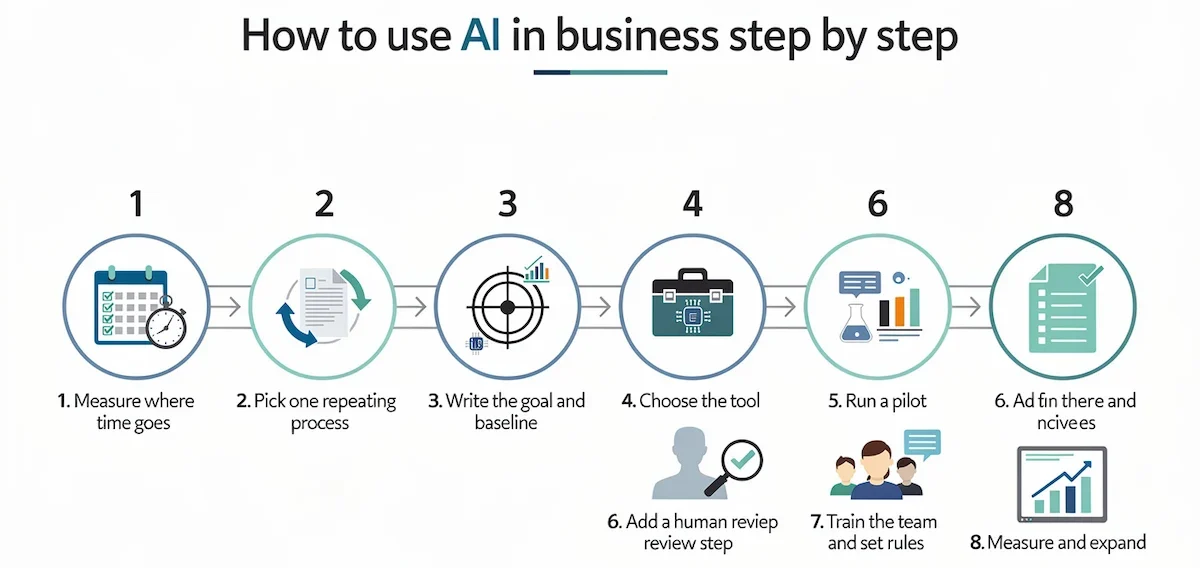
Eight steps cover the whole process from the first use case to the review, and the order matters. Most failed projects skip the first three and start with a tool.
| Step | Time needed | What you have at the end |
|---|---|---|
| 1. Measure where time goes | 1 to 2 weeks | A list of tasks with hours |
| 2. Pick one repeating process | 1 day | One named process |
| 3. Write the goal and the baseline | 1 day | One sentence with a number |
| 4. Choose the tool | 2 to 3 days | One tool |
| 5. Run a pilot | 30 days to 8 weeks | Results against the baseline |
| 6. Add a human review step | During the pilot | A review rule |
| 7. Train the team and set rules | 1 week | A shared prompt list and a short policy |
| 8. Measure and expand | Every 90 days | A decision to keep, change or drop |
1. Measure where the time goes
Track what the team does for one or two weeks, on paper or in a time tracking app. Sort the tasks into two groups: work that needs judgment, and work that follows a pattern. The second group is where AI starts. A UiPath survey found that office workers lose about 4.5 hours a week on routine tasks that could be automated, so most teams find several candidates in the first week.
2. Pick one process that repeats often
Choose the task with the most hours and the most predictable pattern. Good first use cases are answering the same ten customer questions, writing product descriptions, logging meeting notes and sorting inbound leads. Avoid tasks that are rare, risky or different every time. Pick one process, not five. A single workflow that runs reliably is worth more than five that need constant fixing.
3. Write the goal and the baseline
Write one sentence that says what must be true after six weeks. Reply to customers in under 2 hours instead of 8. Cut invoice entry from 6 hours a week to 2. Note the current number today, because without a baseline you cannot prove a gain later. Vague goals such as adopt AI or become more innovative give vague results.
4. Choose the tool last
Check the software you already pay for first. Microsoft 365, Google Workspace, HubSpot and Shopify all have AI features built in. If nothing fits, one chat assistant at about $20 per month covers a long list of tasks. Starting from a new tool and working backward to find a use for it is the most common way to waste money. The checklist in how to choose AI tools for business helps compare options once the task is clear.
5. Run a pilot for 30 days
Give the tool to one person or a small group, and keep the old method available. Set a pilot length between 30 days and 8 weeks, long enough to collect data and short enough to keep attention. Check once a week. Count hours saved, errors found and cases where the output had to be redone.
6. Add a human review step
Decide where a person approves the output before it leaves the company. That covers customer messages, anything with money, contracts and hiring decisions. Internal drafts can skip review. Set more review at the start, then reduce it once the output has proven accurate over several weeks.
7. Train the team and set rules
One hour of training with real examples beats a generic course. Build a shared list of prompts that worked and a short list of data that is not allowed in the tool. The Stanford AI Index report names knowledge and training gaps as the most common obstacle to responsible AI, cited by 59 percent of organizations.
8. Measure the result, then expand
Compare the pilot with the baseline. If the gain is clear, add a second process. If it is not, change the task or the tool, but not both at once. Review the setup every quarter, because tools and prices change often.
How to use AI in business by department
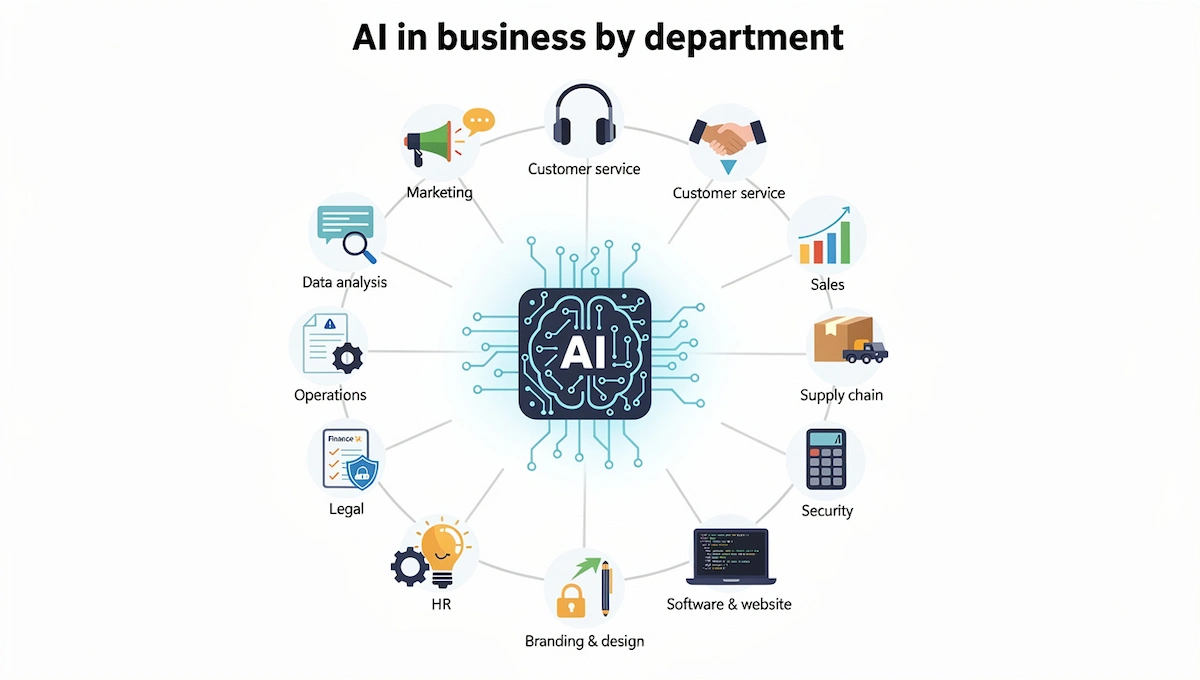
Business use cases fall into a few groups, one for each department. A survey of 1,000 small business owners by Reimagine Main Street showed where people start. Among current AI users, the tasks they are most comfortable automating are marketing content (84 percent), customer service (59 percent), personalized recommendations (57 percent) and employee training (56 percent).
Customer service and support
Customer service is the most common first use. Chatbots answer basic questions and pass the hard ones to a person. Behind the scenes, AI sorts tickets by urgency, summarizes calls and drafts a first reply. The brand Ridge says AI handles over 60 percent of its simple support tickets, and a study of customer support agents found that AI assistance helped them resolve 15 percent more issues per hour. Tools to look at include Zendesk, Intercom and Gorgias. Set a guardrail early: refunds above a set amount and any frustrated customer go straight to a person. The guide on AI customer service covers setup in more detail.
Marketing and content
AI drafts newsletters, social posts, ad variations and product descriptions. The best results come from giving it strong examples, such as past posts that performed well, and asking for variations. Treat every draft as a first version. Edit for brand voice and check every fact. The US Small Business Administration warns that tools which detect AI text may mark it as spam, and customers may lose trust, so a person should read every message before it goes out. ChatGPT, Claude, Canva and Jasper are the common starting points, and the guide on AI marketing automation shows how to connect them.
Sales and lead management
Sales teams lose time to work around selling: researching accounts, logging notes, routing leads and chasing follow ups. AI can enrich a lead from the email domain, score it and send it to the right person within seconds. Zapier describes a company called Popl that handles hundreds of inbound leads a day this way, with over 100 workflows and about $20,000 in yearly savings. A ZoomInfo survey found that 45 percent of sales professionals use AI tools at least once a week. HubSpot has a free CRM with AI features, which makes it the easiest first step.
Market research and competitor analysis
Market research means collecting facts about customers, competitors and your industry, and AI speeds up the manual part. Give the tool your product category, your target audience, two or three competitors and, if you have one, a report from a past campaign. Then ask it to compare pricing, positioning and range. The research modes in ChatGPT and Claude compile public data into a report with sources. Click through and confirm each claim, because a report can contain invented figures. Use it to direct your own analysis, not as the final answer. The same method works for customer feedback: paste in reviews and survey answers with personal data removed, and ask for the three most repeated complaints and requests.
Operations and admin
Operations work is full of small repeating jobs that are easy to automate: entering data, scanning and sorting invoices, filing emails, writing meeting notes and setting reminders. These are low risk and easy to measure, which makes them a good place to run a first pilot. Many meeting tools now record, summarize and list action items without any setup beyond a calendar connection.
Finance and accounting
AI helps with categorizing transactions, matching payments to invoices and flagging odd entries. A simple start is to upload a profit and loss statement and ask what stands out and where spending is higher than expected. Treat the answer as a lead, not a finding. Check every figure the tool flags against the source data before you act on it.
Supply chain, inventory and maintenance
Retailers and manufacturers use AI to forecast demand, set stock levels and predict when a machine needs service. The aim is fewer stockouts, less overstock and fewer surprise breakdowns. This kind of prediction usually runs on traditional machine learning and often comes built into inventory, shipping and planning software. Ask your current vendor what is already included before you buy anything new.
Security and fraud detection
Security tools watch for unusual activity, such as odd logins, strange orders or payment patterns that differ from the norm, and raise an alert early. The SBA lists data protection among the main benefits for small firms. Check the vendor first, because security tools handle sensitive data too.
Legal and compliance
Legal teams use AI to search cases, flag odd terms in contracts and draft standard documents such as NDAs and leases. An Ironclad survey of 800 legal professionals found that 69 percent use AI at work. A lawyer still has to read the final version. For a small firm the practical use is a first pass: ask the tool to flag unusual terms in a supplier contract, then take the flagged points to an attorney.
HR and hiring
AI writes job descriptions, interview questions, candidate emails and onboarding checklists in minutes. Screening tools can rank applicants, but a person must make the final decision, because the training data of these tools can carry bias. Onboarding is a safe place to begin: welcome emails, document lists and training checklists follow a fixed pattern.
Data analysis and reporting
A Thryv survey found that 62 percent of small business decision makers use AI for data analysis, the most common use in that group. Upload a spreadsheet to a chat assistant and ask for trends, outliers and a short summary for the owner. If your team lives in spreadsheets, Microsoft Copilot in Excel and Gemini in Google Sheets work inside the file you already have.
Product ideas, branding and design
AI is useful at the idea stage. Ask for product names, taglines, feature ideas and 50 versions of a headline, then keep the best five and refine them. Image tools such as Midjourney and DALL-E produce logo ideas and ad graphics from a written brief that includes brand values and audience. Check every image for errors, which are common, and confirm that nothing resembles an existing trademark.
Business plans and proposals
Give the tool rough notes about your business and ask it to turn them into a business plan or a proposal in plain language for a specific reader. Add the audience, the budget and the goal. Then ask it to find weak points, such as hidden costs and financial risks. Numbers in the final text must come from you, not from the tool.
Software and website
Vibe coding means building software by describing what you want in plain language. Non technical owners use it to build a simple site, a form or a small internal tool. Developers use Claude Code, GitHub Copilot and Lovable to write and test code faster. In both cases, test before launch, because generated code can look right and still break.
Examples of how companies use AI
These use cases come from public write ups by Shopify, Zapier and Coursera. The results are reported by the companies, so treat them as examples, not guarantees.
| Company | What it does with AI | Result reported |
|---|---|---|
| Ridge | AI answers simple support tickets and sends complex ones to people | Over 60 percent of simple tickets handled by AI, satisfaction score up from about 90 to 95 to 97 |
| Popl | Zapier and OpenAI route and enrich inbound leads | Hundreds of leads a day, about $20,000 saved per year |
| JBGoodwin REALTORS | An agent drafts blog and social content from local news for review | Over 900 agents supported by one marketing coordinator |
| NisonCo | An agent scans industry news daily and lists leads in a sheet | Replaced the work of three to five part time researchers |
| HP | Developers use GitHub Copilot for code suggestions | Higher productivity and easier troubleshooting |
| Team Liquid | SAP AI Core analyzes match data for draft picks | 6,000 professional and 1.6 million amateur matches analyzed |
The pattern is the same in every row: one narrow task, a clear measure and a person who stays responsible for the outcome.
Example prompts you can copy
A good prompt saves more time than a better tool. The examples below work in any chat assistant. Replace the words in brackets with your own details.
A simple prompt formula
Give five things: the role, the task, the context, the format and the limits. For example: You are a customer service lead at a small online shop. Write a reply to this complaint. The customer waited 10 days for an order. Keep it under 100 words, in a friendly tone, and offer a refund or a new shipment. More patterns are in the guide on prompt engineering for business.
Six prompts to start with
- Review reply: Write a polite reply to this review of our [type of business]. Thank the customer, address the problem in one sentence and offer a fix. Maximum 80 words.
- Meeting summary: Summarize these notes in five bullets. List every decision, the owner and the due date.
- Product description: Write a product description for [product] for [audience]. Use these facts only: [facts]. Two short paragraphs and a list of three benefits.
- Marketing plan: Draft a one month marketing plan for [product]. Audience: [audience]. Budget: [amount]. Give weekly actions and one number to track each week.
- Spending check: Here is our profit and loss for last quarter. What stands out, where are we over or under spending, and what should I check first?
- Email sorting: Classify this email as sales inquiry, support request or spam. Then write a short first reply.
Remove names, account numbers and other personal data before you paste anything into a tool.
AI tools for business
Pick tools by the job, not by the brand. This applies to AI tools for small business and for larger teams alike. The table lists the usual choices by category. Prices change often, so confirm them on the page of the vendor.
| Job | Common tools | Free plan | Paid plans |
|---|---|---|---|
| Chat assistant | ChatGPT, Claude, Gemini | Yes | About $20 per user per month |
| Office suite | Microsoft 365 Copilot, Gemini in Google Workspace | Limited | Add on per user |
| Automation | Zapier, Make | Yes | Priced by volume |
| CRM and sales | HubSpot, Salesforce | HubSpot CRM is free | Per seat |
| Customer support | Zendesk, Intercom, Gorgias | Trials | Per agent or per seat |
| Content and design | Canva, Jasper | Canva has one | Per user |
| Meetings and notes | Otter, Granola | Otter has one | Per user |
One assistant, one automation tool and the AI features inside software you already own is enough to start. Add a tool only when you hit a limit that a current tool cannot fix. The guide on the AI tool stack for business shows how to build that setup step by step and when to add the next piece.
How to use AI in a small business
A small business has fewer people, less data and no IT department, which makes a short, focused plan the right tool. The point is to get one clear win in a month and build from there.
A 30 day plan
- Week 1: Log tasks for five working days, pick one, and write the baseline number.
- Week 2: Set up one tool and run it on 5 to 10 real cases, with a person checking every result.
- Week 3: Run it daily. Count hours saved and errors found, and fix the prompt where the output is weak.
- Week 4: Compare with the baseline. Keep the tool, change the task, or drop it, and write down the rules for your team.
Owners who want a wider view of this stage will find it in the guide on AI for small business.
What to do if you work alone
A solo owner can use AI as a second pair of eyes. Ask it to find problems in an upcoming project, such as hidden costs or financial risks, to draft a business plan, to write job posts and blog posts, and to handle scheduling, email sorting and invoice reminders. Keep the decisions for yourself.
What it costs to start
You can begin at $0 with the free tiers of the major assistants, the Zapier free plan and the free HubSpot CRM. One paid assistant costs about $20 per month, and one extra tool brings the total to $40 or $50. Zapier gives a simple way to judge the spend: two hours saved per week at $75 per hour is $7,800 per year, which makes a $50 monthly tool cost $600. The guide on how much AI tools cost lists current prices by plan.
How to get your team on board
Resistance usually comes from fear and unclear rules, not from the tools. In a 2023 Forbes Advisor survey of 600 business owners, about one third worried that AI would cut jobs, and 43 percent worried about becoming too dependent on it. Address both directly.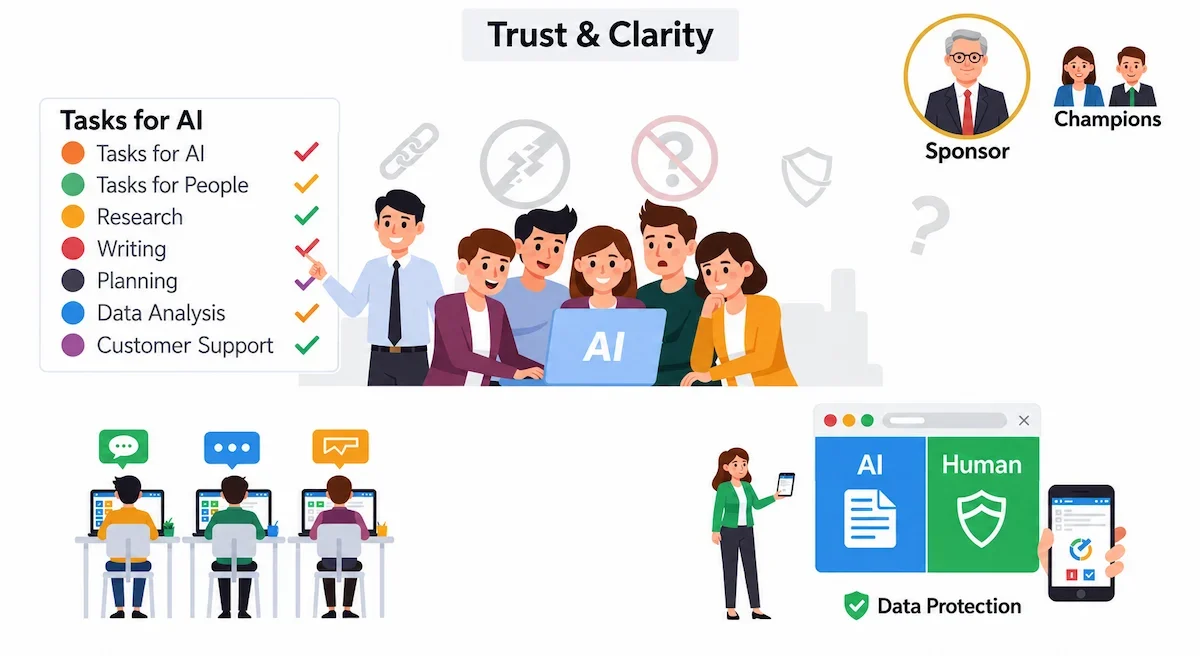
Say what will change and what will not
Tell the team which tasks the tool will take over and which stay with people. Be honest about it. If nobody loses a job, say so in writing.
Name a sponsor and a few champions
The owner or a senior manager should back the pilot in public. Pick two or three curious people to test first and share what works. Their examples convince colleagues faster than any presentation.
Train on real work
Run short sessions built on tasks people already do. Ask each person to bring one task, solve it together with the tool, and add the prompt that worked to a shared log. One session of an hour plus the log is enough for a small business.
Be open with customers
Tell customers when they are talking to a bot and how their data is protected. The SBA suggests a short public statement on how the business uses AI. Customers accept the tool more readily when they know a person is available for the hard cases.
How to use AI in business safely
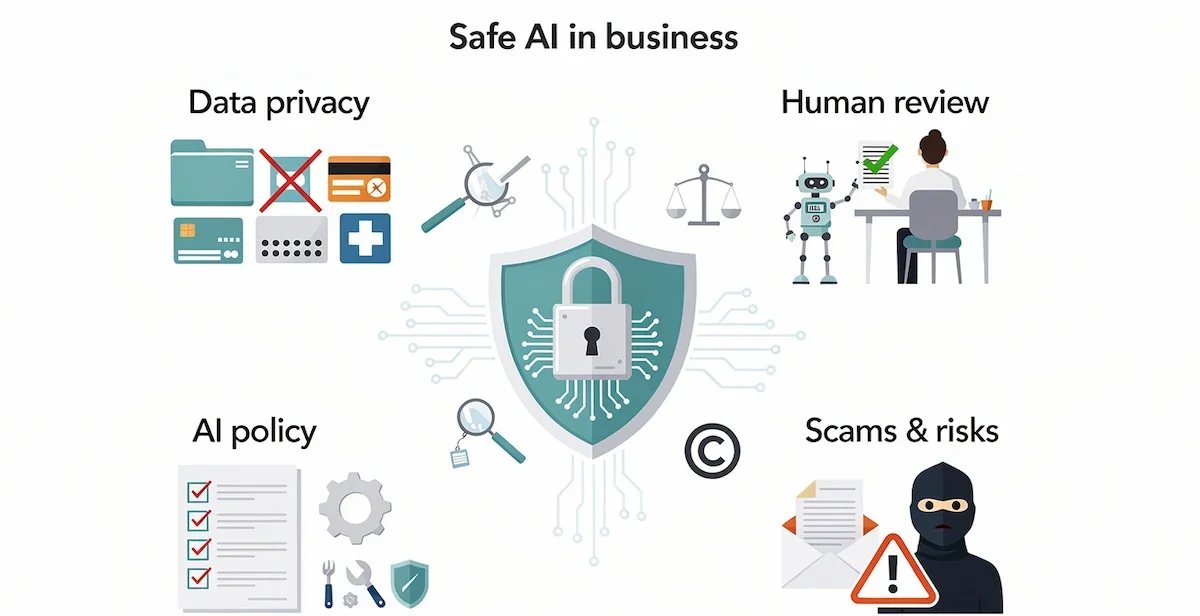
The risks are known and easy to manage if you set the rules before the first pilot. Data privacy comes first, and human review is the cheapest control you have. Four areas cover most of them.
What data never goes into an AI tool
Keep these out of free and personal plans: customer personal data, passwords, bank and card numbers, contracts under confidentiality, medical information and unreleased financial figures. Free tiers may use your inputs to improve future models unless you opt out. For company data, use a business plan with admin controls and a written promise that inputs are not used for training. The guide on AI data privacy for business explains what to check before you pay.
When a person must review the output
Require review for anything a customer sees, anything with money, legal wording, hiring decisions, published content and any number you plan to quote. Over time, as the output proves accurate, you can reduce the review. Default to more checking early, because one mistake that reaches a customer costs more than the time saved by skipping the check.
A short AI policy for your team
- A list of approved tools
- A list of data that is never allowed in them
- Who reviews which kind of output
- When customers must be told they are talking to a bot
- One named owner for each AI workflow
- A simple log of where AI is used
- A review of the policy every six months
No federal or state law in the United States currently requires a business to disclose that it uses AI, but the SBA notes that disclosure is becoming an expected practice, so check the rules where you operate. For a structured approach, the NIST AI Risk Management Framework can be scaled down to a small firm.
Accuracy, bias and copyright
Verify every figure and quote an AI tool gives you, because it can invent them with full confidence. Screening and scoring tools can repeat bias from their training data. Text and images may overlap with protected work, so check anything you publish for patents, copyrights and trademarks.
Scams written with AI
Attackers also use AI, and phishing emails now read cleanly and sound convincing. Teach staff to treat any unexpected request for money, passwords or gift cards with care, even when the message looks well written, and to confirm it through a second channel such as a phone call.
How to measure what AI saves you
The ROI of AI is simple to calculate. Use one formula: hours saved per week times the cost of an hour times 52. Two hours at $75 gives $150 per week and $7,800 per year. Subtract the cost of the tool and the time spent on review to get the net figure.
Track a few simple numbers next to the baseline you wrote in step 3: time to first reply, tickets handled per person, time to produce a draft, and errors found. Also track adoption, because a tool nobody opens saves nothing. Review at 30 days and again at 90 days. The method in AI ROI for business shows how to put these numbers into a one page report.
Common mistakes when using AI in business
- Automating a broken process. AI makes a bad process faster. Fix the steps first, then automate.
- Doing too much at once. One reliable workflow beats five half built ones.
- Choosing the tool before the problem. Start from the task, and the right tool becomes obvious.
- Skipping review. Customer facing mistakes are expensive and often show up late.
- Pasting sensitive data into free tools. Set the data rules before the first test.
- No owner. A workflow without a named person drifts, breaks and gets forgotten.
From AI tools to AI agents
AI agents do not follow a fixed list of steps. They take a goal, such as research this new lead and log a summary in the CRM, and decide how to do it across several tools. That fits work with many steps where each next move depends on the last result. Start with a low risk task, such as a daily research job or inbox sorting, and keep a review step in place. The guide on AI agents for business explains what they handle well and where they still need a person.
The bottom line on using AI in business
Using AI for business works when you start small. Measure where your time goes, pick one repeating task, write the baseline, test one tool for 30 days with a person reviewing the output, and compare the result. Keep sensitive data out of free tools and write a short policy before the team grows. Expand only after the first process shows a clear gain.
Frequently asked questions
How can AI be used in a business?
AI can be used for drafting content, answering customer questions, sorting leads, summarizing meetings, entering data, analyzing spreadsheets and writing code. The best entry point is a routine task your team spends many hours on, such as answering the same support questions every week.
How do I start using AI in my business?
Track where time goes for one or two weeks, pick one repeating task, write down how long it takes now, and test one tool on it for 30 days. Keep a person reviewing every result and compare the outcome with your starting number.
What is the easiest way to start using AI in a business?
The easiest way is a free chat assistant for drafting and summarizing, or the AI features in software you already pay for, such as Microsoft 365, Google Workspace or HubSpot. Both need no setup and no code.
Which is the best AI for business?
No single tool is best. ChatGPT, Claude and Gemini suit general writing and analysis, Zapier suits automation, and HubSpot or Zendesk suit sales and support. Pick the tool that fits the task you chose and test it on real cases.
How much does it cost to use AI in business?
You can start at $0 with free tiers. One paid assistant costs about $20 per user per month, and a small team with two or three tools usually pays $40 to $100 per month. Enterprise plans cost more and are quoted by the vendor.
How long does it take to implement AI in a business?
A focused first use case usually takes a few weeks to a few months, from goal setting to a measured pilot. Spreading AI across the whole company takes quarters, not days. Speed comes from a clear plan and clean data.
Can small businesses use AI?
Yes. A 2025 Intuit QuickBooks survey found that 68 percent of small businesses use AI regularly. A single owner can set up a working workflow in an afternoon with free or low cost tools and no IT team.
Is it safe to use AI with customer data?
Only on a business plan with admin controls and a written promise that your inputs are not used for training. Keep customer personal data, payment details and confidential contracts out of free and personal plans.
What should I automate first?
Automate a task that is frequent, follows a clear pattern and carries low risk, because you can automate it without risking customers. Lead follow up, sorting support tickets, entering data from forms and writing meeting summaries are the most common first picks.
Why do AI projects fail?
The usual causes are unclear goals, messy data, no human review step, weak training and trying to do too much at once. Each one can be avoided with a written goal, a baseline, a pilot and a named owner.
Do I need to know how to code to use AI in business?
No. Chat assistants, no code automation tools and the AI features inside business software work without any coding. Coding only matters if you build your own app or connect tools through an API.
Is AI going to replace my employees?
AI takes over routine tasks, not whole jobs. In most small businesses, it frees people from data entry and first drafts so they can spend time on customers and decisions. Tell your team what will change and train them on the tools before the pilot starts.
What is the difference between AI and traditional business automation?
Traditional automation follows fixed rules and repeats the same action every time. AI reads context, makes judgment calls on messy input and handles cases that do not fit a template. Most good setups use AI for interpretation and automation for the reliable execution afterward.
Is AI automation safe for customer facing processes?
Yes, with guardrails. Let AI draft, classify or pull context, and have a person approve anything that reaches a customer, especially at the start. Reduce the review only after weeks of consistent accuracy.
What is the difference between AI implementation and AI adoption?
Implementation is the work of setting up and deploying the tool. Adoption is whether people actually use it every day. A well built tool that nobody opens has no return, so training and a named owner matter as much as the setup.
What are the benefits of using AI in business?
The main benefits are time saved on routine tasks, fewer manual errors, faster replies to customers, more output from the same team and insight from data that was too slow to analyze by hand. The size of the gain depends on the task and on how well the rollout is managed.
How can a business use AI safely?
Use approved tools, keep sensitive data out of free plans, set a human review step for customer facing and financial output, verify important figures, and name one owner for each workflow. Review the rules every six months.










