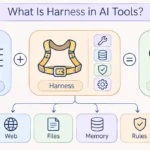
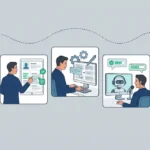
So, what is harness in AI tools? A harness is the software layer around an AI model that lets it read files, run commands, call tools and check its own work. The model only predicts text, and the harness turns that text into real actions. You will also see it called an AI harness or an agent harness, and the formula behind it is simple: Agent = Model + Harness.
We work with AI tools every day, and one lesson came up again and again: the name of the model matters less than the tool built around it. Claude Code, Codex and Cursor are harnesses, not models, and even a plain chat window is a thin one. In this guide we explain what a harness does, which parts it has, how it works in popular AI tools and how you can start with a simple one. We also separate it from a test harness and from Harness, the software company, because those names confuse a lot of readers.
In short:
- A harness is everything around the model: tools, memory, rules, checks and limits.
- The model reasons, and the harness acts.
- The same model gives different results in different tools, because the harness is different.
- A good harness checks its own work and stops before risky steps.
- You can build a basic one with a rules file, a test command and a plan step.
What is harness in AI tools?
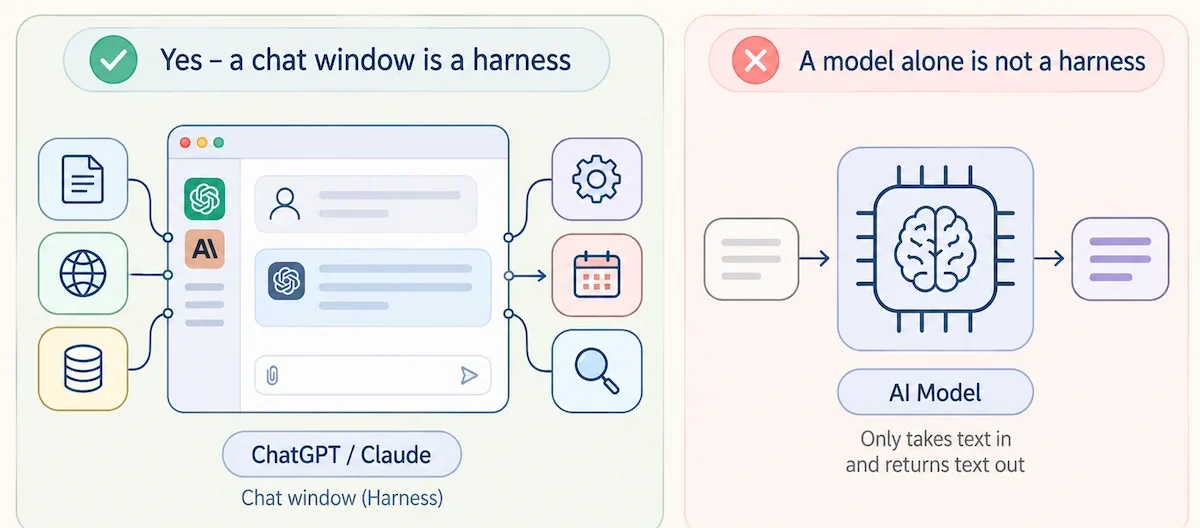
A harness is the program built around an AI model that gives it hands, memory and rules. On its own, a model takes in text and sends back text. It cannot open a file, run a test, search the web or remember what happened yesterday. The AI harness does all of that for the model: it sends the task, reads the answer, runs the tool the model asked for and feeds the result back in.
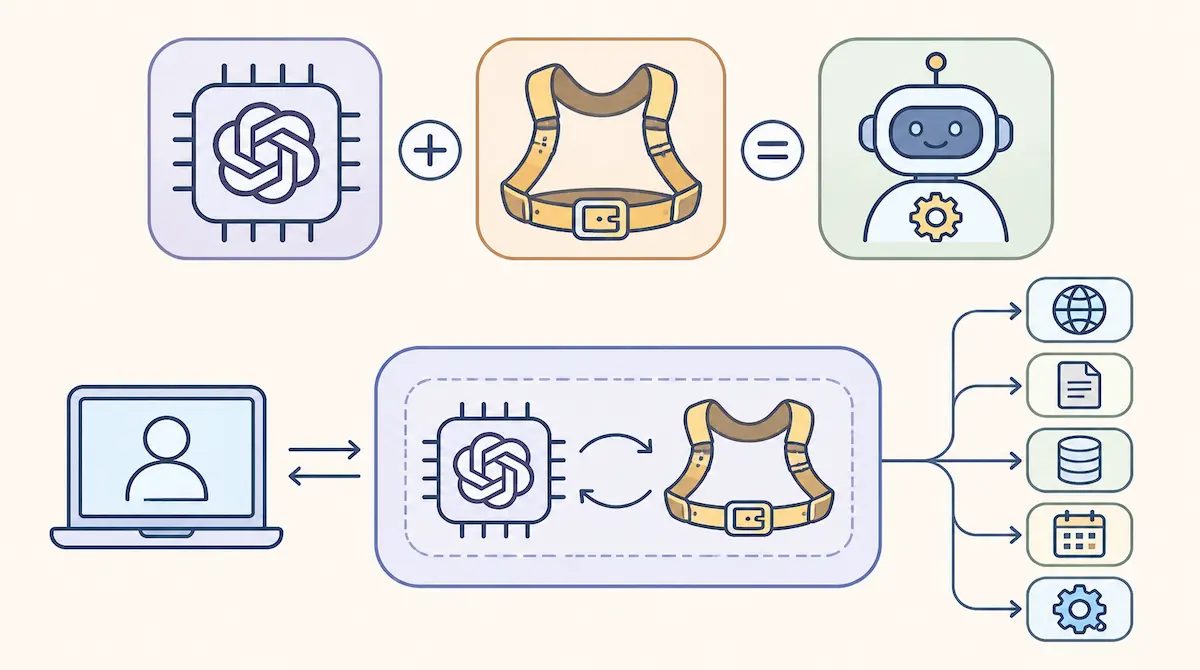
Picture the model as a strong horse and the harness as the saddle and reins. The horse has the power, but without the gear it does not go where you want. That is why we say Agent = Model + Harness. The agent is the full system you talk to, the model is the part that thinks, and the harness is everything else.
The word comes from software testing. A test harness is the setup around a piece of code that makes it run and lets you watch the result. In AI the idea is the same, because the harness makes the model run and lets you see and control what it does. Many people use AI harness, agent harness and AI agent harness for the same thing, and we do too in this guide. If any term here is new to you, our AI terms glossary explains it in plain words.
What an AI harness is not
Four things get mixed up with a harness, so it helps to rule them out.
- The model. Claude, GPT and Gemini are models. They sit inside the AI harness.
- A prompt. A prompt is one input. A harness manages the whole run, including which tools exist and what the model may do.
- An API wrapper. A thin wrapper passes calls through. An AI harness also handles tools, context, memory and checks.
- An agent. The agent is the model and the harness working together.
Harness vs model vs agent vs framework
People often ask how an AI harness differs from an agent or from a framework like LangChain. The table below keeps the four terms apart.
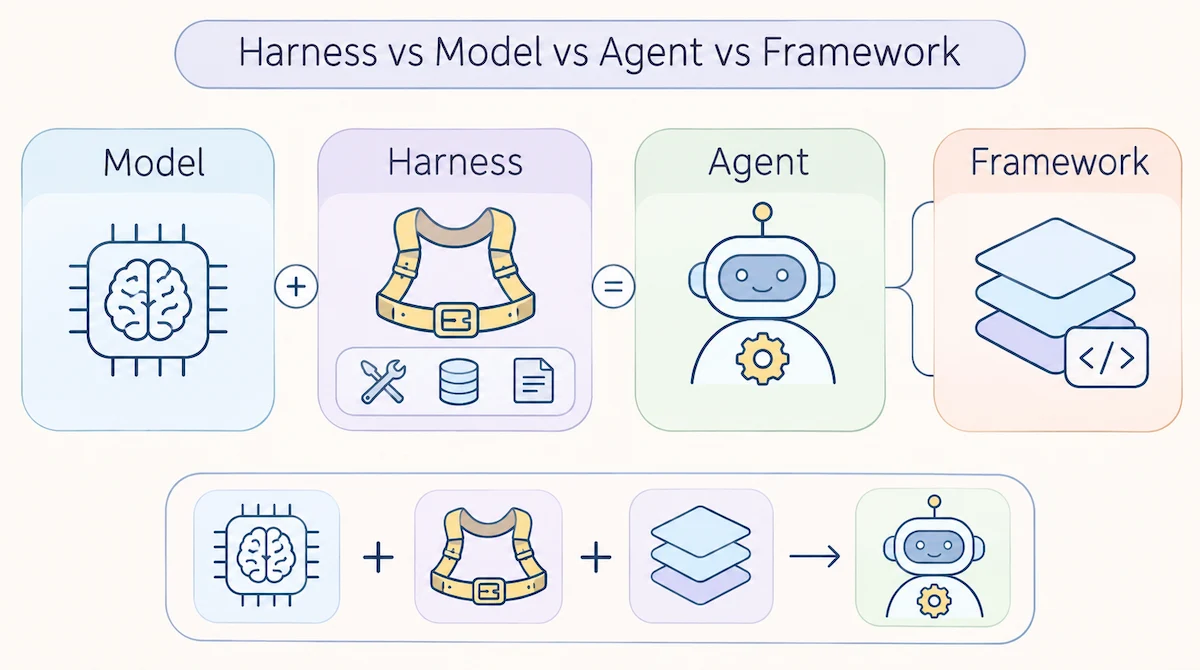
| Term | What it is | Example |
|---|---|---|
| AI model | Generates text and decisions | Claude, GPT, Gemini |
| AI harness | The code, rules and tools around the model | Claude Code, Codex, Cursor |
| AI agent | A model and a harness working on a task | A coding assistant that edits files and runs tests |
| Framework | A toolkit for building a harness faster | LangChain, LlamaIndex, AutoGen |
A framework helps you build an AI harness, but it is not the harness. The AI harness is the final setup of tools, rules and checks that fits your task.
Harness, test harness and Harness.io: what is the difference?
Three different things share this name, and search results mix them.
- A test harness is a testing setup for code. It has nothing to do with language models except the name.
- Harness (harness.io) is a company with delivery, security and incident tools, and it has AI features too. That is a product, not the idea in this article.
- An AI harness is the layer around a model, which is what we explain here.
When someone says harness in AI tools, they almost always mean the third one. And no, it has nothing to do with a harness for your dog.
Why does an AI model need a harness?
A model has hard limits. It works only with the text in front of it, it forgets everything when the run ends, and it cannot act outside the chat. It does not know what happened after its training, it cannot run code and it cannot touch your files. Anything beyond writing text has to come from the layer around it.
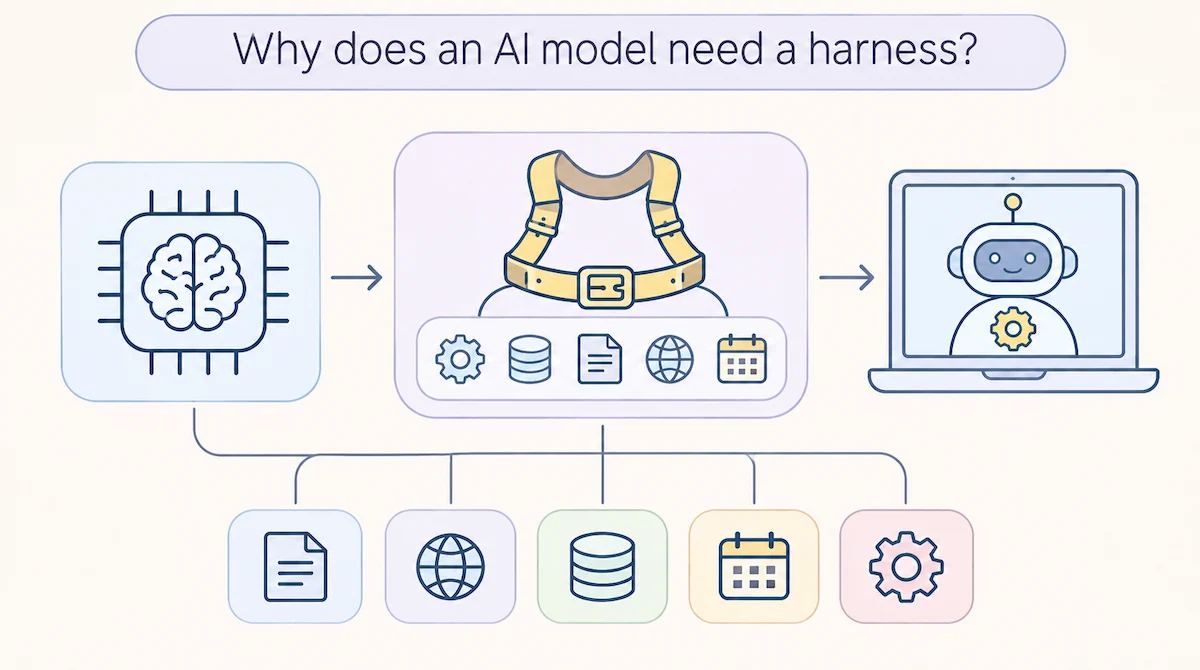
The model also has a context window, which is a fixed limit on how much text it can hold at once. To act, the model asks for a tool, and the harness runs that tool and returns the result. We call this tool calling. This is also what separates a chat reply from an agent. If you want to see how agents are used inside companies, we cover it in our guide to AI agents for business.
What is the reason, act, observe loop?
Almost every agent harness runs the same loop. Developers call it the ReAct loop, short for reason and act.
- Reason. The model reads the task, the memory and earlier results, then decides the next step.
- Act. The harness runs that step: a tool, a command or a file edit.
- Observe. The harness catches the result and feeds it back to the model.
- Repeat. The loop continues until the task is done or a limit is reached.
Take a bug fix. The model proposes a change, and the harness saves it and runs the tests. The tests fail, so the harness sends the error back, and the model reads it and tries again. The loop ends when the tests pass, when the step limit is reached or when the model says it is done.
In code this is often a plain while loop. The hard part is everything the loop has to manage: context, errors, limits and permissions. A raw model is like a processor with no memory, no disk and no input or output, and the harness supplies all three.
Which harness patterns are most common?
Three patterns cover most setups. The ReAct pattern is the loop above, where the model decides one step at a time. Plan and execute starts with a full plan, then works through it step by step and changes it only when something breaks. Multi-agent orchestration splits the job between several agents, for example one that writes code and one that reviews it. We use plan and execute for anything that touches many files, and plain ReAct for small fixes.
What is the difference between chatting with a model and agentic coding?
In a chat, you send a message and the model sends one answer back. Agentic coding works differently: the model plans, edits files, runs the tests, reads the errors and tries again until the work is done or a limit stops it. The model is the same in both cases, and the harness is what makes the second one possible.
You may also hear the term vibe coding. It means you describe what you want and accept the result without reading the code. That works for a quick test and breaks down on bigger projects, where nothing checks the output. A harness with tests and approval steps keeps this style from turning into a mess.
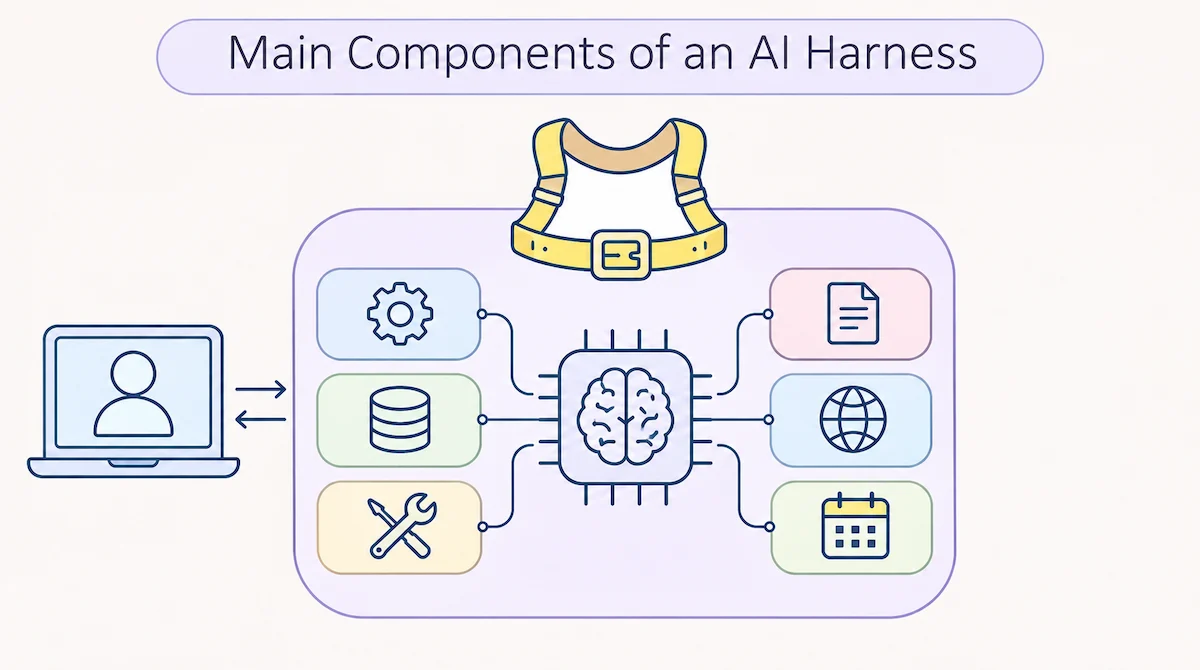
What are the main components of an AI harness?
Every AI harness is a little different, but most of them are built from the same ten parts. We go through them one by one, starting with the one that matters most.
Tools and tool calling
Tools are functions the model can call: read a file, search the web, run a shell command, query a database or send an email. Each tool has a name, a short description and a list of inputs. The AI harness shows this list to the model, catches the tool call in the answer, runs it and returns the result. The Model Context Protocol (MCP) is a common standard for connecting outside apps as tools. Fewer, well-described tools work better than a long menu, because the model has to pick the right one.
System prompt and instructions
The system prompt is the standing set of instructions the model receives every time. It tells the model who it is, what the goal is and which rules apply. A good harness keeps this text short and clear, and adds project rules on top. Weak instructions are one of the most common reasons for unstable results.
Context and memory
Every model has a context window. When a long task fills it, quality drops and old instructions get lost. We call this context rot. A good AI harness fights it with context compaction, which turns the long history into a short summary, and by loading only the files that matter for the current step. For memory across runs, many tools read a plain text file at the start, such as CLAUDE.md or AGENTS.md, where you write the code style, the folders to avoid and the test command. You write it once and stop repeating yourself.
Filesystem and sandbox
A filesystem gives the agent a place to read and write files, so the work does not live only in the chat. A sandbox is an isolated space where code can run without touching anything outside it. Running code that a model wrote straight on your machine is risky, so a good AI harness either asks first or uses a sandbox. Shell access matters here too, because with bash the model can write its own small scripts instead of waiting for a ready-made tool.
Verification and feedback loops
Without a check, a model will often say its own output looks fine. A good agent harness adds verification: run the tests, run the linter, take a screenshot or ask a second model to review the result. The outcome goes back into the loop, and this feedback loop turns a guess into a fix. It is also why the quality of your tests matters more once an agent works on your code, since self-verification is only as good as the signal it reads.
Permissions, guardrails and human approval
Permissions decide what the agent can touch: which folders, which commands, which websites. If your agent can reach customer data, read our guide on AI data privacy for business before you give it access. Guardrails block actions that are unsafe or not approved, and the strongest one is human-in-the-loop control, where the AI harness stops and asks before it deletes a file, sends a message or spends money. These rules live in the agent harness, not in the model, so they hold even when the model makes a bad call.
Orchestration and sub-agents
Orchestration is the logic that decides what happens next. For a small task it is a single loop. For a bigger task the agent harness can start sub-agents, each with a clean context, and collect only their short summaries, which keeps the main chat small. Multi-agent setups cost more and are harder to debug, so we start with one agent and split the work only when one agent clearly struggles. If you want to see this idea in a business setting, look at how to create an AI automation workflow.
Planning and task tracking
For long work, the agent needs a plan it can see. Many harnesses keep a to-do list that the model writes at the start and ticks off as it goes. This keeps the agent on track, and it lets you read the plan and stop a wrong direction early. Plan mode in Claude Code works this way: the agent writes the steps first and changes nothing until you approve them.
Skills and hooks
Skills are saved instructions for one kind of task, such as how to write a test or how to publish a post. The harness loads a skill only when the task needs it, so the context stays small. Hooks are small scripts that run at fixed points, for example a formatter after every file edit or a block on a dangerous command. Both let you change how the agent behaves without touching the model.
Observability and logging
Observability means you can see what the agent did and why: every tool call, every result, every error. Logs and traces make debugging possible. Without them an agent is a black box that gives you an answer and no way to check the path that led to it. When a run goes wrong, the log is the first place we look, because it shows the exact tool call where the problem started and what the model saw at that moment.
How does a harness work in popular AI tools?
Most AI tools you use are an AI harness of different size. If you want a list of the best known ones first, check our overview of the most popular AI tools. Here we look at four we use or compare often, and then at a few more.
Claude Code
Claude Code is a coding agent from Anthropic that works in the terminal. The model is Claude, and the agent harness gives it tools to read and edit files, run commands and search code. It has a plan mode, where the agent writes out its steps before it changes anything, plus hooks, sub-agents and a permission system. A CLAUDE.md file in the project holds your rules. The plan step is the part we value most, because we catch a wrong idea before a single file changes.
Codex
Codex is the coding agent harness from OpenAI. It works in the terminal, in editors and in the cloud, and it reads an AGENTS.md file for project rules. It is built around approval levels and a sandbox, so you decide how much it can do alone, from only suggesting changes to running commands without asking. The model is different from the one in Claude Code, but the loop is the same.
Cursor and GitHub Copilot
Cursor and GitHub Copilot build the agent harness into the editor. Their agent modes can read the whole project, edit several files and run commands in a terminal, all inside the editor window. The editor indexes the code, so the model can pull in only the files it needs instead of filling the context window. The same model can feel very different here than in a terminal tool, because the harness is different.
Is a chat window like ChatGPT or Claude a harness?
Yes, in a very small way. A chat window keeps the history of your messages, adds a system prompt and sends everything to the model on each turn. That is an AI harness, just a thin one. Most AI tools started this way and then added memory, file access, web search and checks on top. So when you ask what is a harness in AI tools, the plain answer is that every tool has one, and the difference is how much it does.
Other AI harnesses at a glance
Many more harnesses exist, and several are free or open source. Prices and features change often, so check how much AI tools cost and read each site for current details before you pick one.
| Tool | Where it runs | Good to know |
|---|---|---|
| Aider | Terminal | Open source, every change is a git commit |
| OpenCode | Terminal | Open source, works with many model providers |
| Cline | VS Code, JetBrains, terminal | Open source, supports MCP tools |
| Kilo Code | VS Code, JetBrains, terminal | Open source, works with a large list of models |
| GitHub Copilot | Editor and command line | Agent mode and a coding agent |
Why does the same model perform differently in different harnesses?
This is the question we get most often. Two tools can call the same model and still feel very different. The AI harness decides what the model sees, which tools it can use, how errors are handled and when the work counts as done. One AI harness might fill the context with long tool output, so the model loses the thread. Another trims the output, keeps notes and runs the tests after each edit. The model is the same, and the results are not.
Four things usually make the gap:
- Context. What gets loaded, what gets trimmed and when the history is summarized.
- Tools. How many there are, how clear the descriptions are and how well they fail.
- Checks. Whether tests and reviews run after each step or only at the end.
- Limits. How many steps, how many retries and what needs approval.
Is a better harness more important than a better model?
Neither wins alone. A strong harness around a mid-level model can beat a weak AI harness around the best model, and a great harness cannot lift a model that is too weak for the task. Harness quality shapes the final result as much as the model does. For that reason we fix the harness first, because it is cheaper and faster to change than the model. When you compare AI tools, compare the harness too, not only the model name.
Harness engineering vs prompt engineering vs context engineering
Prompt engineering is the first skill most people learn, and we cover the basics in our guide on prompt engineering for business. Harness engineering is the wider job. It covers the whole system around the model, and prompts and context are only two parts of it. Harness engineering also decides which checks run and when the agent must stop.
| Discipline | Focus | Main result | Typical use |
|---|---|---|---|
| Prompt engineering | The wording of the input | A clear prompt | Chat and early apps |
| Context engineering | What the model sees and when | Retrieval and memory design | Apps that use documents |
| Harness engineering | The full system around the model | The harness itself | Agents and long tasks |
A prompt is best for the intent of one task. A harness is best for knowledge that should stay: rules, project facts, the order of work and the meaning of done. When an agent fails on us, we look at the harness first and at the prompt second. Good harness engineering means you stop pasting the same rules into every message and put them where the agent always reads them.
What types of AI harnesses exist?
The word covers several kinds of setups. They share the same idea, a layer that makes a model usable for a certain job.
- Coding agent harness. Tools like Claude Code, Codex and Cursor that edit code and run commands.
- Evaluation harness. A setup that runs a model through a fixed set of tasks to compare results. A well known open source example is the LM Evaluation Harness.
- RAG harness. A model connected to a search layer, so it can pull documents before it answers.
- Safety and red-team harness. A setup that tests a model with bad inputs, such as prompt injection, before real users see it.
- Enterprise harness. A shared layer for many agents in one company, with access rules, logs and approvals.
Why do teams build their own AI harnesses?
Teams that run agents every day usually build or adapt a harness for four reasons.
- Repeatability. The same task runs the same way each time, with the same rules and the same tools.
- Evaluation. You can run the agent on a fixed set of tasks and compare versions, which shows whether a change helped.
- Observability. Logs and traces show what the agent did, so you can fix problems at the source.
- Safety and cost control. Limits on steps, tokens and permissions stop a bad run before it gets expensive.
Without these four, an agent is a demo. With them, it becomes a tool you can trust with real work.
What goes wrong in an AI harness?
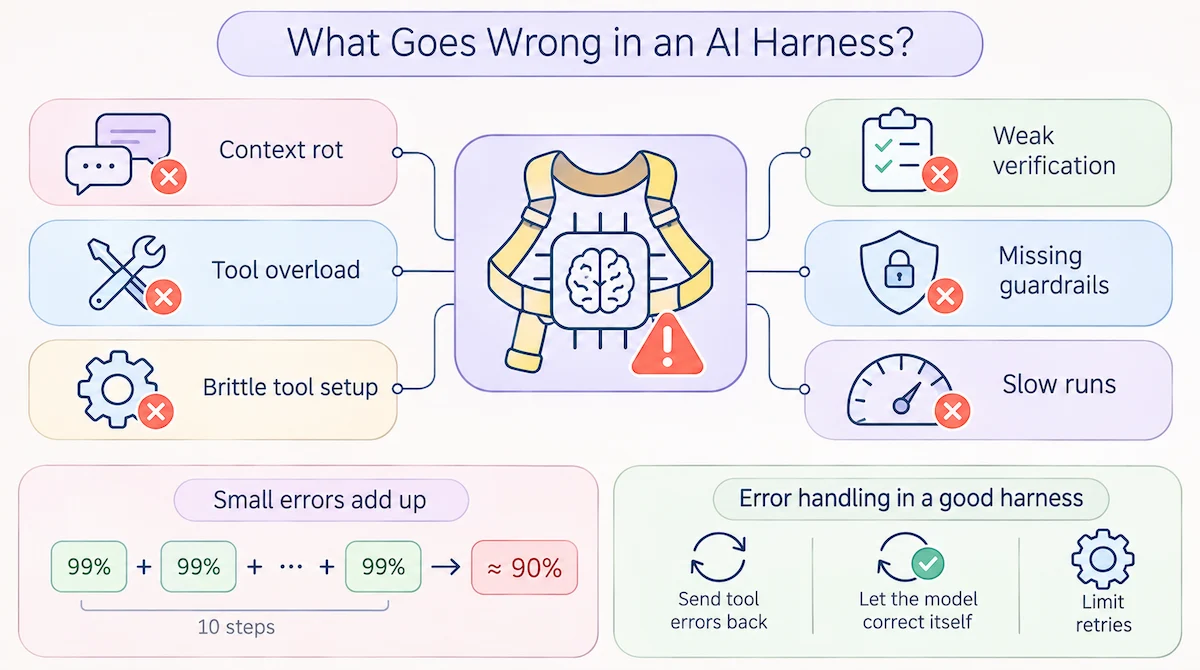
Most agent failures come from the AI harness, not from the model. These are the problems we see most often:
- Context rot. The history grows, the model loses track and quality drops.
- Tool overload. Too many tools at once confuse the model before it starts.
- Brittle tool setup. A small change in a tool description makes the model use it wrong, and the failure is silent.
- Weak verification. The agent stops early or calls unfinished work done.
- Missing guardrails. The agent deletes, sends or buys something without approval.
- Slow runs. Many tool calls in a row can take ten seconds or more.
Small errors also add up. If each step of a ten-step task works 99 percent of the time, the full task works only about 90 percent of the time. That is why error handling matters. A good harness sends tool errors back to the model so it can correct itself, and it caps the number of retries.
How does an AI harness handle long-running tasks?
A big task rarely fits into one context window. The agent works for a while, the window fills up, and a new run starts with no memory of the old one. A good agent harness solves this with handoff notes: a progress file, a to-do list and a git commit after each finished step. The next run reads those files first and picks up where the last one stopped.
We follow one rule here: every step must leave the project in a state that the next run can understand. Small commits, short notes and a test command that anyone can run give a fresh agent enough to continue without guessing.
How do companies run AI harnesses at scale?
One developer can live with a single harness on a laptop. A company with dozens of agents cannot. When every team builds its own, you get agent sprawl: different tools, different rules, no shared logs and nobody who knows what each agent can reach. The fix is a shared enterprise harness layer that handles access control, logging, approvals and cost limits in one place, while teams build their own agents on top of it. If you plan to roll out agents across a business, our guide on how to use AI in business is a good place to start. Keep the shared layer thin, so teams can still move fast.
How can you start with a simple AI harness?
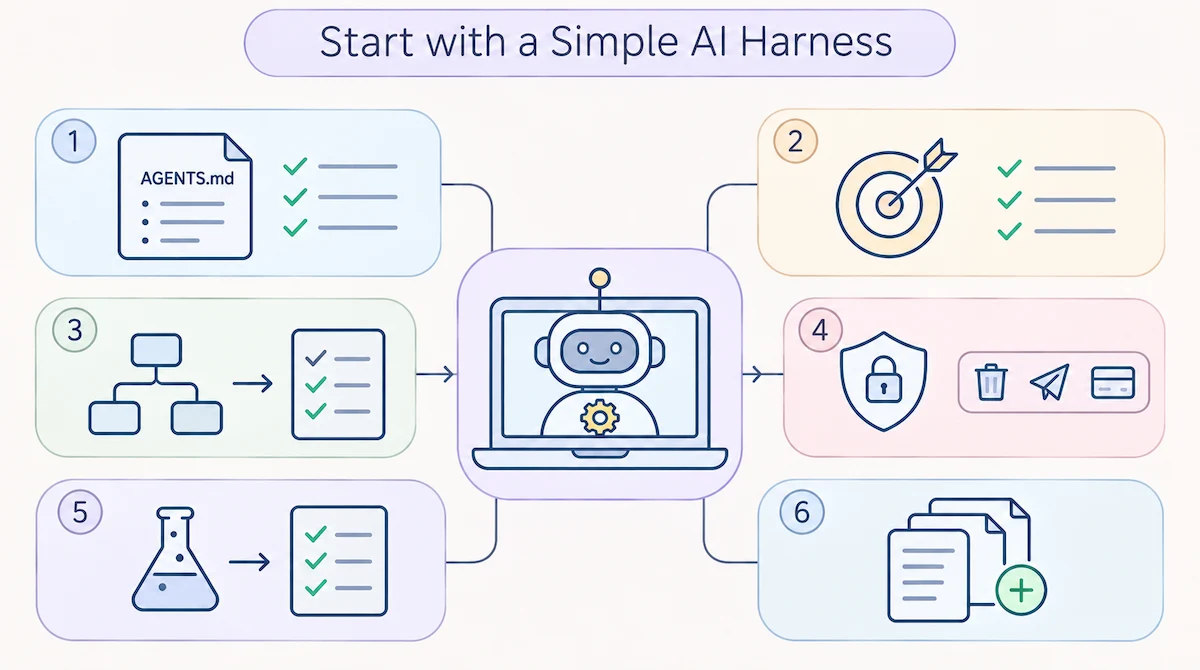
You do not need a framework on day one. A small AI agent harness is mostly plain text files, and this is how we start:
- Write a short rules file, AGENTS.md or CLAUDE.md, with the code style, the folders to avoid and the test command.
- Define what done means: tests pass, only the requested files changed and the original request is met.
- Ask for a plan first and read it before any change.
- Add approval for risky steps such as deleting, sending or paying.
- Run tests or checks after every change.
- Grow the files only when you notice you repeat yourself.
If you keep explaining the same thing to the agent, that knowledge belongs in the harness. The next question is whether to build everything yourself, use a framework or pay for a platform. If you are choosing tools for a company, start with our steps on how to choose AI tools for business.
| Option | Best when | Trade-off |
|---|---|---|
| Use a framework | You want ready-made loops and tool support | Fast start, harder to leave later |
| Build from scratch | Your needs are unusual and you want full control | More work before the first result |
| Use a managed platform | You need a fast launch with little engineering | Less control and less visibility |
Most teams end up with a mix: a framework for the base and custom code for the parts that matter most.
Rules, skills, workflows and context: where does each thing go?
Once the first files exist, the next question is where each piece of knowledge belongs. We sort it into four simple buckets.
| Bucket | What goes in | Example |
|---|---|---|
| Rules | What must always be true | Never edit the billing folder, always run the tests |
| Context | Facts about this project | Folder map, tools used, naming style |
| Skills | How to do one kind of task | Steps to write and publish a post |
| Workflows | The order of work | Plan, edit, test, review, commit |
If one bucket grows too big, the agent starts to ignore parts of it. Keep each file short, and move long how-to text into a skill that loads only when needed.
Which frameworks help you build an AI harness?
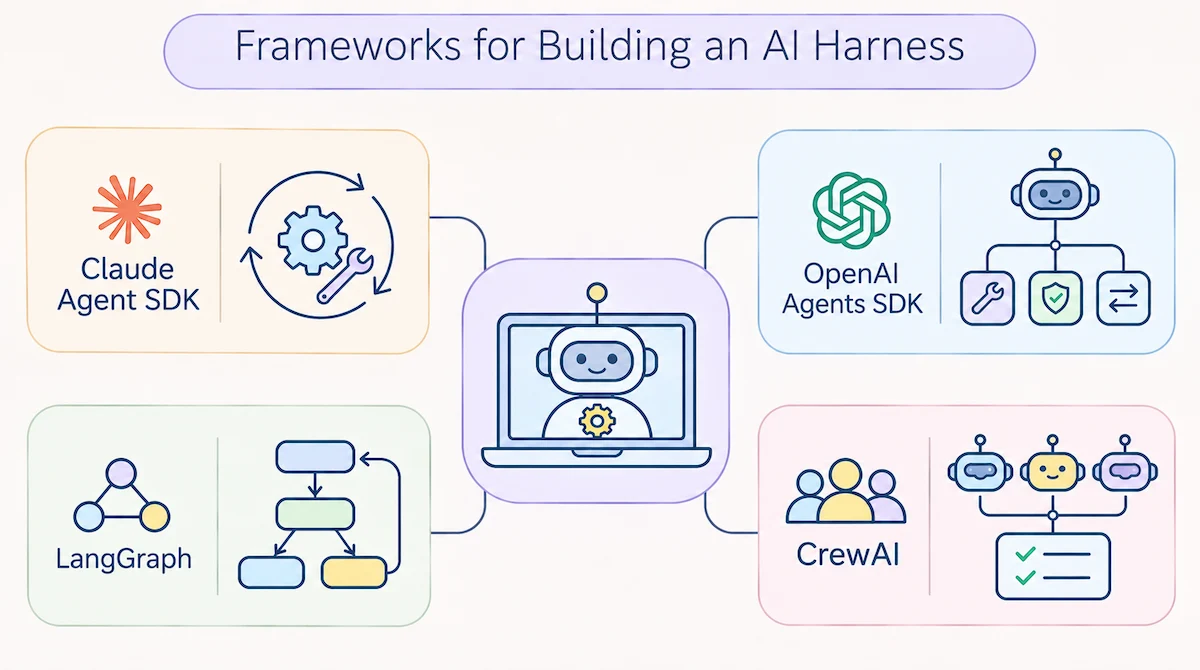
If you write your own agent, a framework saves time on the loop and the tool plumbing. These are the names we see most:
- Claude Agent SDK. Gives you the same agent loop and tools that Claude Code uses, so you can build on top of them.
- OpenAI Agents SDK. A light toolkit with agents, tools, handoffs and guardrails.
- LangGraph. Models the agent as a graph of steps with shared state, which suits complex flows.
- CrewAI. Builds a team of role-based agents that work on tasks together.
Check each project for current features before you commit, because they change fast.
Should a beginner use an AI harness, and which one first?
Yes, because you already use one every time you open an AI tool. The only change is that you start to control it. If you code, begin with one tool in an editor or terminal, such as Claude Code, Codex or Cursor, and add a rules file on day one. Pick one tool and learn its plan and approval features before you try a second one. If you do not code, you can still build a simple agent with no-code tools, and our steps on how to build a chatbot without coding show how to begin. Start with a small task you already know well, so you can judge the result fast.
Will harnesses still matter as models improve?
Some work that harnesses do today will move into the models. Models get better at planning and checking themselves, so tool makers remove steps from their harnesses. We expect lighter harnesses over time, but not zero. Something still has to run the tools, hold the context, enforce permissions and log what happened. Another shift is that tool makers now train models together with their own harness, so a model often works best inside the tool it was trained with.
Two ideas are worth watching. Disposable harnesses are built for one task and thrown away afterward, and harnesses written in plain language instead of code let more people change how an agent works. For a technical read on long tasks, Anthropic published a guide on effective harnesses for long-running agents.
So, what is harness in AI tools?
A harness is the part of an AI tool that is not the model. It supplies tools, memory, rules, checks and limits, and it turns a text predictor into something that can do work. Remember the formula: Agent = Model + Harness. Next time you compare AI tools, look at what the harness does, and you will see why the same model gives different results.
Frequently asked questions
What is an AI harness in simple terms?
An AI harness is the software around an AI model that lets it use tools, read and write files, keep context and follow rules. The model does the thinking, and the harness does the acting and keeps it safe.
What is the difference between an AI agent and an AI harness?
The agent is the complete system you work with. The AI agent harness is the part of it that is not the model: tools, memory, checks and limits. An agent equals a model plus a harness.
Is Claude Code an AI model or a harness?
Claude Code is a harness. The model inside it is Claude. The harness gives the model tools for files and commands, a plan mode and a permission system.
Is a harness the same as a framework like LangChain?
No. A framework is a toolkit for building a harness faster. The harness is the specific setup of tools, rules and checks that you build for your case, with or without a framework.
Do I need a harness to build an AI agent?
Yes. Any agent that calls tools, keeps memory or checks its output already runs an AI agent harness, even if nobody calls it that. The real question is whether you designed it on purpose.
Why does the same model act differently in different AI tools?
Because each tool has its own harness. Context handling, the list of tools, permissions and checks differ, so the same model sees different input and works under different limits.
What is the Model Context Protocol (MCP)?
MCP is a standard way to connect outside apps to a model as tools. A harness that supports it can use any MCP server, so you can add features without rewriting the harness.
Can a harness work with more than one AI model?
Yes, many can. Tools like Aider, OpenCode, Cline and Kilo Code let you switch between model providers. Others are built around one maker, such as Claude Code with Claude models, so check the supported models before you choose.
What is the difference between a harness and a prompt?
A prompt is the text you send in one request. A harness is the system that decides which tools exist, what the model remembers, which checks run and what needs approval. The prompt shapes one answer, and the harness shapes every run.
How do companies keep many AI agents under control?
They use a shared enterprise harness layer for access control, logs, approvals and cost limits. Teams build agents on top of that layer, so every agent follows the same rules and every action can be traced.