Node-based AI tools are apps where you build an AI process out of blocks, called nodes, and join them with lines on a canvas. Each block does one job, such as writing a prompt, making an image or upscaling a result. The output of one block feeds the next, so the whole chain can be saved and run again.
Most people meet AI through a single box. You type a prompt, press enter and hope the result is close. That works for a quick idea. It falls apart when you need the same look across fifty images, or when one step in a long process needs a small change.
A node-based AI workflow keeps every step in view. The prompt, the reference image, the model and the upscaler sit on screen as separate blocks. You swap one of them, hit run, and the rest of the chain stays untouched.
This guide explains what a node is, how a graph runs and how the approach differs from prompt-only tools. You will also see which node-based AI platform fits which person, and when you should skip nodes completely. One note before we start: node-based here has nothing to do with Node.js.
Node-based AI tools in short
- What they are: node-based AI tools show an AI process as a graph of blocks joined by lines.
- What you gain: repeatable results, control over every step and the freedom to mix models.
- What it costs you: a learning curve and more setup time than a single prompt box.
- Who it suits: designers, marketers, video makers and teams that run the same job again and again.
- Best known examples: ComfyUI, Figma Weave, Krea Nodes, Freepik Spaces, Flora and Adobe Firefly Graph.
What are node-based AI tools?
A node-based tool is software where the work is drawn as a graph instead of typed as one prompt. Every block is a node, every line is an edge that carries data, and the finished layout is the file you keep. Because the graph is saved, node-based AI tools let you hand it to a colleague, rerun it next week or call it from another app.
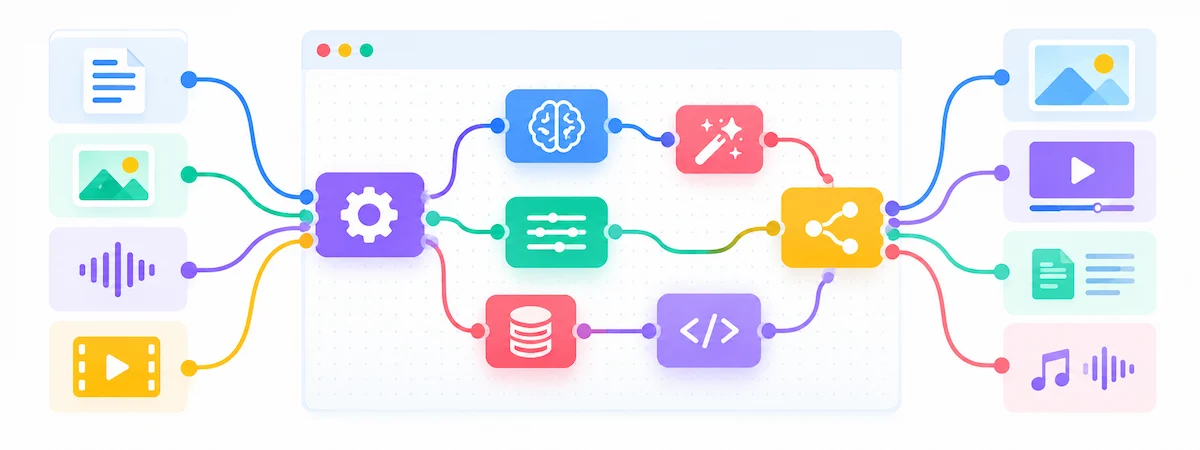
The idea is old. Blender, Nuke, Houdini and Unreal Engine have used nodes for years to build materials, composite film shots and script game logic. What changed is that the blocks in node-based tools now call image, video, audio and text models. If you have ever used a patch bay in a music studio or a flowchart app, the mental model carries over almost directly.
What is a node in AI?
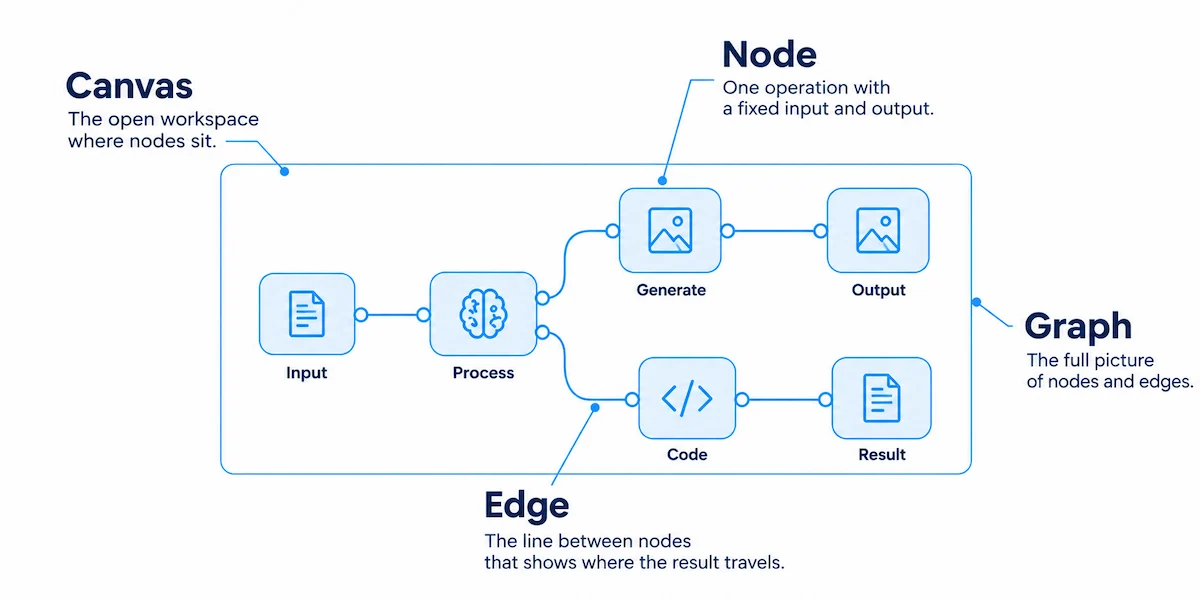
A node is one operation with a fixed input and a fixed output. A text-to-image node takes a prompt and returns a picture. An upscale node takes that picture and returns a larger one. A node can also be a model call, a mask, a color adjustment, a piece of code or a switch that sends data left or right.

Because the types are declared, the editor knows which nodes can connect before you press run. An image output will not plug into a text input by mistake. That small rule saves many failed runs in large node-based AI workflows.
What is a node canvas and what are edges?
The canvas is the open workspace where the nodes sit. Many node-based editors use an infinite canvas, so you can keep adding blocks in any direction. The lines between blocks are called edges, wires or cables, depending on the product, and they show where each result travels. The full picture of nodes and edges is the graph.
New terms pile up fast in this field. A short reference such as the AI terms glossary helps when a product page uses words you have not met yet.
Is node-based AI like After Effects or Photoshop layers?
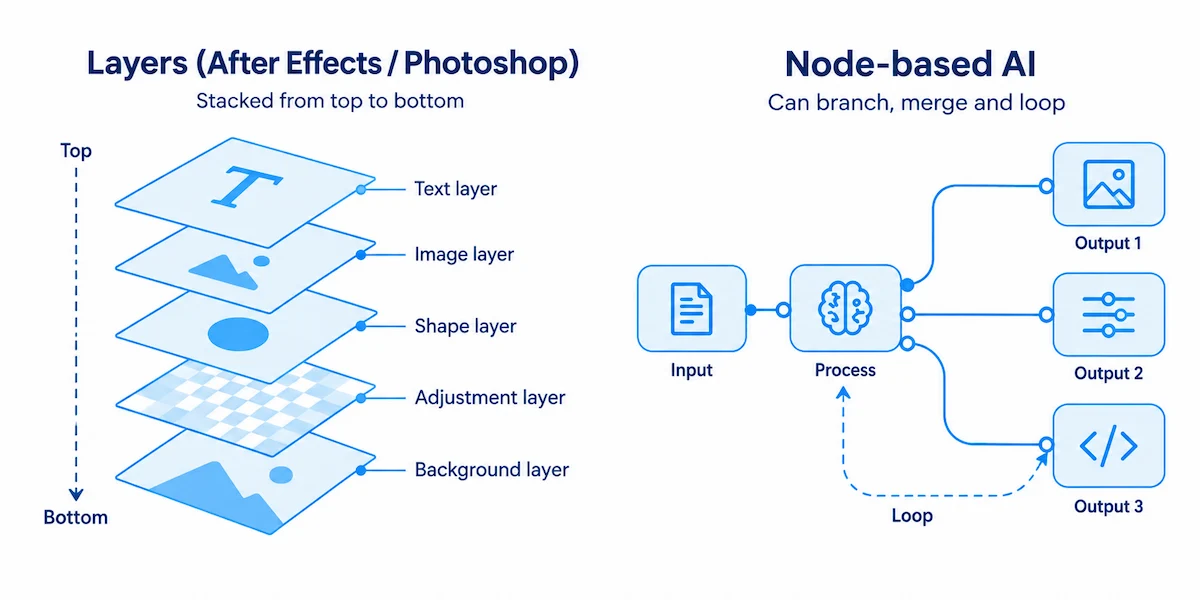
It is close, with one difference. Layers stack on top of each other and you read them from top to bottom. A graph can branch, merge and loop, so one input can feed three different outputs. Editors who know compositing in After Effects, DaVinci Fusion or Nuke pick up node-based tools quickly, because the habit of thinking in steps is the same.
Is node-based AI the same as Node.js?
No. The two searches get mixed up, but they are unrelated. Node.js is a runtime for running JavaScript on a server, while node-based AI is about the visual graph. Some platforms are built on Node.js, which adds to the confusion.
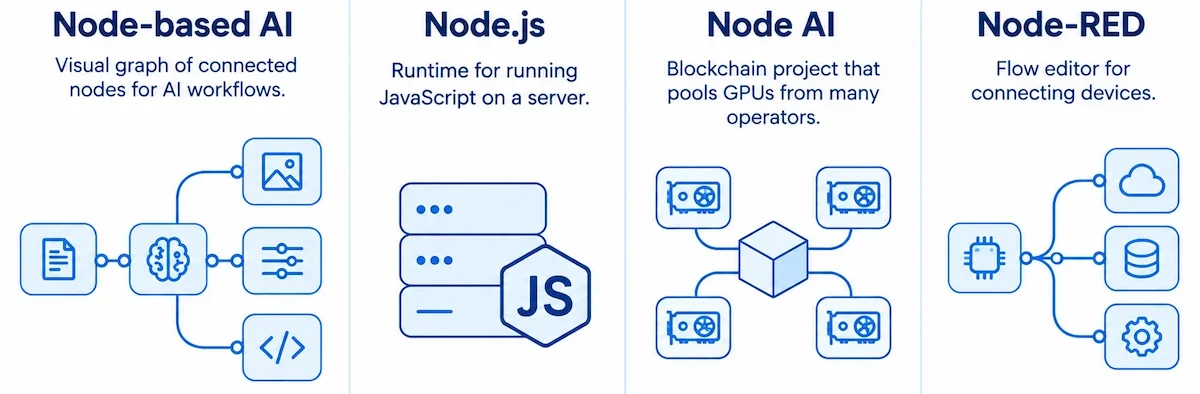
Two other things share the name. Node AI is a blockchain project that pools GPUs from many operators, and Node-RED is a flow editor for connecting devices. Neither one is what this guide covers.
How do node-based AI workflows work?
A node-based AI workflow runs in dependency order. Each node waits until the nodes feeding it have finished, then does its job and passes the result forward. Nodes that do not depend on each other can run side by side. This is the core logic behind every node-based AI workflow, whatever the brand.
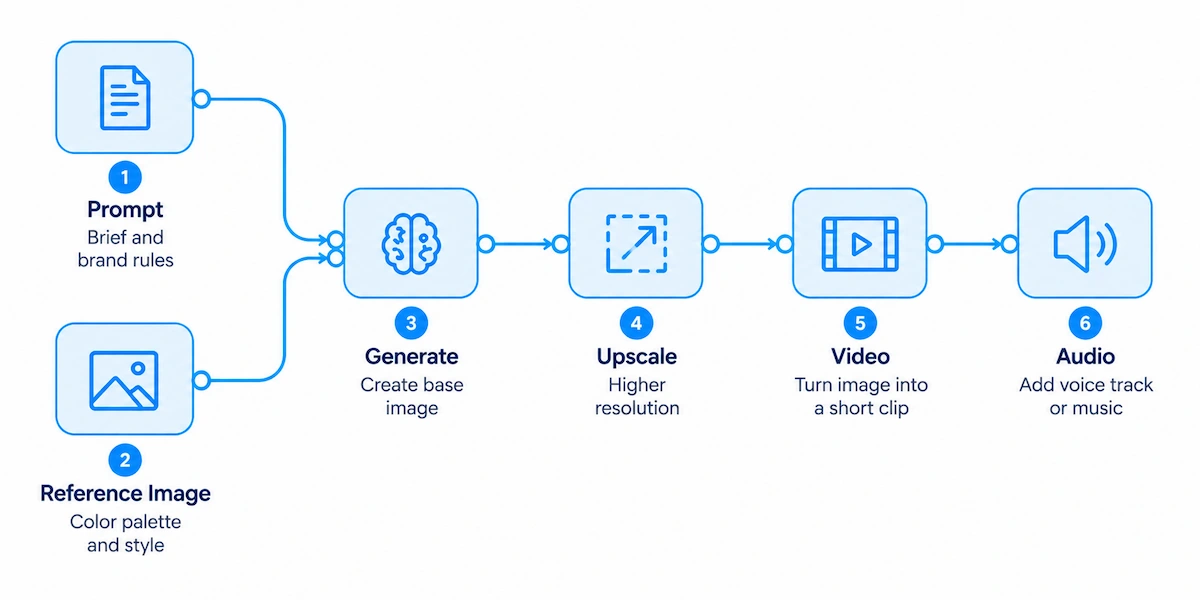
A simple example, from prompt to video
Say you need a short product clip for an ad. You would build the chain like this:
- A prompt node holds the brief and the brand rules.
- A reference image node locks the color palette and the style.
- A generator node makes the base image.
- An upscaler node raises the resolution for print or a large screen.
- A video node turns the still into a short clip.
- An audio node adds a voice track or music.
Press run once and the whole chain executes. Next week the brief changes. You replace the text in the prompt node and the reference image, press run again, and every later step updates on its own. That is the everyday gain of a node-based AI workflow.
Inputs, outputs and node types
Most node-based tools group nodes into a few families. Input nodes bring in text, images, video or files. Model nodes call a generator, an editor or a language model. Processing nodes handle upscaling, background removal, masking and color, and output nodes save or export the result.
Some node-based AI tools add logic nodes, such as arrays and loops. With them, one graph can produce every combination of five backgrounds and three camera angles in a single run, which means fifteen images without fifteen prompts.
Why you can rerun only the step that changed
Since each step is separate, you do not start over. Change the lighting node and only the nodes after it need to run again. Some node-based editors keep earlier results in memory, so a rerun costs less time and fewer credits.
ComfyUI goes one step further and stores the whole graph inside the saved image file. Drag that picture back into the editor and it rebuilds the exact setup that made it.
Node-based AI vs prompt-based tools
Prompt tools are built to give one good result from one instruction. Node-based AI tools are built for a process you can repeat. Neither is better in every case, because they solve different jobs.
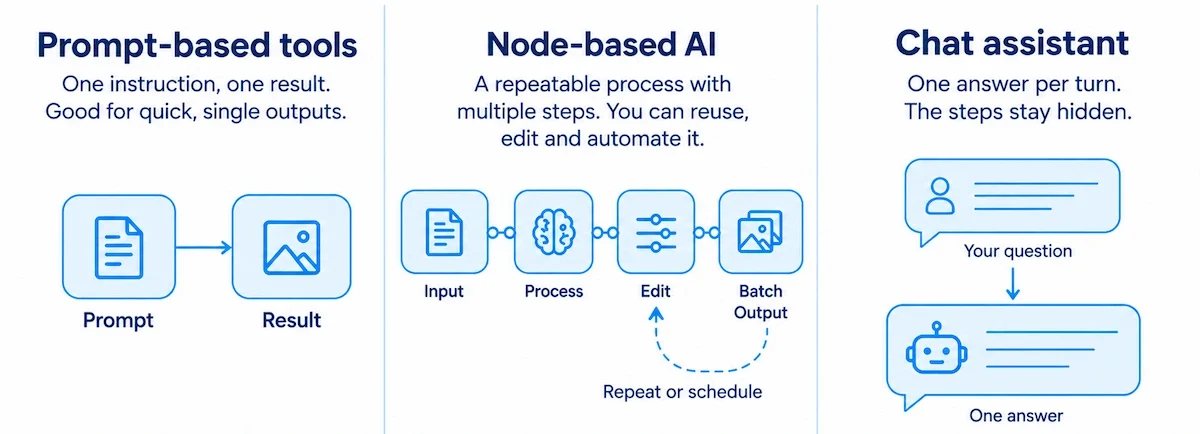
Node-based AI vs a chat assistant
A chat assistant gives one answer per turn, and the steps behind it disappear into the conversation. A node-based AI workflow keeps the steps. You can run the same flow on new input, run it on a batch or trigger it on a schedule, and you can edit step three without touching steps one and two.
Good prompts still matter inside a node-based AI workflow, because every model node reads one. The habits in this guide on prompt engineering for business apply to each prompt node you write.
Node-based AI vs Midjourney and one-prompt generators
Single-prompt generators feel like a slot machine. You pull the lever, look at the result and pull again. That is fine for exploring a look, but it is a poor fit when a client wants thirty images in the same style, since you cannot lock the parts that already work.
Node-based AI lets you freeze the style, the seed and the reference. Then you change only one variable at a time.
Side by side comparison
| Feature | Prompt-based tool | Node-based AI tool |
|---|---|---|
| Steps | Hidden inside one prompt | Visible as separate nodes |
| Repeatability | Low, results vary | High, same graph and same process |
| Control | One text box | Settings on every step |
| Time to first result | Seconds | Minutes to hours of setup |
| Learning curve | Low | Medium to steep |
| Batch work | Manual | Built in or scriptable |
| Best for | Ideas, mood, one-off images | Campaigns, series, production |
Why creators are switching to node-based AI workflows
Interest in node-based AI grew because teams need consistent output, not only a lucky first image. Five reasons come up again and again.

You can repeat what works
Type the same prompt twice and you get two different pictures. That is fine while you play, but it hurts when a character must look the same across a video series. In a node-based AI workflow you build the process once, save it and run it again with the same settings.
Need fifty product shots with the same light and angle? Load the products, press run and go grab a coffee. Want the same style on a new character? Plug in the new reference image and leave everything else alone.
You are not stuck with one model
Single-prompt apps limit you to whatever their model does well. If it draws bad hands, you live with it. In a node-based editor you pick the best model for each step instead.
Use a fast model for the base image, a second one for the pose, a third for the upscale and a video model for motion. Swapping one of them is a normal edit, not a rebuild.
Every step lives on one canvas
The old way of working means generating in one app, upscaling in another, compositing in a third and animating in a fourth. Files get exported, renamed and uploaded again. A node-based canvas removes that shuffle because the output of one step is already the input of the next.
A typical case is a shop that needs many product shots from a single photo. The guide on creating product photos with AI shows the idea in a simple setup, and a graph is what you would build to automate it for a whole catalog.
You can see where it went wrong
Prompt tools act like a black box, while node-based tools show their work. When the result is off, you do not know why, and when it is good, you cannot say how to get it again. A graph shows the logic. One node makes the image, one changes the color grade, one swaps the background.
If the lighting looks wrong, you know which block to open. If the upscale is soft, you replace that single model.
It scales through batch runs and APIs
Once a graph works, you can point it at a spreadsheet and let it run over every row. Many hosted platforms also publish a finished graph as an endpoint, so another app can call it with new inputs. Some go further and expose the graph as a tool that an agent can run.
This is where node-based AI platforms with an API stop being a toy. If that is your goal, read how to create an AI automation workflow before you choose a product.
Why node-based AI tools are growing now
Three things came together. New image, video and audio models appear every month, and nobody wants to rebuild a process each time one arrives. Teams also need consistent output across many files, which a single prompt cannot promise. Finally, big companies moved in. Figma bought Weavy and turned it into Figma Weave, Adobe built Firefly Graph, and ComfyUI added App Mode and ComfyHub in March 2026.
What you can build with node-based AI tools
The same few building blocks cover a wide range of jobs. A node-based AI workflow is a recipe, so the question is which recipe you repeat most often.
- Product and ad images: one photo in, many backgrounds, angles and sizes out.
- Consistent characters: a reference image node keeps the face and outfit steady across a series.
- Video clips: a still image goes into a video node, then an upscaler and an audio node finish the clip.
- Storyboards: a script feeds a row of image nodes, one per scene.
- Batch edits: a folder or spreadsheet runs through the same graph, one row at a time.
- Text and agent tasks: an LLM builder can read documents, search a knowledge base and send a result to another app.
Types of node-based AI tools
Not all node-based tools do the same job. Four groups cover almost everything you will find, and mixing them up is the fastest way to pick the wrong app.
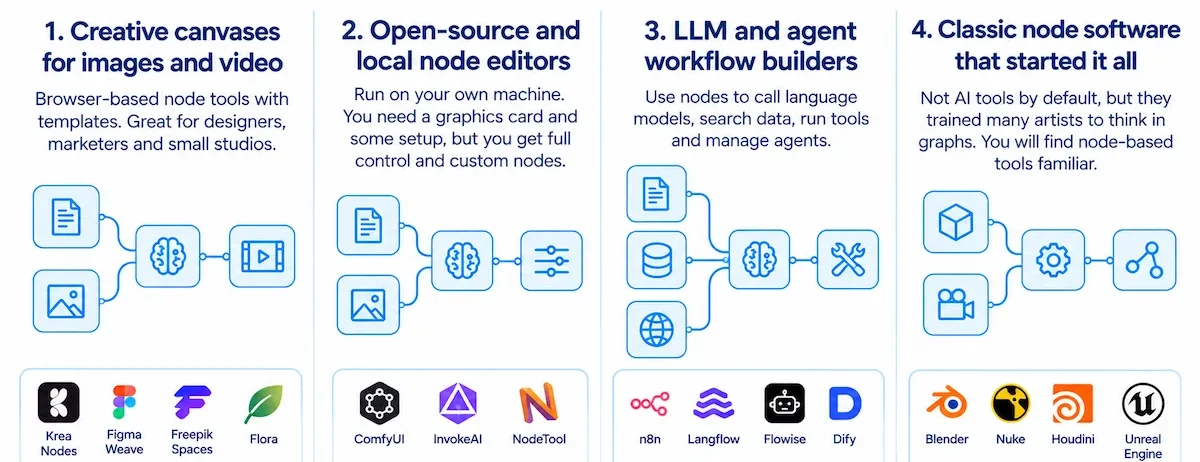
Creative canvases for images and video
Krea Nodes, Figma Weave, Freepik Spaces and Flora are node-based tools that live in the browser, run on cloud hardware and ship with templates. They suit designers, marketers and small studios who want results without installing anything. Most also offer team features such as shared canvases and comments.
Open-source and local node editors
ComfyUI, InvokeAI and NodeTool are the best known. They run on your own machine, so you need a graphics card and some patience with setup. Many guides name 8 GB of video memory as a practical minimum for images, and video models ask for more. In return you get custom nodes, community workflows and no per-image bill.
LLM and agent workflow builders
n8n, Langflow, Flowise and Dify use the same node-based logic for text instead of pictures. Their blocks call language models, search a knowledge base, run a tool or hand a task to an agent. If your goal is software that acts on tasks rather than makes media, start with this overview of AI agents for business.
Classic node software that started it all
Blender, Nuke, Houdini, TouchDesigner and the Blueprint system in Unreal Engine are not AI tools by default. They matter because they trained a generation of artists to think in graphs. Anyone who has used them will find node-based tools familiar within an hour.
Best node-based AI tools in 2026
There is no single winner among node-based tools. The right pick depends on your hardware, your team and the kind of output you need. Features and prices change often, so check the product page before you pay for anything.
ComfyUI
ComfyUI is the open-source reference point for the whole node-based category. It is free, runs locally and has a huge library of community nodes. The trade-off is setup. You manage models, drivers and Python, and a node that worked last week can break after an update. In March 2026 the team added App Mode, App Builder and ComfyHub, so people can run a workflow without looking at the graph.
Figma Weave (formerly Weavy)
Figma bought Weavy in late 2025 and renamed it Figma Weave. It mixes generative models with classic editing nodes such as curves, levels and masks, so you can correct a result with exact numbers instead of asking a model to try again. App Mode turns a finished graph into a simple form that teammates can use without learning the canvas. Advanced parameters are less exposed than in ComfyUI.
Krea Nodes
Krea Nodes puts more than 50 image, video, audio and 3D models on one infinite canvas, with templates you can copy and share. The platform describes the feature as a pipeline you define once and run with a single click, and it recommends starting with two or three nodes. You can read the setup steps in the Krea documentation on nodes.
Freepik Spaces
Freepik Spaces is a cloud canvas inside the Freepik AI suite. Its nodes cover uploads, text, an assistant, image generation and video generation, and the stock library can feed a graph directly. Several people can edit the same Space at once. Free users get up to three Spaces. The trade-off is that the tool leans on stock assets and hides some of the deeper settings.
Flora
Flora is built for visual thinking and story work. It ships ready-made Flows for fields such as film, fashion and architecture, which solves the empty canvas problem. An agent called Fauna can assemble a node-based workflow from a plain request. Costs can climb fast when you generate a lot of video.
Adobe Firefly Graph
Firefly Graph is a node-based canvas inside Creative Cloud, aimed at companies. It adds controls over which models people can use, central deployment of workflows and content credentials that record how an asset was made. Adobe explains its view in a post on why node-based workflows matter for creative teams.
fal Workflows and hosted API canvases
fal.ai offers a workflow builder that chains hundreds of models and sends requests through an API. Wireflow and Flowy follow a similar idea in the browser, with a canvas on the front and an endpoint behind it. These node-based AI tools lean toward developers and teams that want to call a graph from code.
Other node-based AI tools worth a look
Wireflow turns a finished canvas into an API endpoint, and it can also be called through MCP. Flowy is a hosted canvas with a similar idea. Runway Workflows lets you chain text and image nodes into a video node inside Runway. Playbook3d and Leonardo also show up in comparison lists. Morphic goes the other way and offers repeatable workflows without a node canvas, which suits people who want the result but not the wiring.
Best free and open-source node-based AI tools
ComfyUI, InvokeAI and NodeTool are free to run. You pay with hardware, or with your own keys when a node calls a hosted model. NodeTool can also work fully offline with local models, which suits people who do not want their files to leave the machine.
ComfyUI alternatives with no GPU
If you do not own a strong graphics card, pick a browser tool. Krea, Freepik Spaces, Figma Weave, Flora and hosted platforms all run models in the cloud and bill by credits or per generation. You trade some depth of control for a setup that takes minutes.
Figma Weave vs Flora
Figma Weave leans toward control. It has array and iterator nodes, classic editing nodes and App Mode for sharing a finished graph. Flora leans toward ideas and story. It gives you ready-made Flows and an agent that builds a graph from a request. Pick Weave when you need exact, repeatable production steps. Pick Flora when you are still shaping the concept.
Best node-based AI tools for images and for video
For images, ComfyUI gives the deepest control, Krea Nodes gives the widest model choice in a browser and InvokeAI gives a cleaner interface for artists. For video, the model matters more than the editor, because models such as Kling, Veo and Seedance decide quality and cost. Browser canvases make it easy to swap those models, while ComfyUI can run local video models if your graphics card has enough memory.
How much do node-based AI tools cost?
Prices differ too much to list here, and they change often. The pricing models are stable, though. Open-source editors are free, and you pay for hardware or rented GPUs. Browser canvases sell monthly plans with credits, often per seat. API platforms bill per run. Video nodes cost far more than image nodes in every model, so test a short clip before you plan a long series.
Quick comparison table
| Tool | Type | Runs | Best for | Learning curve |
|---|---|---|---|---|
| ComfyUI | Open source | Local or rented GPU | Maximum control | Steep |
| InvokeAI | Open source | Local | Artists who want a cleaner interface | Medium |
| NodeTool | Open source | Local or own keys | Image, audio and text in one graph | Medium |
| Krea Nodes | Creative canvas | Browser | Many models, quick start | Low to medium |
| Figma Weave | Creative canvas | Browser | Design teams and compositing | Medium |
| Freepik Spaces | Creative canvas | Browser | Teams that use stock assets | Low to medium |
| Flora | Creative canvas | Browser | Storyboards and narrative work | Low |
| Adobe Firefly Graph | Enterprise canvas | Creative Cloud | Brand work with rules and approvals | Medium |
| n8n, Langflow, Flowise, Dify | Agent builders | Self-hosted or cloud | Text, tools and automation | Medium |
Many graphs end in a video node, and the choice of model there changes cost and quality a lot. The overview of AI video creation explains the tools behind that last step.
When to use node-based AI workflows, and when to skip them
Pros and cons of node-based AI tools
| Pros | Cons |
|---|---|
| Repeatable results from the same graph | Learning curve for node types and data flow |
| Control over every step | Slow setup for a single image |
| Freedom to swap models | Custom nodes can break after updates |
| Batch runs and API access | Credits or hardware costs add up with video |
| Easy to share as templates | Large graphs get hard to read |
Use nodes when you repeat the same process
Node-based AI workflows pay off when the same shape of work comes back again and again. Ad variations, batch edits and a fixed look across every shot of a series are the classic cases. You lock the base, change one variable and run.
A simple rule works well. If you will not run the process more than a few times, a plain prompt box is faster. The graph is an investment that pays back on the second and third use, not on the first.
Skip nodes for one-off ideas and brainstorming
When you are exploring a mood or hunting for a look, nodes slow you down. By the time you have wired the third block, a normal tool could have made forty pictures. A graph also asks you to know the inputs, the steps and the output before you begin.
The better order is to find the look in a simple tool first. Once you have it, move the recipe into a graph and scale it.
Do you actually need a node canvas?
Even the vendors are adding easier paths. ComfyUI launched App Mode in March 2026, and in the same month Glif dropped its node builder and became a single chat agent. On apps like these the graph still exists underneath, and someone still has to maintain it.
You need a canvas when the middle steps are the product, when you must rerun an identical graph months later or when you want to work fully offline. You can skip it when you only need finished content and the colleagues who run the process will never learn graph logic. Before paying for any tool, test it on your real task with the steps in how to choose AI tools for business.
How to choose the right node-based AI tool
Start with your task, not with the brand. Five questions narrow the list quickly.
| Question | If yes | If no |
|---|---|---|
| Do you own a strong GPU and want full control? | ComfyUI, InvokeAI | A browser canvas |
| Do you want to start in under an hour? | Krea Nodes, Flora | ComfyUI |
| Does a team need to share and edit graphs? | Freepik Spaces, Figma Weave | Any tool |
| Do you need an API or batch runs? | fal Workflows, Wireflow, ComfyUI | A creative canvas |
| Do you need text automation instead of media? | n8n, Langflow, Flowise, Dify | An image and video canvas |
For a beginner with no GPU, Krea Nodes or Flora is the gentlest start. For someone who wants to learn the craft deeply and does not mind setup, ComfyUI is the long-term choice.
How to start with node-based AI step by step
You do not need to learn every node-based tool. Pick one, spend an hour with it and build from there.
- Pick one tool by goal. Choose a browser canvas for images and video, ComfyUI if you want full control on your own hardware, or an agent builder for text and automation.
- Open a template. Krea, Flora, Figma Weave and ComfyUI all ship starter graphs. Run one without changes so you see how data moves.
- Build three nodes. A prompt node, a generator and a save node are enough for a first graph. Add more only when you have a reason.
- Run after every new node. Small tests catch a wrong connection early. Give each node a clear name so you can read the graph next month.
- Save, label and reuse. Duplicate the graph, change the input and run it again. Share it as a template or publish it as a simple app for teammates.
Runway publishes a good first exercise. Two text nodes feed an image-to-video node, and you can run the full node-based AI workflow or just one node to test a change quickly. Copy that pattern in any tool you try.
As your graph grows, you will have to decide which other apps stay in the picture. This guide to an AI tool stack for business helps with that decision.
Common problems with node-based AI
- Learning curve. Even friendly node-based tools ask you to learn node types and how data flows between them.
- Missing node errors. Opening a graph made by someone else often fails because a custom node is not installed.
- Updates that break things. In ComfyUI, a new core version can break popular node packs.
- Hardware needs. Local editors need a strong graphics card, and video models need more memory than image models.
- Credit costs. Video nodes can use far more credits than image nodes, and cloud pricing is not always clear.
- Browser lag. Very large graphs can slow down a canvas that runs in a tab.
- Slow chains. Waiting for three services in a row takes longer than one model call.
Simplified app modes help here. A senior person builds the graph, and everyone else fills in a short form with a product name or a background style.
Conclusion
Node-based AI tools turn a prompt into a process you can see, save and rerun. They fit people who repeat the same work, need a steady look across many files or want to connect several models without moving files around. They fit badly when you are still exploring an idea or making a single image.
Start small. Choose one tool, open a template, build a graph of three nodes and run it. After that you will know whether a canvas belongs in your daily work or not.
Frequently asked questions about node-based AI
What is node-based AI?
Node-based AI is a way of building AI work as a graph instead of a single prompt. Each node does one job, such as loading an image, calling a model or upscaling a result, and edges carry data to the next node. You see every step and can change one without redoing the rest.
What is a node in AI?
A node is one operation with a defined input and output. A text-to-image node takes a prompt and returns a picture, and an upscale node takes that picture and returns a larger one. Because the types are set, the editor can warn you about bad connections before you run the graph.
Do I need to code to use node-based AI tools?
No. Building a graph means picking nodes and connecting them. Some tools offer code nodes or an API for people who want them, but a beginner can build a full image or video chain with no code at all.
Do I need a GPU?
Only for local node-based editors such as ComfyUI, InvokeAI or NodeTool with local models. Browser tools like Krea, Freepik Spaces, Figma Weave and Flora run on cloud hardware, so a normal laptop is enough. You pay with credits or per generation instead.
Is there a free node-based AI tool?
Yes. ComfyUI, InvokeAI and NodeTool are free and open source, and you pay only for your hardware or for provider keys. Some browser tools also offer a free plan, though with limited credits or a cap on projects.
How is node-based AI different from Midjourney?
Midjourney gives you one result per prompt, so you tune the text and try again. A node-based tool keeps every step as a block, so you can lock the style, change a single input and rerun the same process. It suits series and batch work better than a single image.
Is Weavy the same as Figma Weave?
Yes. Weavy was the original startup, and Figma bought it and renamed the product Figma Weave. It still runs as a standalone tool, and Figma plans to bring its workflows into the wider Figma platform over time.
Can node-based AI workflows run automatically?
Yes. Many platforms let you run a graph in batch, on a schedule or through an API. A finished graph can answer a request from another app, and some hosted tools also expose it as a tool that an AI agent can call.
Does node-based AI mean Node.js?
No. Node-based refers to the visual graph of blocks and connections on a canvas. Node.js is a separate runtime for JavaScript. A few node editors happen to run on Node.js, which is why people mix up the two terms.
Is node-based AI the future of creative AI?
It is growing, mainly because teams need repeatable results and control over each step. Adobe, Figma, Krea and Freepik all invest in node-based canvases. At the same time, vendors add simple app modes and chat agents, so most people will use the graph through an easier layer.
Which node-based AI tool is best for beginners?
Browser tools such as Krea Nodes and Flora are the easiest start, because they ship templates and need no install. ComfyUI teaches the most, but it asks for more time and a capable computer.
How much do node-based AI tools cost?
Open-source editors like ComfyUI, InvokeAI and NodeTool are free, so you pay only for hardware or provider keys. Browser canvases use credit plans, and API platforms charge per run. Check the current pricing page, because plans change often.
Is node-based AI like After Effects?
The thinking is similar. Both let you build a result from connected steps, and editors who know node compositing adapt fast. The difference is that the nodes here call AI models for images, video, audio and text.
Can I use the results commercially?
That depends on the model and the platform terms, not on the node editor. Read the license of each model you use and the terms of the service, and keep a record of which models made each asset.










