Most creators and brands already have hours of long video sitting in a folder: podcasts, webinars, tutorials, interviews and live streams. Cutting that footage into Shorts by hand often takes longer than recording it. AI clip tools now do the first pass, so you spend your time choosing and polishing clips instead of scrubbing a timeline.
This guide shows how to turn long videos into Shorts with AI, from picking the right source video to export and publishing. You also get copy-ready prompts, a tool comparison, platform settings, a manual method for when you do not want a tool, and the mistakes that make clips fail.
Every step works for YouTube Shorts, TikTok and Instagram Reels, so one long video can become a week of Shorts in all three feeds.
The short answer
To turn a long video into Shorts with AI, follow these six steps:
- Upload the video or paste a YouTube link into an AI clip generator.
- Let the AI find and score the strongest moments.
- Review the Shorts and delete the weak ones.
- Rewrite the hook for the first three seconds.
- Reframe each Short to 9:16 and add captions.
- Export the Shorts and publish them natively on each platform.
Clear audio and a speaker who finishes each thought give the best results. The AI finds the moments, but a person still decides which Shorts go live, because a Short that reads well in a transcript can fall flat on screen.
What are Shorts and what does it mean to clip a long video?
Shorts are vertical videos on YouTube that can run up to three minutes. TikTok videos and Instagram Reels use the same vertical format, so most clips work on all three platforms. Clipping means cutting a self-contained part out of a longer recording and publishing it as its own video.
When an AI tool does the picking, cutting, cropping and captioning for you, the process is called AI clipping, and the tool is an AI clip generator or an AI clipper. Many AI tools also call it AI video repurposing, which means the same idea applied to a whole library of recordings.
Why long videos are the best source for Shorts
A long video already contains finished ideas: an answer to a question, a story with an ending, a tip with an example, a joke with a punchline. One 30 minute podcast can hold a dozen of these moments, and each one can become its own Short. That is why a long recording is the best source for Shorts, and why most AI tools start from it.
Repurposing long-form content also saves production work. You keep the same guest, script, lighting and audio, and you only spend time on editing. A short clip brings new viewers to your channel, and those viewers can then watch the full video when the topic fits them.
If you already use AI for content creation, clipping is the natural next step, because it turns one recording into many posts without another shoot.
What makes a good Short clip?
A clip works when a stranger can follow it in under a minute without having seen the rest of the video. Look for these traits before you accept any Short from an AI tool:
| Trait | What to look for |
|---|---|
| One idea | The clip answers one question or makes one point |
| Strong first line | The first sentence gives the answer, a bold claim or a question |
| Clear payoff | The viewer gets the result, the punchline or the tip before the clip ends |
| No missing context | Nobody needs the earlier part of the video to follow it |
| Clean cut | The clip starts and ends on a full sentence |
Completeness matters more than length. YouTube allows Shorts up to three minutes, but Adobe suggests a working range of 30 to 90 seconds for most Shorts. Start from the idea and let the length follow.
The structure of a strong Short
Strong Shorts follow a simple order, even when they are only 30 seconds long:
- Hook: the first sentence promises or states the point.
- Setup: one line of context, only if the viewer needs it.
- Payoff: the answer, the example or the result.
- Next step: a short pointer to the full video or the next Short in the series.
Check every AI clip against this list. A clip that skips the payoff or buries the hook is the first one to delete.
How AI turns a long video into Shorts
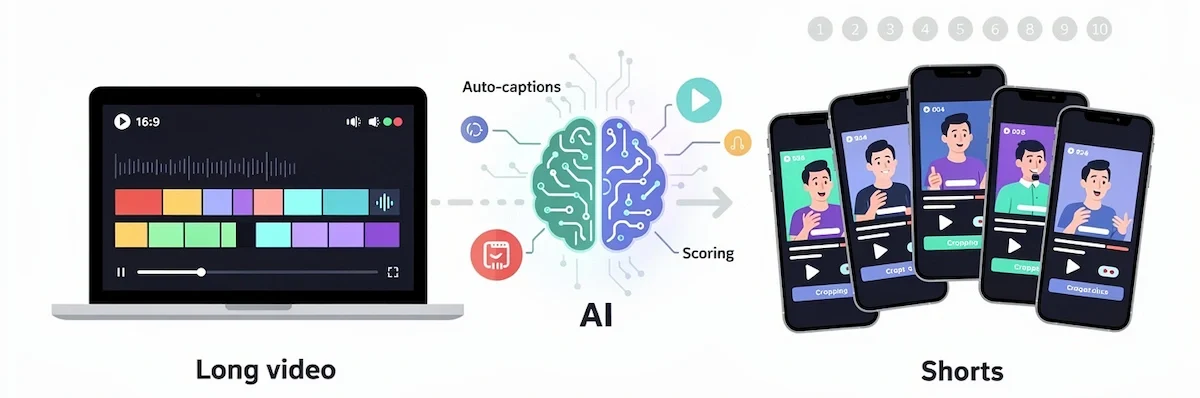
Most AI clipping tools work in three layers. First, the tool turns speech into a transcript with timestamps using speech recognition. Second, it scans the transcript for passages that hold a complete thought, a question and answer, a number or a strong opinion. Third, it ranks those passages and gives each clip a score.
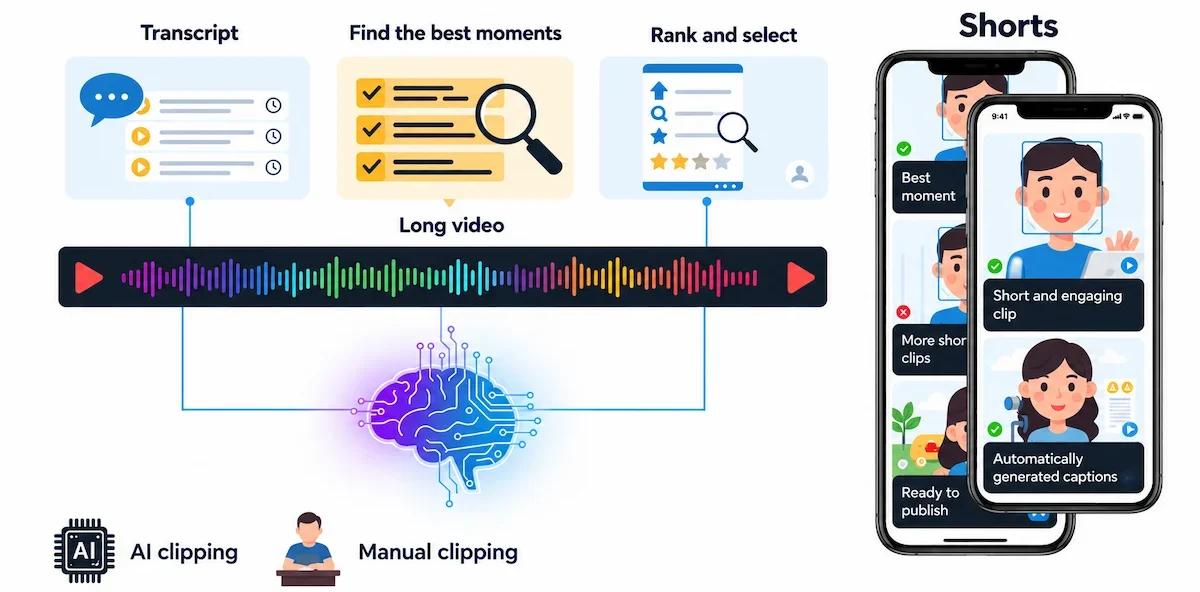
After that, AI face tracking and speaker detection crop the frame to vertical, and captions are added automatically. You then review, edit and export the finished Shorts.
How AI finds the best moments
The AI looks for sentence boundaries, a change of speaker, emphasis in the voice, laughter, pauses and topic shifts. A high score is a prediction, not a promise, so treat it as a sorting tool that puts the likely best Shorts at the top of the list.
AI tools also differ in how they pick. Vizard focuses on full-context clips so a Short does not start or end halfway through a thought. invideo lets you describe the moments you want in plain words and searches the video by meaning. That is why the same long video can give different Shorts in different tools.
AI clipping vs manual clipping
| Task | AI clipping | Manual clipping |
|---|---|---|
| Finding moments | Transcript scan and scoring | Watching and scrubbing the timeline |
| Vertical crop | Automatic face tracking | Keyframes set by hand |
| Captions | Generated automatically, needs a spelling check | Typed or imported from a transcript |
| Control | Needs a review of every clip | Full control over every frame |
| Cost | Free tier or subscription | An editor you may already own |
Use AI for the first pass and manual edits for the final polish. That mix gives you speed without Shorts that feel automatic.
Plan your repurposing strategy before you clip
Repurposing with AI pays off because the recording, the guest and the script are already paid for, and each extra Short only costs review time. A short plan keeps that time under control:
- Goal: reach new viewers, collect leads, grow subscribers or sell a product.
- Audience: the viewers each platform should bring in.
- Source list: the long videos that already perform well or have strong topics.
- Volume: the number of Shorts you can review and publish every week.
- Owner: the person who approves every clip before it goes live.
Start with your best long videos, because a topic that already held viewers in the long format often does well as a Short too.
How to turn long videos into Shorts with AI step by step
The workflow below fits any AI clip generator and shows how to get publish-ready Shorts from one recording. Button names differ between tools, but the order stays the same.
1. Pick the right source video
Videos led by speech work best: podcasts, interviews, webinars, talks and tutorials. Choose a recording with clear audio, one person speaking at a time and a face that stays in the frame. Heavy background music and people talking over each other lower the accuracy of both the AI transcript and the clip picks.
A longer source also gives you more Shorts to choose from. OpusClip says a 20 to 30 minute video can give roughly 10 to 20 clips, so a one hour episode is a good place to start.
2. Upload the video or paste a link
Most AI clip tools accept a file upload or a YouTube link. Pick the language of the video, set the length range for the Shorts and choose the vertical 9:16 format. If the tool has a prompt box, describe what you want, for example “tips for beginners” or “the funniest moments”.
Keep the original file at full quality. Compressed uploads give blurry Shorts, and no editor can restore detail that was lost before upload.
3. Let the AI find and score the moments
Run the AI generator and wait for the list of suggested Shorts. Each Short usually comes with a transcript excerpt, a length and a score. Sort by score, then read the transcript before you watch, because a quick read shows whether the clip makes sense on its own.
Do not accept the AI score as final. A Short with a lower score can still be the best fit for your audience, and a high score can hide a sentence that needs context.
4. Review the clips: keep, maybe, delete
Sort every Short into three groups. Keep the Shorts that work as they are. Put the Shorts that need a small fix in Maybe. Delete the Shorts that depend on earlier parts of the video, wander off topic or end in the middle of a sentence.
Watch each Short once with sound on. Check the first second and the last second closely, because that is where AI cuts most often go wrong.
5. Write a new hook for the first three seconds
Do not keep the original opening of the long video. Start with the most interesting sentence in the Short: the answer, the result, a bold claim or a direct question. Move that line to the start, or place a short text title on screen for the first three seconds.
- Question: “Why do most podcast clips fail in the first second?”
- Bold claim: “You only need one idea per Short.”
- Result first: “This one change doubled my watch time.”
- Problem: “Your clips lose viewers before the point is made.”
Only use a result you can support with your own numbers. A hook that promises more than the Short delivers makes viewers swipe away.
6. Reframe to 9:16
AI auto-reframe uses face tracking to keep the speaker in the middle of a vertical frame. With two speakers, turn on AI speaker detection or use a split screen so the active person stays visible. Play every Short to check that the crop does not cut off a head, a hand or text on screen.
Leave free space at the bottom and on the right side, because app buttons and descriptions cover that area. Slides and screen recordings usually need a manual crop or a zoom on the part that matters.
7. Add captions that people can read
Many viewers watch with the sound off, so captions carry the Short. Use large text with strong contrast, two lines at most and highlight the word being spoken if the tool supports it. Keep the captions inside the safe area so they do not sit behind buttons.
Read every caption once. AI often gets names, brands and technical terms wrong, and a single typo in a caption looks careless in a short clip.
8. Add B-roll, music and branding only where it helps
B-roll hides jump cuts and keeps the eye busy while the speaker explains something abstract. Add a logo or a brand color so viewers recognize your clips in the feed, but keep it small. Music should stay below the voice, and you should use a licensed or royalty-free track.
If you want ready-made footage and voiceovers for gaps, see our guide to AI video creation.
9. Export and publish for each platform
Export at 1080×1920 as an MP4 file at 30 frames per second. A bitrate of about 8 to 12 Mbps is a common recommendation for sharp vertical video. Upload each file directly to YouTube Shorts, TikTok and Instagram Reels instead of posting a downloaded copy with another app watermark.
Save the editable project next to the MP4, so you can fix a caption or a cut later without starting over. Some AI tools, such as invideo, export editable projects for Premiere, Final Cut and DaVinci Resolve.
Write a fresh title and description for every platform. On YouTube, a Short title can be up to 100 characters, so use the space for the main topic.
10. Check the results and repeat
After a few days, compare the Shorts you published. Look at which hooks, topics and lengths held viewers longest, then make more Shorts like the winners. Every batch teaches the tool and you what your audience wants.
How to tighten the pacing without breaking the meaning
Good pacing keeps viewers watching to the end of a Short. Remove long pauses, filler words such as um and uh, and repeated phrases, but keep the natural rhythm of the voice. A clip that is cut too tight sounds nervous and robotic.
- Trim silence at the start and the end of every clip.
- Delete filler words with the AI auto-remove feature or by deleting them in the transcript.
- Hide jump cuts with a small zoom, B-roll or a text overlay.
- Play the clip again after every cut, because a cut can change the meaning of a sentence.
Transcript-based editing in AI-assisted editors such as Descript and Premiere makes this faster, since you delete words in the text and the video follows.
How to turn a YouTube video into Shorts with a link
If the long video is already on YouTube, many AI clip tools let you paste the link instead of uploading a file. The tool pulls the video, builds the transcript and returns a list of suggested Shorts within minutes. Klap, FlexClip and vidIQ all support this link-based workflow.

Use it only for your own videos or for videos you have permission to clip. After the AI returns the Shorts, review them the same way as an uploaded file: check the cuts, fix the captions, rewrite the hook and export the clips as vertical MP4 files. A link is fast, but it does not replace the review step.
AI prompts to find moments and write hooks
You can also use an AI chat assistant such as ChatGPT or Claude to pick clips from a transcript. Export the transcript with timestamps from your video tool or from YouTube, then paste it in sections. These prompts work well, and our guide to prompt engineering for business explains how to improve them.
- Find clips: “Here is the transcript of a 30 minute podcast with timestamps. Find 10 self-contained moments between 30 and 60 seconds. For each one, give the start and end timestamp, a one-line reason it works as a Short, and the first sentence a viewer would hear.”
- Rewrite the hook: “Rewrite the opening of this clip in three ways: a question, a bold claim and a result first. Keep each version under 12 words and keep the meaning of the speaker.”
- Check the context: “Read this clip on its own. List every sentence that depends on something said earlier in the video.”
- Plan a series: “Group these 10 moments into three series with a clear theme. Give each series a name and put the Shorts in the best viewing order.”
- Write the text: “Write five titles under 70 characters and one description with two hashtags for this Short. Use only facts that appear in the transcript.”
Always check the timestamps against the video. An AI chat assistant can invent a start time or merge two moments, so open each clip and confirm that it starts and ends where the answer says.
Best AI tools to turn long videos into Shorts
Most AI tools cover the same basics: a transcript, clip scoring, vertical reframing and captions. The differences are in editing control, caption styles, scheduling and how well they handle several speakers. If you are comparing several options for a team, our guide on how to choose AI tools for business gives a simple checklist.
| Tool | Best for | What stands out |
|---|---|---|
| OpusClip | High volume of clips | Clip scores, animated captions, brand kits, scheduling |
| Vizard | Podcasts, interviews and webinars | Full-context clips that do not cut a thought in half |
| Klap | Starting from a YouTube link | Face tracking, caption styles, brand kit |
| invideo | Editing with an AI assistant | Describe the moments you want, editable timeline, captions |
| Descript | Editing by editing the transcript | Cut video by deleting text |
| Submagic | Caption-focused clips | Caption styles for retention |
| VEED | Browser editing with a brand kit | Clip generator, transcript editor, engagement scores |
| CapCut | Quick conversion with scene detection | Scene detection, clip length choice, auto captions |
| FlexClip | Interviews and tutorials | Paste a YouTube link, speaker detection, auto subtitles |
| Adobe Express | Quick edits in a familiar editor | Clip Maker, subtitles, music library |
Before you pick an AI tool, compare these points on a real video of your own:
- Clip accuracy: how often the suggested Shorts start and end on a full sentence.
- Captions: spelling quality, supported languages and style options.
- Layouts: speaker detection, split screen and zoom on slides.
- Editing control: a timeline or transcript editor to fix a clip without starting over.
- Brand kit: saved fonts, colors and logo for every new Short.
- Publishing: scheduling and direct posting to YouTube Shorts, TikTok and Instagram.
- Limits: watermark, monthly video minutes and export quality.
For podcasters and interviews
Podcasts and interviews need good speaker detection and a clean transcript. OpusClip, Vizard and Descript are common choices here, because they keep the active speaker in frame and let you fix the transcript before export. Record a short intro line for each clip if the topic needs a setup.
For marketers repurposing webinars
Webinars have slides, a presenter and a lot of filler. Pick a tool that can crop to the speaker, zoom into a slide or use a split layout. invideo, Klap and Vizard let you control the layout and add brand elements, which keeps each Short consistent with your other campaigns.
For solo creators on a budget
Start with a free tier in VEED, FlexClip or Adobe Express and test one video before you pay for anything. A solo creator or a team of two has limited time, so the best tool is the one that gets you to a reviewed clip fastest. Our guide to AI for small business covers how smaller teams can pick tools without overspending.
Free vs paid AI clip makers
Free AI plans are enough to test a workflow, but they come with limits. Check these points before you commit: the watermark on exported Shorts, the maximum export quality, the number of video minutes per month, the number of clips per upload, and access to caption styles and the brand kit.
A fair test uses the same 20 minute video in every AI tool. Count how many Shorts you would actually publish, how many captions need fixes and how long the review takes. The tool that gives you the most usable Shorts with the least cleanup is usually worth more than the one with the longest feature list.
Prices and limits change often, so open each pricing page before you decide. For a broader view of what these subscriptions usually cost a team, read how much AI tools cost. Test the same video in two AI tools and compare the clips, because quality differences show up quickly in side-by-side results.
How to turn long videos into Shorts without AI
You can make Shorts from a long video with any video editor, and it works well when you only need a few clips.
On desktop
- Play the video with a transcript open and write down the timestamps of the best moments.
- Cut each moment into its own sequence in your editor, such as Premiere, Final Cut, DaVinci Resolve or CapCut.
- Set the sequence to 1080×1920, then scale and move the picture so the speaker sits in the middle.
- Add captions with the auto-caption feature in your editor and fix the errors.
- Export as MP4 and upload the vertical file to YouTube as a Short.
Features such as text-based editing and auto reframe in Premiere, for example, speed up the cutting and the vertical crop.
On mobile
In the YouTube app, tap Create, choose Short, then record or add your clip. You can add music, filters and effects, and then tap Next to write a title of up to 100 characters. Mobile works for one or two Shorts, but a batch is much faster on desktop or in an AI tool.
Best settings for YouTube Shorts, TikTok and Reels
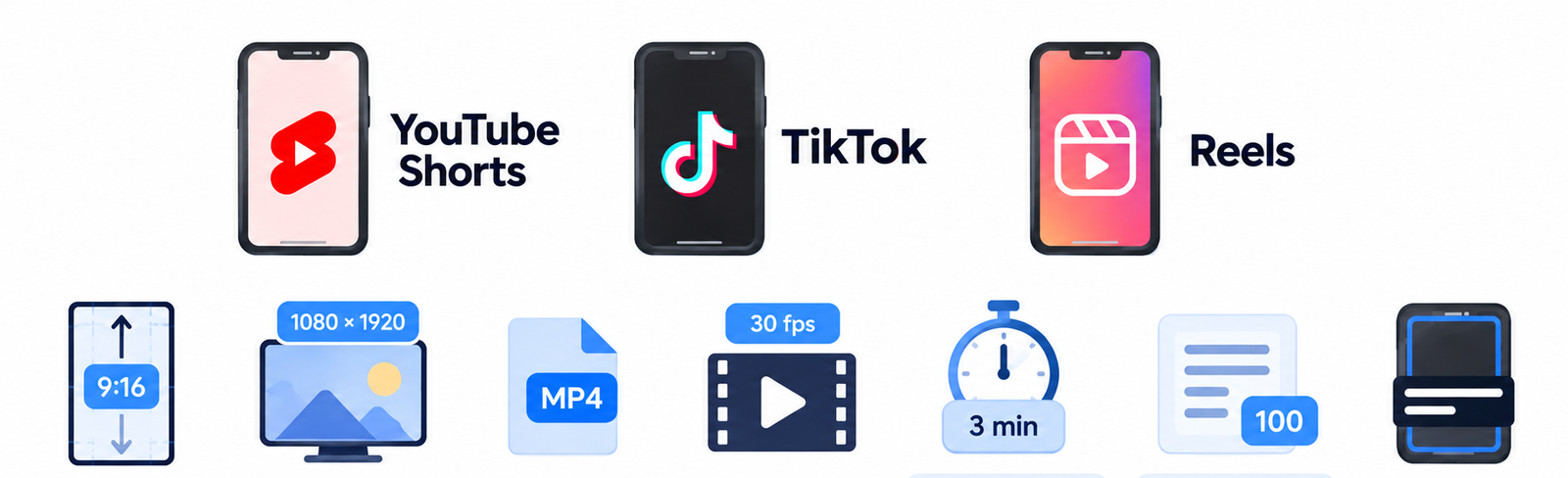
YouTube Help says that Shorts can be up to 3 minutes long, with a maximum resolution of 1080p. A vertical 9:16 frame is the standard for all three platforms, so one export covers every Shorts, Reels and TikTok feed.
| Setting | Recommended | Note |
|---|---|---|
| Frame | 9:16 vertical | Works for YouTube Shorts, TikTok and Reels |
| Resolution | 1080×1920 | YouTube accepts up to 1080p for Shorts |
| File type | MP4 | Most common upload format |
| Frame rate | 30 fps | Matches most phone and screen footage |
| Length | Up to 3 minutes on YouTube | Check the current limit in the TikTok and Instagram apps |
| Title | Up to 100 characters on YouTube | Put the main topic first |
| Captions | Inside the safe area | Keep space at the bottom and right side |
Platform limits change, so confirm the length and format rules inside each app before you batch-export a month of clips.
How long should a Short be and how many can you get from one video?
A Short should be as long as its idea. A single tip can fit in 20 to 30 seconds, while a story with a setup and an ending may need a minute or more. Adobe suggests 30 to 90 seconds as a working range, and YouTube allows up to three minutes.
The number of clips depends on the source. OpusClip says a 20 to 30 minute video can give roughly 10 to 20 Shorts, and Bytecap builds a plan of 10 clips from one podcast episode. Count complete ideas, not minutes, and do not stretch a thin moment into a clip just to hit a number. Do not make every clip the same length either, because uniform clips feel automatic.
Which long videos work best for Shorts
| Video type | Best layout | What to clip |
|---|---|---|
| Podcast | Speaker view or split screen | Opinions, stories, funny moments |
| Webinar | Speaker with slide zoom | One slide with one takeaway |
| Tutorial | Screen crop with a zoom on the cursor | A single step with the result |
| Product demo | Close crop on the feature | One feature and the benefit |
| Live stream | Speaker view without the chat window | Reactions, answers and the best moments |
| Online course | Speaker with a screen share | One lesson point per Short |
| Talking head | Centered face with big captions | A direct answer to one question |
Example: one podcast episode into five Shorts
- The strongest opinion: a clear statement with a short reason.
- A story: a moment with a beginning, a turn and an ending.
- A tip or a list: three quick points from the guest.
- A funny moment: a joke that works without context.
- A question and answer: the host asks, the guest answers in one go.
Mix these five types in your posting plan so your Shorts feed does not feel repetitive. Each Short should link back to the full episode in the description or with a related video link.
Common mistakes when turning long videos into Shorts
Clipping moments that need too much context
A strong line often depends on a question asked two minutes earlier. If the viewer needs that question to understand the answer, add it as on-screen text or skip the clip.
Keeping the original intro
Long videos start with greetings and setup. A Short needs the point in the first three seconds, so cut the warm-up and start where the idea begins.
Captions that are too small or too fast
Small, low-contrast captions disappear on a phone. Use large text, two lines at most, and check that the words match the speech at normal speed.
Posting the same file everywhere without checking the layout
Each app places buttons and descriptions in slightly different spots. Preview every clip in each app and move the captions if something is covered.
Trusting the AI output without a review
AI tools cut in the wrong place, misspell names and pick clips that need context. Review every Short before it goes live, even when the score is high.
What to do when AI picks poor Shorts
Every AI clip tool misses sometimes. The fix is usually small, and knowing it saves you from deleting a whole batch of Shorts.
| Problem | Why it happens | Fix |
|---|---|---|
| The clip starts or ends mid-sentence | The cut follows silence, not meaning | Trim the start and end to a full sentence in the editor |
| The Short makes no sense alone | The AI picked a reply without the question | Add the question as on-screen text or pick another moment |
| The wrong person is in the frame | Speaker detection failed on crosstalk | Switch to split screen or set the crop by hand |
| Captions have errors | Names and terms are not in the AI vocabulary | Correct the text before export and add custom words if the tool allows it |
| Low views despite a good clip | The hook is weak or buried | Test a new first line and a new title on the same Short |
When most suggestions miss, the source video is usually the cause. Poor audio, long pauses and crosstalk confuse any AI, so improve the recording first and the Shorts get better with it.
How to keep your Shorts on brand
Viewers should recognize your Shorts in a feed without reading the channel name. Save a brand kit in your AI tool with your fonts, colors and logo, and use the same caption style for every clip. Keep the logo small and in the same corner, and use one color for highlighted words.
Also fix a few rules that apply to every Short: the same caption position, the same safe area, a similar length range and a similar first-frame style. A batch of ten Shorts that look related builds a channel identity much faster than ten clips in ten different styles.
How to post Shorts as a series
A series gives viewers a reason to come back. Group Shorts from one long video by theme, number the parts in the title and keep the same format for each one. On YouTube, you can add the Shorts to a playlist so viewers move from one clip to the next.
You can also create two or three versions of the same moment with different hooks and compare them. invideo, for example, builds separate cuts with different hooks from one source. Pin a comment or add a line in the description that points to the full video, so viewers who like the clip can watch the whole conversation.
How to reach a global audience with translated captions
A Short with translated captions can reach viewers who do not speak the language of your long video. Some AI tools, such as FlexClip, create auto subtitles with translation. Generate the captions in the original language first, fix the errors and only then translate, so a mistake does not repeat in every language.
Translations are often longer than the original, so shorten the lines to keep two readable rows on screen. Ask a native speaker to check the first batch, especially for product names and idioms.
How to batch your Shorts and plan a content calendar
Batching saves more time than any single tool setting. Review all clips from one long video in one sitting, then publish them across the week.
- Save templates in your AI tool for caption style, brand kit and export settings.
- Name every file with the date, the source video and the topic.
- Keep a simple sheet with the source video, clip title, hook, platform, publish date and link.
- Schedule a week or a month ahead with a scheduler instead of posting by hand.
- Leave one slot per week for a test, such as a new hook style or a new length.
One long video a week is enough for a steady feed of Shorts if you review and schedule them in a batch.
How to get more reach from every Short
The clip is only half the work. Write a title that states the topic in plain words, add a short description with a few relevant hashtags, and point viewers to the full video. On YouTube, link the Short to the long video so interested viewers can continue watching.
Post natively on each platform and adjust the text for each audience. A scheduling tool saves time when you publish several clips a week, and our guide to AI marketing automation shows how to connect clipping, scheduling and reporting. Keep a steady rhythm rather than posting ten clips in one day and nothing for a month.
Titles, descriptions and hashtags
Put the main topic first and write the title in plain words. YouTube allows up to 100 characters, so use the space for the topic, not for tricks. In the description, add one or two sentences, a link to the full video and a few relevant hashtags. Pick a clear first frame with a readable face, and where the app lets you choose a cover, use that frame.
Posting frequency and timing
There is no single best time to post. Start at the hours when your audience is online according to your analytics, then test two or three time slots over a few weeks. Choose a number of Shorts per week that you can review properly, and keep that rhythm, because steady posting beats a burst followed by silence.
Copyright, Content ID and using videos from other creators
Only clip videos you own or have permission to use. YouTube says that Shorts made with remixed content are attributed back to the original work, and that using copyright-protected material can lead to a Content ID claim. A valid copyright takedown notice can lead to removal and a copyright strike.
YouTube also states that a Short longer than one minute with an active claim is blocked. Royalty-free music from the YouTube Audio Library does not receive a Content ID claim, so it is the safest choice for background tracks.
If you clip footage of clients, guests or employees, check the permission first. Before you upload private recordings to any AI tool, read how it stores and uses your files, and see our guide to AI data privacy for business.
Can you make money from Shorts?
YouTube says that ad revenue from the Shorts feed is pooled each month and shared among creators based on their share of engaged views in each country. Creators keep 45 percent of their allocated revenue. If a Short uses music, part of the revenue goes to music licensing instead of the creator pool.
Only monetizing partners who accepted the Shorts monetization terms can earn this revenue, and the eligibility rules change, so read the current YouTube Help page before you plan around income. Shorts can also pay off indirectly: they bring viewers to long videos, collect leads, support product sales and attract sponsors. No Short earns a fixed amount per view, so treat any promised figure with caution.
How to measure results and improve
Open YouTube Studio and the analytics of each app after a few days. Look at views, the share of viewers who stayed instead of swiping away, the average view duration and the clicks to your long video. Compare hooks, topics and lengths across your Shorts.
Keep a simple list of what worked: the hook type, the clip length, the topic and the caption style. After two or three batches, patterns appear, and you can write better prompts and pick better clips from the next long video.
Reuse the same video in other formats
A long video does not have to stop at Shorts. The same recording and transcript can feed several other formats:
- A blog post written from the transcript, which our guide on how to write blog posts with AI explains step by step.
- A newsletter that links to the best clip and the full video.
- Quote graphics and carousel posts built from the strongest lines.
- An audio clip with captions for podcast feeds and social posts.
Plan these formats together with your Shorts, so every recording gives you a full week of content in several places.
Final workflow checklist
- Choose a long video with clear audio and a speaker who finishes each thought.
- Upload it to an AI clip generator and set the clip length and language.
- Read the transcript excerpt of every suggested Short.
- Sort the Shorts into keep, maybe and delete.
- Rewrite the hook so the point comes in the first three seconds.
- Reframe to 9:16 and check every crop.
- Add captions, fix the spelling and keep them in the safe area.
- Add music, B-roll and branding only where they help.
- Export at 1080×1920 as MP4 and upload natively to each platform.
- Check the results and use them to pick the next batch.
Final thoughts on turning long videos into Shorts
AI makes the slowest part of repurposing fast, but the quality still comes from your choices: the source video, the clips you keep and the hook you write. Start with one long video, test one tool and compare the results with a manual cut. After a few batches, the process becomes a routine that turns every recording into a week of Shorts.
Frequently asked questions
How do I turn a long video into Shorts?
Upload the video or paste a YouTube link into an AI clip generator, let it find the best moments, review the clips, rewrite the hook, reframe to 9:16, add captions and export. You can also cut the clips by hand in any video editor.
Can AI find Short-worthy moments without my timestamps?
Yes. AI tools read the transcript, look for complete thoughts and score each clip, so you do not need to give timestamps. You still need to review the results, because the score is a prediction and the cut points are sometimes off.
How many Shorts can I make from one long video?
It depends on the video. OpusClip says a 20 to 30 minute video can give roughly 10 to 20 clips. Count complete ideas rather than minutes, and keep only the Shorts that make sense on their own.
How long should my source video be?
A source of 20 minutes or more gives you enough choices for several clips. Shorter videos can still work, but they give fewer self-contained moments, so you may only get a few strong Shorts.
How long should a Short be?
As long as the idea needs. YouTube Shorts can be up to three minutes, and Adobe suggests 30 to 90 seconds as a working range for most clips. A single tip can be shorter, and a story may need more time.
Is there a free AI tool to turn long videos into Shorts?
Several AI tools offer a free plan or a free trial, including VEED, FlexClip and Adobe Express. Free plans often add a watermark or limit the minutes and export quality, so check the current terms on each pricing page.
Do I need to edit AI clips before posting?
Yes. Check the first and last second of each Short, fix the captions, review the crop and rewrite the hook if needed. A quick review takes a few minutes per clip and prevents most mistakes.
Can AI make Shorts from a podcast?
Yes. Podcasts are one of the best sources because the speech is clear and the topics are easy to separate. Use speaker detection or a split screen for two voices and add the question as text when the answer needs it.
Do I need different versions for TikTok, Reels and YouTube Shorts?
One 9:16 export works for all three, but it helps to change the title, description and hashtags for each platform. Preview the Short in each app and move the captions if a button covers them.
Can I make Shorts from a video that belongs to someone else?
Only with permission or through the tools that YouTube provides for remixing. Using copyright-protected material can lead to a Content ID claim or a takedown, so clip your own videos or content you have the rights to use.
Will posting many Shorts hurt my long videos?
Shorts do not replace long videos, and they can bring new viewers to them. Link each Short to the full video and keep publishing long-form content so the audience that arrives has something to watch.
How do I add captions automatically?
Most AI clip tools and editors have an auto-caption feature that turns the audio into text. Turn it on, pick a large style with strong contrast and read through the text to fix names and technical terms.
How long does AI take to clip a video?
Processing time depends on the AI tool and the length of the video, and it is usually much shorter than the video itself. Plan extra time for review, because checking the Shorts and fixing the hooks is the real work.
Do AI clip makers add a watermark?
Many free AI plans add a watermark to exported clips, while paid plans usually remove it. Check the export terms before you rely on a free tool for published content.
What is the best AI tool to turn long videos into Shorts?
There is no single best tool. OpusClip, Vizard and Klap are common for a high volume of clips, invideo and Descript give more editing control, and VEED, FlexClip and Adobe Express are easy to start with on a free plan. Test one of your own videos in two AI tools and compare how many Shorts you would actually publish.
How accurate is AI at picking clips?
Accuracy changes with the AI tool and the video. Clear speech and one speaker at a time give the best picks. A score is a prediction, so plan to fix or delete some clips in every batch.
What video formats do AI clip tools support?
Most AI clip tools accept MP4 and MOV, and VEED lists MP4, MOV, AVI, MKV, WEBM and WMV. Check the supported formats and the maximum file size of your tool before you upload, or paste a YouTube link instead.
Can I use the Shorts for commercial purposes?
Yes, if you own the video and the music, footage and guest appearances in it are cleared. Read the terms of your AI tool as well, because some free plans limit commercial use.
Do I need ChatGPT or Claude to do this?
No. An AI clip tool can do the whole job on its own. An AI chat assistant is optional and helps with hooks, titles and a second opinion on which moments to keep.
Can AI repurpose casual videos without a clear structure?
Yes, but the results are weaker. Unscripted videos with long pauses and jumping topics hold fewer self-contained moments, so expect to review more clips and edit more of them.
Does turning long videos into Shorts work for B2B content?
Yes. Webinars, product demos and customer interviews give strong Shorts. Keep each clip to one point and add a clear next step, such as a link to the full video.
Why do my Shorts get low views?
Common reasons are a weak first three seconds, a clip that needs context, small or hidden captions and a file with another app watermark. Fix the hook first, then test the title and the length.
Can I make money from Shorts?
YouTube pools ad revenue from the Shorts feed each month and shares it by engaged views, and creators keep 45 percent of their allocated revenue. Eligibility rules change, so check YouTube Help before you plan around it. Shorts can also bring leads, sponsors and traffic to your long videos.










