What is Venice AI? It is a private AI platform for chat, image, video and music generation that gives you many different models in one place. Erik Voorhees, the founder of ShapeShift, launched it in May 2024 as an alternative to mainstream assistants that save conversations on company servers. Venice keeps your chat history in your own browser and states that it does not store or log prompts and responses on its servers.
This guide explains how Venice AI works, which features you get, what the four privacy modes mean, what uncensored means in practice and what each plan costs. It also lists the downsides that reviewers report, such as weak support, no sync between devices and no published independent security audit. Plans, prices and limits were checked on the official Venice pages on 22 October 2026. Plans change often, so confirm the numbers before you pay.
Venice AI quick answer
- What it is: a private AI platform for chat, images, video and music with many models in one place.
- Privacy: chat history is stored in your browser, and Venice states that it does not store or log prompts on its servers. Four privacy modes exist, from Anonymized to end-to-end encryption.
- Price: a free plan, Pro at $18, Pro Plus at $68 and Max at $200 a month. Credits cost 100 for one dollar.
- Uncensored: fewer restrictions than most assistants, but every model keeps its own rules, and the Mature Filter can be turned off only on Pro or higher.
- Main downsides: no published independent audit, no sync between devices, generally non-refundable subscriptions and slow support reports.
- Best for: people who want a private chat history and a choice of models, not teams that need audited security.
Venice AI at a glance
| Detail | Venice AI |
|---|---|
| Founder | Erik Voorhees, founder of ShapeShift |
| Launched | May 2024 |
| Where it runs | Web, progressive web app, iOS and Android |
| Plans | Free, Pro $18, Pro Plus $68, Max $200 per month |
| Chat history | Stored locally in your browser, optional encrypted backup on Pro |
| Privacy modes | Anonymized, Private, TEE and E2EE |
| Tools | Text chat, images, video, music, documents, web search, characters |
| API | Follows the OpenAI format, pay per use or monthly API spend on Pro Plus and Max |
| Tokens | VVV and DIEM, optional |
| Refunds | Subscriptions are generally non-refundable |
What is Venice AI and how does it work?
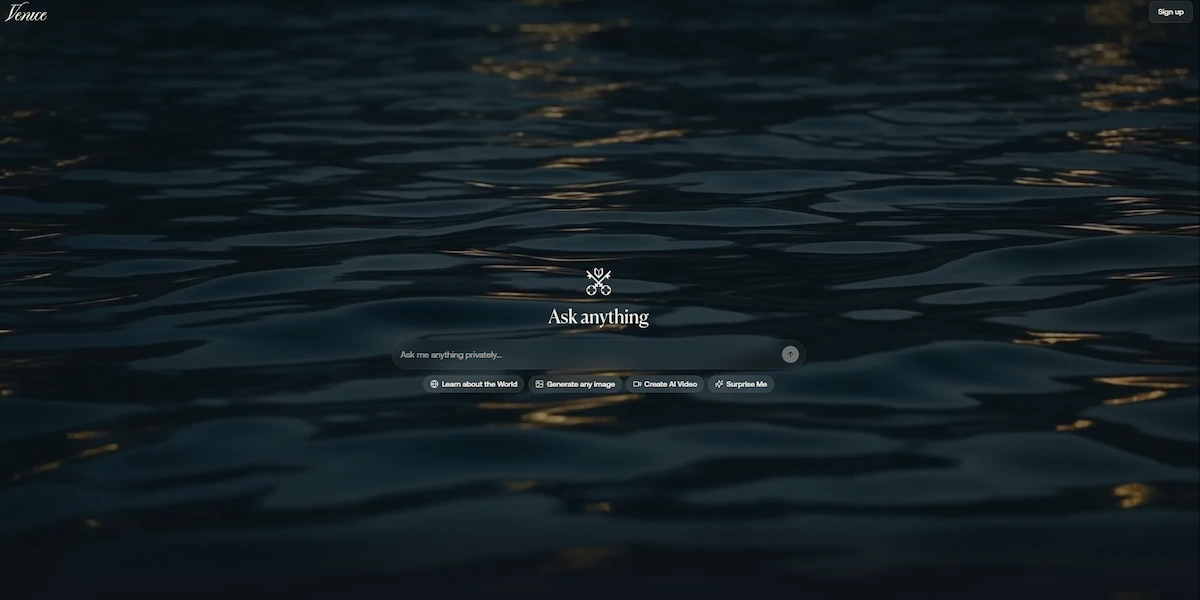
Venice is a web and mobile service where you type a prompt and get text, images, video or music back. It is built around three ideas: privacy, a choice of models and fewer restrictions on what the models are allowed to answer. Instead of running one model from one company, Venice lets you pick from a list that includes open-source models and, according to several reviews, models from larger providers. Each model in the selector shows a badge that tells you which privacy mode it uses.
Who is behind Venice AI
The best known name is Erik Voorhees, who built the crypto exchange ShapeShift and who launched Venice AI in May 2024. Teana Baker-Taylor appears in press coverage as chief operating officer. Early articles pointed out that the website did not name its founders clearly at launch, so check the About page for current details if the people behind a tool matter to you.
How Venice AI works
When you send a message, it does not travel straight from your screen to a model. The request passes through Venice servers, which hide your identity, and then goes to a model provider or to GPUs that Venice controls or rents. The model reads the text, writes the answer and sends it back, and the conversation is saved in your browser.
Voorhees has said that the GPU sees the plain text of each prompt while it is processed, and that Venice itself does not keep the conversation history or link a prompt to a person. If a term in this guide is new to you, the AI terms glossary explains it in plain words.
What Venice AI is used for
People use Venice AI for everyday questions and drafts, for writing and role play, for generating images and short videos, for summarizing documents and for coding help. Developers use the API as a drop-in replacement for other chat services. Privacy minded users choose it mostly because the chat history stays on their own device, and creative users choose it because the models refuse fewer requests than the big assistants.
Venice AI does not try to replace a full office suite, so it works best as a private place to think, write and experiment.
Venice AI features
The free plan covers basic chat and images with base models. Paid plans add access to all Pro models, more images and credits for the heaviest tools.
Text chat and models
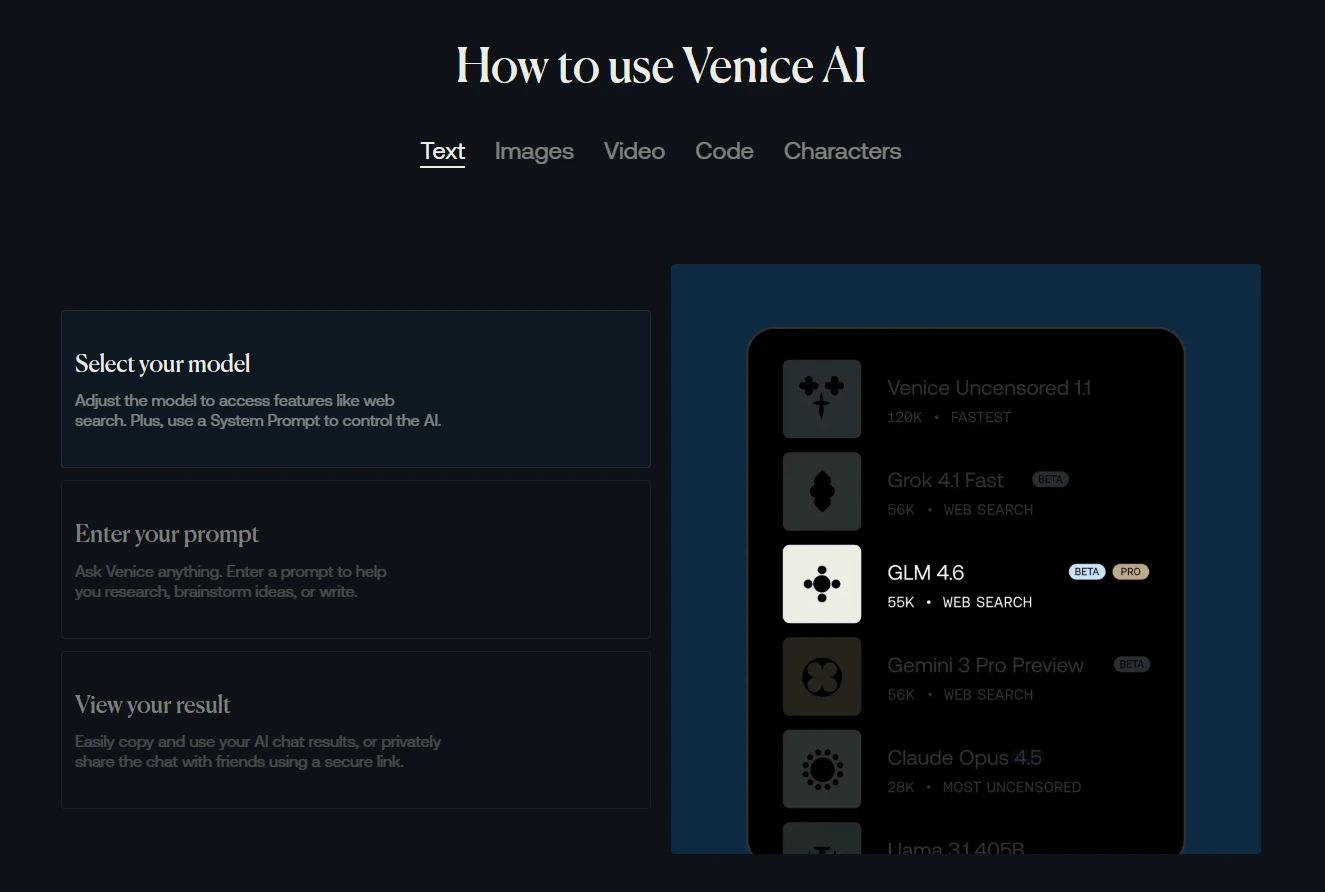
Chat is the core of the service. You choose a model, write a prompt and get an answer, and you can set a system prompt to change how the model behaves. The Pro plan gives unlimited text prompts on standard models, while frontier models spend credits. The model list changes often, and reviews describe a mix of open-source models such as Llama, DeepSeek and Mistral plus models from bigger companies, so look at the selector inside your account for the current list.
How to choose a model
The model you pick decides the quality of the answer, the cost and the level of privacy, so choose it on purpose. Check the privacy badge first, because it tells you whether the prompt is anonymized, private, processed in a TEE or encrypted end to end. Then match the model to the task: a large model for long writing and reasoning, a smaller one for quick questions and a coding model for code. Look at the credit cost before you run video or frontier models, and switch to a smaller model when speed matters more than polish.
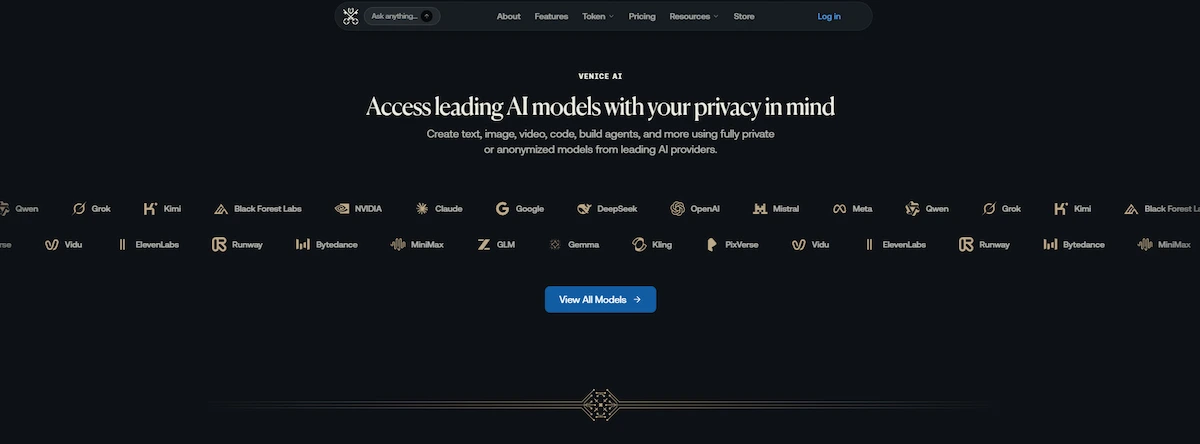
Reviews name open-source text models such as Llama, DeepSeek, Mistral, Dolphin and Qwen, image models such as FLUX and Stable Diffusion, and video models such as Sora, Kling, Runway and Veo. The list changes often and models are added or removed, so use the selector in your account as the final answer.
Image generator
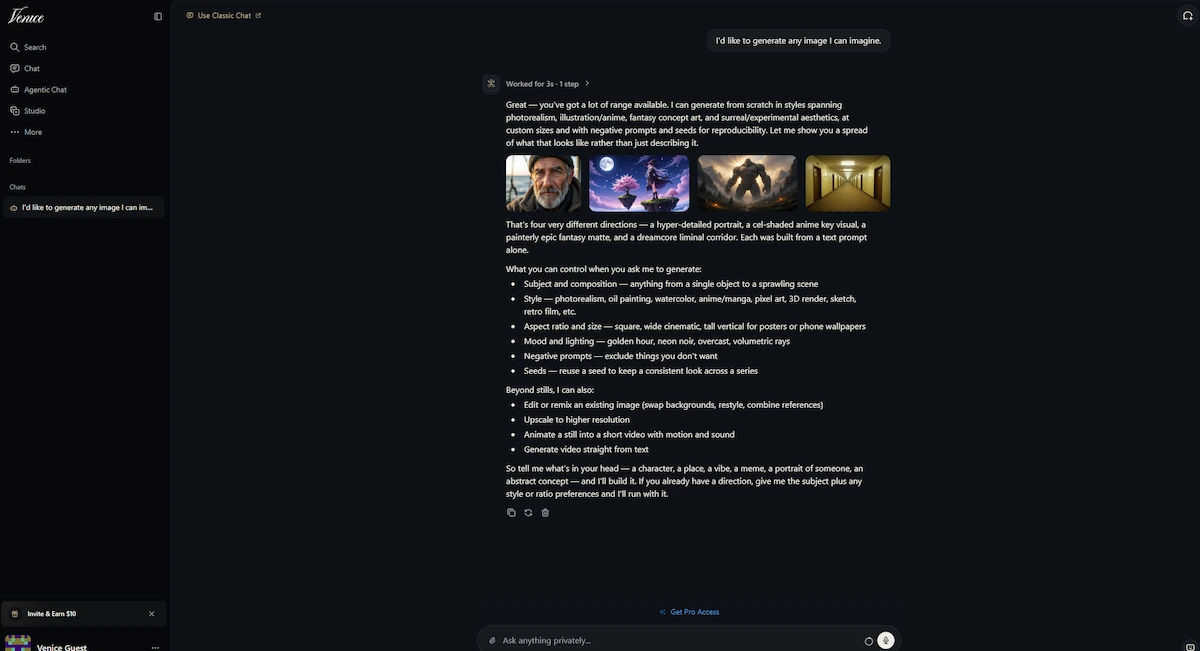
The Venice AI image generator creates pictures from a text prompt and lets you adjust settings such as aspect ratio and negative prompts. Pro users get up to 1,000 image prompts a day, plus upscaling, background removal and image variants. If image quality is your main reason for choosing a tool, compare Venice with the options in the guide to ChatGPT alternatives for image generation, because results depend a lot on the model you select.
Video and music
Pro plans can generate video and music, and these tools spend credits, not the daily prompt allowance. The cost depends on the model, and the pricing section below shows how credits convert to dollars. Review testers describe video as the most expensive part of the service, so check the price shown before you generate a clip.
Documents, web search and coding
You can upload files such as PDF and text documents and ask questions about them. One hands-on review reported a size limit of about 10 MB for these uploads, so check the current limit in the app. Web search is available too, and Venice states that it uses outside providers, including Brave with zero data retention and anonymized Google. Coding tasks work like any other chat, and one reviewer tested a simple Python game and a Bash script edit without problems.
Memory and sharing
Venice AI has a memory feature that is also stored locally, so the assistant can recall earlier details without sending them to a central server. In E2EE mode memory is turned off. You can also share a conversation through an encrypted link, which is useful when you want to move a chat to another device because history does not sync automatically.
Custom characters
Pro users can create and share custom characters, which are saved personas with their own instructions and background text. People use them for role play, writing practice, study helpers and branded assistants. Reviews list this feature as one of the main reasons users stay on a paid plan.
Venice AI privacy: what is stored and what is not
Privacy is the reason most people try Venice. Your conversations are stored locally on your device, in your browser, and the Venice FAQ states that Venice does not store or log your prompts or model responses on its servers. The details matter, because privacy depends on the mode of the model you pick.
The four privacy modes
| Mode | What it means | What to keep in mind |
|---|---|---|
| Anonymized | Venice hides your identity from the model provider | The provider still reads the prompt and may handle it under its own policy |
| Private | The prompt is processed on Venice controlled or zero-data-retention partner infrastructure and is not retained | Relies on contracts and trust, which you cannot check yourself |
| TEE | The prompt is processed inside a Trusted Execution Environment, a hardware protected area | Reviews report it needs a paid plan and works only on selected models |
| E2EE | The prompt is encrypted on your device and decrypted only inside a verified secure enclave | Web search and memory are turned off in this mode |
What Venice says and what you can check
Most of the privacy promises come from Venice itself. Two reviews that tried to verify them reported that no completed independent security audit has been published, and that a community request for one was still open. The Private mode depends on contracts with partners, while TEE and E2EE use hardware that can produce an attestation report. That makes the two stronger modes easier to check than the first two.
Local storage has its own side effects. Because chats live in your browser, anyone who can open that browser can read them. History does not sync between browsers or devices, and clearing browser data can erase it. Pro users can make encrypted backups on the web version, but a backup expires after 90 days, you can keep five at a time and a lost password cannot be recovered. For rules on what company data you should keep out of any chatbot, read the guide on AI data privacy for business.
Does Venice AI train on your data?
The Venice FAQ does not say whether prompts or conversations are used to train models. Venice states that it does not store or log prompts and responses on its servers, so nothing is kept on the Venice side that could be used for training. The open question is the model provider. In Anonymized mode the provider still reads the prompt and handles it under its own policy, so read that provider policy if training matters to you. One review reports that conversations are not used for training, but that statement comes from the company and not from an audit.
How to test the privacy claims yourself
You do not have to take the promises on trust. A few checks take only minutes and show how Venice AI behaves in your own browser.
- Check the privacy badge on each model before you type anything private.
- Open your browser storage tools and confirm that the chat text is saved locally.
- Clear the browser data on a test chat and see whether the history disappears, which also shows what a backup is for.
- Read the data policy of the model provider if you use Anonymized mode, because the provider still sees the prompt.
- Use the E2EE or TEE mode for sensitive text and look for the attestation report where it is offered.
E2EE mode: what you gain and what you lose
End-to-end encryption gives the strongest protection of the four modes, because the text stays encrypted until it reaches the secure enclave. The price is convenience. Web search and memory do not work in E2EE mode, so the assistant cannot look anything up or remember earlier chats. Use it for sensitive text, and use a normal mode for everyday questions.
- Open the model selector and look at the privacy badge next to each model.
- Choose a model marked E2EE, which reviews say needs a paid plan.
- Send your prompt and expect that web search and memory are off.
- Switch back to a normal model when you need search or memory.
Is Venice AI safe and legit?
Venice AI is a real, active service with named founders, a public launch in 2024 and paying users, so it is not a scam in the usual sense. Whether it is safe for you depends on what you type into it. Reviewers praise the privacy approach and the choice of models. Complaints on review sites most often mention slow support, trouble with refunds and an error message that says a model is not available when a content filter is triggered. Do not paste passwords, payment details or other secrets into any chatbot, including this one.
How to delete your Venice AI data and account
Your chat copy lives in your browser, so you delete it there: remove conversations inside the app or clear the site data for the Venice website. Because Venice states that it does not keep prompts on its servers, removing the local copy removes the chat. Encrypted backups are the exception, because they are stored with Venice and expire after 90 days. Subscriptions are cancelled before the next billing date, or in the Apple or Google store if you paid there. The FAQ does not describe the steps for deleting a full account, so use the settings page or contact support, and keep a record of your request.
What does uncensored mean on Venice AI?
Venice markets itself as unrestricted, but the FAQ does not define the word uncensored. In practice it means that Venice does not add its own heavy filter on top of the models, and that some models are chosen because they refuse fewer requests. Three limits still apply. Each model has its own built-in rules and policies. Mobile app stores set their own limits for apps. And the Mature Filter can be turned off only by users on Pro or a higher plan.
Reviews describe a small number of text models as the least restricted, and they report that uncensored text and images are limited to paid plans, while the free plan uses a moderated setup. Laws and platform rules still apply to what you create, and Venice does not remove your responsibility for how you use the results.
Venice AI pricing and plans
Venice offers four plans. These numbers come from the official pricing page, checked on 22 October 2026, and they are worth rechecking because older reviews show different prices and limits, such as 25 daily text prompts on the free plan.
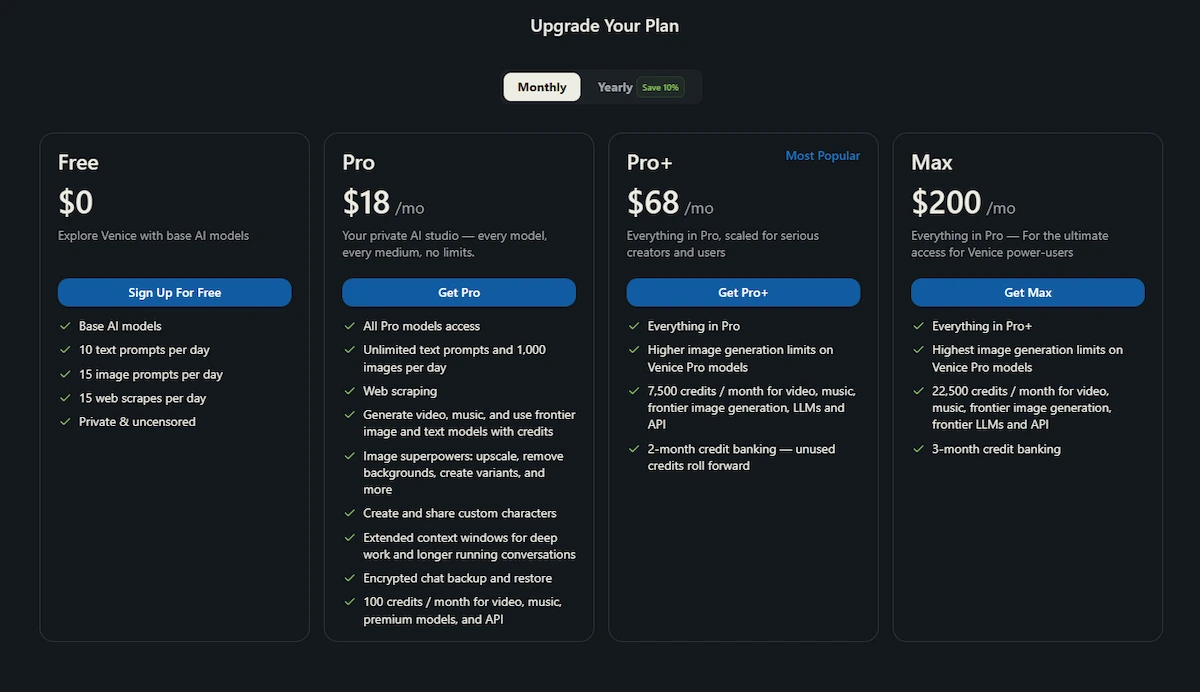
Free, Pro, Pro Plus and Max
| Plan | Price per month | Text and images | Credits per month | Credit banking |
|---|---|---|---|---|
| Free | $0 | 10 text prompts and 15 image prompts a day, base models | 0 | None |
| Pro | $18 | Unlimited text, up to 1,000 images a day | 100, plus 500 welcome credits once | None listed |
| Pro Plus | $68 | Everything in Pro, higher image limits on Pro models | 7,500 (10% bonus) | 2 months |
| Max | $200 | Everything in Pro Plus, highest limits | 22,500 (12.5% bonus) | 3 months |
Yearly billing lowers the price: the page shows a saving of 16.7% on Pro and 10% on Pro Plus and Max. Venice lists the official prices on its pricing page, and you should look there for the current offer.
How Venice AI credits work
Credits pay for the heaviest tools. One hundred credits equal one dollar. A short video of about five seconds costs under 80 credits, which is under one dollar, according to the pricing page. Frontier models and music also use credits, while basic text chat does not. Higher plans include a bonus, and Pro Plus and Max let unused credits roll over for two or three months.
One reviewer reported losing banked credits after cancelling, so spend them before you end a plan. If you plan to create clips often, the guide to AI video creation compares what different tools offer.
Is Venice AI free?
Yes, there is a free plan with 10 text prompts and 15 image prompts a day on base models. It is enough to test the service and see whether the answers suit you. The free plan does not include credits, so video, music and frontier models are off limits. Several reviews say you can start chatting without an account, but the FAQ does not state this clearly, so check on the website. An account is required for the API, subscriptions and encrypted backups.
Is Venice AI worth paying for?
The $18 Pro plan suits people who chat a lot, generate many images or want custom characters and a way to turn off the Mature Filter. Pro Plus and Max make sense for heavy video users and developers who spend real money on the API, because the larger credit packs add a bonus. If you only ask a few questions a week, the free plan is enough. Whether the price makes sense also depends on what other subscriptions you already pay for, and the guide on how much AI tools cost helps you compare.
Checklist before you subscribe
- Use the free plan first and see whether the answers and the speed suit you.
- Estimate your credits. One hundred credits equal one dollar, and video costs under 80 credits for about five seconds.
- Pick the right plan. Pro covers daily chat and images, while Pro Plus and Max add credits, a bonus and banking.
- Check your payment route. A subscription bought in Apple or Google is managed there.
- Accept the refund rule. Subscriptions are generally non-refundable.
- Plan for your history. Decide on an encrypted backup before you rely on saved chats.
Cancel and refund rules
Venice states that subscriptions are generally non-refundable once payment is processed. You can cancel before the next billing date and keep access until the paid period ends. Subscriptions bought through Apple or Google are managed in those stores. The FAQ does not describe the exceptions, and refund complaints appear in user reviews, so treat every payment as final.
VVV and DIEM tokens explained
Venice has its own crypto tokens, but you do not need them to use the service. VVV is a token on the Base network. People who stake it receive a share of Venice capacity, and the FAQ mentions Pro access linked to staking. DIEM launched in August 2025 and is created by locking staked VVV. Each DIEM gives one dollar of API credit per day, according to Decrypt. Token prices change, and reviews that quote returns from staking do not give sources, so treat those numbers with caution. Most users pay by card and never touch the tokens.
How to get started with Venice AI
- Open the Venice website in your browser. The service also works as a web app on mobile, and there are iOS and Android apps.
- Start a chat on the free plan or sign up with an email address or a crypto wallet if you want to upgrade.
- Pick a model and look at its privacy badge before you type anything sensitive.
- Turn on Chat Persistence or make an encrypted backup if you want to keep your history, because clearing browser data can erase it.
- Try a paid plan only after you reach the free limits, and cancel before the next billing date if it does not fit.
Venice AI login and sign up
Sign up and login work with an email address or a crypto wallet, and the Venice AI login is also required for the API, paid plans and encrypted backups. Chat history is saved in the browser where you used it, so logging in on a second device gives you your plan but not your old chats. Use an encrypted backup or a shared link to move conversations between devices.
Venice AI app
The Venice AI app is available as a progressive web app you can add to your home screen, and as iOS and Android apps. The FAQ notes that app store rules can limit what the model is allowed to do, and the full uncensored experience is described for the web app version. Subscriptions bought inside Apple or Google are managed and cancelled in those stores, not on the Venice website.
Venice AI API
Venice has a public API that follows the OpenAI format, so many tools and libraries that work with OpenAI can connect to it with a new key and address. Reviews report support for function calling, web search and image generation. You pay per use at the published model rates, or you pick Pro Plus with $75 of monthly API spend or Max with $225.
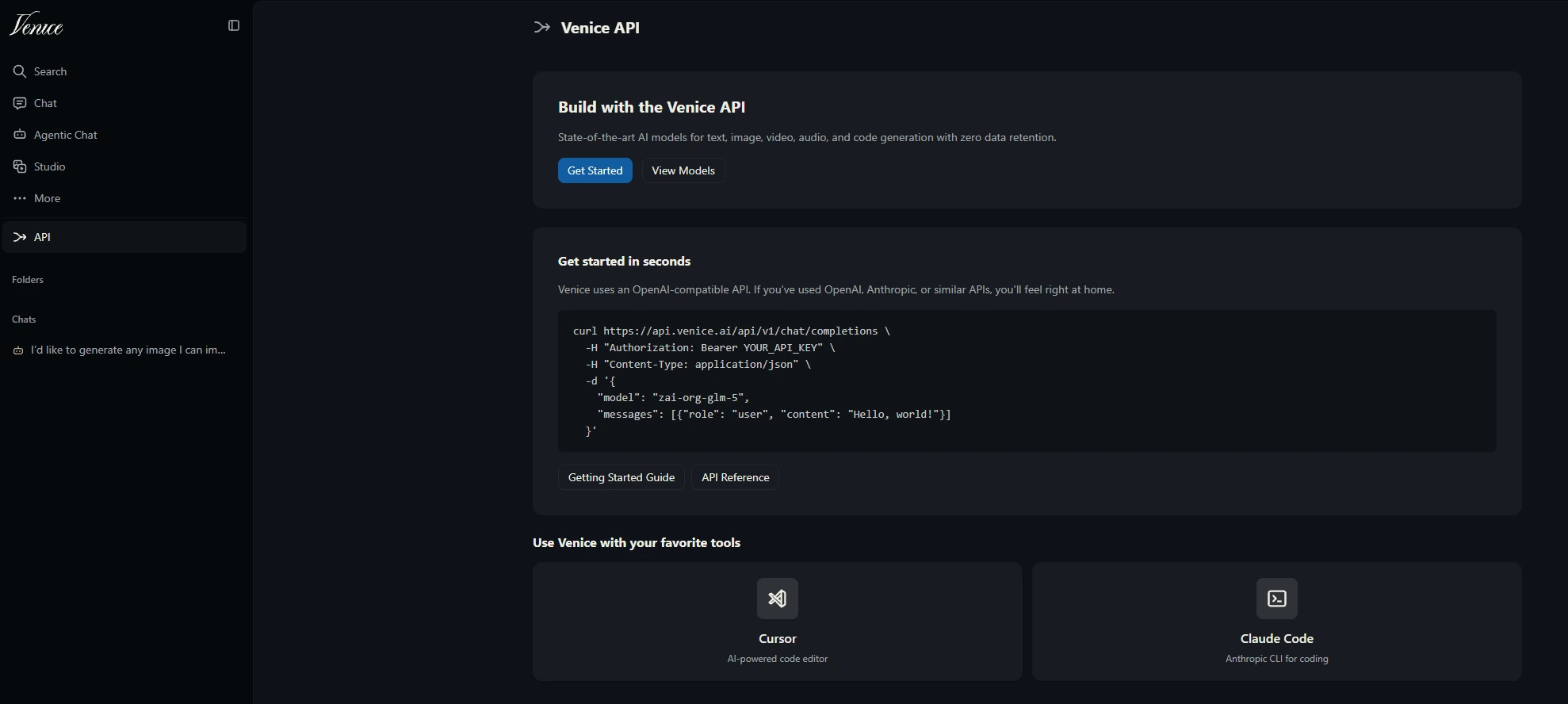
Developers use it to power chatbots and automations, and the guide on how to build a chatbot without coding shows a simpler path if you do not write code.
Common Venice AI problems and fixes
Most problems fall into a few groups. If a model shows a message that it is not available, a content filter or a provider limit is usually the reason, so switch to another model and rephrase the prompt. If your history is missing, you are probably in a different browser or you cleared the site data, because chats do not sync. If web search does not work, check whether you are in E2EE mode, which turns it off. If credits disappear fast, look at what you generated, since video and frontier models cost far more than basic chat. Reviewers also report slowdowns at busy hours, and larger models answer more slowly than basic ones, so switch to a smaller model, try again later or reduce the image size when replies drag.
Billing problems and refunds need a message to Venice support, and several reviews report slow replies, so keep your payment receipt and write down the date of the charge. For subscriptions bought in Apple or Google, contact those stores. When a model gives weak answers, try another one, because quality changes a lot from model to model.
Example prompts to try
These prompts show what the service does well. Clear, specific prompts give better results, and the guide on prompt engineering for business explains the method in more detail.
Privacy test: Explain in simple words what happens to this message after I send it, and which parts of it a model provider can see.
Document summary: Summarize the attached document in five bullet points and list any dates and amounts that it mentions.
Image: A quiet harbor at sunrise, soft light, wide angle, no text, no people. Negative prompt: blur, watermark.
Code: Write a Python function that removes duplicate rows from a CSV file and explain each step.
Venice AI vs ChatGPT and other tools
The main difference is where your data goes and how much control you have. ChatGPT is built by one company and saves chats to your account by default, while Venice keeps history in your browser and gives you models from several sources. The table compares three common choices.
| Feature | Venice AI | ChatGPT | Local model on your computer |
|---|---|---|---|
| Where chats are stored | In your browser, with optional encrypted backup | In your account, with a temporary chat option | On your own machine |
| Models | Many, from several providers | One company | Open-source models you download |
| Content limits | Fewer, with a Mature Filter on paid plans | Set by one company | Depends on the model |
| Setup | Open a website | Open a website or app | Needs a capable computer and some setup |
| Support | Reviewers report slow replies | Help center and account support | Community forums |
Venice is the better fit if privacy and model choice matter most. ChatGPT is the better fit if you want the most polished app, and a local model is the best choice for full control if you have the hardware. For a longer list, read the guide to AI tools better than ChatGPT.
Venice AI vs Claude, Grok and Perplexity
Claude is made by one company and is known for long documents and careful writing, while Venice gives you a choice of models and a different privacy approach. Grok is tied to the X platform and works best for people who already use it. Perplexity answers questions with sources from live web search, which Venice does only as one feature. Character-style apps focus on role play and companions, while Venice treats characters as one tool among many. Pick Venice if privacy and model choice come first, and pick the others when their main strength fits your task better.
Venice AI pros and cons
Pros
- Chat history stays in your browser, and Venice states that it does not log prompts on its servers.
- Four privacy modes, including TEE and end-to-end encryption.
- Many models, plus image, video, music and document tools in one place.
- A free plan to test the service.
- An API that works with tools built for OpenAI.
Cons
- Most privacy claims cannot be checked, and no independent audit has been published.
- History does not sync between devices, and clearing the browser can erase it.
- Subscriptions are generally non-refundable, and users report slow support.
- Unlimited text applies to standard models, while frontier models, video and music use credits.
- Quality changes from model to model, and models are added or removed often.
What users say about Venice AI
Reviews on Trustpilot, app stores and Venice AI Reddit threads follow a clear pattern. People like the privacy approach, the choice of models and the fact that the assistant refuses less often. Complaints focus on support response time, refund requests, billing problems in some countries and the occasional error when a model is unavailable. Treat single stories, such as lost credits, as warnings and not as averages, because the numbers are hard to verify. To see how Venice compares with the tools most people use, check the ranking of the most popular AI tools.
Venice AI timeline
- May 2024: Venice AI launches publicly, built on open-source models.
- July 2024: live web search is added, using the Brave search API, and results show source links.
- August 2025: the DIEM token launches, tied to staked VVV and API credit.
- Early 2026: reviews report moderation added to the free tier, with uncensored text and images limited to paid plans.
- Later plans: Pro Plus and Max appear next to Pro, with credit banking and bonus credits.
Venice AI for business use
Teams can use Venice AI for brainstorming, first drafts, summaries of non-sensitive documents and image concepts. It is harder to recommend for regulated data, because no independent audit has been published and the local storage model gives you no central admin control. Before you use it with company information, ask who can see the browser where the chats are stored, which privacy mode the chosen model uses and whether your contracts allow sending the text to an outside model provider. Check the commercial terms for generated images and text on the official site, because review sites disagree about them.
Who should use Venice AI and who should not
Venice AI fits people who want a private chat history, who like to compare models and who write, role play or experiment with images and video. It also fits developers who want an OpenAI-style API with more model choice. It is a poor fit if you need audited security for company data, if you want a refund guarantee or if you expect fast human support. Teams in regulated fields should check the data rules first.
Venice AI alternatives
- ChatGPT: the best known assistant with the most polished apps.
- Claude: strong for long documents and writing.
- Gemini: works closely with Google apps.
- Perplexity: answers with sources from web search.
- Local models with Ollama: run on your computer and keep all data on your machine.
If you want to compare more options, the list of free ChatGPT alternatives shows tools you can try without paying,.
Final verdict
Venice AI is a good choice if you want private chat with a wide choice of models and you accept that most privacy claims come from the company itself. Start with the free plan, use the TEE or E2EE modes for anything sensitive, keep your own backups and read the refund terms before you pay. If you need audited security or fast support, pick a different tool.
FAQ about Venice AI
What is Venice AI?
Venice AI is a private AI platform that offers chat, image, video and music generation with many models. Erik Voorhees launched it in May 2024, and it keeps chat history in your browser and states that it does not store prompts on its servers.
Is Venice AI really private?
It is more private than most assistants by design, because chats stay in your browser. Privacy still depends on the mode of the model you choose, and the claims have not been confirmed by a published independent audit.
Is Venice AI safe and legit?
It is a real service with named founders and paying users. It is safe for ordinary questions, but you should keep passwords, payment data and company secrets out of any chatbot, and use the E2EE mode for sensitive text.
Is Venice AI free?
Yes. The free plan gives 10 text prompts and 15 image prompts a day on base models. Credits, video, music and frontier models need a paid plan.
Does Venice AI store your chats?
Your chats are stored locally in your browser, and Venice states that it does not store or log prompts and responses on its servers. Encrypted backups, a Pro feature, are uploaded to Venice but cannot be read without your password.
Is Venice AI uncensored?
Venice offers fewer restrictions than most assistants, but the FAQ does not define uncensored. Each model has its own rules, and the Mature Filter can be turned off only on Pro or a higher plan.
What models does Venice AI use?
Reviews describe open-source models such as Llama, DeepSeek and Mistral, plus image models like FLUX and models from larger providers. The list changes often, so check the selector in your account.
Is Venice AI worth paying for?
The $18 Pro plan is worth it if you chat or generate images every day. If you use it a few times a week, the free plan is enough, and heavy video users should compare the cost of credits first.
How much does Venice AI cost?
Free is $0, Pro is $18 a month, Pro Plus is $68 a month and Max is $200 a month. Yearly billing lowers the price by up to 16.7%, and 100 credits equal one dollar.
Venice AI vs ChatGPT: which is better?
Venice is better for private history, model choice and fewer limits. ChatGPT is better for polish, support and ease of use, so the choice depends on what you value more.
What is the VVV token and do I need crypto?
VVV is a token on the Base network that can be staked for a share of Venice capacity. You do not need it, because you can pay by card.
Does Venice AI have an API?
Yes. The API follows the OpenAI format and charges per use, or you can pick Pro Plus or Max, which include a monthly API spend.
Who is behind Venice AI?
Erik Voorhees, the founder of ShapeShift, launched it in May 2024. Teana Baker-Taylor appears in press coverage as chief operating officer.
Is Venice AI good for roleplay and characters?
Yes, many users choose it for this. Pro users can create and share custom characters, and the Mature Filter can be turned off on paid plans.
Do I need an account to use Venice AI?
Several reviews report that you can start chatting without one, but the FAQ does not say so clearly. An account is required for the API, subscriptions and backups.
Does Venice AI train on your data?
The FAQ does not say. Venice states that it does not store prompts on its servers, but in Anonymized mode the model provider reads the prompt under its own policy, so check that policy.
Is Venice AI a scam?
No evidence points to a scam. It is an active service with named founders and paying users, but complaints about support and refunds are common, and the privacy claims have not been audited by an independent party.
Who owns Venice AI?
Erik Voorhees, the founder of ShapeShift, launched Venice AI in May 2024. Check the About page on the official site for current company details.
How do I delete my Venice AI data and account?
Delete conversations in the app or clear the site data in your browser, and remember that encrypted backups last 90 days. Cancel your plan before the next billing date, and contact support for a full account deletion.
What is the difference between Pro and Pro Plus?
Pro costs $18 a month with 100 credits. Pro Plus costs $68 a month with 7,500 credits, a 10% bonus, two months of credit banking and higher limits on Pro models.
What happens when I reach the free limit?
The free plan allows 10 text prompts and 15 image prompts a day, and the limit resets the next day. You can wait or upgrade to Pro for unlimited text on standard models.
Is adult content allowed on Venice AI?
The Mature Filter can be turned off by users on Pro or a higher plan, and each model keeps its own rules. App stores and laws still apply, so read the terms of service.
What is E2EE mode and when should I use it?
E2EE encrypts the prompt on your device and decrypts it only inside a secure enclave. Use it for sensitive text, and expect that web search and memory are turned off.
Does Venice AI have a mobile app?
Yes. It works as a web app you can add to your home screen, and there are iOS and Android apps. App store rules can limit some content, and subscriptions bought in those stores are managed there.
Can I use Venice AI on more than one device?
You can log in on several devices, but chat history does not sync between browsers. Use an encrypted backup on the web version or an encrypted share link to move a conversation.
Can I use Venice AI output for commercial projects?
Reviews say yes, but the details are not stated clearly in the FAQ, so read the terms of service on the official site before you publish generated text or images for a client.
How do I cancel or get a refund?
Cancel before the next billing date to keep access until the period ends. Subscriptions are generally non-refundable, and Apple and Google subscriptions are managed in those stores.










