A 2025 Deloitte survey found that a typical AI use case takes two to four years to reach a satisfactory return, while most technology investments are expected to pay back in seven to twelve months. Only 6% of respondents reported payback in under a year. Meanwhile, a manager who just bought a team subscription gets a much simpler question from the boss: is it paying off?
Answering that question is the core of AI ROI for business. A feeling that the team is faster does not count, and neither does a screenshot of hours saved. You need a baseline, the full cost, a value you can defend and a time frame.
This guide shows how to measure the ROI of AI tools step by step. You get the formula, a worked example with actual costs for a ten-person team, the metrics worth tracking, realistic timelines, the mistakes that inflate results, and a checklist and template you can use this month.
Key takeaways
- AI ROI is net value divided by total cost. The hard part is getting honest numbers for both sides.
- Time saved is not money saved. Only the share of saved time that turns into paid work counts.
- Paying for seats means nothing if people do not use them. Adjust every result for adoption.
- Count the full cost: subscription, setup, training, review time and admin.
- Pick one primary metric, set a baseline first and run a short pilot before you scale.
- Expect months for a focused tool and years for a company-wide change.
What is AI ROI?
AI ROI is the value a business gains from AI tools compared with the total cost of buying, setting up, running and managing them. It is usually shown as a percentage: net value divided by cost, multiplied by 100.
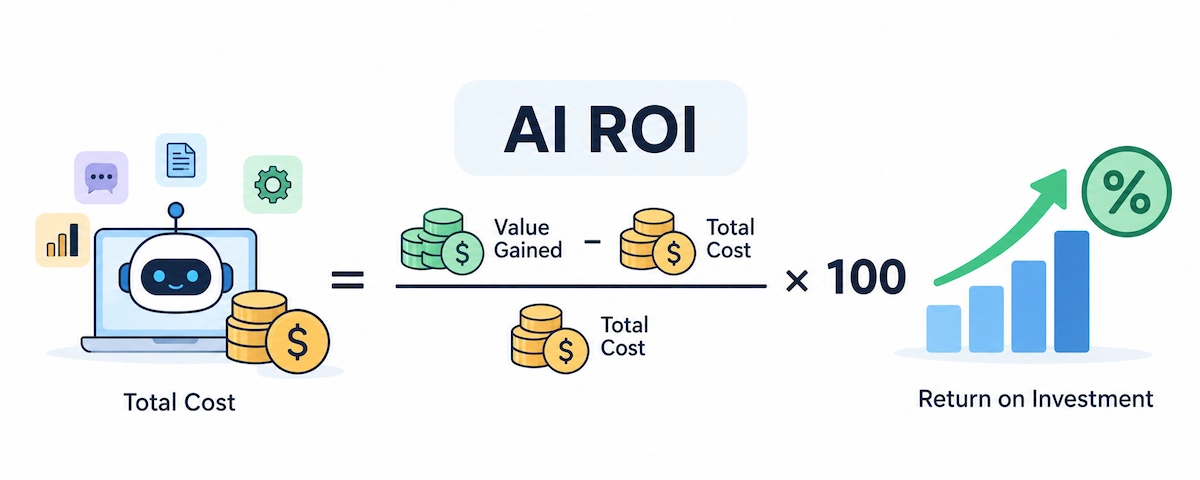
The idea is the same as for any other purchase. A 100% return on investment means every dollar spent came back with another dollar of net value. Leaders often ask for an AI ROI figure before they approve a second year of spending. What changes with AI is where the value shows up. A single chatbot subscription can speed up support, marketing, sales and admin at once, and the gains are spread across people who never report them to the same manager.
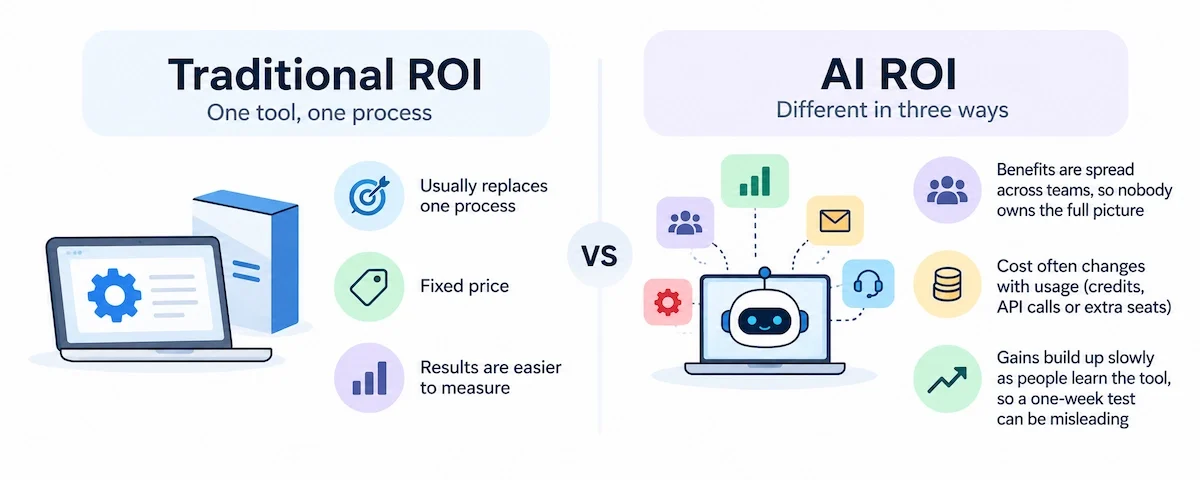
AI ROI vs traditional ROI
A normal software purchase usually replaces one process and has a fixed price. AI tools are different in three ways. The benefits are spread across teams, so nobody owns the full AI ROI picture. The cost often changes with usage, through credits, API calls or extra seats. And the gains build up slowly as people learn the tool, which makes a one-week test misleading.
Hard ROI vs soft ROI
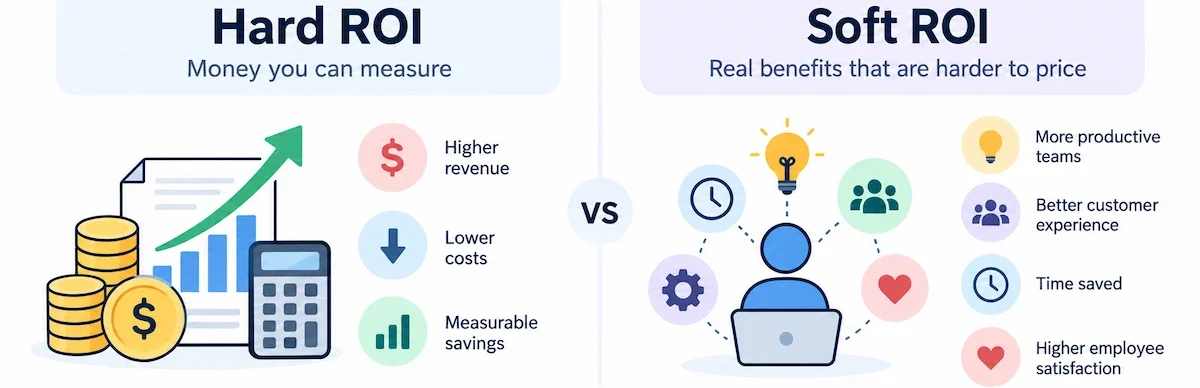
Hard ROI is money you can point to on a statement. Soft ROI is a real benefit that is harder to price. Track both, but keep them separate, and do not let a soft benefit carry the case on its own.
| Type | Examples | How to measure |
|---|---|---|
| Hard ROI | Lower cost per task, fewer contractor hours, more output from the same team, faster follow-up that closes more deals | Compare the baseline with the result after the tool, in dollars |
| Soft ROI | Happier employees, better customer experience, faster decisions, less burnout, better knowledge sharing | Surveys, satisfaction scores and retention, tied to a metric. Price it only if you can defend the number |
Financial, operational and strategic ROI
Another way to sort the AI ROI benefits is by the kind of value they create. Financial ROI covers cost savings, extra revenue and lower losses. Operational ROI covers faster work, fewer errors and more capacity from the same team. Strategic ROI covers things like better access to company knowledge, faster product development and lower risk.
Risk is the hardest one to price, because the value comes from something that did not happen, such as a fraud case caught early or a compliance mistake avoided. Estimate it as expected loss reduction: the likelihood of the event times its cost, before and after the tool. Operational and strategic gains often come first and set up the financial return later, so keep them in the report, but do not use them to cover a weak financial case.
Why measuring AI ROI matters
Measuring AI ROI is not paperwork for the finance team. It is how you decide where the next dollar and the next hour go. A clear AI business case lets you:
- Pick the use cases that deserve more money and drop the ones that do not
- Stop a project early, before a weak pilot turns into a yearly contract
- Defend the budget when someone asks why the subscription is still running
- Spot adoption problems that a bill never shows
- Decide when a pilot is ready to scale
- Report results to leadership in numbers instead of opinions
Without measurement, the loudest opinion wins. People who like the tool defend it, people who do not like it cancel it, and neither side has data.
Why AI ROI is hard to measure
Most failed AI ROI reports have the same causes. The tool may be fine. The measurement is what breaks.
Time saved is not money saved
An hour saved turns into money only if it goes into something worth money, such as handling more tickets, writing more proposals or avoiding overtime. If the hour disappears into extra meetings or a longer lunch, the cost line does not move. This is why a good AI ROI model uses a realization rate, the share of saved time that becomes productive work. When you have no data, 50% is a careful starting point. Adjust it after the pilot.
AI rarely acts alone
A support team adds an AI assistant in the same month it changes its ticketing system and hires two new agents. Response time drops. Which change caused it? Without a control group or a clean before and after, you cannot say. Attribution is the reason so many leaders struggle to prove the return.
Returns take longer than expected
AI ROI timelines differ a lot by project size. Large projects with new data systems and changes across the company take years. A focused tool that one team uses daily can pay back much faster, but even then the first weeks are slow, because people are still learning and the baseline is still unclear.
The adoption gap
A company can pay for 100 licences while only 30 people open the tool each week. Cost follows seats, but value follows use. How people actually use AI day to day is covered in the guide on AI in the workplace, and it is worth reading before you set targets.
How to choose your first AI use case
The best first project is not the most exciting one. It is the one you can measure within a month. Score each candidate on the points below and start with the strongest.
| Criterion | Good sign | Warning sign |
|---|---|---|
| Volume | The task happens daily or weekly | It happens a few times a year |
| Repetition | The steps are the same each time | Every case is different |
| Measurability | Time, cost or error rate is already tracked | Nobody records the current result |
| Risk | A mistake is cheap and easy to catch | A mistake means legal or safety trouble |
| Data | Files and records are clean and easy to reach | Information is scattered or missing |
| Ownership | One named person owns the result | Nobody is responsible |
A support reply, a weekly report or a product description fits most of these points. A one-off strategy document does not. Choose a task where you already know what a good result looks like, because otherwise you cannot tell whether the tool helped.
How to calculate AI ROI for business: formula and worked example
You can run the whole AI ROI calculation in a spreadsheet. You need four things: a baseline, a full cost, a defensible value and a time frame.
The AI ROI formula
The basic AI ROI formula is:
AI ROI (%) = (Total value – Total cost) / Total cost x 100
To see how fast you get the money back, add the payback period:
Payback period (months) = Upfront cost / Monthly net benefit
A simple AI ROI calculator is just these two lines in a spreadsheet, with the cost and value from the steps below.
Step 1: Pick one use case and set a baseline
Choose one task with a clear start and finish, such as writing a first draft of a customer reply or preparing a weekly report. Measure how it works today, before any AI. Record time per task, volume per week, error rate and cost per unit. Two to four weeks of data is enough. Without a baseline, you can say the team feels faster, but you cannot prove it. Also write a one-sentence hypothesis, for example: if we use this tool for first drafts, time per draft will fall by 30% within 90 days. A hypothesis gives you something to prove or reject.
Step 2: Add up the full cost
The total cost of ownership is more than the price on the pricing page. Include:
- Subscription or usage fees for every user, plus any API or credit overage
- Setup, including policy writing and tool configuration
- Training time for every person, valued at their hourly cost
- Time spent reviewing and correcting AI output
- Admin and monitoring time
- Integration and any extra tools needed to connect it to your systems
For typical price ranges per seat and per plan, see the guide on how much AI tools cost. Add everything for the first year. That figure is your cost.
Step 3: Put a value on the benefit
Pick the formula that matches the benefit you are claiming:
- Time: hours saved x loaded hourly cost x adoption rate x realization rate
- Capacity: extra units completed x contribution per unit
- Errors: errors avoided x average cost per error
- Revenue: extra revenue x contribution margin
- Retention: customers kept x average contribution per customer
The loaded hourly cost is salary plus taxes, benefits, equipment and overhead, divided by the hours actually worked. It is higher than the hourly wage, and finance can usually give you the figure.
Step 4: Calculate ROI and payback
Put the first-year cost and value into the formula. Then work out the payback period using the upfront costs (setup and training) and the monthly net benefit. If the AI ROI result looks too good, check the adoption and realization numbers again. A strong result that survives a harsh review is worth far more than a huge one that does not.
AI ROI example: a 10-person team on a $30 per seat tool
A small company buys a business plan of a chatbot tool for ten people at $30 per seat per month. The team says it saves about two hours a week per person. The prices and wages below are an illustration, so replace them with your own.
| Item | Calculation | Amount |
|---|---|---|
| Subscription | 10 users x $30 x 12 months | $3,600 |
| Training | 10 people x 4 hours x $40 | $1,600 |
| Setup and usage rules | 10 hours x $50 | $500 |
| Review and admin | 2 hours a month x $50 x 12 | $1,200 |
| Total first-year cost | $6,900 | |
| Claimed time saved | 10 people x 2 hours x 48 weeks | 960 hours |
| Adjusted for adoption | 7 of 10 people use it regularly (70%) | 672 hours |
| Adjusted for realization | Only half becomes productive work (50%) | 336 hours |
| Value | 336 hours x $40 loaded hourly cost | $13,440 |
| ROI | ($13,440 – $6,900) / $6,900 x 100 | 95% |
| Payback period | $2,100 upfront / $720 monthly net benefit | About 3 months |
Now compare that with the quick version. If you count all 960 hours at $40, you get $38,400. Set that against the subscription alone, at $3,600, and the AI ROI looks like 967%. That number is wrong in three ways: it counts people who never used the tool, it counts time that did not turn into work, and it ignores training, review and admin. The honest AI ROI is 95%, which is still a good return. It is simply a figure you can defend in front of a finance director.
AI ROI example 2: a support team measured by cost per ticket
The first example counted time. This AI ROI example measures cost per unit, which many teams find easier to defend. A support team handles 2,000 tickets a month at a labor cost of $5.00 per ticket, or $10,000 a month. After an AI assistant is added, the cost per ticket drops to $4.40, about 12%, which is what a 14% productivity gain looks like when converted to cost per ticket. These numbers are an illustration.
| Item | Calculation | Amount |
|---|---|---|
| Monthly saving | 2,000 tickets x ($5.00 – $4.40) | $1,200 |
| Monthly running cost | Seats, admin and review time | $600 |
| One-time setup and training | Training hours and configuration | $1,800 |
| First-year value | $1,200 x 12 | $14,400 |
| First-year cost | ($600 x 12) + $1,800 | $9,000 |
| ROI | ($14,400 – $9,000) / $9,000 x 100 | 60% |
| Payback period | $1,800 / ($1,200 – $600) | 3 months |
Measuring cost per unit replaces the guesswork about realization, because the saving shows up in a number you already track. It still has one condition. The saving is real only if the team handles the same volume with less overtime, fewer contractors or a hiring plan that no longer needs the extra person. If nothing changes in the payroll or the workload, the saving exists on paper only.
AI ROI metrics and KPIs to track
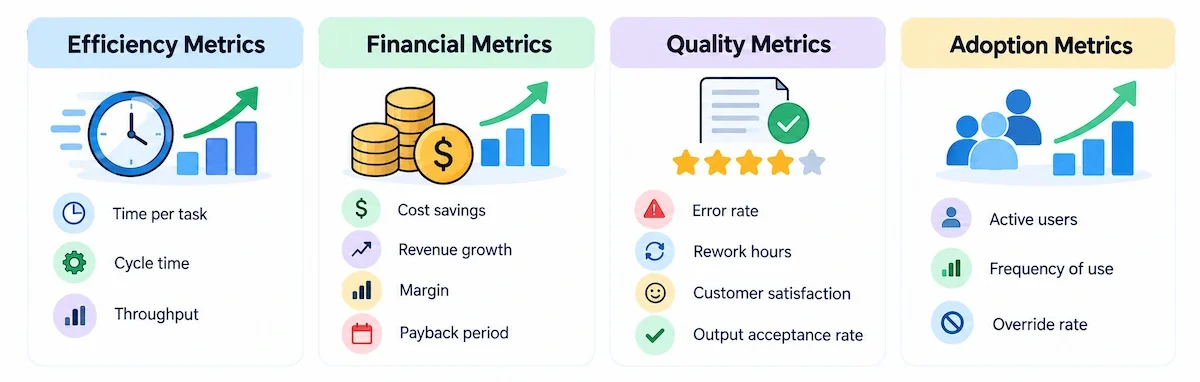
Pick three to five AI ROI metrics and make one of them primary. Tracking twenty indicators makes it hard to see whether the project works.
Efficiency metrics
Time per task, cycle time and throughput show how fast work moves. These are the easiest AI ROI metrics to measure and the first to move after a rollout.
Financial metrics
Cost savings, cost per unit, revenue growth, revenue per employee, margin and payback period connect the tool to the budget. These are the numbers leadership asks for when it reviews AI ROI.
Quality metrics
Error rate, rework hours, customer satisfaction and the output acceptance rate (the share of AI drafts used with little or no change) protect you from the trap of faster but worse work. A tool that doubles output and triples complaints has negative ROI.
Adoption metrics
Active users, frequency of use and the override rate (how often people reject the AI output) show whether the tool has become part of the job. Low adoption is the most common reason for a weak AI ROI result.
Leading vs lagging indicators
Leading indicators, such as weekly active users and tasks completed with the tool, move first and warn you early. Lagging indicators, such as cost per unit, revenue and retention, confirm the result later. Track both, and do not judge the project on leading numbers alone.
| Function | Primary metric | Supporting metrics |
|---|---|---|
| Marketing and content | Cost per published piece | Hours per draft, output per person, conversion rate |
| Sales | Qualified leads per rep | Response time, proposal turnaround, sales cycle length |
| Customer service | Cost per ticket | First response time, resolution time, satisfaction score |
| Finance | Cost per invoice processed | Close time, exception rate |
| HR | Time to hire | Onboarding time, cost per hire |
| Software development | Cycle time | Defect rate, review time, release frequency |
| Operations and admin | Cost per process | Throughput, error rate, hours spent on admin |
AI ROI by use case
The same tool delivers a different AI ROI in different jobs. These are the use cases where small and mid-sized teams most often measure results.
Customer service
Start with cost per ticket and resolution time, which the AI customer service guide covers in more detail. Be careful with deflection. A chatbot can deflect a conversation, meaning the customer never reaches a person, without solving the problem. Track resolution as well. A study of 5,179 support agents by Brynjolfsson, Li and Raymond found that an AI assistant raised issues resolved per hour by 14% on average and by 34% for novice workers, with little effect on experienced ones.

Marketing and content
Measure cost per published piece, hours per draft and output per person. Revenue effects are harder, because campaigns, pricing and seasons also move the numbers, so use a test group before you claim them. Faster drafting only pays when the edited result performs as well as before, which is why quality checks belong in the same report as speed. For the broader picture of campaign tools, see AI marketing automation.

Sales and lead work
Track response time to new leads, proposal turnaround and qualified leads per rep. Faster follow-up often matters more than the drafting itself, so measure the whole path from inquiry to offer.

Finance, HR and admin
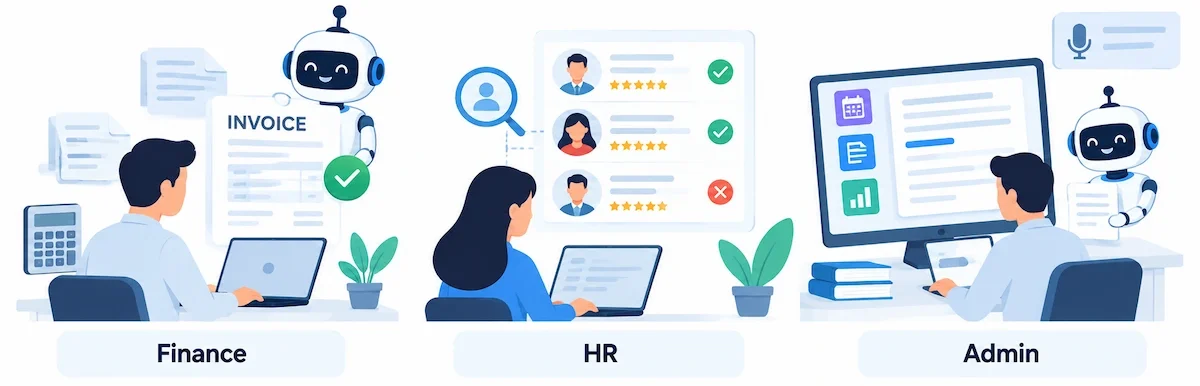
Invoice processing, candidate screening, meeting notes and report preparation are repetitive and measurable. Use cost per invoice, time to hire and hours spent on admin. In HR, add a check for bias and fairness, because a fast screening tool that rejects good candidates is a cost, not a saving.
Software development
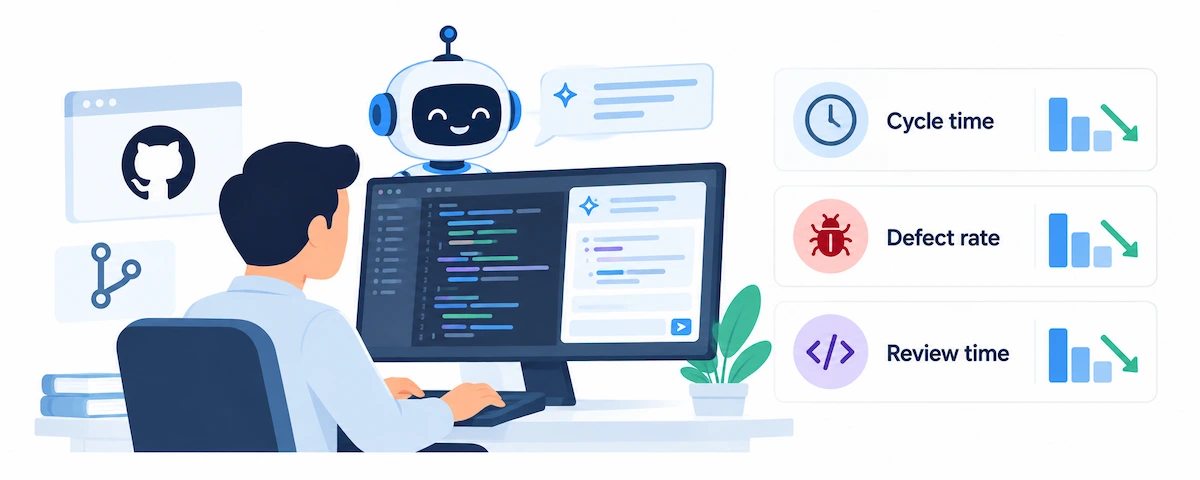
Results here are mixed, which is a good reason to measure your own team. A controlled GitHub study found developers finished one coding task about 55% faster with Copilot. A 2025 METR experiment, in contrast, found experienced open-source developers took 19% longer on their own familiar projects with AI tools, even though they believed it had made them faster. Track cycle time, defect rate and review time on your own work.
AI agents
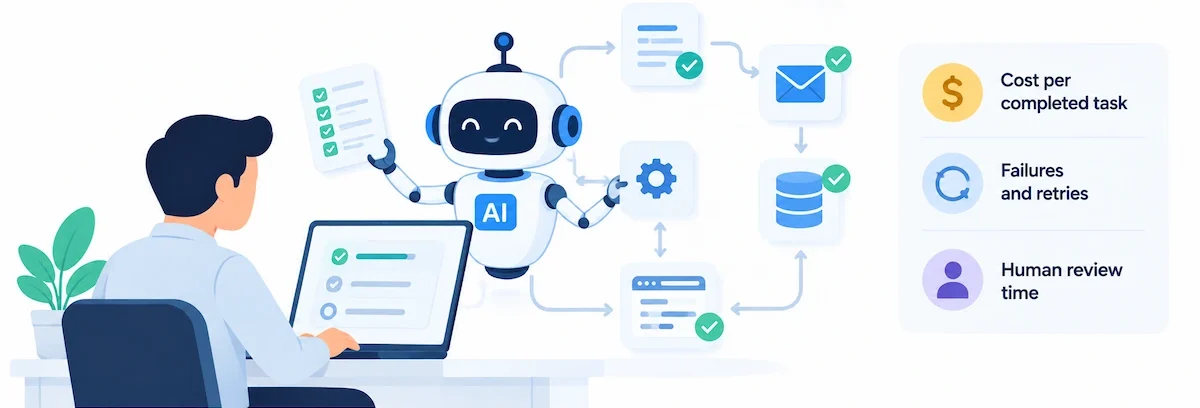
Agents take multi-step actions, so measure cost per completed task, including failures, retries and human review. Deloitte found that only about 10% of organizations using agentic AI see significant returns today, and most expect payback over one to five years. The guide on AI agents for business explains where they fit.
AI ROI by industry
Public AI ROI benchmarks by industry vary widely, so use them as a prompt for what to measure and not as a promise of results. These are the metrics that usually matter in each sector.
| Industry | Common use | Metrics to track |
|---|---|---|
| Retail and e-commerce | Product descriptions, customer chat, demand forecasting | Cost per listing, conversion rate, return rate, stockouts |
| Professional services | Proposals, research, meeting notes, reporting | Billable hours recovered, proposal turnaround, win rate |
| Healthcare practices | Scheduling, documentation, patient messages | Admin hours per clinician, no-show rate, documentation time |
| Manufacturing and logistics | Maintenance alerts, planning, quality checks | Downtime hours, defect rate, forecast accuracy |
| Real estate | Listings, lead follow-up, document review | Response time, time to list, leads per agent |
| Finance and insurance | Claims, document checks, fraud flags | Cost per claim, processing time, error rate |
Regulated sectors need one more line in the cost column: compliance. Health and financial data carry strict rules, so check privacy and security before you count any saving.
How long does it take to see AI ROI?
How long it takes to see AI ROI depends on the size of the change. A focused tool used daily by one team can show results in a few months. Company-wide programs take much longer.
| Period | What happens | What to measure |
|---|---|---|
| Weeks 0 to 4 | Baseline, setup and training | Time per task, volume, cost per unit |
| Months 1 to 3 | Pilot with a small group | Adoption, time per task, quality |
| Months 3 to 6 | First reliable numbers | Net value, ROI, payback period |
| Months 6 to 12 | Decide: scale, change or stop | ROI against your target |
| Year 2 and after | Gains build up or fade | Trend, reinvested time, new use cases |
For large programs, the Deloitte findings summarized by ACCA are a useful benchmark: most respondents expect two to four years, and even among the most successful projects, only 13% saw returns within twelve months. For a small tool like the one in the worked example, a few months is realistic. Treat that as a target to test, not a promise.
Generative AI ROI vs agentic AI ROI
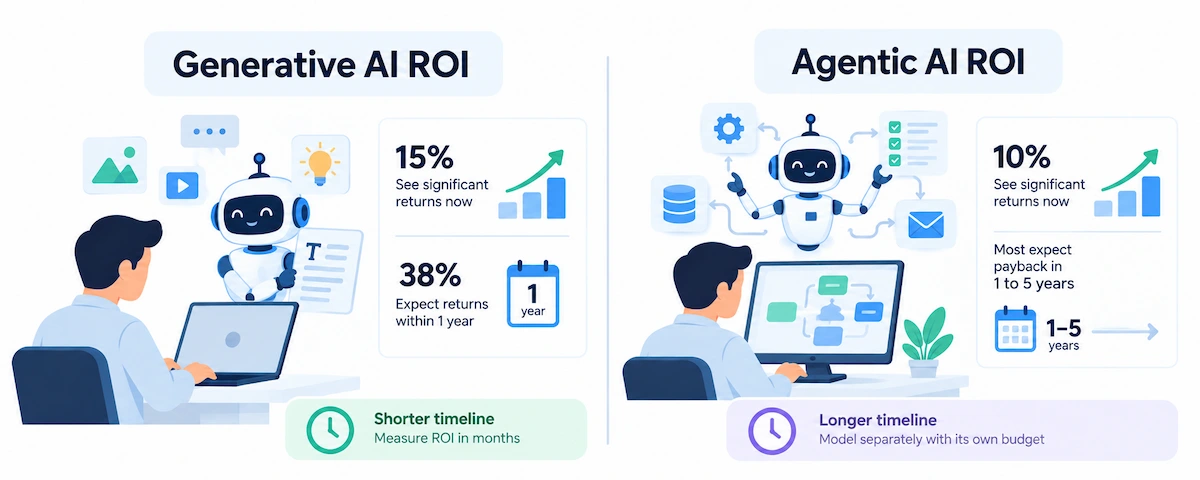
Generative AI ROI and agentic AI ROI follow different timelines. In the Deloitte survey, 15% of respondents using generative AI already reported significant, measurable returns, and another 38% expected them within a year. Among users of agentic AI, only 10% saw significant returns, and most expected payback in one to five years. If you run both, model them separately. A writing assistant used by one team should be judged in months. An agent that runs a multi-step process needs a longer horizon and its own budget line.
Why published AI ROI benchmarks disagree
A 2025 Google Cloud survey reported that 74% of leaders see returns from generative AI within the first year, while Deloitte found that only 6% of respondents reported payback in under a year. Both can be true, because the questions differ. One asked whether at least one use case shows a return. The other asked how long a typical use case takes to reach a satisfactory one. Check who paid for a study, who was asked and what exactly was counted before you quote a benchmark to your boss.
How to prove AI caused the improvement
A good AI ROI result means little if something else caused it. These methods separate the effect of the tool from everything else that changed:
- Before and after: compare the baseline with the result. This is quick but weak if anything else changed in the same period.
- Control group: let one group use the tool while a similar group keeps working as before, then compare them over the same weeks.
- A/B test: split tasks or customers randomly between the AI path and the normal path.
- Holdout: keep a small share of work or customers outside the rollout until the end.
- Difference-in-differences: compare the change in the AI group with the change in a similar group, which removes shared effects like season or pricing.
- Incrementality test: for marketing, check how much extra revenue came from the AI-assisted activity and not from demand that would have arrived anyway.
A small team does not need a statistics department. Two groups, the same four weeks and the same metric already beat a before and after guess.
How to present AI ROI to management
Decision makers do not want a tour of your spreadsheet. They want to know what you need from them and what happens if the numbers miss. Open with the request, such as keeping the subscription for another year or extending it to the sales team. Then give the AI ROI and the payback period in one line, followed by the assumptions behind them.
Show a range, not a single number. Run the same model with a cautious, an expected and an optimistic case for the adoption rate and the realization rate. Using the ten-person example:
| Case | Adoption rate | Realization rate | Hours counted | Value | AI ROI |
|---|---|---|---|---|---|
| Cautious | 50% | 40% | 192 | $7,680 | 11% |
| Expected | 70% | 50% | 336 | $13,440 | 95% |
| Optimistic | 90% | 60% | 518 | $20,736 | 200% |
Even the cautious case stays positive here, which makes the proposal easy to defend. If your cautious case is negative, say so and explain what you will do about it. Add the full cost, the review date and a rule for stopping the tool. A finance team trusts a report that lists its own weak points far more than one that shows only good news.
Hidden costs of AI tools
Underestimated costs are the quickest way to inflate an AI ROI figure. They all belong in your total cost of ownership, so check this list before you finish the cost column:
- Time spent reviewing, editing and fixing AI output
- Training and the productivity dip while people learn
- Integration with your current tools and data
- Data cleanup before the tool can use your files
- Security and compliance work, including the steps in the guide on AI data privacy for business
- Usage above the plan limits, such as extra credits or API calls
- Switching costs if you change tools later
- Failed experiments and abandoned pilots
- Management and vendor follow-up time
Common AI ROI mistakes
Most weak AI ROI reports repeat the same errors:
- Counting hours saved as money. Only the hours that became paid work count.
- Skipping the baseline. Without it, every improvement is a guess.
- Ignoring adoption. Seats paid for are not seats used.
- Judging too early. A two-week pilot measures the learning curve, not the tool.
- Leaving out costs. Review, training and admin time belong in the cost.
- Tracking too many metrics. One primary metric and a few supporting ones are enough.
- Measuring activity instead of results. Prompts sent and documents generated say nothing about value.
- Crediting AI for unrelated gains. A price rise or a seasonal peak can look like an AI effect.
When AI is the wrong investment
Sometimes the honest answer is no. AI may not be worth it when:
- The task is rare, so the saved time never adds up
- Simple rules or a basic automation already solve the problem for less
- Your data is messy, scattered or missing
- One mistake would be expensive, and a person must check every result anyway
- You cannot describe the baseline or the outcome you want
In those cases, fix the process first or use a cheaper tool. If you are still comparing options, the guide on how to choose AI tools for business helps you narrow the list before you spend anything.
It also helps to compare the options side by side, including doing nothing. The baseline cost keeps running every month you wait, so staying manual has a price too, and it belongs in your AI ROI comparison.
| Option | Upfront cost | Running cost | Time to value | Works best when |
|---|---|---|---|---|
| Do nothing | None | The current baseline cost continues | None | The task is rare or already cheap |
| Simple rules or basic automation | Low | Low | Weeks | Steps are fixed and inputs are predictable |
| Off-the-shelf AI tool | Low to medium | Per seat or per use | Weeks to months | Work is varied, language-based and repeated |
| Custom AI build | High | Medium to high | Months to years | The task is core to the business and no tool fits |
How to improve AI ROI after launch
The first AI ROI number is rarely the best one. Most returns improve once people learn the tool and the work is redesigned around it, so plan a second round of measurement three to six months after launch.
Go deep on two or three use cases instead of spreading thin across ten. Teams that reach full adoption in a few tasks usually do better than teams with light use everywhere. Improve how people ask for results too, because clear instructions cut review time. The guide on prompt engineering for business shows how.
Reinvest the early gains on purpose. If the team saves five hours a week, decide whether those hours go into more output, better quality or a lower cost, and write it down. Otherwise the time simply disappears, and the next review shows no return. Keep an eye on the cost side as well, because plan prices, usage limits and extra seats change often, so recheck the bill every quarter.
Train people on their own tasks, not on the tool in general. Match the tool to the job, so you do not pay for the most expensive plan to do simple work. Decide in advance what happens to the saved time, whether it goes into more output, better quality or a lower cost. Review the numbers each month, and drop any tool that has not earned its place. For a step-by-step rollout, see how to use AI in business.
From pilot to rollout: when to scale
Many projects stall between a good pilot and a company-wide rollout, and the AI ROI is never proven at scale. Scale when four things are true:
- The result held for at least two measurement periods, not just one good month
- Adoption in the pilot group is steady, and the remaining people can be trained
- The cost per user is understood, including review and admin time
- One person owns the metric and the budget
Scale in steps, one team at a time, and measure again after each step. A motivated pilot group often does better than the rest of the company will, so lower your adoption and realization assumptions for the next group. If the numbers fall short, change the workflow or stop. Stopping a tool that failed its test is a good outcome, because it frees money for one that works.
AI ROI for small business
A small company does not need a data team to measure AI ROI. It needs one owner, one use case and thirty days. Follow this plan:
- Week 1: choose one task, measure the baseline and write down the cost of the tool.
- Week 2: start a pilot with three to five people and give them short training.
- Weeks 3 and 4: keep measuring the same metric and compare it with a group that does not use the tool.
- Day 30: calculate ROI and payback using adoption and realization rates, then decide to keep, change or stop.
Set the decision rule before you start. For a subscription tool, a payback period under six months is a reasonable bar for many small businesses. Write down your own number so the result is not argued after the fact.
Tool choice matters more at this size, because every seat shows up in the monthly bill. The AI for small business guide covers which tools fit small teams and budgets, and it helps you avoid paying for features you will not use.
AI ROI template: what to track in a spreadsheet
An AI ROI template can be one tab with one row per use case. These are the columns that matter, with the example from above filled in:
| Use case | Owner | Baseline | Monthly cost | Monthly value | Adoption | Net per month | Payback |
|---|---|---|---|---|---|---|---|
| Team chatbot subscription | Operations lead | 2 hours per person per week claimed, no AI | $400 ongoing, $2,100 upfront | $1,120 | 70% | $720 | About 3 months |
Add a column for the review date and one for the decision, and update the sheet monthly. Over time it becomes a record of what actually paid off.
Where to keep the AI ROI numbers
A spreadsheet is enough for one or two tools. When several teams use AI, move the figures into a shared dashboard in your reporting tool and pull usage data from the vendor admin panel. Keep one owner for the sheet and agree on one definition of each metric, so two teams do not count the same hour in two different ways.
AI ROI checklist
Use this AI ROI checklist before you present results to anyone:
- One use case and one primary metric are defined
- A baseline was measured before the tool
- Total cost includes subscription, setup, training, review and admin
- Value uses loaded hourly cost, not wages alone
- Results are adjusted for adoption rate
- Saved time is adjusted with a realization rate
- A control group or test period separates AI from other changes
- Quality and satisfaction were measured next to speed
- Payback period is calculated and compared with your target
- A date is set for the next review and a decision to keep, change or stop
Conclusion
Good AI ROI for business work comes down to a few habits: measure before you start, count every cost, value only the time that turns into work, adjust for adoption and compare against a group that did not use the tool. Do that for one use case and you will know within a quarter whether a tool deserves more money. Start with the baseline this week. Every other number depends on it.
Frequently asked questions
What is a good ROI for an AI project?
There is no universal benchmark for a good AI ROI. It depends on risk, cost and how fast you need the money back. A common rule of thumb for subscription tools is payback within six to twelve months. Custom builds and company-wide programs take longer, so set a target before you start.
How long does it take to see ROI from AI tools?
A focused tool used daily by one team can show a measurable AI ROI in a few months. Company-wide projects often take two to four years, according to Deloitte. Measure from the start, because the first months mostly show the learning curve.
How do you calculate AI ROI?
Subtract total cost from total value, divide the result by total cost and multiply by 100. Total cost includes subscription, setup, training, review and admin. Value should be adjusted for adoption and for the share of saved time that became productive work.
What is the difference between hard ROI and soft ROI?
Hard ROI is a direct financial result, such as lower cost per task or extra revenue. Soft ROI covers benefits that are harder to price, such as employee satisfaction or better decisions. Report them separately, and do not rely on soft ROI alone to justify spending.
How do you measure AI ROI without hard financial data?
To measure AI ROI without hard financial data, use proxy metrics that you can still count, such as time per task, error rate, response time and customer satisfaction. Compare them with a baseline or a control group. Convert them to money only when you can defend the conversion, and show the rest as supporting evidence.
How much should a business budget for AI tools?
Plan for more than the subscription. In the worked example above, setup, training and review added almost as much as the seats themselves. Start with a small pilot group, include time costs in the budget and scale only after the pilot pays back.
How can I prove AI caused the improvement?
Use a control group, an A/B test or a holdout, and compare the same metric over the same period. A before and after comparison alone is weak, because pricing, seasons and staffing changes can move the numbers too.
What are the hidden costs of AI tools?
The most common are time spent reviewing output, training, integration, data cleanup, security and compliance work, usage above plan limits and the cost of switching tools later. Add them to the cost column, or your AI ROI will look better than it is.
Which AI use cases pay off fastest?
Focused, repetitive and high-volume tasks usually pay off first. Examples are support replies, document drafting, report preparation, meeting notes and routine admin. Tasks that happen rarely, or that need heavy review, take longer to repay the cost.
Why do AI projects fail to show ROI?
Weak AI ROI usually traces back to no baseline, unclear goals, low adoption, hidden costs and measuring activity instead of results. IBM’s 2025 CEO study reported that only 25% of AI initiatives delivered the expected return and 16% scaled across the company.
Is AI ROI guaranteed?
No. AI ROI depends on the use case, the quality of your data, how many people adopt the tool, how well you control costs and how honestly you measure. Many projects return little or nothing, which is the reason to run a small pilot and calculate the result before you scale.
What is the difference between AI ROI and automation ROI?
Automation ROI is usually predictable, because fixed rules produce the same saving each time. AI ROI is less certain, because output quality varies and people must review it. That is why AI calculations need adoption and realization rates, review costs and a range of scenarios.
How do you justify AI investment to get budget approval?
Present a one-line request, the expected AI ROI and payback period, the assumptions behind them and a cautious case. Show the full cost, a review date and a rule for stopping. A small pilot with measured results is much easier to approve than a promise.
How do you choose the right AI use case?
Pick a task that is frequent, repetitive, already measured, low risk and owned by one person. Score the candidates against those points and start with the strongest, so your first AI ROI result is easy to measure. Avoid tasks where nobody can describe what a good result looks like.










