A system prompt is a block of hidden instructions that an AI model receives before a conversation starts. The model is the engine that reads those instructions and your message and writes the answer. Together they decide how every AI tool behaves, and that is why System Prompts and Models of AI Tools is also the name of a famous GitHub repo that collects the prompts of dozens of coding tools.
In this guide we explain what a system prompt is, how it differs from a model, which models sit behind the popular tools, and what the repo contains. We also cover the legal and security side and give a method for writing your own prompt. The facts were checked in October 2026, and where a number changes often, we give the date.
System Prompts, Models and Tools at a Glance
Here is the short version in one table. The sections below explain each row.
| Term | What it means |
|---|---|
| System prompt | Hidden instructions that set role, rules, tone and tool use before the chat begins |
| Model | The engine that produces the answer, for example GPT, Claude or Gemini |
| Tool schema | The list of actions a tool may take, such as reading files or running commands |
| The repo | A GitHub collection of prompts and tool definitions for 28 to 34 AI tools |
| Maintainer and license | Lucas Valbuena (x1xhlol), GPL-3.0 |
| Biggest problem | Nobody has proven that the leaked prompts are real or current |
What Is a System Prompt?
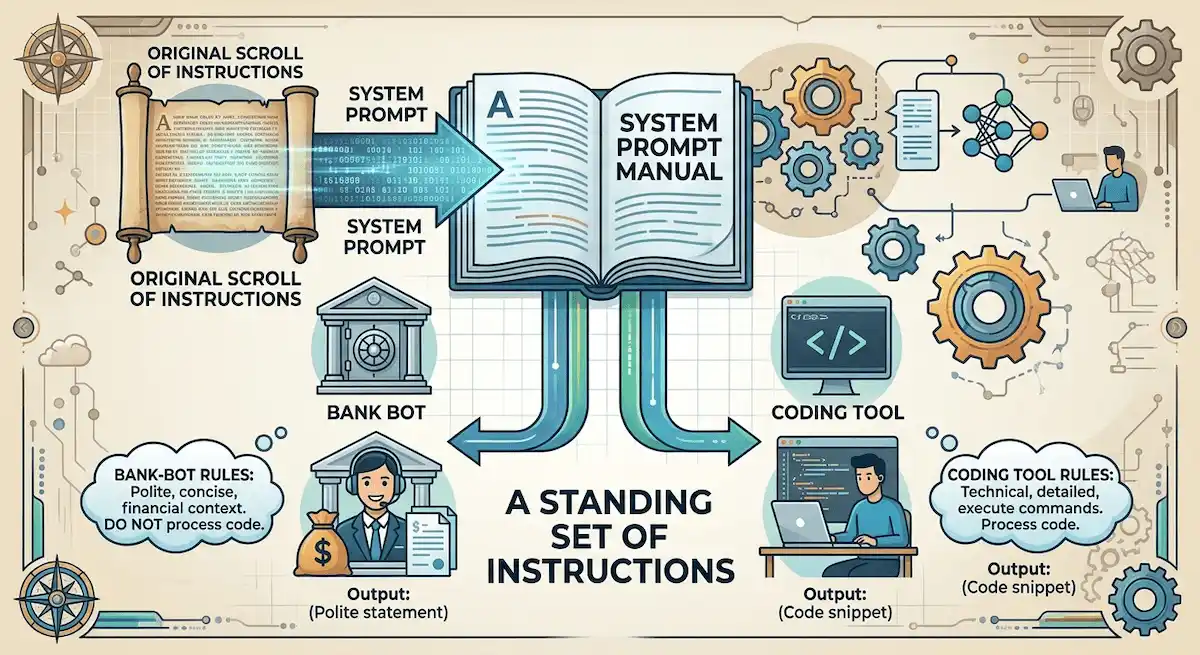
A system prompt is a standing set of instructions that the model follows in every conversation. It tells the model who it is, what it may do, how it should talk and which rules it must never break. You usually never see it, because the tool adds it to your message in the background. The easiest comparison is a manual of operating instructions that a new employee reads on the first day, before any customer arrives.
People also say system message or system instructions, and the meaning is the same. If you want a quick refresher on these words, the AI terms glossary explains them in plain language.
System Prompt in Plain Words
Think about a chatbot on a bank website and the same model inside a coding tool. The model is the same, but the bank bot is polite, short and careful about money, while the coding tool writes files and runs commands. The difference comes from the system prompt, which gives each product its personality and its limits. We treat the prompt as the part of a product that a company can change in minutes, while the model takes months to change.
What Goes Inside a System Prompt
Most prompts cover the same few topics:
- Role and identity: who the assistant is and what job it does.
- Capabilities: what it knows and which domain it works in.
- Communication style: tone, length and format of the answers.
- Safety and compliance: what it must refuse and when it must ask first.
- Tool rules: which tools exist and how to call them.
- Context: facts about the company, the user or the date.
A simple prompt may be two lines that set a persona. A complex one can run to thousands of words, as we show in the section on prompt length.
Why System Prompts Matter
A good system prompt does four jobs at once. It keeps the behavior consistent, so the assistant answers in the same tone on Monday and on Friday. It sets safety limits before a user can ask for something risky. It makes the output predictable, which matters when another program reads the answer. And it saves money, because a clear prompt means fewer retries and shorter answers. A weak prompt does the opposite: answers drift, rules get ignored and the support team spends the day fixing odd replies.
What Is a Model in an AI Tool?
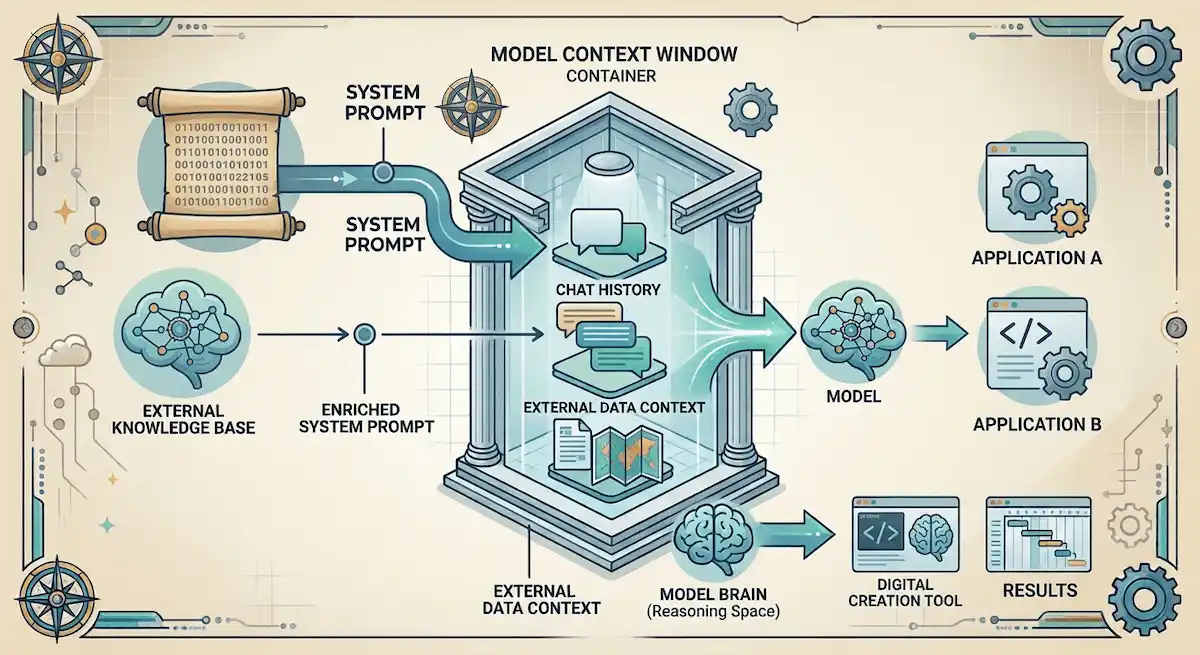
The model is the engine. GPT from OpenAI, Claude from Anthropic and Gemini from Google are the best known, and each can be used by many different tools. The model has the raw ability to read, reason and write. It does not know your company, your rules or your tone until a system prompt tells it. Because so many tools share the same few models, the system prompt is where most of the difference between products comes from. For a wider view of what these models do for a company, we recommend the guide to generative AI for business.
Same Model, Different Tool
Two coding tools can run the same model and still feel very different. One answers in a few lines and asks before it changes a file. Another plans first, saves notes to memory and edits many files at once. The model did not change. The prompt, the tool schema and the interface did. That is the main idea behind the phrase models of AI tools: the model supplies ability, and the layers around it supply behavior.
Model Settings That Work With the Prompt
The prompt is not the only dial. Temperature controls how predictable the wording is, and low values suit rules, code and facts. Max output tokens caps the length of the answer. The context window is the total space for the prompt, the chat history and the reply, so a huge prompt leaves less room for your files. Some newer models also have a reasoning effort setting that trades speed for deeper thinking. When an answer looks wrong, check these settings before you rewrite the whole prompt.
System Prompt vs Model vs Tool Schema vs Fine-Tuning
These four layers are mixed up all the time. The table shows what each one controls and who can see it.
| Layer | What it controls | Who owns it | Can you inspect it? |
|---|---|---|---|
| System prompt | Role, rules, tone, priorities | The tool maker or developer | Usually hidden |
| Base model | Raw ability and knowledge | The model company | Only through documentation |
| Tool schema | Which actions the tool can take and how | The tool maker | Visible in code and API calls |
| Fine-tuning and RLHF | Deep behavior baked into the model | The model company | No |
A system prompt can be changed in a minute, while fine-tuning needs new training. That is why companies use the prompt for fast fixes and keep fine-tuning for slow, deep changes. A system prompt is also not a replacement for retrieval (RAG), which brings fresh documents into the conversation. The two are often used together.
System Prompt vs User Prompt
The system prompt is written by the product, and the user prompt is written by you. The model is trained to follow the first one with more weight.
| Feature | System prompt | User prompt |
|---|---|---|
| Written by | Developer or company | The person using the tool |
| When it is set | Before the conversation | During the conversation |
| How often it changes | Rarely | Every message |
| What it controls | Behavior, limits, tone | The task of the moment |
| Priority | Higher | Lower |
System Prompt vs Developer Message and Custom Instructions
Providers use different names for a similar idea. OpenAI uses a developer message in its newer models, Gemini calls it system instructions, and Claude takes a system parameter. Custom instructions in a chat app are a lighter version that you write yourself, and they sit below the tool own system prompt. All of them follow an instruction hierarchy: the model weighs the system level first, then the developer level, then the user. We advise against copying one prompt across all providers without testing it, because each model reacts a little differently.
How System Prompts and Models Work Together
Every message you send goes through the same path. Knowing it makes the rest of this guide much easier.
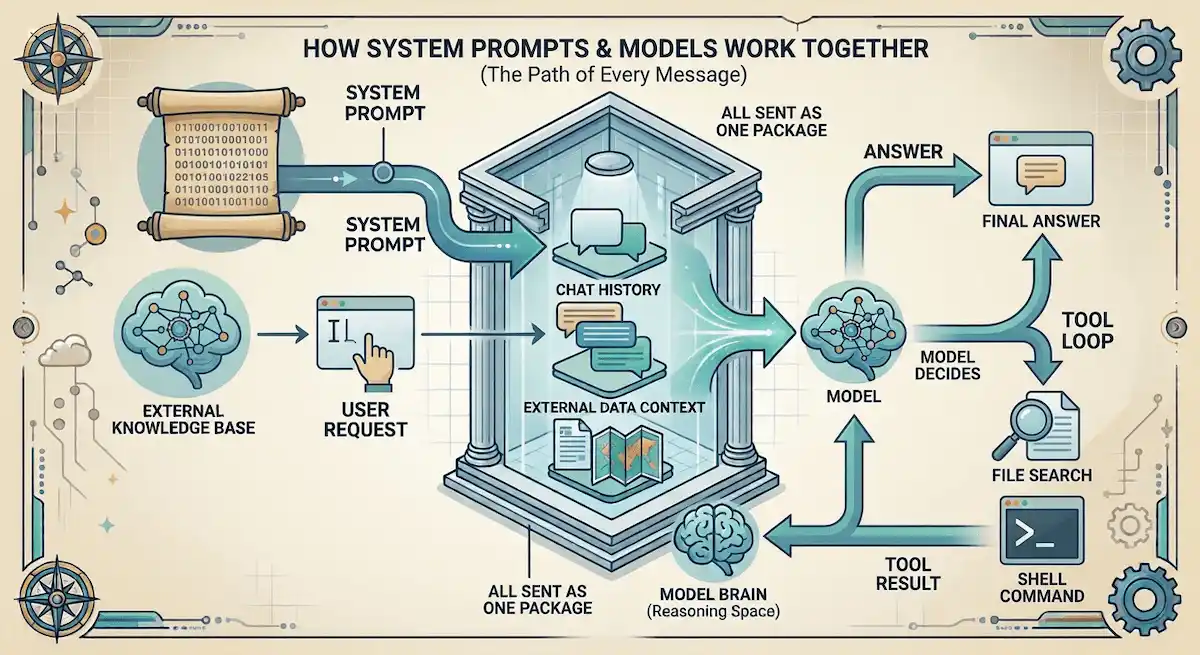
- You type a request into the tool.
- The tool adds the system prompt, the tool schema and the earlier messages to your request.
- All of that is sent to the model as one package, which uses tokens from the context window.
- The model decides whether to answer or to call a tool, such as a file search or a shell command.
- If a tool is called, the result goes back to the model, and the loop repeats.
- The final answer is shown to you.
The system prompt rides along with every request, so a long prompt costs tokens each time. This is one reason tool makers keep prompts short where they can, and why many of them tell the model to keep answers brief.
The GitHub Repo Called System Prompts and Models of AI Tools
The name of the guide you are reading comes from this repo. It is a public GitHub collection of system prompts, tool definitions and model settings from dozens of AI tools. It is reported to be one of the most starred repos for AI coding tools, with more than 130,000 stars, and it is the reason this phrase gets searched so often. You can see it on GitHub.
Who Made It and What It Contains
The maintainer is Lucas Valbuena, who uses the handle x1xhlol. The license is GPL-3.0. The repo holds more than 30,000 lines of prompts and definitions, and it has been growing since early 2025. Each tool gets its own folder, and a folder usually contains the system prompt, tool definitions as JSON and sometimes the model that the tool uses. There is also a folder with open source prompts that their makers published on purpose. The README warns AI startups that exposed prompts and models can become targets, and it points to a service that tests whether a prompt can be extracted.
Which Tools Are Covered
The list changes, but the main names are these:
- Coding tools: Cursor, Claude Code, Windsurf, Devin AI, Augment Code, Replit, VS Code Agent, Xcode, Warp, Kiro, Junie, Trae and Same.dev.
- App builders: v0, Lovable and Bolt.
- General agents and assistants: Manus, Perplexity and NotionAI.
Why the Star Counts Do Not Match
If you read several articles about the repo, you will see different numbers. They are all correct for the day they were written, because the repo grows every week.
| Month in 2026 | Stars | Forks | Tools counted |
|---|---|---|---|
| March | about 131,000 to 132,000 | about 33,000 to 33,500 | 30 to 34 |
| April | about 136,000 | about 34,000 | 28 or more |
| May and June | 138,000 to over 140,000 | about 34,400 to 34,600 | 28 |
The count of tools also changes with the way people count: some include the open source folder and some do not. Check the live page before you quote a figure.
Models Behind Popular AI Tools
The model list of a tool changes almost every month, so this table is a snapshot from October 2026.
| Tool | Models you can use | Note |
|---|---|---|
| Cursor | GPT-5.6, Claude Opus 5.5, Sonnet 5.5, Fable 5.1, Gemini 3.1 Pro and 3.8 Flash, Grok 4.7 and its own Composer 2.5 | You can pick a model or use Auto |
| Devin Desktop (formerly Windsurf) | GPT-6 Sol, Luna, GPT-6.1 Sol, Claude Sonnet 5.5, plus its own SWE-1.5 and SWE-2 | No Google or xAI models listed |
| Claude Code | Anthropic Claude models | Tied to one provider |
Choosing between them is a question of budget, models and team size, and our guide on how to choose AI tools for business lists the questions to ask first.
Windsurf Is Now Devin Desktop
Many articles about the repo still say Windsurf, so this point causes confusion. Cognition bought Windsurf in a deal that closed in December 2025, reportedly for around $250 million. On June 2, 2026 the product was renamed Devin Desktop, and the old windsurf.com address now redirects to devin.ai. The Cascade agent reached its end on July 1, 2026, and Devin Local took its place. The repo folder keeps the old name, and the prompts inside date from the Windsurf period.
What the Tools Cost
Prices also move, but the pattern is stable. Cursor has a free Hobby plan, then Pro at $20, Pro+ at $60 and Ultra at $200 per month, and teams pay $40 per user. Devin Desktop has Free, Pro at $20 and Max at $200, and a team plan with a base fee of $80 plus $40 per full seat. Because usage is metered, the real bill depends on which model you pick, and the guide on how much AI tools cost helps you plan it.
What the Leaked System Prompts Reveal
The value of the repo is that it lets you compare how tools are told to behave. These are the patterns that stand out, and we describe them in our own words.
Persona and Rules
Each prompt starts with a role and a list of rules. Claude Code is told to keep answers very short unless the task is complex, to skip long introductions and endings, and to use emojis only when asked. Cursor is built around code search, with questions written in natural language and a short reason attached to each tool call. Windsurf leans on a memory system and a planning tool, and it tells the model to save notes freely because the context may be wiped. v0 has its own habits, such as a tagged debug message in the console and local image paths by default.
Tool Use and Autonomy
The tool definitions show what an agent may do: read and write files, run shell commands, use the network, and which actions need approval. Tools differ a lot in how much freedom they give by default. If you are interested in how this applies to business work, read our guide on AI agents for business.
System Prompts, Memory and Context
Long coding sessions fill the context window, so several tools tell the model to save notes to a memory store and to re-read them later. This is part of what people now call context engineering: deciding what the model sees at each step, and not only how the first prompt is worded. The system prompt stays fixed, while memory, search results and file contents change on every turn.
Safety Guardrails
Almost every prompt spells out what is forbidden and when to stop and ask. The common rules are: no destructive commands without confirmation, no unrequested documents, defensive security only and as few tokens as possible. These rules show which risks each company worries about most.
How Long a System Prompt Can Be
Length varies enormously. The prompt of the Claude chat app, measured in May 2025, came to about 16,739 words (110 KB) and defined 14 tools, with nearly 80 percent of the text describing tool use. The prompt of the OpenAI o4-mini model in ChatGPT came to about 2,218 words, roughly 13 percent of that. Prompts like these include fixes for known weak spots of language models, such as letter counting and knowledge cutoff dates. App builders such as Bolt need long prompts because they must describe code output, security rules and formatting in one place.
Are the Leaked System Prompts Real?
Honestly, nobody can prove it. The repo describes the files as extracted from real tools, but no company has confirmed them, and the files are snapshots that may be out of date within weeks. Prompts are usually pulled out by asking directly, by role play, by completion tricks or by reading the tool calls. Well protected tools are harder to extract from, and none are provably immune.
Removal does not erase a leak. Lovable took its prompt out of the repo, but the repo had already been forked more than 34,000 times. A similar claim about a GPT-5 prompt spread on Reddit in August 2025, and it showed how hard it is to check such posts. We recommend treating every leaked prompt as reported, not confirmed.
Can You Legally Use Leaked System Prompts?
This is the question most guides skip, so we answer it carefully, and it is not legal advice. The GPL-3.0 license belongs to the repo, which means it covers the way the repo is shared. It does not prove that the prompts inside are free to reuse, because the tool makers own their own text. The safe approach is to study patterns and write your own prompt, not to paste someone else.
Do not mix this up with a different event. In early April 2026 the source code of Claude Code, not its prompts, was exposed by mistake. Anthropic filed about 8,100 DMCA takedown notices, which briefly disabled thousands of repos, and within hours the request was narrowed to one repo and 96 forks. It shows how fast a company can react when its code is copied, and how little can be said with certainty about prompts.
Official System Prompts: What Companies Publish
Not every prompt is a secret. Anthropic publishes the system prompts of its chat models in its release notes. The first set came out on July 12, 2024 for Claude 3 Haiku, Claude 3 Opus and Claude 3.5 Sonnet, with a promise to update them. These apply to the consumer apps, not to the API. Some developers also publish their own prompts on purpose, which is the idea behind the open source folder in the repo. Official prompts are the only ones you can trust to be current.
Security Risks: Extraction, Prompt Injection and Leakage
A system prompt is an instruction, not a lock. A model can be tricked into breaking it with prompt injection, where hidden text in a document or a web page tells the model to ignore its rules. That is why a prompt should never contain a secret such as a password or a private key, and why important rules need a second layer in the application code. If your company puts private data in front of a model, read our guide on AI data privacy for business.
There is also a business lesson. A secret prompt is not a lasting advantage. Competitors can often rebuild the behavior, so the real edge comes from model quality, product design, training data and integrations. Tests that try to pull out your own prompt before others do are becoming a normal part of launching a tool.
How to Write a Good System Prompt
We recommend writing the prompt in clear blocks, in a fixed order. Short and specific beats long and vague.
The Anatomy of a System Prompt
- Role: one line on who the assistant is, and a real job, not only a title.
- Goal: what a good answer looks like.
- Behavior: tone, length and how to handle unclear requests.
- Context: stable facts about the company or product.
- Boundaries: what it must refuse and when to hand over to a person.
- Tool rules: when to call a tool and what to do if it fails.
- Output format: lists, tables or plain text, and how long.
- Uncertainty: say what is not known instead of guessing.
- Priorities: which rule wins when two rules clash.
A role alone is not enough. The line you are an expert tells the model almost nothing, while the rules, the limits and the output format change its behavior. The guide on prompt engineering for business shows the same method on everyday tasks.
A Short Example
A support assistant for an online shop could look like this in outline: the role is a calm support agent for the shop, the goal is to solve order questions in three sentences, the rules say never promise a refund before checking the order, the tool rule says to look up the order first, and the boundary says to pass billing disputes to a person. Notice that each line is a rule the model can follow or break, which also means you can test it.
Common System Prompt Mistakes
- Vague rules such as be helpful, which the model reads in many ways.
- Adding rules without measuring whether they help.
- Mixing changing data, such as prices, with stable behavior rules.
- Repeating the same rule in several places.
- No uncertainty rule, so the model guesses.
- No tool failure rule, so the model claims an action worked when it failed.
- Copying one prompt across every model without testing.
System Prompt Examples by Use Case
The same structure works for very different jobs. The table shows what changes from one use case to another, written as short outlines and not as full prompts.
| Use case | Role | Key rules | Output |
|---|---|---|---|
| Customer support | Calm support agent for one shop | Check the order first, never promise refunds, hand billing disputes to a person | Three short sentences |
| Coding assistant | Senior engineer in one codebase | Read before editing, ask before destructive commands, explain changes briefly | Code blocks plus a short note |
| Content writer | Editor for one brand voice | Follow the style guide, no invented facts, flag missing sources | Draft with headings |
| Data analyst | Analyst who shows the method | State assumptions, never guess numbers, say when data is missing | Table plus a summary |
If you build the support case, our guide on AI customer service covers the workflow around it.
Techniques That Make a System Prompt Stronger
- Few-shot examples: show two or three good answers so the model copies the pattern.
- Step-by-step instructions: ask for the checks in order when a task has several stages.
- Clear structure: separate the blocks with headings or tags so the model can tell rules from context.
- Positive wording: say what to do, since a list of only prohibitions is easy to misread.
- Fixed output format: name the format and the length, especially when code reads the answer.
Examples work best when they are short and varied. If every example looks the same, the model will copy the shape too closely and miss the cases that differ.
How to Test and Version a System Prompt
A prompt that works in a quick demo can fail in production. We suggest keeping a list of real test cases, including bad ones, and running them after every change. Regression testing checks that old answers still work, adversarial testing tries to break the rules, and A/B testing compares two versions on real traffic. Keep each version with a date and the failures it fixed, and change one thing at a time. Temperature also matters: lower values suit rules and facts, higher values suit creative work.
What Users Think About System Prompt Transparency
A 2026 research paper analyzed 1,309 system prompts from nine sources and surveyed 109 people. About 88 percent knew about system prompts or suspected them, and about 89 percent wanted some level of transparency. Around 79 percent wanted some influence over the prompt, but only about 8 percent wanted unrestricted editing. The takeaway for tool makers is clear: people want to know the rules, and they do not want to rewrite them.
Who Should Read System Prompts and Why
- Developers use them as a model for their own prompts and tool definitions.
- Product builders learn how others handle rules, memory and tool approval.
- Security engineers test whether their own prompt can be extracted.
- Ordinary readers get a rare look at how an AI product is told to behave.
Final Thoughts
The model gives an AI tool its ability, the system prompt gives it direction, and the tool schema sets its limits. When you compare tools, read the rules and the model list, not the marketing page. Use leaked prompts to learn patterns, not to copy, and treat them as reported, not confirmed. Before you commit to a set of tools, plan how they fit together with our guide on the AI tool stack for business.
System Prompts FAQs
What Is the System Prompts and Models of AI Tools Repository?
It is a public GitHub repo that collects system prompts, tool definitions and model settings of dozens of AI tools. It is maintained by Lucas Valbuena (x1xhlol) under the GPL-3.0 license and has more than 130,000 stars.
What Is a System Prompt in AI?
It is a hidden set of instructions that the model follows in every conversation. It sets the role, the rules, the tone and the tools the assistant may use.
What Is the Difference Between a System Prompt and an AI Model?
The model is the engine that produces the answer. The system prompt is the instruction set that tells the engine how to behave in a particular product.
What Is the Difference Between a System Prompt and a User Prompt?
The system prompt is written by the developer and applies to the whole conversation. The user prompt is written by you for a single request, and it has lower priority.
Can a User Override a System Prompt?
Usually not directly, because the model is trained to give the system level more weight. Prompt injection can still trick a model, so important rules need extra protection in the application code.
Are the Leaked System Prompts on GitHub Real?
Nobody has proven it. The files are described as extracted from real tools, but no company has confirmed them, and they may be out of date.
Can You Legally Reuse Leaked System Prompts?
The GPL-3.0 license covers the repo, not the prompts inside it, which belong to the tool makers. Study the patterns and write your own, and ask a lawyer if the use is commercial.
Which Models Do Cursor and Devin Desktop Use?
Cursor offers models from OpenAI, Anthropic, Google and xAI plus its own Composer 2.5. Devin Desktop offers GPT-6 models, Claude Sonnet 5.5 and its own SWE-1.5 and SWE-2. These lists change often.
Why Do AI Coding Tools Behave So Differently?
Because the prompt, the tool schema and the interface differ, even when two tools use the same model. Memory, planning and approval rules change the result a lot.
How Long Should a System Prompt Be?
As long as it needs to be and no longer. A simple assistant can work with a few lines, while a coding agent may need thousands of words. Every word costs tokens on each request, so remove rules that do not help.
Does a System Prompt Use Tokens?
Yes. It is sent with every request, so it counts against the context window and adds to the cost of each message.
Can a System Prompt Stop Prompt Injection?
Not fully. A prompt can make the model more resistant, but it is not a hard boundary like code. Use extra checks and keep secrets out of the prompt.
Does Claude Publish Its System Prompt?
Yes, for its consumer chat apps. Anthropic has published them in its release notes since July 12, 2024. The prompts do not apply to the API.
What Is the Difference Between a System Prompt and Fine-Tuning?
A system prompt is text added at run time and can change in minutes. Fine-tuning changes the model itself through new training and is slower and more expensive.
Can the Same System Prompt Work in ChatGPT, Claude and Gemini?
It can work as a starting point, but each model reacts differently. Test it on every model you use, and do not assume equal results.
What Are Good Examples of System Prompts?
Good examples are short and specific. A support agent prompt names the shop, the three sentence limit and the rule to check the order first. A coding prompt names the codebase, the approval rules and the output format. Each one has a role, rules, boundaries and a format.
What Is the Best Format for a System Prompt?
Use clearly separated blocks in a fixed order: role, goal, rules, context, tools and output format. Headings or tags work well, and plain short paragraphs are fine for simple assistants. Keep stable rules apart from data that changes.
Is Windsurf the Same as Devin Desktop?
Yes. Cognition bought Windsurf, and the product was renamed Devin Desktop on June 2, 2026. The old Cascade agent ended on July 1, 2026 and Devin Local replaced it.










