Bolt AI is the name most people use for Bolt.new, a browser-based app builder from StackBlitz. You type what you want in plain English, Bolt writes the code, runs it in a live preview and publishes it when you are ready. No local setup is needed. Everything happens inside one browser tab.
If you are asking what is Bolt AI before you pay for it, this guide gives you the full picture. You will see how Bolt AI works, which features matter, what each plan costs in 2026, how tokens are counted and who gets the most value from it. You will also see where it falls short, how it compares with Lovable, Replit, v0 and Cursor, and whether it is worth the money.
Bolt AI in Short
- What it is: a browser-based AI app builder from StackBlitz, also called Bolt.new.
- What it does: turns plain English prompts into working full-stack web apps with a live preview.
- Price: a free plan with 1M tokens per month, Pro at $25 per month and Teams at $30 per member.
- Best for: prototypes, MVPs, landing pages and internal tools.
- Main downside: tokens run out fast on large projects, and the code needs a review before launch.
What Is Bolt AI?
Bolt AI is an AI app builder that turns a text prompt into a working full-stack app. The product is officially named Bolt.new, and both names point to the same tool. You describe the app in plain English, Bolt AI generates the files, and you see the result in a live preview next to the chat. Then you keep asking for changes until the app looks and works the way you want.

Most AI coding tools suggest code and leave the rest to you. Bolt AI covers the whole loop. It creates the project, installs packages, starts the server and publishes the finished app on its own hosting. You can also connect a GitHub repository or export the code if you want to continue in another editor. That is why founders, marketers and developers use Bolt AI for prototypes, MVPs and small internal tools. Companies that already use generative AI for business tasks like writing and reporting often see Bolt AI as the next step, because it handles software instead of text.
| Detail | Bolt AI |
|---|---|
| Official name | Bolt.new |
| Made by | StackBlitz |
| Type | Browser-based AI app builder |
| Output | Full-stack web apps, usually React and Node.js |
| Free plan | Yes, 1M tokens per month |
| Paid plans | From $9 to $25 per month, plus Teams and Enterprise |
| Best for | Prototypes, MVPs, landing pages and internal tools |
Who Made Bolt AI and When
Bolt AI comes from StackBlitz, a company known for its browser-based coding platform. The team, led by Eric Simons, launched Bolt.new in 2024. It grew fast through demos on social media, where creators showed full apps built in minutes. Several reports say it passed 5 million users within months of launch. The product keeps changing, and Bolt V2 together with the Forge agent are the latest big updates.
Why Bolt AI Became So Popular
Four things pushed Bolt AI into the spotlight:
- Speed: a working app appears in minutes instead of weeks.
- End-to-end build: code, preview, database and hosting sit in one place.
- Low entry barrier: non-coders can start with plain English and no setup.
- Public demos: creators posted full builds online, and each demo brought new users.
The hype also created wrong expectations. Bolt AI does not replace a developer on a big product. It replaces the slow first step, which is getting from an idea to something you can click.
Bolt AI vs BoltAI for Mac
The names are close, and search results mix the two. BoltAI for Mac is a separate native macOS app from another company. It works as a chat client that connects to more than 300 models with your own API keys. It does not build web apps. When people search for Bolt AI to build an app, they mean Bolt.new, and this guide covers that product.
How Does Bolt AI Work?
Bolt AI works in three layers, and Bolt.new hides most of that work behind a simple chat box. Knowing them explains most of its strengths and most of its limits.
The Three Layers: Models, Orchestration and WebContainers
- Models: an agent reads your prompt and writes the code. The Standard agent runs on Claude, the Max agent is made for bigger tasks, and the Forge agent runs on open source models such as GLM, Kimi and DeepSeek.
- Orchestration: Bolt splits the request into steps. It creates files, edits them, runs terminal commands and reacts to errors.
- WebContainers: this StackBlitz technology runs Node.js inside the browser. It lets Bolt install npm packages and start a dev server without a local machine.
The result is that everything, from the first prompt to the live preview, happens in one tab. The trade-off is that the size of the project you can handle depends on the browser and on how much context the agent can hold.
From Prompt to Live App Step by Step
- You type a prompt that describes the app, its pages and its main actions.
- The agent plans the structure and picks a stack, usually React with Vite and Tailwind CSS.
- Files appear in the code editor while the terminal installs packages.
- The live preview opens and you click through the app.
- You ask for changes in the chat, or edit the code and design by hand.
- You publish with one click, add a custom domain or push the code to GitHub.
Context Limits and Why Large Projects Slip
Bolt.new sends parts of your project to the model with every prompt. A small app costs few tokens. A large app costs much more, and the agent can start to forget earlier decisions, repeat work or break a feature that worked before. This is the main reason reviews warn about big projects.
Tools like target files, lock files and the .bolt/ignore file let you tell the agent what to touch and what to skip. They keep costs and mistakes down, and they matter more the bigger your app gets.
Bolt AI Features
Bolt.new has grown from a simple prompt box into a full build and hosting platform. These are the features that matter most.
Prompt to Full-Stack App
You describe the app, and Bolt AI builds the front end, the back end logic and the database connection together. Typical results are web apps with login, forms, dashboards and payments. The first version works like a draft. Plan to refine it with follow-up prompts, because the agent rarely gets every detail right on the first try.
Code Editor and Live Preview
Bolt AI includes a code editor, a file tree, a terminal and a live preview in the same window. You can read every file the agent writes and change it by hand. Developers often fix small issues themselves because that is faster than explaining them in the chat. Beginners can use the same view to learn how a project is structured.
Bolt Cloud: Hosting, Database and Domains
Bolt Cloud gives each project hosting, a database and user login without a separate account elsewhere. You can connect a custom domain and publish with one click. If you prefer other services, Bolt AI also connects to Supabase for the database and to Netlify for hosting, so you can mix tools as your project grows.
Discussion Mode and Plan Mode
In discussion mode you talk through ideas, structure and problems with the agent, and no code changes. Plan mode lets the agent write out the steps before it builds anything. Both save tokens, because you fix the direction first and pay for the build only once.
Error Detection and Fixes
Bolt AI watches the terminal and the preview for errors. When something breaks, it shows the message and offers a fix button that sends the error to the agent. This works well for simple problems like a missing package. For deeper bugs the loop can repeat and burn many tokens, so read the error yourself after the second failed attempt.
Project Control: Target Files and Lock Files
You can point the agent to target files so it edits only those. Lock files protect files you do not want touched, and the .bolt/ignore file hides files from the agent. These controls keep large projects stable and lower the token cost of each prompt.
Visual Edits and Prompt Library
The visual editor lets you click an element in the preview and change text, colors or spacing directly, often at no token cost. The prompt library stores prompts you reuse, such as a style guide or a page layout, so you do not retype them for every project.
Integrations: Supabase, Stripe, GitHub, Netlify, Figma and Expo
Bolt AI connects to Supabase for databases and login, Stripe for payments, GitHub for version control, Netlify for hosting, Figma for design import and Expo for mobile apps. This list covers most of what a small product needs to launch. Newer builds also support MCP connectors to tools such as Notion, Linear and Jira, according to recent reviews.
Version History, Backups and Code Export
Every change is saved, so you can restore an earlier version when a prompt breaks something. You can download the project files or send them to GitHub at any time, so you are not locked into the platform.
AI Agents: Standard, Max and Forge
You pick the agent for each task. Standard handles most work. Max suits large or complex changes. Bolt Forge uses open source models and uses far less of your token budget per task. There is also bolt.diy, an open source version of Bolt that you can run yourself with many model providers.
Bolt AI Pricing
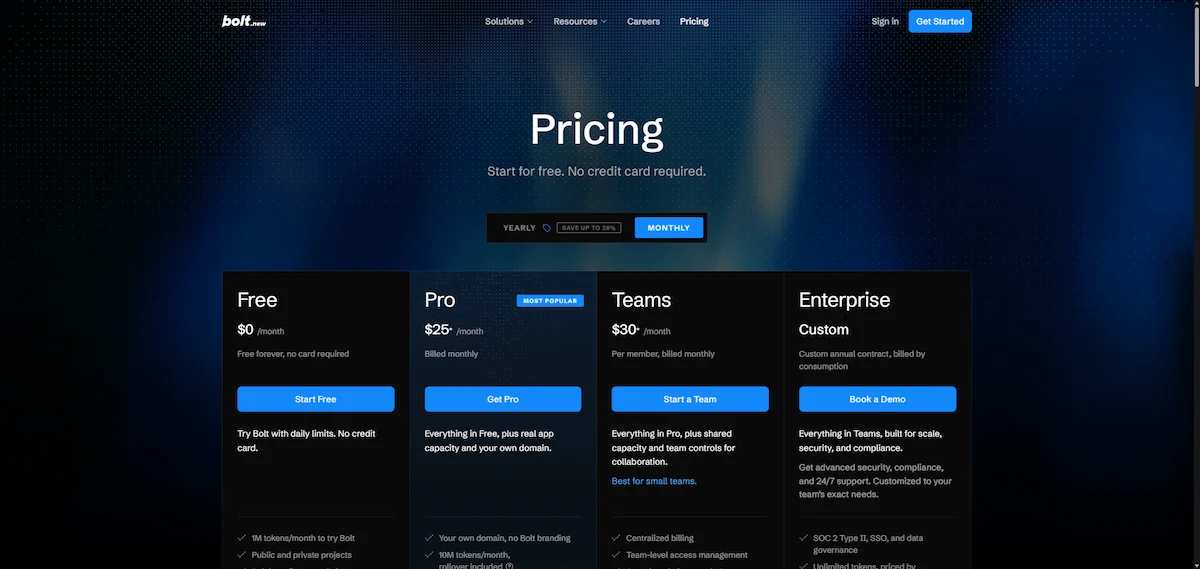
Bolt.new uses token-based pricing, so Bolt AI plans work like a monthly credit budget. Each plan includes a token budget, and every prompt uses part of it. The table shows the plans as listed in October 2026. Check the official pricing page before you buy, since plans and limits change often.
| Plan | Price | Tokens | Best for |
|---|---|---|---|
| Free | $0 | 1M per month, 300K per day | Testing and small prototypes |
| Lite | $9 per month | Forge models only | Cheap builds, closed to new signups |
| Pro | $25 per month | 10M per month, no daily cap | Solo founders and freelancers |
| Teams | $30 per member per month | Counted per member | Small teams |
| Enterprise | Custom | Custom | Companies with security needs |
Bolt AI Free Plan
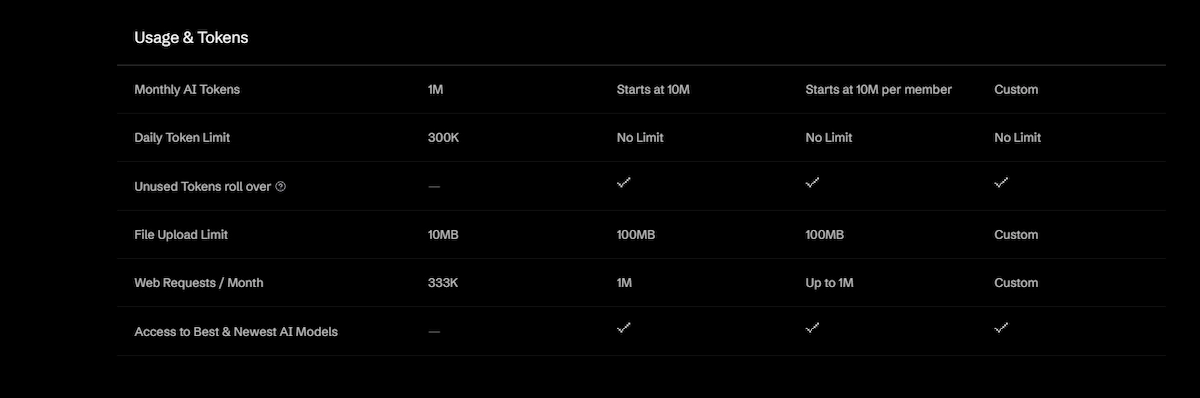
The free plan gives 1M tokens per month with a daily limit of 300K tokens. That is enough to build a small prototype and test the workflow. Once you hit the daily cap, you wait until the next day. A medium or large project will use the free budget fast, so treat this plan as a trial.
Bolt Lite and Bolt Forge
Bolt Lite costs $9 per month and gives access to Forge models only. Forge launched with a free preview that ran until October 14, and new Lite signups closed on that date. Existing subscribers keep renewing at $9. Forge is built around an opt-in data trade, so you agree to share session data in return for the extra usage. It is not available on Teams and Enterprise.
Pro and Teams Plans
Pro costs $25 per month and includes 10M tokens, no daily cap and one extra month of rollover for unused tokens. Teams costs $30 per member per month and adds shared projects, with tokens counted per member. Heavy users can move to larger Pro tiers, with the top tier listed at 1,200M tokens for $2,000 per month. Enterprise adds SSO, audit logs and custom terms. Extra tokens can be bought as a reload, around $20 for 10M tokens.
Annual and Monthly Billing
Bolt AI offers a discount for annual billing. Sources list different amounts, from 10 percent to higher figures, so check the pricing page for the current number before you commit to a year.
What Changed in 2026
Recent updates changed the product a lot. Bolt V2 made the Claude agent the default and added an automatic debugging pass. Forge brought open source models and much higher usage, and Lite added a $9 entry plan. Older reviews still list outdated prices and token tiers, so check the date of any source before you trust its numbers.
How Bolt AI Tokens Work
A token is a small chunk of text that the model reads or writes. Bolt counts the code it reads from your project plus the code it writes. This means the same prompt costs more on a big project than on a small one. The numbers below are rough estimates from third party reviews, not official figures.
| Project size | Tokens per prompt (estimate) |
|---|---|
| Small | 50K to 150K |
| Medium | 150K to 500K |
| Large | 500K to 1M or more |
For a wider view of budgets across tools, see this guide on how much AI tools cost.
What Bolt AI Really Costs in Practice
A hobby project often fits inside the free plan. A solo founder who builds one MVP over a few weeks usually needs Pro. Heavy builders who work on several projects can run out of tokens before the month ends and buy a reload. The best way to control cost is to treat tokens like a budget: plan first, build once and fix small things by hand.
Is Bolt AI Pro Worth $25 per Month?
Pro makes sense when you build every week and the free daily cap keeps blocking you. You get 10M tokens, no daily limit and a rollover month for unused tokens. It does not make sense if you build once and stop, since the free plan or a single month of Pro covers a one-off prototype. Cancel after launch if you no longer need new builds.
How to Save Tokens in Bolt
- Use discussion mode or plan mode before you start a build.
- Write one clear prompt instead of five vague ones.
- Use target files and lock files so the agent does not rewrite the whole project.
- Hide unused files with the .bolt/ignore file.
- Use the visual editor for small design changes.
- Switch to the Forge agent for simple tasks and drafts.
- Read errors yourself before you press the fix button a third time.
Who Is Bolt AI For?
Bolt AI fits anyone who needs a working web app fast and does not want to set up a dev environment. The value depends on what you build and how much you check the result.
Non-Technical Founders and Solo Builders
Founders use Bolt AI to test an idea before they hire a developer. A landing page, a booking app or a simple SaaS dashboard can exist within a day. If you run a small company and want to see where else automation fits, this guide to AI for small business shows more options. Indie hackers also like Bolt AI because the Pro plan costs less than a few hours of freelance work.
Developers and Small Teams
Developers use Bolt AI to scaffold a project and skip boilerplate. They export the code and continue in their own editor. Small teams on the Teams plan share projects and review changes together, which makes Bolt AI useful for quick internal tools.
Product Managers, Marketers and Agencies
Product managers build clickable prototypes for user tests. Marketers build campaign pages and calculators without waiting for the dev team. Agencies deliver first drafts to clients faster and hand them to developers afterward. In all three cases the app is a draft that people review, not a final product.
Students and Hobbyists
Students use Bolt AI to learn how apps are built by reading the code the agent writes. The free plan covers small practice projects, and the live preview makes mistakes easy to spot.
Who Should Skip Bolt AI
Skip it if you need a large production system with strict security rules, complex backend logic or heavy offline work. Teams that already have a strong dev pipeline may get more from a code editor like Cursor. People who expect a finished product from one prompt will be disappointed, since Bolt AI delivers a first draft that needs review.
What Users Say About Bolt AI
This Bolt AI review section sums up the pattern in user feedback on Bolt.new from G2, Trustpilot and Product Hunt. Praise is steady: users like the speed of the first build, the live preview and the low barrier for non-coders.
Complaints are steady too. Tokens disappear fast on large projects, the agent sometimes loops on the same bug, and support replies can be slow. Many users say the best results come from small, clear prompts and from checking the code before launch. That pattern matches the feature list. Bolt AI is strong at starting projects and weaker at maintaining big ones. To check whether the time you save covers the token cost, use the steps in this guide on AI ROI for business.
What Can You Build With Bolt AI?
Bolt.new works best on web apps with a clear scope. Common builds include:
- Landing pages and marketing sites: fast to build and easy to change by prompt.
- Internal tools and admin panels: forms, tables and simple approval flows.
- Dashboards: charts and filters connected to a Supabase database.
- Client portals and simple CRMs: login, records and notes.
- Booking apps: calendars with Stripe payments.
- Small SaaS products and MVPs: a first version to test with real users.
- Mobile app prototypes: built with Expo for quick phone tests.
Tutorials from nocode.mba show Bolt AI cloning Spotify and Airbnb interfaces. That proves it handles design well, while logic and backend work need more care. If you only need a support bot, a guide on how to build a chatbot without coding may be a faster route.
How to Use Bolt AI
- Create an account at bolt.new and start a new project on the free plan.
- Write a clear prompt. Name the app type, the pages, the main features and the style.
- Pick an agent. Use Standard for most tasks and Forge for cheap drafts.
- Review the preview. Click every button and fill every form.
- Refine in small steps. One change per prompt works better than a long list.
- Publish or export. Use Bolt Cloud, connect Netlify or push the code to GitHub.
If your first attempt is vague, press the enhance prompt button and let Bolt rewrite it with more detail.
Prompt Examples That Work
- “Build a booking app for a barber shop with a calendar, login and Stripe payments.”
- “Create a landing page for a fitness coach with three pricing cards and a contact form.”
- “Make an admin dashboard with a sales chart, a customer table and a search filter.”
Each prompt names the app, the main parts and one integration. That is enough for a solid first draft. For more ideas on wording, see this guide on prompt engineering for business.
Tips for Better Results
- List the pages and features before the first prompt, so the agent builds the right structure.
- Ask for one feature per prompt and test it before you ask for the next one.
- Describe the style with simple words, such as colors, font mood and layout, or import a Figma design.
- Push the code to GitHub often, so one bad prompt never costs you the whole project.
- Use discussion mode when you do not understand a piece of code.
- Restore an earlier version from the history when the agent gets stuck in a loop.
Build Your First App: A Recipe Tracker Example
A recipe tracker is a common first project because it is small and clear. Type a prompt such as “Build a recipe tracker where I can add recipes with ingredients, search them and mark favorites.” Bolt AI creates the pages and the preview within a minute or two. Click through the app and ask for one change at a time, for example a category filter. Then connect Supabase so recipes are saved for each user, and publish the app with Bolt Cloud.
Connecting a Database With Supabase
Open the Supabase integration inside your project and connect your account. Then ask Bolt AI to create the tables and the login flow in plain English. Check the result in the Supabase dashboard, and turn on row level security so users only see their own data. Bolt Cloud offers a built-in database as an alternative if you do not want a separate account.
How to Deploy a Bolt AI App
Press the publish button to host the app on Bolt Cloud, or connect Netlify and deploy there. Add a custom domain in the project settings and point your DNS records to it. If you want full control, push the code to GitHub and host it with any provider you like. Test the live link on a phone before you share it.
Bolt AI Pros and Cons
Pros
- Fast path from idea to working app in one browser tab
- No local setup, so beginners can start in minutes
- Full code access and export, so there is no lock-in
- Built-in hosting, database and domains with Bolt Cloud
- Free plan to test before you pay
- Forge and bolt.diy give cheaper or self-hosted options
Cons
- Tokens run out fast on large projects
- Debugging loops can burn tokens
- Complex backend logic needs manual work
- Generated code needs a review before launch
- Support speed gets criticized in user reviews
- Works online only
Bolt AI Limitations to Know Before You Start
Reviews of Bolt AI point to the same weak spots, and most of them come from how the tool works.
Token cost grows with project size. Each prompt reads your files again, so a big app burns through a plan quickly. On the free plan a few large prompts can use up the daily cap.
The agent loses track on large apps. Context drift leads to repeated work, broken features and fixes that undo earlier fixes.
Debugging can loop. The agent sometimes tries the same fix again and again, and every attempt costs tokens.
Backend logic is limited. Bolt AI handles forms, login and simple data well. Background jobs, complex permissions and heavy integrations usually need a developer.
The stack is mostly JavaScript. If your team works in Python, Java or another language, a tool like Replit or Cursor fits better.
Quality varies. The same prompt can give different code on different days, so review everything before launch.
Is Bolt AI Safe and Ready for Production?
Bolt AI is safe to use for prototypes and many small products, but generated code needs a human check before real customers use it. The agent can miss input validation, expose keys in the front end or skip access rules. Always review login, payments and database rules yourself or with a developer.
Data handling matters too. The Forge agent works on an opt-in data trade, so you share session data in return for extra usage. Teams and Enterprise projects stay out of Forge, and Enterprise adds SSO and audit logs for stricter companies. Read the terms and this guide on AI data privacy for business before you upload client data.
Pre-Launch Checklist
- Move API keys out of the front end and into environment variables.
- Turn on row level security in your Supabase tables.
- Test login, logout and password reset with a second account.
- Verify Stripe webhooks before you accept real payments.
- Validate every form field on the server, not only in the browser.
- Check the installed packages for old or unused items.
For the latest changes to agents and plans, see the Bolt release notes.
Bolt AI Alternatives
Several tools compete with Bolt AI. The table shows where each one fits.
| Tool | Best for | Main difference |
|---|---|---|
| Lovable | Non-coders who want polished apps from chat | Simpler chat flow with less direct code work |
| Replit | Full cloud development in many languages | Complete online IDE with hosting and its own agent |
| v0 | React and Next.js interface design | Made by Vercel and focused on the front end |
| Cursor | Developers with an existing codebase | Desktop code editor, not an app builder |
| Base44 | Quick business apps with a built-in backend | All-in-one hosted setup |
| GitHub Copilot | Code suggestions inside an editor | Assistant only, with no hosting or preview |
Bolt AI vs Lovable
Lovable focuses on chat-driven design and suits non-coders. Bolt AI gives more access to the code and includes a terminal, which suits people who want control. Pricing is close, so test both free plans with the same prompt. Choose Lovable if clean design from a short chat is your main goal. Choose Bolt AI if you want to open the code, run commands and move the project to your own stack.
Bolt AI vs Replit
Replit is a full cloud IDE that supports many languages and deployments. Bolt AI focuses on JavaScript web apps and gives a faster start for that case. Choose Replit if you need Python or another language, and Bolt AI if a JavaScript web app is enough.
Bolt AI vs v0
The v0 tool from Vercel generates interface components and pages, mostly in React and Next.js. Bolt AI builds the whole app with a back end and a database, not only the front end. Pick v0 when you only need interface pieces for an existing Next.js project.
Bolt AI vs Cursor
Cursor is an editor for developers who already have a project. Bolt AI is for people who start from nothing. Many developers use both: Bolt to scaffold the app and Cursor to finish it.
If you are still deciding, this guide on how to choose AI tools for business helps you compare options by budget and need.
Is Bolt AI Worth It?
Bolt.new is worth it if you need prototypes, MVPs or small internal tools fast and you accept that the first draft needs review. The free plan is enough to test the workflow, and Pro at $25 per month suits solo builders who ship every week. It is a poor fit for large systems or strict compliance work. To judge the return, compare the hours you save with the tokens you spend over one month.
So, what is Bolt AI in short? A fast browser tool that turns plain English into working apps. Start on the free plan, build one small project and judge the result before you upgrade.
Frequently Asked Questions About Bolt AI
What Is Bolt AI in Simple Terms?
Bolt AI, also called Bolt.new, is a browser tool that builds web apps from plain English prompts. It writes the code, shows a live preview and publishes the app. You do not install anything or set up a server.
Is Bolt AI Free to Use?
Yes. The free plan gives 1M tokens per month with a 300K daily limit. It works for small tests. Bigger projects need the Pro plan at $25 per month.
How Much Does Bolt AI Cost per Month?
Plans run from $0 for Free to $25 for Pro and $30 per member for Teams. Lite costs $9 but is closed to new signups. Enterprise pricing is custom.
Can Beginners Use Bolt AI Without Coding?
Yes. You can build simple apps with prompts only. Basic web knowledge helps when you fix errors, and reading the generated code is a quick way to learn.
Can Bolt AI Handle Complex Applications?
It handles small and medium apps well. Large apps with heavy backend logic strain the context limit and the token budget. For those, use Bolt AI for the first version, then export the code and continue with a developer.
Can I Export My Bolt AI Project and Host It Elsewhere?
Yes. You can download the files or push them to GitHub, then host the app on Netlify or any other provider. The code is yours to move.
Is Bolt AI Safe to Use?
Yes for prototypes and small products, with a review before launch. Check login, payments and database rules, and read the data terms if you use the Forge agent.
Can Bolt AI Connect to a Database?
Yes. Bolt Cloud includes a database, and Bolt AI also connects to Supabase. Both handle user login and stored data for most small apps.
Can Bolt AI Build Mobile Apps?
Bolt AI can build mobile app prototypes through the Expo integration. You preview the app on your phone. For a full store release, expect extra work outside the platform.
Does Bolt AI Create Production-Ready Apps?
It creates a solid first version, but production needs a review. Check security, payments, database rules and error handling before launch.
What Happens When I Run Out of Tokens?
On the free plan you wait for the daily or monthly reset. On paid plans you can buy a token reload or move to a higher tier. Using plan mode and target files makes tokens last longer.
How Many Tokens Does a Typical Bolt AI Project Use?
Reviews estimate 50K to 150K tokens per prompt on a small project and 1M or more on a large one. A small prototype often fits inside the free plan.
How Do I Fix Errors in Bolt AI?
Press the fix button once, then read the error message yourself. If the same error returns, rewrite the prompt with the exact message, use discussion mode to find the cause or restore an earlier version from the history.
Do Unused Bolt Tokens Roll Over?
On paid plans, unused tokens roll over for one extra month. Free plan tokens reset every month and also follow a daily cap.
Is Bolt AI Better Than Lovable or v0?
It depends on the project. Bolt AI offers more code control and full-stack builds. Lovable suits non-coders, and v0 suits React interface design. Test the free plans before you choose.
Does Bolt AI Work Offline?
No. The agent needs an internet connection, so Bolt AI only works online.
Is Bolt AI the Same as BoltAI for Mac?
No. BoltAI for Mac is a native macOS chat app from another company that connects to many models with your own API keys. Bolt AI builds web apps.










