AI agents for business are software workers that take a recurring job, start on a trigger such as a new lead or an overdue invoice, read the records they need across your tools, and carry out the steps while a person approves anything risky. The idea is easy to like and hard to run well. The McKinsey State of AI survey reports that 62% of organizations are experimenting with agents, yet only 23% are scaling one anywhere in the company.
This guide covers what agents do and which types exist, use cases by function and by industry, the platforms worth a look with public prices, how to choose by company size and stack, what a small business should start with, what the whole thing costs including build versus buy, the risks, and both a 14-day pilot and a 90-day path to production. Prices and figures come from vendor pages and published surveys from September and October 2026. Confirm every number on the vendor site before you buy, because plans and billing units change often.
What are AI agents for business?
An AI agent for business is software that owns a recurring job from start to finish. It starts on a trigger, reads the records it needs in your CRM, inbox, and accounting tools, decides what to do, and acts. A person approves the steps that carry risk, such as refunds, contract changes, or any message that reaches a customer.
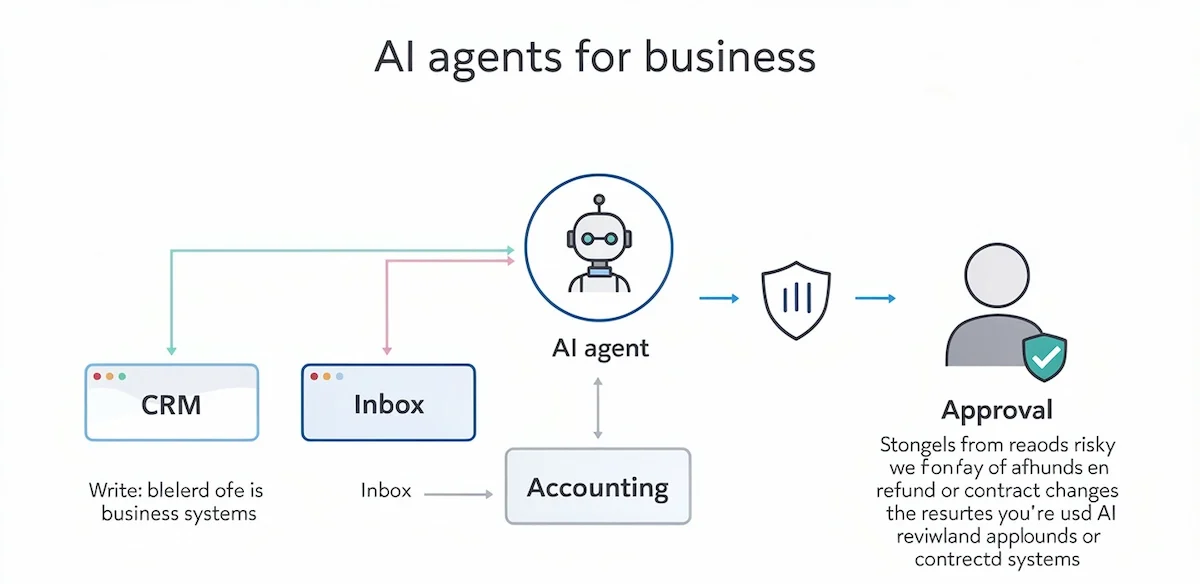
The label is attached to almost every software product now, so a few checks help before you trust it. Most AI agents for business that survive in production share the same traits. They run without anyone typing a prompt, they pull context from more than one system, they write results back into those systems, and they stop for approval where a mistake would cost money or damage a customer relationship. A tool that misses the last trait is a script with a language model inside it. Vendors also call this approach agentic AI, and the two terms mean the same thing in practice.
How an AI agent works: trigger, context, decision, approval
Every agent in this guide follows the same four steps, and those steps are the best way to judge a vendor demo.
- Trigger: a new form submission, an email in a shared inbox, a ticket, a due date that passed, or a schedule such as Monday at 7 a.m.
- Context: the agent reads the lead record, the last three emails, the order, or the policy before it decides anything.
- Decision and action: it classifies, scores, drafts, and routes, then writes back to the CRM, sends the message, or creates the task.
- Approval: anything irreversible waits in a queue until a person clicks approve.
Platforms differ mostly in how well they handle the approval step and in how many tools they can reach during the context step.
Three questions that separate a real agent from a relabeled automation
Many products carry the word agent in the marketing copy and fail a simple test. Ask whether the tool picks its own next step based on what it just read, instead of following a path you mapped. Ask whether it calls tools in the middle of a task, reads the response, and changes course. Ask whether earlier steps of the run influence later ones, so that step four depends on what happened in step two. A product that answers no to the first two is workflow automation, which is still useful and usually cheaper. Run this check on any shortlist before you compare prices.
AI agent vs chatbot
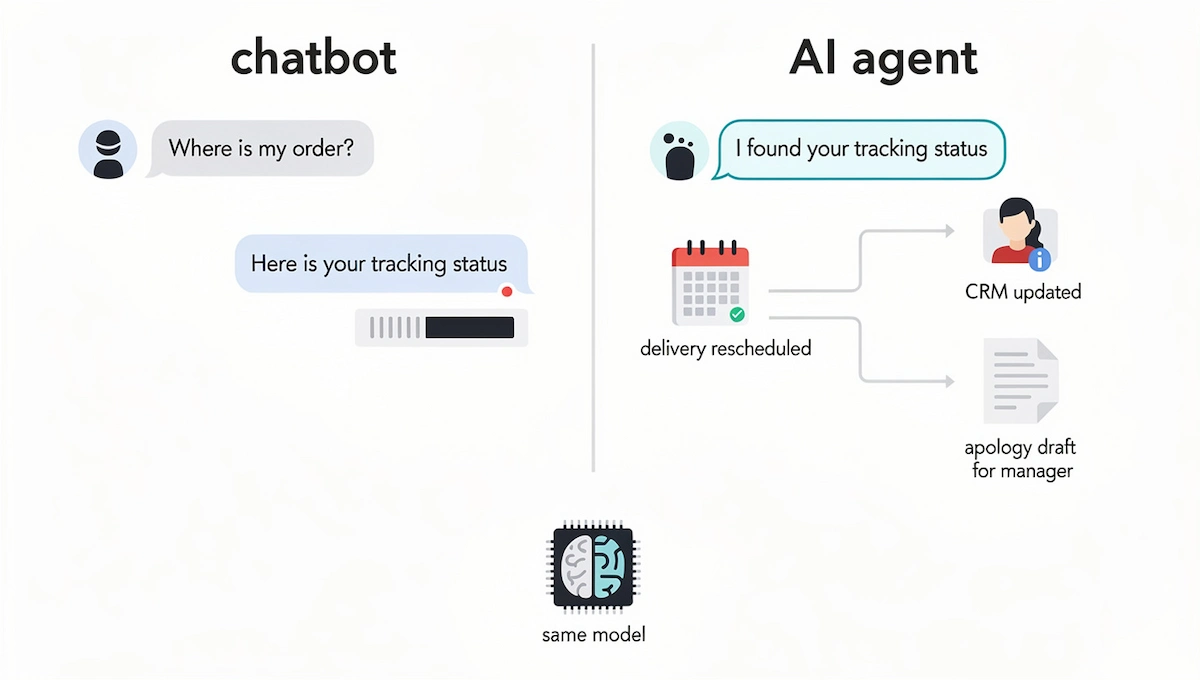
A chatbot waits for a question and answers it. Ask where an order is and it pulls the tracking status. In an AI agent vs chatbot comparison, the gap shows up in what happens next. The agent sees that the delivery is delayed, reschedules it, updates the CRM, and drafts an apology for a manager to approve. The same language model can sit under both products. The difference is access to tools and permission to act.
AI agents vs workflow automation and RPA
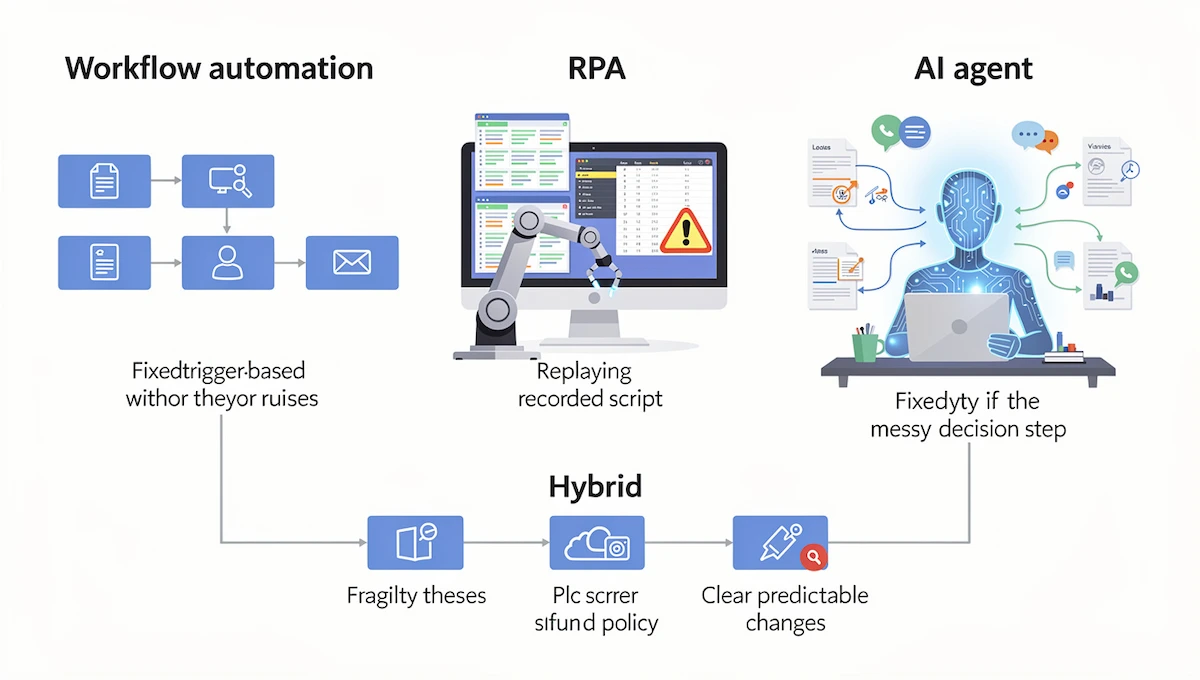
Workflow automation, such as a Zap or a Make scenario, runs steps you wrote in advance: when a form is submitted, create a contact. It is reliable and it cannot judge. RPA bots follow recorded scripts on structured data and break when a screen or a process changes. An agent keeps the same trigger-based skeleton and adds judgment in the steps where someone has to read something and decide, such as which lead deserves a call, why an invoice is disputed, or which refund policy applies. Many teams combine the two, with fixed rules for predictable parts and an agent step for the messy one. That hybrid is easier to debug, since the same input follows the same path outside the agent step.
AI agent vs AI assistant
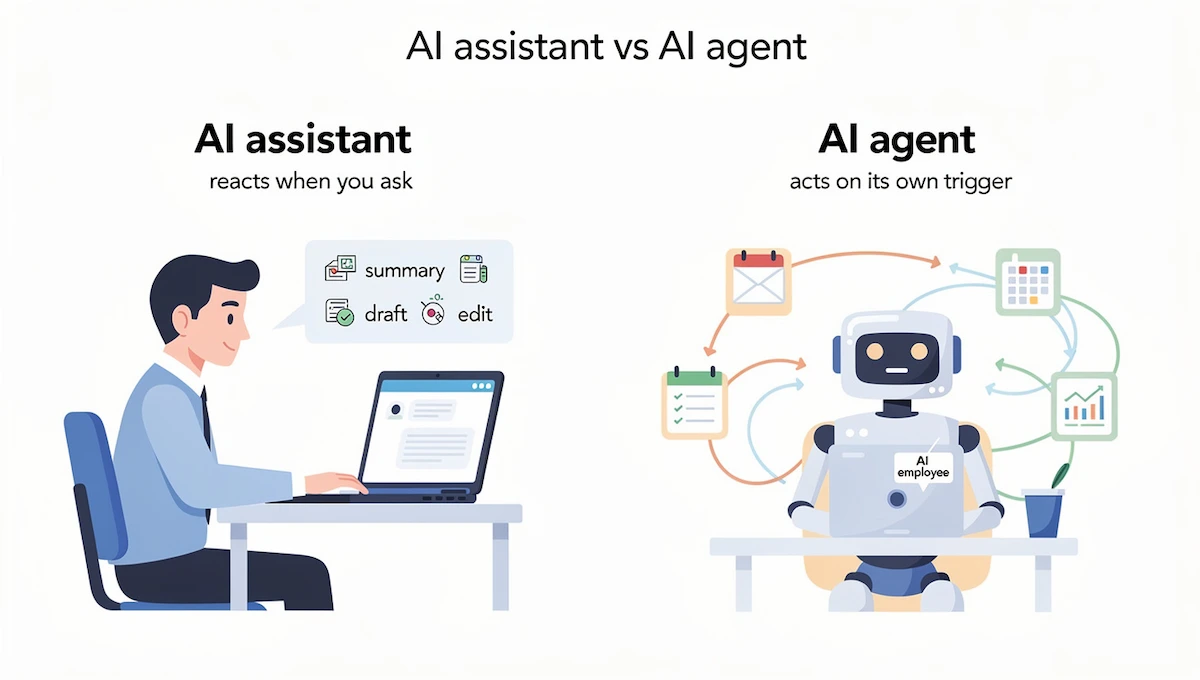
An AI assistant answers when a person starts the conversation. You ask for a summary, a draft, or an edit, and you get one. An agent acts on its own trigger inside limits you set. The test is who initiates the work. If one person on your team repeats a task and you want it done three times faster, an assistant solves most of the problem at a lower cost. If the task happens whether or not anyone remembers it, and you want it handled without attention, you need an agent. Teams also use the term AI employees for agents that hold a role, such as a sales development rep or a bookkeeper, with several workflows under one set of permissions. For the technology underneath all of this, read our guide to generative AI for business.
| Type | Starts on | Decides | Acts in your tools | Typical risk |
|---|---|---|---|---|
| Chatbot | A visitor question | Picks an answer | Rarely | Wrong or stale answer |
| AI assistant | A prompt from a person | Drafts and summarizes | Only when asked | Weak draft that a person catches |
| Workflow automation | App event or schedule | No, follows rules | Yes | Breaks when an app changes |
| RPA bot | Schedule or script | No | Yes, on fixed screens | Breaks when a process changes |
| AI agent | Trigger or schedule | Yes, within limits | Yes, with approval rules | Silent errors at volume |
Types of AI agents
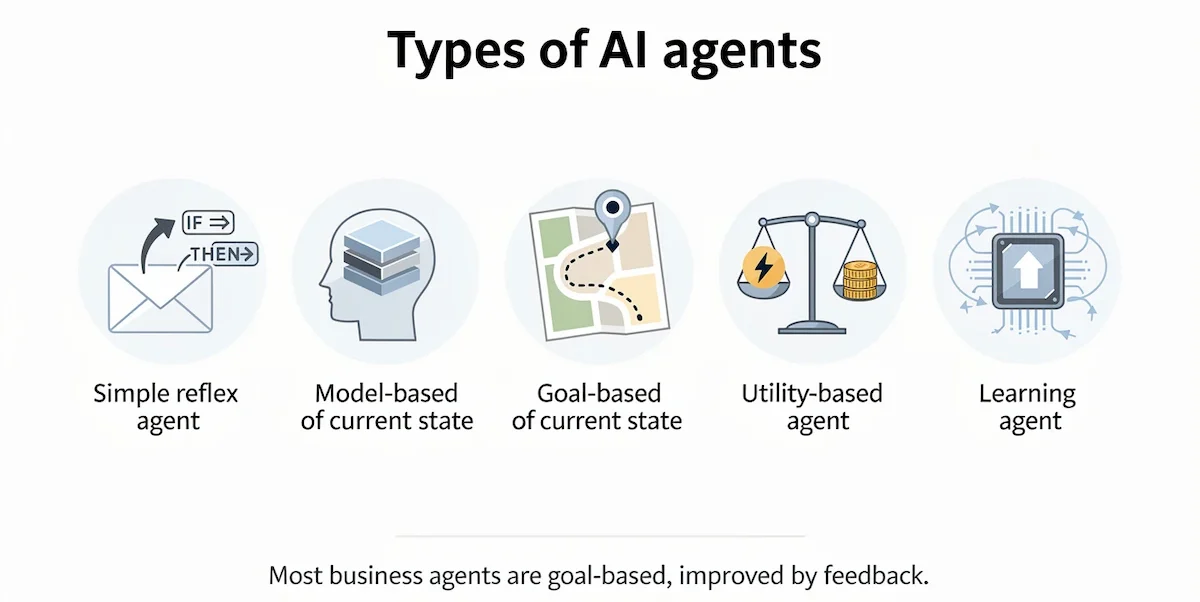
Textbooks and IBM list five types. A simple reflex agent reacts to a condition, like an out-of-office rule. A model-based agent keeps a memory of the current state. A goal-based agent plans steps toward an objective. A utility-based agent weighs trade-offs between options, for example speed against cost. A learning agent improves from feedback. Almost every business agent in this guide is goal-based, and the better ones behave like learning agents only in the sense that people correct the instructions after each review. The type matters less than the job, the tools, and the approval rules.
Single agent vs multi-agent systems
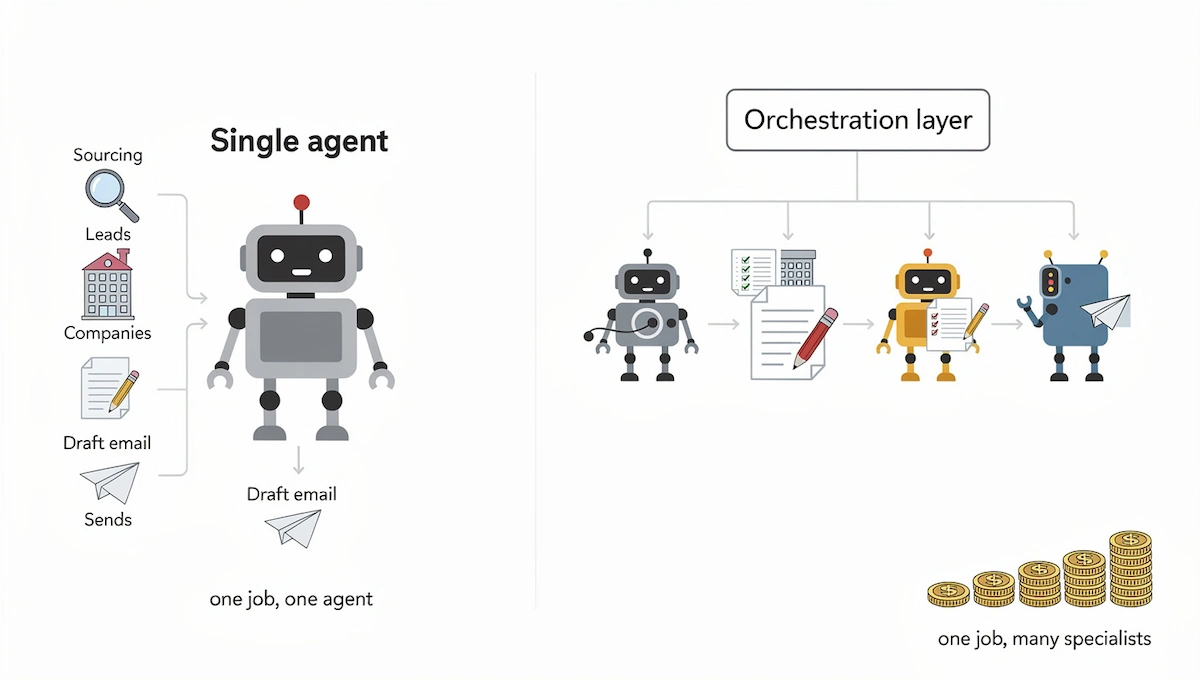
A single agent owns one job. A multi-agent system splits a job across specialists that hand work to each other, for example one agent that sources leads, one that researches each company, one that drafts the email, and one that sends it. An orchestration layer decides who works next and checks the result. Interest in this setup is growing fast, and so is the bill, since every handoff burns tokens. Start with one agent. Move to several when the instructions of a single agent grow too long to follow or when the steps need different tools and permissions.
Where businesses stand with AI agents in 2026
Experiments are everywhere and scaled deployments are rare. The gap rarely comes from the model. It comes from processes nobody mapped, tasks without a measurable result, and agents that received permissions with no approval rule attached. Gartner expects more than 40% of agentic AI projects to be canceled by the end of 2027 and names three reasons: rising cost, unclear business value, and inadequate risk controls. Read those as a checklist before you build AI agents for your business. Know what one run costs, know which hours or errors the agent replaces, and know who approves what.
Small firms have an extra problem, because nobody owns the setup after the first week. The agents that last tend to have a named owner who reads the activity log every week, fixes instructions when a draft is wrong, and decides when a step can move from approval to notification. Vendors talk more about setup in minutes than about this routine. A first agent can go live within an hour on most no-code platforms, and it still needs a few weeks of review before anyone should trust it with customers. If you are still deciding where AI belongs in the company at all, start with our overview of how to use AI in business and come back here for the agent part.
What blocks agents in practice
The blockers repeat in survey after survey. Integration comes first: the agent needs documented APIs, and a lot of company data sits in PDFs, shared drives, and old spreadsheets. Data quality is next, because an agent that reads a CRM full of duplicates writes duplicates back. Change management follows, since teams resist new routines and nobody has time to review drafts. Privacy worries and the lack of a written plan complete the list. None of these is a model problem, and none is solved by switching vendors.
Add AI to the old workflow or redesign it
Companies that report real gains rebuild the workflow around the agent instead of attaching it to the old steps, and McKinsey makes the same point about high performers. The table shows the difference on three common tasks.
| Task | Agent added to the old process | Process rebuilt around the agent |
|---|---|---|
| Ticket triage | A dispatcher reads each ticket, then asks the agent for a second opinion | The ticket goes to the agent first. It classifies, routes, and resolves routine cases, and people handle exceptions |
| Status reporting | A manager writes the report, then asks the agent to polish the wording | The agent builds the report from live project data and the manager adds comments and decisions |
| Lead follow-up | A rep researches the lead, then uses the agent to rewrite the email | The agent enriches, scores, and drafts, and the rep approves or edits in under a minute |
AI agent use cases for business by function
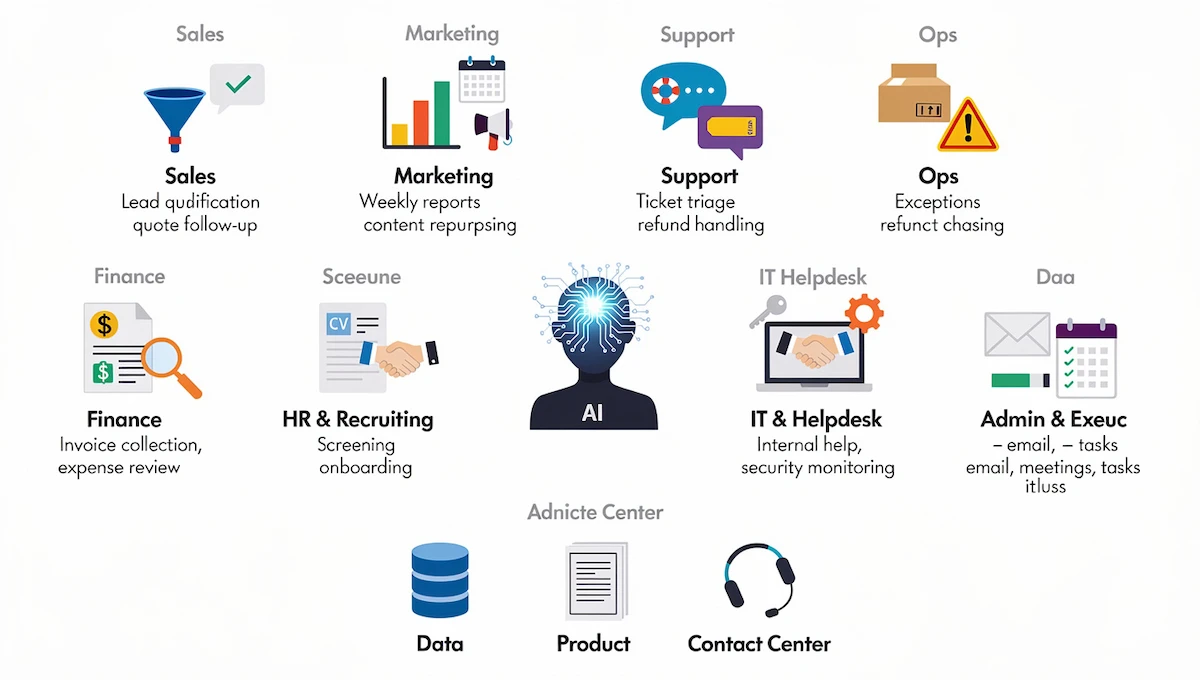
The AI agent use cases below repeat across companies because they share one shape: a clear trigger, data in systems you already own, and a result you can check. Each one lists the trigger, what the agent does, and where a person approves. This is the practical layer of AI agents for business, and picking the two that eat your own week is a better start than reading all twelve.
Sales: lead qualification and quote follow-up
Lead qualification starts when a form, demo request, or inbound email arrives. The agent researches the company, scores the lead against your ideal customer profile, assigns an owner by territory, enriches the CRM record, and drafts a first reply that answers what the lead asked. The rep approves the draft before it goes out. A second recipe covers quotes that sit open for a set number of days. The agent reads the deal history, chooses between a nudge, an offer of a call, or a flag for a discount talk, and drafts the follow-up in the voice of the rep. Any change to price or terms waits for the sales lead.
Marketing: weekly reports, content repurposing, SEO checks
Marketing agents take over work that repeats on a schedule. A Monday report pulls ad spend, email, web, and CRM numbers, writes a short summary of what changed, and posts it to Slack. A content agent takes a published blog post or webinar, drafts posts for each channel, and queues them for approval. A third agent audits pages on a schedule and flags broken links, missing titles, and thin sections before they cost traffic. The tools that sit around these agents, such as schedulers, email platforms, and analytics, are covered in our guide to AI marketing automation. Keep approval on anything that publishes or moves ad budget, and let the report run without a gate.
Customer support: ticket triage and refund handling
Ticket triage is the use case with the longest track record. The agent classifies each new ticket by intent and urgency, checks the plan and history of the customer, routes it to the right queue, and drafts a first reply from your help docs. A support rep reviews the draft, while tags and routing run automatically. Refund handling follows the same pattern with one hard rule: a manager approves the refund itself, because the agent has done the reading and the math but money is moving. Zapier reports that Remote resolves 27.5% of IT help desk tickets automatically, which saves 616 hours a month. Setup details for chat and email support are in our guide to AI customer service.
Operations: order exceptions and project chasing
Operations agents watch for things that slip: a shipment that missed a scan, a supplier confirming late, stock below a threshold, a task overdue in the project tool. The agent finds the affected orders, drafts customer notices and a reorder or reroute suggestion, and updates the ops board. Reorders above a spend limit and every customer message wait for approval. Internal nudges to a task owner can send directly, and a second miss escalates to the manager.
Finance: invoice collection and expense review
Invoice collection has the clearest cash return for a small company. The agent checks the accounting system every morning, picks the tone for the stage of the overdue invoice, sends the 7-day and 14-day reminders after you approve the templates once, and puts the 30-day escalation in front of the finance lead with the customer history attached. Expense review works from the other side. The agent extracts line items, compares them with policy, purchase orders, and past spend, flags duplicates and missing receipts, and routes the report. The approver still approves, but the checking is done before the report arrives.
HR and recruiting: screening and onboarding
A screening agent scores each application against the must-haves of the role, drafts a knockout question or a scheduling invite, and books the screen on the recruiter calendar. A human approves every rejection. An onboarding agent starts when an offer is accepted. It builds the checklist, requests accounts and equipment, schedules first-week meetings, and answers policy questions in Slack from the handbook, while IT approves account provisioning. Hiring is also where the rules get stricter, which the privacy section below explains.
IT and internal helpdesk
Employees ask the same questions about passwords, access, and policy. An agent picks up a request the moment it lands in Slack, email, or a chatbot, checks the requester in the directory, sets the priority, looks at similar resolved tickets, and suggests a fix before anyone opens the ticket. A second agent turns a solved Slack thread into a knowledge base article when someone marks it with a checkmark. Security teams add agents that watch logs and alerts around the clock, filter noise, and rank what needs a person, while blocking access or isolating a system stays behind approval. Access changes and anything that touches permissions also wait for a human.
Admin and executive assistance: email, meetings, tasks
Admin work arrives as small interruptions: an email that needs a quick reply, a Slack message that turns into a to-do, a meeting request nobody blocked time for. An email triage agent reviews each new message, archives the noise, drafts replies for routine ones, and flags only the tricky ones. A meeting agent reads the call transcript, pulls decisions and action items, and drafts the follow-up for you to send. A task agent turns a Slack thread, marked with an emoji, into a scheduled task with context and a block of focus time. Sending stays manual until you trust the drafts.
Data and reporting agents
Data agents connect to a warehouse or a BI tool and answer questions in plain language, such as which three marketing channels brought the most pipeline last quarter. They generate recurring reports, flag unusual numbers, and write the summary for people who never open a dashboard. Keep them read-only and name the source tables they may use, since a confident answer built on the wrong table is the main risk.
Product management
Product managers spend hours turning raw input into documents. An agent can draft a requirements document from a feature request or a bug report, create it in Google Docs, and log the entry in a tracker. Another agent summarizes customer calls into themes and drafts requirements for the strongest ones. A third scans Jira, Slack, and meeting notes each week and drafts the stakeholder update, listing what moved, what is blocked, and what comes next. The product manager still sets priorities and edits the result.
Voice agents and agent assist for contact centers
Phone-based customer support now has two agent types. A voice agent answers calls, handles routine requests, and passes the call to a person with the full context. Agent assist works the other way and sits next to a human rep, suggesting answers and pulling the customer history in real time. Platforms such as Cognigy and Microsoft Copilot Studio offer both. Voice raises the bar for approval rules and escalation speed, since a caller cannot wait in a queue.
AI agent examples by industry
Use cases look different by sector, and the most common AI agent examples by industry are in the table. AI agents for business in regulated sectors such as healthcare, banking, and insurance carry extra review steps and data limits, so the same agent needs tighter permissions there.
| Industry | Typical agent jobs | Where a person approves |
|---|---|---|
| E-commerce and retail | Order status, returns, cart recovery, product recommendations, stock forecasts | Refunds and discounts |
| Real estate | Instant reply to listing inquiries, property matching, follow-up on cold leads | Pricing advice and offers |
| Healthcare | Appointment booking, records admin, reminders, drafts of clinical notes | Anything clinical |
| Banking and insurance | Onboarding checks, claims intake, fraud flags, customer questions | Decisions on credit, claims, and fraud |
| Travel and hospitality | Booking help, check-in requests, dynamic offers, post-trip follow-up | Price changes and compensation |
| Logistics and transport | Route changes, warehouse exceptions, delivery notices, supplier chasing | Reroutes above a cost limit |
| Telecom and utilities | Billing questions, outage notices, plan changes, proactive outreach | Plan changes and credits |
| Education | Tutoring support, quiz grading, drafts of study material, progress tracking | Final grades |
Which use cases work today and which still fail
Not every use case is ready. The table sorts them by how reliably they run in production at the time of writing.
| Maturity | Use cases | Why |
|---|---|---|
| Working | Internal knowledge search, tier-1 support triage with a clean issue list, inbound lead enrichment and scoring, meeting notes pushed into CRM fields | Errors are cheap to catch and easy to reverse |
| Emerging | Outbound SDR sequences, candidate sourcing, invoice coding in suggest mode, content pipelines | Works at volume, quality still varies a lot |
| Not reliable yet | Sending customer emails without approval, rewriting or deleting CRM records without review, moving money without a checkpoint, one agent that runs the whole company | Silent damage, irreversible actions, and almost no production examples |
The math explains why the last row stays blocked. An agent that is right 98% of the time across 5,000 actions a month makes 100 mistakes a month. Ask what each of those 100 would cost in your business.
Results companies report, and one reversal
Published numbers help set expectations, as long as you remember that most come from the vendor. Zapier reports that Mercari resolves about 47,000 support tickets a month with people stepping in only where judgment is needed, that Miro raised participation in peer feedback from 50% to 93% in eight weeks, and that Rush Home scores more than 11,000 leads with an agent built on MCP. The cautionary case is Klarna. The company said in 2024 that its AI assistant handled about two thirds of customer service chats, and in 2025 it said it would bring more human staff back into customer support after quality problems. Treat any headline automation rate as a ceiling seen in good conditions, not as a forecast for your first month.
Best AI agent platforms for business
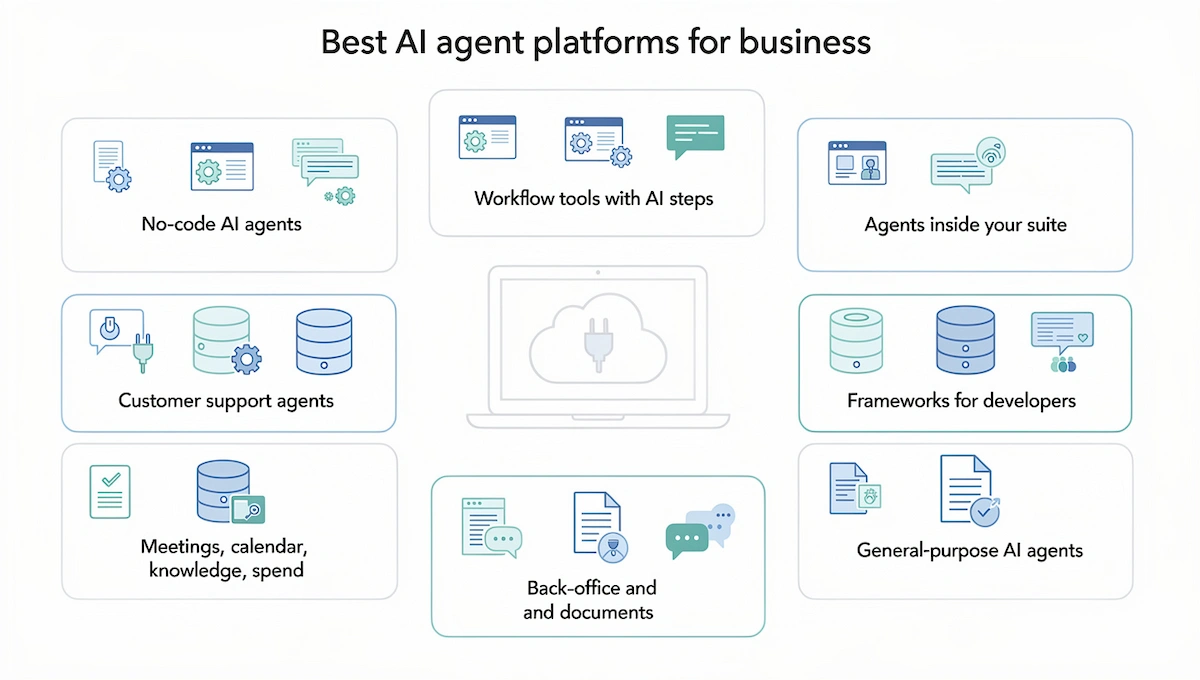
The market has hundreds of products, and the useful split is by who builds and maintains the agent. This section covers AI agent platforms by category with public prices from September and October 2026. Billing units differ (credits, actions, activities, executions, conversations), so estimate your monthly volume in each unit before you compare the best AI agents for business on headline price. Our guide to choosing AI tools for business adds a longer buying checklist.
How to compare platforms: five criteria
- Time to first agent: templates and chat-based setup shorten it.
- Integrations: check the exact action and permission, not only the logo in the directory.
- Approval and logging: approval on a single step without a developer, plus a log of every run.
- Memory: whether the agent remembers the corrections you made last week.
- Billing unit: what one unit buys and what happens when the allowance runs out.
No-code AI agents
No-code AI agents suit teams without engineers, and most no-code AI agent builders take instructions in plain language. Lindy configures agents by chat, with plans from $29.99 per user a month for 3,000 credits. Zapier Agents reaches more than 9,000 apps, includes 400 free activities a month, and costs about $33 a month billed annually for 1,500 activities on Agents Pro. Zapier and Gumloop also support MCP, a standard that lets an agent reach many tools through one connection. Gumloop charges $37 a month for Pro with 20,000 credits and unlimited seats, and any teammate with access can run an agent that someone else built. Relevance AI targets sales and revenue teams that want multi-agent setups, with a Pro plan documented at $19 a month billed annually. The vendor pricing page currently pushes enterprise contracts, so confirm what is available before you plan around it.
Workflow tools with AI steps
n8n is source-available and can be self-hosted for free, with cloud plans from 20 euro a month billed annually for 2,500 executions. One execution counts as one full run no matter how many steps it has, which keeps long multi-step flows cheap. It suits teams with an engineer and data residency needs. Make uses credits, has a free plan, and offers agents inside its visual canvas. Zapier remains the widest option for connecting apps, and Zapier Agents are billed separately from ordinary Zap tasks, so two meters run at once.
Agents inside your suite
If the company already runs on one platform, the native agent has the deepest context on your data. Microsoft Copilot Studio deploys agents into Teams and SharePoint and costs $200 a month per 25,000 Copilot Credits, while internal agents are included with Microsoft 365 Copilot licenses at $30 per user a month. Salesforce Agentforce charges $2 per conversation or $500 per 100,000 Flex Credits. HubSpot Breeze agents run on credits billed on top of the plan, so forecasting monthly spend takes some arithmetic. The Gemini Enterprise Agent Platform from Google, the new name for Vertex AI Agent Builder, bills compute and tokens with no base fee. Each of these stops at the edge of its own suite, and workflows that cross many outside tools feel awkward.
Customer support agents
Tidio Lyro can handle test conversations within an hour after you paste a FAQ and a returns policy, with plans around $30 a month. Intercom Fin posts strong resolution rates but is priced for serious ticket volume. Sierra sells to large brands on outcome-based quotes and covers chat, email, SMS, WhatsApp, and voice. All three need a clean escalation path to a human.
Frameworks for developers
CrewAI is open source and organizes several agents with defined roles and hand-offs, with a paid enterprise tier. LangGraph from the LangChain team is the common choice for engineers who build custom agents from scratch. Both ask for engineering hours instead of a subscription, and the hours are the real cost.
Meetings, calendar, knowledge, and spend
A group of narrower tools behaves like agents in one area. Fireflies joins calls, transcribes them, and pushes notes into HubSpot or Salesforce. Reclaim protects focus time and reschedules tasks around conflicts. Notion AI and Slack AI search and summarize across docs and threads. Brex audits company spend and matches receipts, and QuickBooks has added accounting agents for categorization and invoice follow-up on eligible plans. These cost less to adopt than a general platform, and each covers one job well.
Back-office and document-heavy work
Beam AI builds agents for invoice reconciliation, accounts receivable, compliance reports, and recruiting, with human approval steps and hosting in the cloud, on-premises, or hybrid. It has a free tier with 20 tasks a month and a Pro plan at $50 a month for 200 tasks, and serious volumes move to custom pricing. StackAI targets regulated industries such as wealth management and logistics, with a free plan and custom enterprise contracts.
General-purpose agents from OpenAI, Anthropic, and Google
The model makers also sell agents. ChatGPT Work from OpenAI handles multi-step research and deliverables, runs on a schedule or on a trigger, and asks for approval before important actions. It is included in ChatGPT plans from Plus at $20 a month and works only with OpenAI models. Claude Code from Anthropic builds and ships software from the terminal, and Emergent produces complete web and mobile apps from a description, which fits the case where the software you need does not exist yet. Microsoft 365 Copilot Business and Google Gemini Business start around $21 per user a month for smaller companies, according to vendor announcements reported in 2026.
| Platform | Best for | Starting price | Billing unit |
|---|---|---|---|
| Lindy | Small teams, inbox, calendar, outreach | $29.99 per user a month | Credits |
| Zapier Agents | Teams already on Zapier | Free, then about $33 a month | Activities |
| Gumloop | Shared team workflows | $37 a month | Credits |
| Relevance AI | Sales and revenue teams | $19 a month billed annually (check availability) | Actions plus vendor credits |
| n8n | Teams with an engineer | 20 euro a month billed annually | Executions |
| Microsoft Copilot Studio | Microsoft 365 companies | $200 a month per pack | Copilot Credits |
| Salesforce Agentforce | Salesforce companies | $2 per conversation | Conversations or credits |
| HubSpot Breeze | HubSpot users | Credits on top of the plan | Credits |
| Tidio Lyro | Store and small team support | About $30 a month | Conversations |
| Sierra | Large brand support | Quote only | Outcomes |
| Beam AI | Finance, HR, and back office | Free for 20 tasks, then $50 a month | Tasks |
| ChatGPT Work | Research and deliverables for ChatGPT users | Included from $20 a month | Plan usage |
| CrewAI, LangGraph | Engineering teams | Free framework | Engineering hours |
Which platform to start with: by company size and by stack
Your existing stack decides most of the choice when you pick AI agents for business. Our guide on building an AI tool stack for business explains how to fit an agent platform next to the tools you already pay for.
| Situation | Start with |
|---|---|
| A team of 1 to 50 people without developers | Lindy, Zapier Agents, or Gumloop |
| You already run automations in Zapier | Zapier Agents |
| Your company runs on Microsoft 365 | Copilot Studio |
| Salesforce is your system of record | Agentforce |
| Your team lives in HubSpot | HubSpot Breeze |
| You have an engineer and want control or self-hosting | n8n, CrewAI, or LangGraph |
| A sales and revenue team running outbound at volume | Relevance AI |
| A document-heavy finance or HR back office | Beam AI |
| Customer-facing support at large scale | Sierra or Intercom Fin, and Tidio Lyro for smaller stores |
| A Google Cloud organization | Gemini Enterprise Agent Platform |
AI agents for small business
Companies with fewer than twenty people can run AI agents for small business without a developer, because no-code platforms take plain-language instructions and a login for each app. Our guide to AI for small business covers the wider toolkit. The skill that matters most is knowing your own process, including the exceptions, since the exceptions become the instructions.
Three starter workflows
- Inbound lead reply within five minutes: connect the contact form or inbox, describe the ideal customer, and let the agent draft a reply that answers the question and proposes a next step. You approve from your phone.
- Invoice chasing: connect QuickBooks, Xero, or FreshBooks. The agent checks overdue invoices each morning and sends reminders from templates you approved once. The 30-day escalation lands in front of you with the history attached.
- Weekly numbers: every Monday you get revenue, new leads, open invoices, support volume, and ad spend in five sentences, plus the one thing that changed. No approval is needed, and seeing the agent work every week builds trust in the other two.
A realistic bill for these three AI agents for small business is $20 to $60 a month including model usage. Spend the first month reading the usage meter before you pay for a bigger plan.
Do small businesses need AI agents?
Not always. A task that happens twice a week is rarely worth the setup. If the work is high volume, repetitive, and spread across several apps, such as follow-ups, lead research, or the same customer questions, an agent pays back. If it is not, a well-configured assistant or a plain automation is the better start.
How much do AI agents for business cost?
The price on the vendor page is one of four costs. Our guide on how much AI tools cost compares pricing across categories, and the breakdown for agents follows.
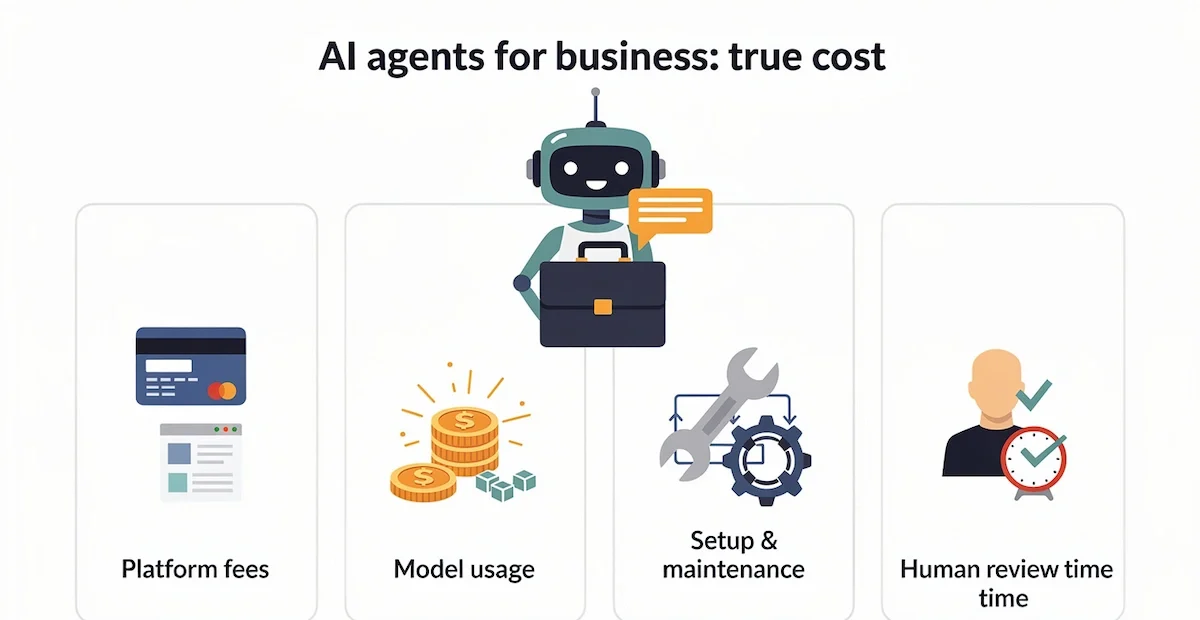
Platform fees
Entry plans on no-code platforms run $19 to $50 a month, and suite agents bill per conversation, credit, or seat. Enterprise contracts start at a few thousand dollars a month. Frameworks cost nothing to license and a lot in engineering hours.
How platforms bill
Billing units are the main reason prices do not compare. One credit, one activity, and one execution buy very different amounts of work.
| Model | Examples | Watch for |
|---|---|---|
| Per seat | Lindy, HubSpot Starter | Cost grows with every teammate who needs access |
| Credits | Gumloop, Make, Copilot Studio, HubSpot Breeze | Different actions use different credit amounts |
| Activities or actions | Zapier Agents, Relevance AI | Agent activities are metered apart from ordinary automation tasks |
| Executions | n8n | One full run counts once, whatever the number of steps |
| Per conversation | Agentforce, Tidio Lyro | Volume spikes raise the bill fast |
| Per outcome | Sierra | Needs a clear definition of a resolved outcome |
Model usage and credits
Every platform meters what the agent consumes. A lead reply agent that runs 200 times a month costs much less than a research agent that reads ten pages per run. A complex run with retrieval, several tool calls, and retries can use 10,000 to 50,000 tokens, and multi-agent setups can multiply that by five. A failed run costs the same as a good one, so a 90% success rate is not free. Measure one representative run before you trust any headline price.
Setup, review, and maintenance time
Integration work for a first production agent runs from 40 to 200 engineering hours on custom builds, and far less on no-code platforms, though never zero. The cost most people forget is review time. In suggest mode, 10,000 actions a month at 30 seconds each is 83 hours of a person reading drafts. Maintenance adds prompt updates when models change, fixes for broken integrations, and weekly checks, often 10% to 20% of the setup cost per year.
Assistant, platform agent, or custom build
| Option | Typical cost | Scope |
|---|---|---|
| AI assistant | $20 to $30 per user a month | Several tasks per person, started by the person |
| No-code platform agent | $19 to $100 a month per workspace or per user | One job per agent, runs on a trigger |
| Suite or enterprise agent | $500 to $10,000 a month and up | A department workflow with governance |
| Custom build | $40,000 to $100,000 or more | A differentiated agent owned by you |
The custom figure comes from agencies that quote development work, and your quote can differ. Build only when no platform covers the job or when data cannot leave your environment. Buy when the job looks standard, such as support triage or lead reply, which covers most AI agents for business, because the platform already solved the approval, logging, and integration work.
Worked example: support triage at three volumes
Assume 12,000 tokens per ticket for the ticket text, retrieved help docs, and the drafted reply, a blended price of $5 per million tokens, and 30 seconds of human review per ticket. These are illustrative numbers, so replace them with a measured run.
| Tickets a month | Model usage | Review time | Platform fee (assumed) |
|---|---|---|---|
| 2,000 | $120 | 17 hours | $50 |
| 10,000 | $600 | 83 hours | $250 |
| 50,000 | $3,000 | 417 hours | $1,000 |
At low volume the setup effort dominates the bill, and at high volume model usage and review hours do. Review time is the line that most budgets leave out.
ROI and payback: how to measure it
Compare completed work and hours saved against platform fees, usage, setup, review, and corrections, and track escalations and reopened requests as well. A narrow, well-scoped agent usually reaches break-even in 60 to 90 days when the work it replaces carried real labor cost. If the math does not break even by day 90 at the volume you really have, the case is weak and a better tool will not fix it. Our how-to on AI ROI for business walks through the calculation.
| Use case | What to measure |
|---|---|
| Lead qualification | Qualified meetings booked, response time, share of leads that fit the profile |
| Ticket triage | Cost per resolved ticket, first response time, customer satisfaction, reopened tickets |
| Invoice collection | Average days overdue, share paid after a reminder, hours spent chasing |
| Reporting | Hours to produce the report, errors found by readers |
| Recruiting | Time to first screen, recruiter hours per hire, rejections overturned by a person |
Risks and how to control them
Human-in-the-loop and approval rules
Set approval on every action that moves money, contacts a customer, changes a contract, or deletes data. Let agents run free on research, drafting, classification, and internal reporting. Human-in-the-loop works only with an owner, a review queue, and a turnaround time. An approval that waits 24 hours kills the speed advantage, and a review that depends on whoever is free is not a process. Log every human correction, since those corrections are the best material for improving the instructions.
Permissions: start narrow
Every tool you hand to an agent widens the damage that a wrong decision or a prompt injection can do. Start with read-only access, draft-only email, and CRM changes behind approval. Add rate limits, action logs, and a cap on spend per task. Widen the scope one permission at a time, after the agent has a clean record on the narrower one.
Data privacy, security, and GDPR
An agent with access to your CRM, inbox, and billing tool sees personal data, so GDPR applies whenever you handle data of people in the EU. Check the legal basis, sign a data processing agreement with the vendor, find out where the data is stored, and keep personal data out of test runs by using invented cases. Article 22 of the GDPR gives people rights around decisions made only by automated means, which matters for refunds, credit, and hiring. AI used to screen candidates or manage workers falls into a high-risk category under the EU AI Act, so check the current requirements for your case before you automate it. Ask vendors for SSO, role-based access, audit logs, and certifications such as SOC 2 on their trust page, and read our guide on AI data privacy for business for the policy side.
Failure modes: silent errors, loops, prompt injection, model updates
- Silent data errors: an agent with write access misclassifies a small share of records, and nobody notices until a forecast is off. Use suggest mode for at least two weeks and watch how often each field changes.
- Runaway loops: an agent that repeats a step with no exit condition can burn through the budget overnight. Set a step cap, a cost ceiling per task, and a daily alert at 50% and 80% of budget.
- Wrong tool arguments: the agent picks the wrong customer record or amount and the call still succeeds. Validate arguments and escalate when a name matches several records.
- Prompt injection: text inside an email or web page tells the agent to ignore its rules. Treat all customer content as untrusted, and base sensitive actions on your own systems, never on text in a message.
- Model updates: a provider changes a model and the output format shifts. Pin versions where possible and run a weekly test set.
How to start with AI agents: readiness check and a 14-day pilot
Readiness checklist: five questions
Score one candidate workflow before you pick a tool. A strong first agent for your business passes all five questions.
- Can you write one sentence that says what a finished job looks like, one that a stranger would agree with?
- What happens in the 3% of cases where the agent is wrong?
- Can a wrong action be spotted and undone within 24 hours?
- Can the agent reach the data through documented APIs, or does the data live in PDFs and old spreadsheets?
- Is the volume high enough that 20 to 40 hours of setup pays back within 90 days?
Five yes answers mean go. Four with a fixable gap means fix the gap first. Three or fewer means choose a different job, since a better tool will not rescue a process that is not ready.
When an agent is the wrong tool
Skip the agent if a single repetitive task is covered by a basic automation or a spreadsheet macro, if nobody has mapped the workflow, if the task happens a couple of times a week, or if one wrong action cannot be undone and no person can review it. Agents work only as well as the process they run, so map the process first. A draft-only assistant is often the better first step, and the agent can come later.
14-day pilot plan
- Days 1 and 2: pick one job, write the sentence that defines done, and document how a person does it today, including the exceptions.
- Days 3 and 4: build in draft mode with two or three tools, set every external action to need approval, replay last month of real inputs, and score the drafts.
- Days 5 to 10: run live with approval on everything. Review each run and fix the instructions wherever a draft was wrong.
- Days 11 to 14: count hours saved and error rate. Move low-risk steps from approve to notify. Keep approval on money, contracts, and customers.
Agree on stop conditions before day 1: cost more than 50% over budget, any silent data change, accuracy below 90% in suggest mode, any prompt injection incident, or any customer-facing mistake that harms a relationship. Without written stop conditions, a pilot that should end tends to continue because stopping feels like failure.
From pilot to production: a 90-day path
Larger deployments of AI agents for business use three phases. In shadow mode, days 0 to 30, the agent runs on real inputs while people do the work, you compare its output with their decisions, and you build a set of at least 100 real cases. In suggest mode, days 30 to 60, the agent prepares each action and a person approves, edits, or rejects it, with most drafts approved without edits as the target. In supervised autonomy, days 60 to 90, the agent acts alone on cases where it is confident and sends the rest to a person, while a dashboard tracks accuracy, cost, and exceptions. Teams often aim for 90% agreement in shadow mode and 95% accuracy on automated cases in the last phase, adjusted to what an error costs you.
When to expand and when to stop
Run the first agent for a few weeks before you build a second. Start expanding when the error rate is stable, the owner reads the log, and the saved hours show up in a number someone can verify. Once the first agent works, the second job is mostly an edit of the first. Step back to the previous phase when any stop condition from the pilot appears.
Where to start this week
Pick one recurring job that costs you hours, write the sentence that says what finished looks like, and choose a platform from the table above that already connects to the tools the job touches. Run it in draft mode with approval on every external action, read the activity log each day for the first two weeks, and decide with real numbers whether it earns a place in your stack. AI agents for business pay off for companies that treat the first agent as a small pilot with an owner and stop conditions, and the second agent then takes a fraction of the effort.
Frequently asked questions
What is an AI agent for business?
An AI agent for business is software that owns a recurring job, such as qualifying leads or chasing invoices. It starts on a trigger, reads records across your apps, decides what to do, and acts, with a person approving the risky steps.
What is the difference between an AI agent and a chatbot?
A chatbot answers questions. An AI agent takes a job and finishes it across your tools: it checks the order, drafts the refund, updates the CRM, and sends the follow-up. The model can be the same. The difference is access to tools and permission to act.
How much do AI agents for business cost per month?
Entry plans run $19 to $50 a month, for example Zapier Agents Pro at about $33 and Lindy at $29.99 per user. Suite agents bill by conversation, credit, or seat, and enterprise contracts cost thousands. Add model usage and review time to every platform price.
Can AI agents replace employees?
In most companies they take over repetitive work and leave judgment, relationships, and edge cases to people. The strongest results come from agents that draft and prepare while a person approves.
Are AI agents safe for business data?
They are as safe as the permissions and approval rules you give them. Pick a platform with SSO, role-based access, and audit logs, keep a person on actions that move money or reach customers, and review GDPR duties when personal data is involved.
Do I need coding skills to use AI agents?
Not for no-code platforms such as Lindy, Zapier Agents, or Gumloop, where you describe the job in plain language and connect apps with a login. n8n, CrewAI, and LangGraph expect some code.
Which AI agent is best for a small business?
Start from the job and the stack. Lindy suits inbox and calendar work, Zapier Agents suits teams already on Zapier, Tidio Lyro suits store support, and Gumloop suits shared team workflows. Pick one job first and test it on a free tier.
How long does it take to set up an AI agent?
A first agent on a no-code platform can handle test cases within an hour. Plan two weeks of review before it handles real customers, and longer for custom builds that need integration work.
What percentage of companies use AI agents?
Most companies are still testing. McKinsey reports that 62% of organizations experiment with agents and 23% scale one in some function, and Gartner predicts that 40% of enterprise applications will include task-specific agents by the end of 2026.
What ROI can businesses expect from AI agents?
Narrow, well-scoped agents often break even in 60 to 90 days when they replace work with real labor cost. Surveys quoted by vendors report gains such as 40 to 60 minutes saved per user a day, but results depend on volume, error cost, and review time.
Can AI agents integrate with my existing software?
Yes, through native connectors, APIs, webhooks, and MCP. Zapier reaches more than 9,000 apps, while suite agents run deepest inside their own stack. Check the exact action and permission you need, since a logo in a directory does not guarantee it.
What is a multi-agent system?
A multi-agent system splits one job across several specialist agents, for example sourcing, research, drafting, and sending, with an orchestration layer that routes work between them. It costs more in tokens, so start with a single agent.
Is an AI agent better than ordinary automation?
Not always. Fixed rules win when inputs and steps are predictable, because they are cheaper and easier to debug. An agent wins when the work needs reading, judgment, or a choice between tools. Many teams run both in one workflow.
Does a free trial make an AI agent safe to test?
No. Price and permissions are separate. Test with invented or approved sample data, keep live triggers and write access out of the test agent, and check the activity log for what the agent really did.
How do I deploy AI agents in a regulated industry?
Pick a platform with certifications that match your sector, such as SOC 2, and keep a human approving any action that touches sensitive data or regulated decisions. Turn on full audit logs, scope tools tightly, and run the pilot outside production first.
What is the cheapest way to start with AI agents?
Use a free tier, such as 400 Zapier Agents activities a month, or a self-hosted n8n instance, and run one low-risk workflow like a weekly report. Read the usage meter for a month before paying for a larger plan.
What tasks can AI agents handle for a small business?
Lead qualification and first replies, support triage, invoice reminders, weekly reports, meeting follow-ups, CRM updates, and inbox sorting. The common trait is high volume and clear rules, with a person approving anything that sends money or reaches a customer.
Which industries use AI agents the most?
Customer support, finance, healthcare, logistics, e-commerce, and sales operations lead, because they have high ticket or transaction volume and clear rules. Regulated sectors adopt more slowly and add extra review steps.










