How to make AI avatar videos comes down to a short chain: pick an AI avatar, paste a script, choose a voice, preview the result and export it. No camera, studio or editing timeline is involved, and a first AI avatar video can be ready in under an hour. The part that takes real effort is the script, because the avatar reads every word exactly as written.
Most guides on this topic walk through a single tool. This one covers the steps that stay the same in every AI avatar video maker, then goes further: how to make an AI avatar of yourself, how to write a script that sounds natural, what free plans really give you, how to fix lip sync and voice problems, and which rules apply to consent and disclosure.
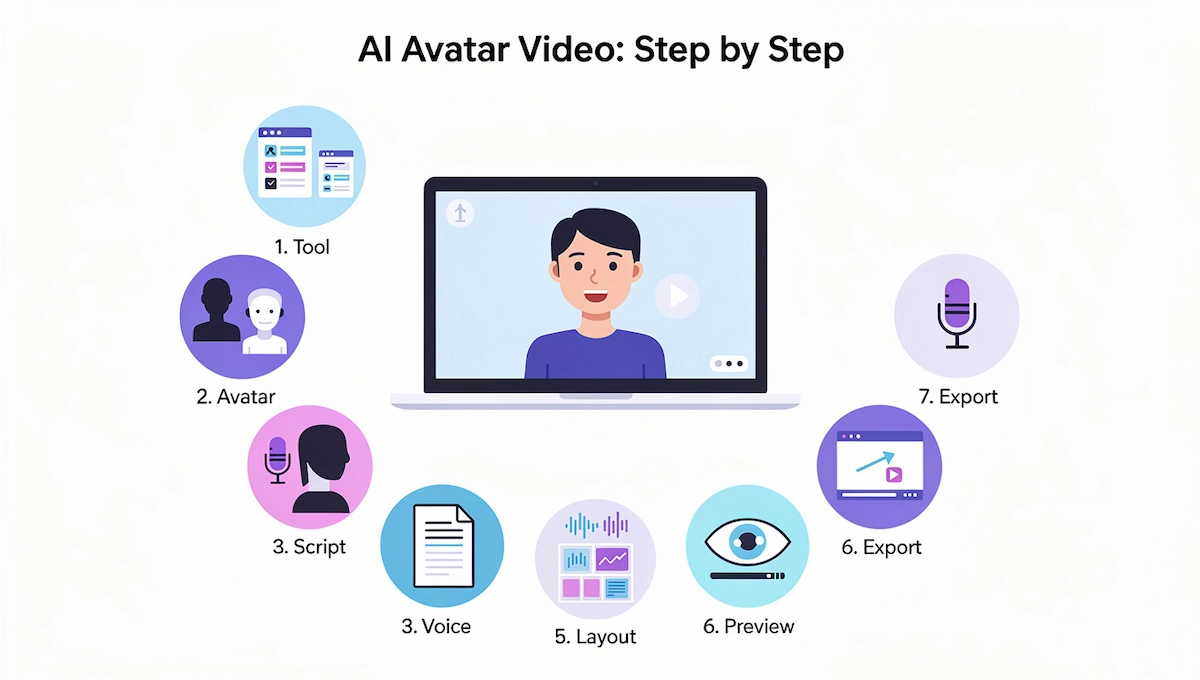
How to Make an AI Avatar Video in 7 Steps
- Pick a tool with a free trial, the AI avatar types you need and the export options you want.
- Choose an AI avatar: a stock presenter, an uploaded photo or a custom avatar recorded from a short video.
- Write a short script with one idea per scene.
- Select a voice and language, or clone your own voice.
- Build the scenes: avatar position, background, on-screen text and B-roll.
- Preview the whole video and fix timing, pronunciation and lip sync.
- Generate and export as an MP4 file or a share link.
What Is an AI Avatar Video?
An AI avatar video is a clip in which a digital presenter speaks a script on screen. The presenter can be a stock character from a library, an animated photo, or a digital twin built from a short recording of a real person. Nobody has to be filmed for each new video, which is why the format suits training, product demos, explainers, onboarding and social content.
Some tools only animate a still photo and add lip sync on top. Others, Captions for example, say they generate the whole performance at once, including voice, eye contact, facial expressions and body language. The difference shows up later, when you compare how natural the results look.
Benefits and Limits of AI Avatar Videos
The main benefit is speed. You skip filming, lighting, retakes and editing, and you can change a single sentence without reshooting the whole clip. Costs stay low because one AI avatar can appear in dozens of videos, and the same script can be dubbed into many languages. A brand also keeps the same presenter, voice and framing from one video to the next.
The limits are just as real. Even good AI avatars can look slightly stiff, long videos test the patience of viewers, and people trust a real face more on sensitive topics. Use AI avatar videos for repeatable, informational content, and keep real footage for moments that call for a human story.
How AI Avatar Videos Work
Three parts do the work. A generative model creates the face and the movement. Text to speech turns your script into a voice, or your cloned voice reads it. Lip sync then matches the mouth to the audio, frame by frame. Weak lip sync is the first thing viewers notice, so it is worth testing before you commit to a platform. For the wider picture of video tools, read this guide to AI video creation.
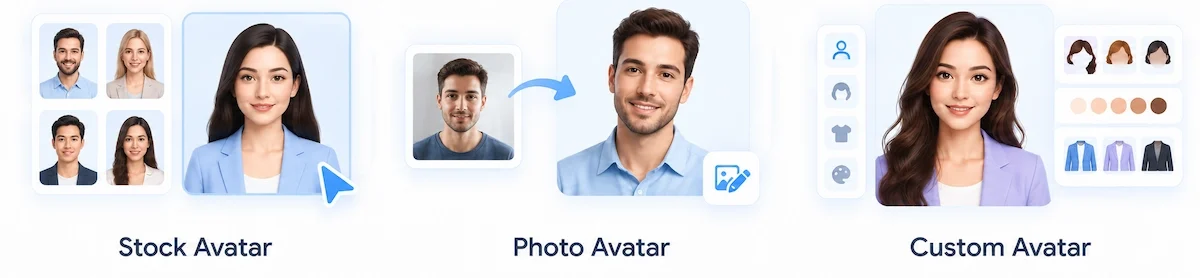
Stock Avatar vs Photo Avatar vs Custom Avatar
| Type | How it is made | Best for | Limit |
|---|---|---|---|
| Stock avatar | Pick a presenter from the library | Fast videos without a personal brand | Other users can pick the same face |
| Photo avatar | Upload one front-facing photo | A quick avatar that looks like you | Less body movement, and the photo background stays |
| Custom avatar | Record a short video, from 20 seconds to a minute on some tools | Natural hand gestures and body language | Needs good footage, and studio versions can ask for 30 minutes or more |
AI Avatar Styles: Realistic, Cartoon, 3D and Anime
The style of the presenter changes how viewers read the message. Realistic AI avatars suit training, finance and company updates. Cartoon and anime styles fit games, content for children and playful brands, while 3D avatars work for product explainers and mascots.
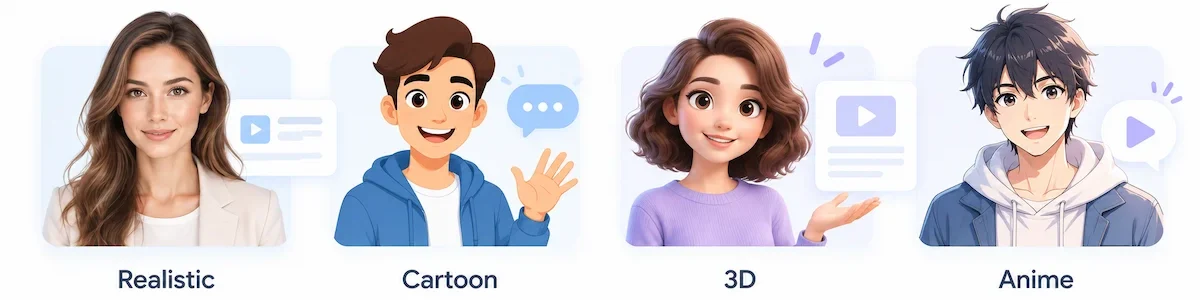
Some tools can turn a portrait into a cartoon or anime AI avatar before animating it. Profile picture (PFP) avatars are still images made for social profiles, so skip them if you need a talking presenter. Pick one style per channel and keep it, because a presenter who keeps changing look confuses returning viewers.
AI Avatar Video vs Filming Yourself
Choose the format that fits the message. An AI avatar video wins on speed and updates, while real footage wins on trust and emotion.
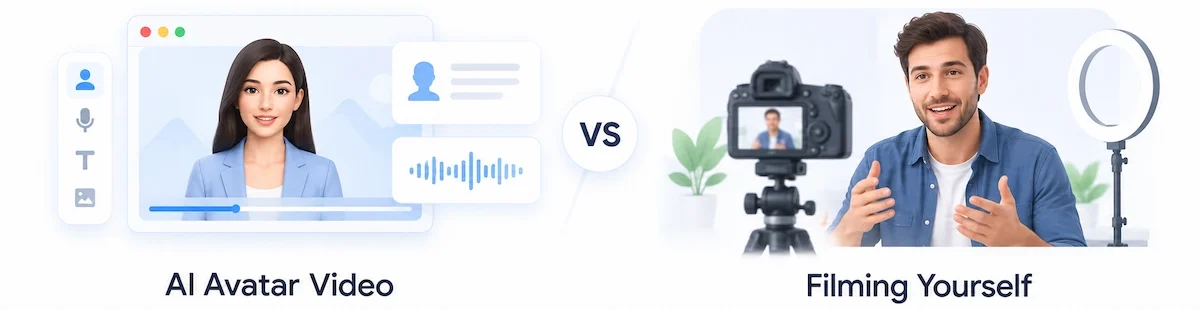
| Factor | AI avatar video | Filming yourself |
|---|---|---|
| Setup | Browser, script and an avatar | Camera, light, microphone and a quiet room |
| Time per video | Minutes to an hour | Hours with retakes and editing |
| Changing one sentence | Edit the script and regenerate | Reshoot or cut around it |
| Other languages | Translate and dub in a few clicks | New recording for each language |
| Trust and emotion | Works for facts and instructions | Stronger for stories and sensitive topics |
Many teams combine both: an AI avatar video for training and FAQs, and real footage for launches, testimonials and anything personal.
When an AI Avatar Video Makes Sense
Reach for an AI avatar video in these cases:
- You do not want to be on camera, or your team does not.
- The content repeats and needs frequent updates, such as onboarding steps or product changes.
- You need the same message in several languages.
- You want one consistent presenter across many videos.
Film a real person instead when the topic is sensitive, personal or emotional, for example a customer story, a testimonial or news about a crisis.
What You Need Before You Start
- A script, even a rough one. The words matter more than any setting.
- A clear, front-facing photo or 20 seconds to a minute of footage, if you want an avatar of yourself.
- A quiet room and a decent microphone, if you plan to clone your voice (about one minute of clean audio).
- Your logo, brand colors and any screenshots or B-roll for the scenes.
- Permission for every face and voice that is not yours.
- An account on a tool with a free trial, so you can test before paying.
Plan Your AI Avatar Video Before You Open the Tool
A short plan saves credits and retakes on any AI avatar video. Spend ten minutes on the three points below before you touch an editor.
Define the Goal and Audience
Choose one goal per AI avatar video, such as explaining a feature, welcoming a new customer or teaching a single process. Name the viewer and decide what they should do after watching. That action becomes your call to action, and it also sets the tone of the script, from friendly to formal.
Set Success Metrics Upfront
Pick the numbers you will check before you publish: completion rate, clicks on the call to action, or the number of support questions the video removes. Writing them down first stops you from judging the result by gut feeling later.
Choose Length and Language
Decide how long the video should run and which languages you need, because both change the script. A 60-second clip needs about 130 to 150 words, and a translated version is easier when the original avoids idioms.
Ways to Start an AI Avatar Video
Most platforms offer more than one starting point for an AI avatar video. Pick the one that matches the material you already have.
From a Script or a Prompt
Paste a finished script, or describe the AI avatar video in a short prompt and let the tool draft the scenes and the narration. Edit the draft line by line, since a generated script often sounds generic. Cut filler, add one concrete example per scene and read it aloud.
From a PowerPoint, PDF or Link
Upload a slide deck, a document or a web page, and the tool turns each slide or section into a scene with narration. This is the fastest route when the content already exists. Check every scene afterward: shorten crowded text, fix the order and rewrite anything that reads like a document instead of speech.
From a Template
Templates give you the layout, the scene order and placeholder text, so you only replace the content. Choose by use case:
| Use case | What the template usually includes |
|---|---|
| Training and onboarding | Lesson intro, steps, recap and quiz |
| Product demo or tour | Feature scenes with screen recordings |
| Sales outreach | Short personal intro and call to action |
| Knowledge base video | Problem, step-by-step fix and links |
| Recruitment and HR | Company overview, role details, next steps |
| Corporate presentation | Agenda, key slides and summary |
Create an Avatar From a Text Description
Some tools build an AI avatar from words alone. You describe the look, for example age, hair, glasses, clothing and background, and the generator returns several options, usually four. If none fits, ask for a new batch and adjust the description. Pick the one that matches your brand, then use it to make an AI avatar video with your script and voice. This route suits a fictional presenter or a mascot, while a photo or a recording is better when the avatar has to look like a real person.
How to Make an AI Avatar Video Step by Step
Step 1: Pick a Tool
Compare the size of the AI avatar library, the languages, custom avatar options, voice cloning, export formats, watermarks on the free plan and the pricing model (minutes, credits or per video). A fair test is to run the same 30-second script through two tools and compare lip sync, voice and render time. A broader method for comparing software is in this guide on how to choose AI tools for business.
Step 2: Choose or Create Your Avatar
Match the presenter to the topic. A relaxed, casual avatar suits social content, while a formal one fits training or a company update. Place the AI avatar in the scene and resize it. You can set it as a small circle in the corner when slides or screen recordings should lead. If you want your own face, the next section covers photo and video avatars in detail.
Not sure which style to pick? Build one short test with a stock AI avatar first. A stock presenter costs nothing to try, and it shows how the editor, the voice list and the export settings work before you spend time on a custom avatar.
Step 3: Write the Script
Paste or type the text the AI avatar will say. Keep sentences short and conversational, and split the video into scenes with one idea each. A scene of about 50 words runs roughly 20 seconds, and a short social video works well under 200 words in total. Many tools also draft a script from a topic or a link, but read the draft aloud before you accept it.
Step 4: Choose a Voice
Audition two or three voices instead of taking the default. Check the accent, the pace and the language, since a mismatched voice makes a good avatar feel generic. If a name or acronym comes out wrong, respell it phonetically in the script. To sound like yourself, upload a clean recording of about a minute and let the tool clone your voice. Most platforms offer four routes: type text for text to speech, upload your own audio, pick a preset voice with a chosen accent, or use a cloned voice.
Step 5: Build the Scenes and Layout
Most editors work like slides. Add a scene for each section, then place text, images, shapes, a logo or a screen recording around the AI avatar. Common layouts include the avatar over B-roll, the AI avatar full screen, and the avatar next to a bullet list. Turn on captions at this stage, because many viewers watch without sound.
Step 6: Preview and Fix Problems
Watch the whole AI avatar video before you generate. Check that the narration matches the on-screen text, that names are pronounced correctly and that each scene makes one point. Fix issues now, since regenerating costs credits on most plans. In some tools the AI avatar does not move until you press generate, so a script change afterward means rendering again.
Step 7: Generate, Export and Publish
Press generate and wait. A short AI avatar video renders in a few minutes, and longer or higher-quality videos can take 20 minutes or more. Export an MP4 in 1080p for most platforms, 16:9 for YouTube and 9:16 for Reels, Shorts and TikTok. If you do not want a large file, share a link from the tool instead. Many platforms also give an embed code for a website, and some export SCORM files for a learning management system.
Optional: Green Screen and Transparent Background
Some tools export the AI avatar on a green screen or a transparent background. That lets you drop the presenter over your own footage, slides or product shots in an editor, which is handy for a demo where the avatar sits in the corner. Check the export options of the plan, because this feature is often limited to paid tiers.
How to Make an AI Avatar of Yourself
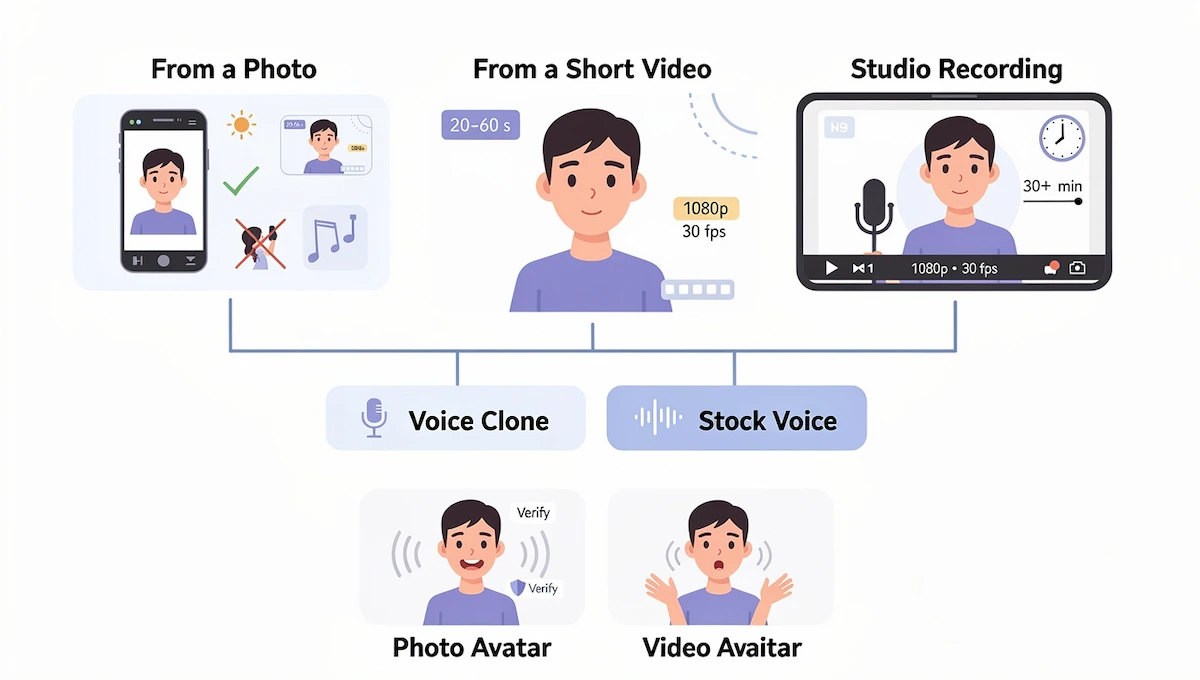
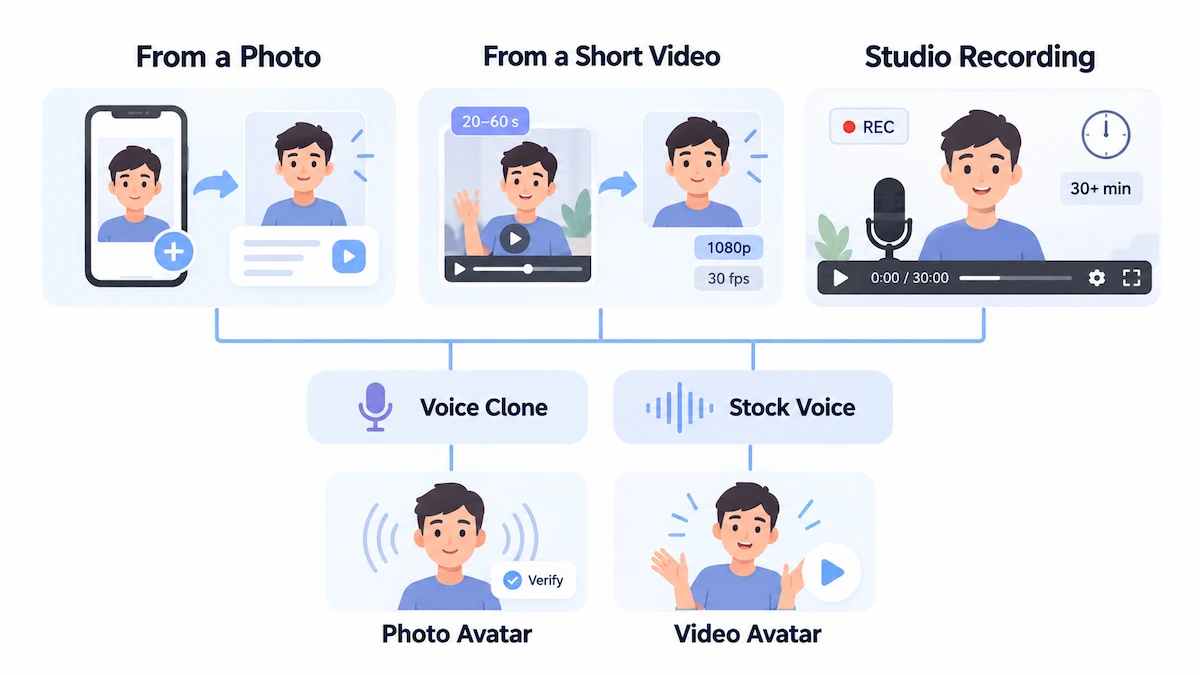
An AI avatar of yourself keeps the same face and voice in every video, so you record once and reuse it. Tools offer three routes: a photo, a short video, or a longer studio recording. Each one trades speed for realism.
From a Photo
Use a sharp, front-facing shot with even natural light and a plain background. Keep your face centered, your mouth visible and your expression relaxed, neutral or slightly smiling. Skip filters, heavy makeup and extreme angles. The background of the photo stays in the finished video, so pick the location on purpose. If the first result looks off, upload two or three different pictures and keep the one that looks most like you.
From a Short Video
Record 20 seconds to one minute of yourself. On a phone, film in 1080p at 30 fps with HDR turned off. Keep your mouth closed while recording, because the lips are synced to your script later. Change your position about every 10 seconds, and remember that clothing, background and hand movements carry over into every video. Some tools build an express version in minutes from a webcam clip or a YouTube link, while studio-grade avatars ask for 30 minutes or more of footage.
Voice Cloning and Verification
Record about a minute of speech with no background noise, and the tool builds a voice that can read any script, often in many languages. Descript asks you to verify your voice before cloning it, so nobody else can use it. That step protects against deepfakes, and it is a good question to ask any vendor. If you prefer not to clone, pair your AI avatar with a stock voice.
Photo Avatar or Video Avatar: Which Looks Better
A video avatar looks more natural because it carries hand gestures and body movement from your recording. A photo avatar is faster and needs no filming, but it moves less. Test both on the same 20-second script and judge the eyes, the pauses and the mouth.
How to Make AI Avatar Videos on Your Phone
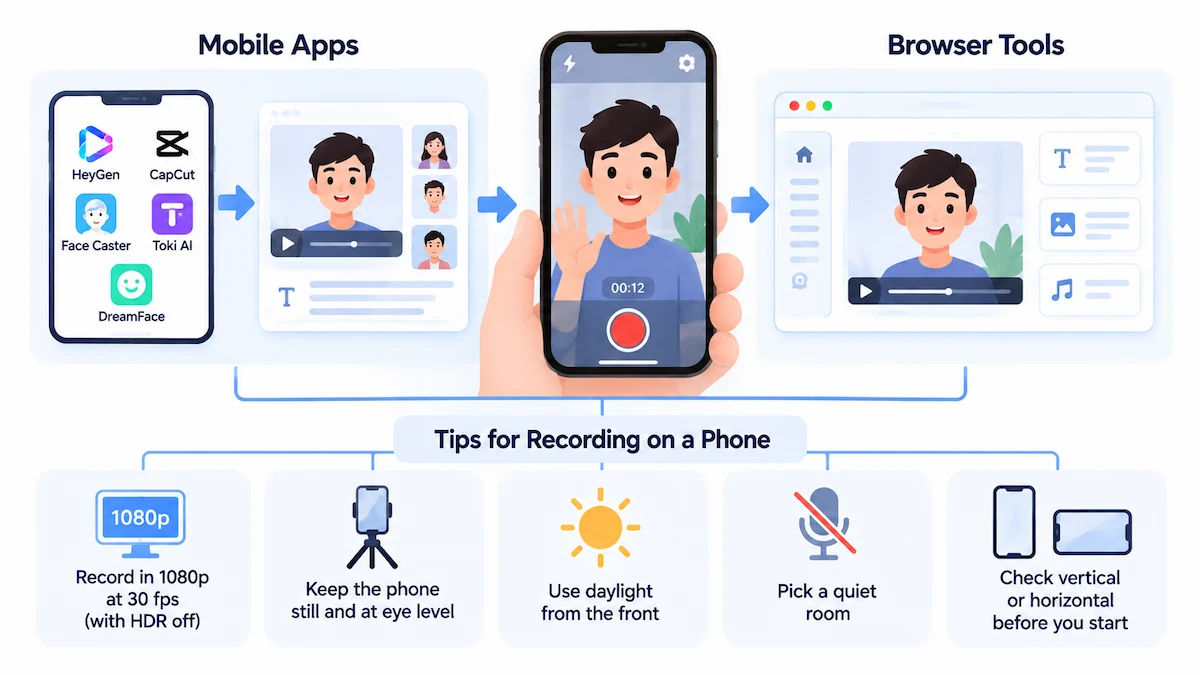
You can build an AI avatar video on a phone in two ways: with a mobile app or with a browser tool open on the phone. Both work for short clips, but they differ in control and in what they ask from you.
Mobile Apps vs Browser Tools
Apps such as the HeyGen mobile app, CapCut, Face Caster, Toki AI and DreamFace let you upload a photo, pick a stock avatar, type a script and export a clip in minutes. Most are free to download and then push a subscription, with plans in the app store running from a few dollars to tens of dollars. Before you install one, check which permissions it requests for photos and videos and read how it stores your uploads. A browser tool needs no install and usually gives a fuller editor, but the small screen makes scene work slower.
Tips for Recording on a Phone
- Record in 1080p at 30 fps with HDR turned off.
- Prop the phone at eye level, and keep it still.
- Use daylight from the front, and avoid a bright window behind you.
- Pick a quiet room, since the same recording often trains the voice.
- Check whether the tool wants vertical or horizontal footage before you start.
How to Write a Script for an AI Avatar Video
Length and Pacing
Plan two to four short sentences per scene in every AI avatar video, and 12 to 23 scenes for a longer video. A common speaking pace is 130 to 150 words per minute, so a 60-second clip needs about 130 to 150 words. Open with a hook in the first five seconds, such as a question, a surprising number or the problem you solve.
The FOCA Framework
Synthesia suggests four parts: Focus (the hook), Outcome (what the viewer will learn), Content (the main message) and Action (one clear call to action). The full method is on the FOCA framework page. Drafting a first version with a chatbot is fine, and these tips on prompt engineering for business help you get a cleaner draft.
Write for the Ear
Read the script aloud, and if you stumble, the AI avatar will too. Use plain words, add pauses on purpose, and keep long lists off the audio and on the screen. If you plan to translate the video, avoid idioms and local references, since they rarely survive dubbing.
How to Make AI Avatar Videos for Free
Several platforms let you make a first AI avatar video without paying, which is enough to learn the workflow. Expect limits on length, quality and features.
What Free Plans Actually Include
| Tool | Free option | Note |
|---|---|---|
| Synthesia | About 10 minutes of video per month | Stated in its own guide, so check the pricing page |
| Pictory | 50 credits in the free trial | A ready-made avatar uses 15 credits per 30 seconds, roughly 100 seconds in total |
| HeyGen | Free plan with watermark and short exports | Upgrading removes the watermark and extends length |
| Descript | Free to start | Avatars come from a gallery or an uploaded photo |
Free plans change often, so treat these numbers as a starting point and confirm them on the vendor page before you decide.
Limits to Expect on Free Plans
Common limits are a visible watermark, short exports, lower resolution, a small pool of credits and no custom avatars. Some plans block the MP4 download entirely. Because every regeneration spends credits, finish the script and the preview before you press generate. For typical price ranges once you outgrow the free tier, see how much AI tools cost.
No Sign-Up and No Watermark: What to Check
Some free generators advertise an AI avatar video with no sign-up and no watermark. HeyGen makes that claim on its free generator page, but it is a vendor statement, so test it yourself. These offers usually come with limits: short clips, a small set of avatars and lower export quality. Read the terms and the privacy policy, and find out whether your uploads are stored before you add a face or a voice.
Best AI Avatar Video Makers Compared

| Tool | Best for | Own avatar option |
|---|---|---|
| HeyGen | Realistic talking avatars and video translation | Photo avatar and personal avatar |
| Synthesia | Corporate training in many languages, slide-style editor | Personal avatar from a photo, plus studio avatars |
| Colossyan | Training with quizzes and SCORM export | Instant avatar from a short clip or photo |
| Descript | Editing by text, avatar plus voice cloning | Gallery avatars or an uploaded photo |
| Fliki | Script to video with avatars and many voices | Upload an image or generate one from a prompt |
| VEED | Avatar plus a full video editor | Record yourself with a preset script |
| Pictory | Turning scripts, links and slides into video | Ready-made avatars |
| Captions | Avatars generated as a full performance | AI twin from a short recording |
These descriptions come from the vendors, and every AI avatar video maker markets its own strengths, so test each tool on your own script and judge lip sync, voice quality and export limits yourself.
What to Look For in an AI Avatar Video Maker
- Ease of use: can a beginner finish a video without a tutorial?
- Facial accuracy and lip sync: does the mouth match the audio, and does a custom avatar look like the person?
- Style options: realistic, cartoon, 3D, outfits and backgrounds.
- Pricing: minutes, credits or per video, and what the free plan allows.
- Privacy and rights: who owns the avatar and the voice, and how uploads are stored.
- Support and updates: help center, templates and regular improvements.
How to Make AI Avatar Videos Look Natural
Pauses and Pacing
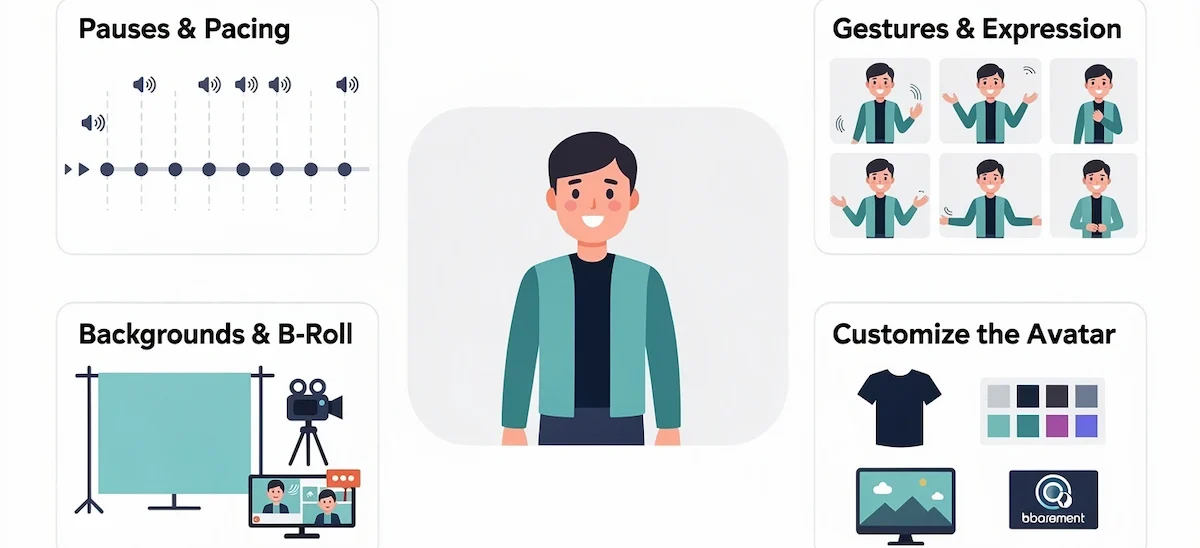
Short pauses after key points make the voice of an AI avatar sound human. Add them in the script instead of leaning on punctuation. Preview the full audio before you generate, and cut any sentence that feels rushed.
Gestures and Expression
Pick motion that supports the message, and keep it light for any AI avatar video. Too many gestures look twitchy, and a flat avatar looks dead. Choose an expressive style for social content and a calmer one for training.
Backgrounds and B-Roll
Use a simple background so the AI avatar stays in focus in each AI avatar video, and add B-roll or screen recordings between scenes to break up long segments. Match the colors and fonts to your brand, and keep them the same from scene to scene.
Customize the Avatar: Outfit, Background and Brand Colors
Most editors let you change the outfit, set a background and apply a brand kit with your logo, fonts and colors. Keep the clothing and the background the same across a series so the AI avatar becomes a recognizable presenter. A custom avatar keeps the clothes from your recording, so wear something plain that matches your brand before you film.
Captions and Subtitles
Burned-in captions help viewers who watch on mute and make an AI avatar video easier to follow in a noisy place. Keep lines short, pick a readable font and match the colors to your brand. Most tools generate captions from the script, but check names and numbers before you export.
Common Mistakes
- Cramming a full paragraph into one scene, which makes the AI avatar drag.
- Skipping the preview and paying for a second render.
- Leaving the default voice and accent on.
- Over-animating with too many transitions and moving elements.
- Writing a script that sounds robotic.
- Forgetting subtitles.
How to Fix Common AI Avatar Video Problems
| Problem | Likely cause | Fix |
|---|---|---|
| Blurry or distorted face | Low-resolution or angled photo, filters | Use a clear front-facing image without filters, in better light |
| Lip sync mismatch | Unclear audio or fast speech | Upload cleaner audio, simplify the script, slow the pace |
| Robotic voice | Default voice, no pauses | Try another voice, add pauses, shorten sentences |
| Avatar does not look like you | One weak photo, smiling or frowning | Upload three pictures with a neutral expression |
| Stiff movement | Still photo or thin settings | Switch to a video avatar or add detail to the motion settings |
| Wrong pronunciation | Names and acronyms | Respell the word phonetically in the script |
| Low-quality export | Low resolution setting or stylized look | Raise the export resolution and pick a realistic style |
Before you generate a long AI avatar video, test a short 5 to 10-second clip. It costs fewer credits and shows most problems early.
What to Use AI Avatar Videos For
Once you know how to make AI avatar videos, the next question is where they fit. They work best for repeatable, informational content with a clear script.
- Training and onboarding: consistent lessons that are easy to update.
- Product demos and explainers: the AI avatar narrates while a screen recording shows the product.
- Social media and UGC ads: short presenter-led clips without filming.
- Sales outreach: a personal intro video instead of a long email.
- Customer support: a presenter that walks viewers through common questions in a help center. For the chat side of support, read about AI customer service.
- Faceless channels: a consistent presenter for people who prefer to stay off camera.
Which Industries Use AI Avatar Videos
Brands use an AI avatar as a digital ambassador that answers product questions on a website or in social posts. Online schools use a virtual tutor to explain lessons and repeat them in other languages. Retailers add a guide that helps shoppers pick a product, and banks and insurers use one for account explanations and claim steps. Healthcare teams record patient instructions once and update them as rules change. The common thread is repeatable information that benefits from a consistent presenter.
Script Ideas for a First AI Avatar Video
- A 30-second welcome message for a website or a new customer.
- A three-step product tour with a screen recording.
- One answer from your FAQ, read by the presenter.
- A weekly update for your team or your channel.
- A short lesson that explains one concept.
UGC-Style Ads With an AI Avatar
UGC-style ads imitate a real customer talking to the camera about a product. An AI avatar can play that role without a shoot. Pick a relatable presenter, keep the AI avatar video to 15 to 30 seconds, open with a hook in the first three seconds, give one benefit and finish with one call to action. Use vertical 9:16 format and burned-in subtitles, then test several avatars and hooks. Draft the hook and the call to action with this guide to write ad copy with AI, and check the disclosure rules of the ad platform before you run the ad.
Interactive AI Avatar Videos: Quizzes, Branching and Buttons
Some platforms, such as Synthesia and Colossyan, add interactive elements to an AI avatar video. You can place a quiz after a scene, branch to different paths based on an answer, or add clickable buttons that open a page. This suits training and onboarding, where you want to check understanding. Keep scenes short, and export the finished module as a SCORM file if it will live in a learning management system.
Best AI Avatar Video Length by Type
| Video type | Typical length | Approximate words |
|---|---|---|
| Marketing explainer | 45 to 90 seconds | 100 to 200 |
| Tutorial | 2 to 4 minutes | 260 to 600 |
| Detailed training | 5 to 7 minutes | 650 to 1,050 |
Shorter videos usually keep more viewers, but the video still has to cover what the audience needs.
How to Translate and Localize an AI Avatar Video
Most tools translate the script and dub it in the same avatar voice, with lip sync adjusted to the new language. Synthesia lists more than 140 languages, and Descript translates into more than 20. Ask a native speaker to review the result before publishing, especially for policy or product wording.
After You Export: Publish, Update and Share With Your Team
Publish and Promote Your AI Avatar Video
Give the file a clear title that names the topic, write a short description with the main keyword, and upload the script as a transcript or captions so search engines can read the content. Choose a thumbnail with a readable face and a few words of text. Post the video where your audience already is, and embed it on the page that answers the same question.
Update and Maintain Your Videos
The biggest advantage of an AI avatar video is easy updates. When a price, a policy or a screen changes, edit the line in the script and generate that scene again instead of reshooting. Keep a simple log with the date, the version and what changed, and review videos on a fixed schedule so outdated answers do not stay online.
Work With a Team
Shared workspaces let several people edit the same AI avatar video, leave comments and approve it before export. Store the brand kit, the approved avatars and the voice in one place, and agree who signs off on facts and on consent. A short review step stops wrong names, outdated numbers and unapproved faces from going live.
Consent, Rights and Disclosure for AI Avatar Videos
Get permission before you use the face or voice of another person in an AI avatar video, and upload only portraits you are authorized to use. Check the terms of the vendor on commercial use, and ask who owns the AI avatar and the voice model.
Disclosure rules are tightening. Under Article 50 of the EU AI Act, deployers who publish deepfakes must disclose that the content was artificially generated or manipulated, and providers must mark synthetic content in a machine-readable way. The European Commission explains the obligations in its Article 50 FAQ. Platforms such as YouTube, Instagram and TikTok also ask for labels on realistic synthetic media. This is general information, not legal advice, so check current guidance for your market.
Faces and voice recordings are personal data as well. Decide who can access uploads, how long they are stored and how deletion works, and read AI data privacy for business for a practical checklist.
Keep a simple record for each AI avatar video: who approved the face, who approved the voice, which tool made the clip and where the consent form is stored. If a person leaves your team or withdraws permission, you can then remove that AI avatar and stop using it in new videos.
How to Measure Whether Your AI Avatar Video Works
Track completion rate for each AI avatar video, plus drop-off points and clicks on your call to action. The video producer at Synthesia aims for about 80% completion on training videos and 60% on marketing videos, which is a personal target rather than a benchmark. If viewers leave at the same scene, rewrite it. Compare two versions with a different hook or presenter, and keep the better one. Read the comments as well. If viewers ask whether the presenter is real, say so in the description and at the start of the video. Linking video results to cost is covered in this guide to AI ROI for business.
Where AI Avatar Videos Are Heading
Platforms are moving from single clips to video agents that take a prompt and return a finished video with B-roll, captions and motion graphics. Interactive avatars that answer viewer questions on a page are becoming common, and translation keeps adding languages while keeping the look and voice of the presenter. Rules are catching up as well, with labeling and consent requirements for synthetic media. Expect AI avatar videos to become easier to make and harder to publish without clear disclosure.
Before You Publish: A Short Checklist
Run through this list each time you make AI avatar videos for a client or a channel.
- One idea per scene, and a hook in the first five seconds.
- A clear call to action near the end.
- Consistent fonts, colors and alignment across scenes.
- Names and acronyms pronounced correctly.
- Captions on, and the video previewed from start to finish.
- Permission and disclosure handled.
- Export in the right ratio and resolution for each platform.
AI Avatar Video FAQ
Can I Make AI Avatar Videos for Free?
Yes. Many platforms offer a free plan or trial with limited minutes or credits, usually with a watermark and short exports. It is enough to learn the workflow and test lip sync. Paid plans remove the watermark and add length, resolution and custom avatars.
Can I Make an AI Avatar of Myself?
Yes. Upload a clear front-facing photo, or record 20 seconds to a minute of video, depending on the tool. Add a cloned voice if you want the AI avatar to sound like you. Video recordings give more natural gestures than a single photo.
How Long Does It Take to Make an AI Avatar Video?
Anyone learning how to make AI avatar videos can finish a short one in under an hour once the script is ready. Rendering takes a few minutes for a short clip and longer for a long one. Most of your time goes into the script and the scenes, not the wait.
Do I Need to Film Anything?
No, not with a stock avatar. You only film if you want a custom avatar of yourself, and even then it is a short clip. A photo avatar needs only one picture.
Can ChatGPT Make AI Avatar Videos?
ChatGPT can plan the video and draft the script, and some avatar tools now connect to it through plugins. The video itself is rendered by an AI avatar tool or a video model. Describe the topic and audience in ChatGPT, then paste the finished script into your avatar maker. For wider content workflows, see AI content creation.
How Realistic Are AI Avatar Videos?
The quality of AI avatar videos varies by tool. Good ones show natural blinking, eye movement and accurate lip sync, while weaker ones look like a still photo with a moving mouth. Test the same script on two tools and compare before you pay.
Can I Turn a Photo Into a Talking Avatar?
Yes. Upload a sharp, front-facing photo with even light and a plain background, add a script and a voice, and the tool animates the face. Results depend on photo quality, so try more than one picture.
Can I Add an AI Avatar to an Existing Video or Presentation?
Yes. Many editors let you place an AI avatar over slides, screen recordings or B-roll. You can drag, resize and reposition it, and the lip sync updates when you edit the script.
How Do I Make an AI Avatar Speak Another Language?
Pick a voice in the target language, or use the translation feature, which rewrites the script and dubs the AI avatar with lip sync adjusted. Keep the original script simple so it translates well, and have a native speaker review the result.
Can I Use My Own Voice?
Yes. Record about a minute of clean audio and the tool clones your voice. Some platforms verify that the voice is yours before they allow cloning, which protects against misuse.
Can I Use AI Avatar Videos for Ads and Commercial Work?
Usually yes on paid plans, but read the license. Check who owns the AI avatar, whether the stock avatar can be used in ads, and whether disclosure is required in your market or on the ad platform.
What Is an AI Avatar Generator?
An AI avatar generator is a tool that creates a digital presenter from a photo, a short recording or a text prompt. Many generators also add a voice and lip sync, so the avatar can read a script on camera. Some focus only on the face, while others export a full AI avatar video.
Can I Make an AI Avatar Video on My Phone?
Yes. Mobile apps and browser tools let you upload a photo, type a script, pick a voice and export a short clip. Apps are quick but ask for access to your photos and videos, so review the permissions and the privacy policy first.
Can I Create an AI Influencer or a Faceless Channel?
Yes. A consistent AI avatar can host a channel without showing a real face, and some creators use custom styles for a fictional character. Disclose that the presenter is AI-generated, and check the rules of each platform for synthetic media.
Is Making an AI Avatar Expensive?
Not at the start. Many tools offer free plans or trials, and paid plans begin at a few dollars to a few tens of dollars a month. Costs grow with minutes, credits, custom avatars and premium features, so test a free tier before you commit.
Which AI Avatar Video Maker Is Best for Beginners?
Pick a tool with a slide-style editor, a free trial, a large avatar library and a clear preview, such as the options in the comparison table above. Test two with the same short script and keep the one whose lip sync and voice you like better.