Tickets keep growing faster than the team, and every new hire adds cost without removing the repetitive questions that fill the queue. Learning how to automate customer support with AI means letting software answer the routine questions, route the rest and draft replies, while people keep the cases that need judgment. This guide shows what to automate first, the eight steps to set it up, the tools worth a look, the channels to cover, the GDPR and disclosure rules, and the metrics that show whether it works.
What does it mean to automate customer support with AI?
To automate customer support with AI means using software to answer, sort and prepare replies to customer questions, so support runs with less manual work. It goes beyond a chatbot on a website. Good customer support automation also covers ticket routing, suggested replies for agents, conversation summaries, follow-up messages, surveys and reports. AI customer support works best when it handles the repeat questions and passes everything else to a person with the full context. For a wider look at the topic, read the guide to AI customer service.
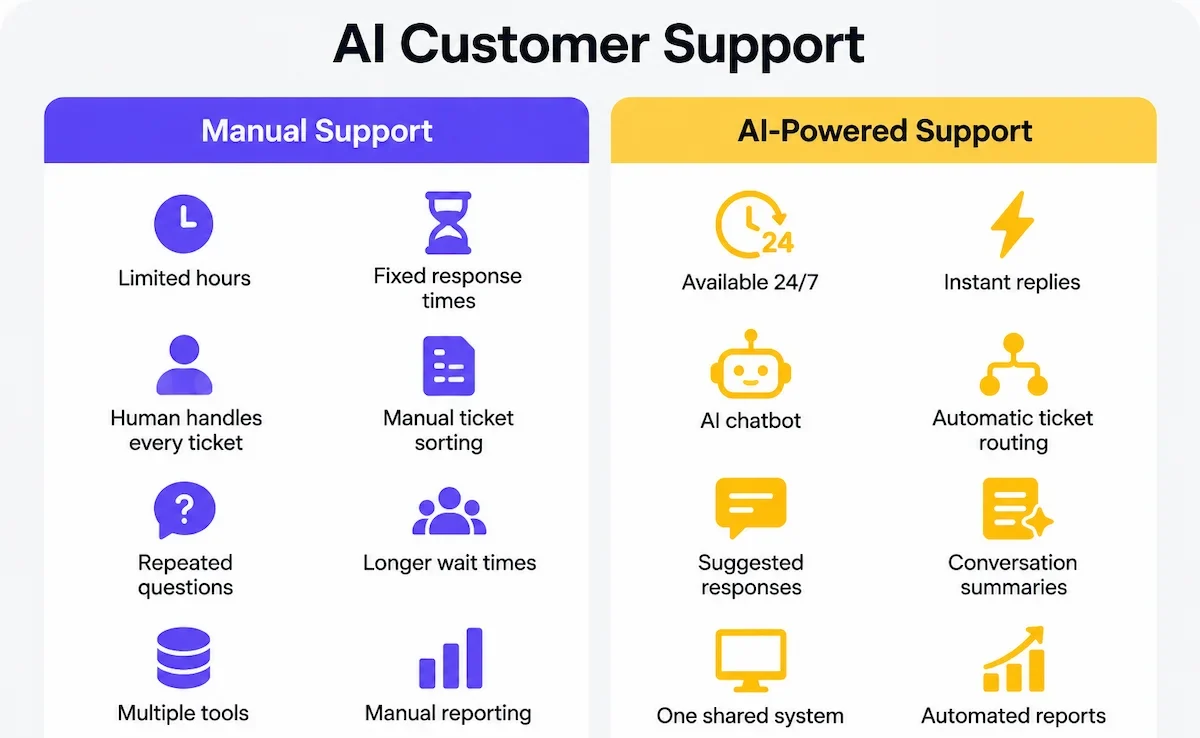
Done well, this is not about removing people. It improves speed and consistency, gives customers an answer at any hour and leaves agents more time for complaints, complex cases and customers who matter most to the business.
Rule-based bots, AI chatbots and AI agents
A rule-based bot follows a fixed script of buttons, menus and keywords. It is cheap and predictable, but it breaks when a customer phrases a question in an unexpected way. An AI chatbot understands free text and answers from your knowledge base. An AI agent goes one step further: it connects to your systems and takes action, such as checking an order status, updating a ticket or starting a return. Most teams begin their customer support automation with a chatbot and add agent features after the first results. The guide to AI agents for business explains how these agents work and where they fit.
What AI can and cannot handle
AI handles repeat questions well: order status, shipping and return rules, account basics, opening hours and simple how-to answers. It also sorts and tags tickets, drafts replies and summarizes long threads. It struggles with judgment, with exceptions to policy, with upset customers and with anything missing from the knowledge base. When it does not know, it can guess, and a confident wrong answer is worse than no answer. That is why every setup needs a clear path to a human.
Why automate customer support now?
Ticket volume rises with every new customer, channel and product, while hiring and training take months. Customers also expect an answer in minutes, at night and on weekends. Automation closes that gap without a new hire for every thousand tickets.
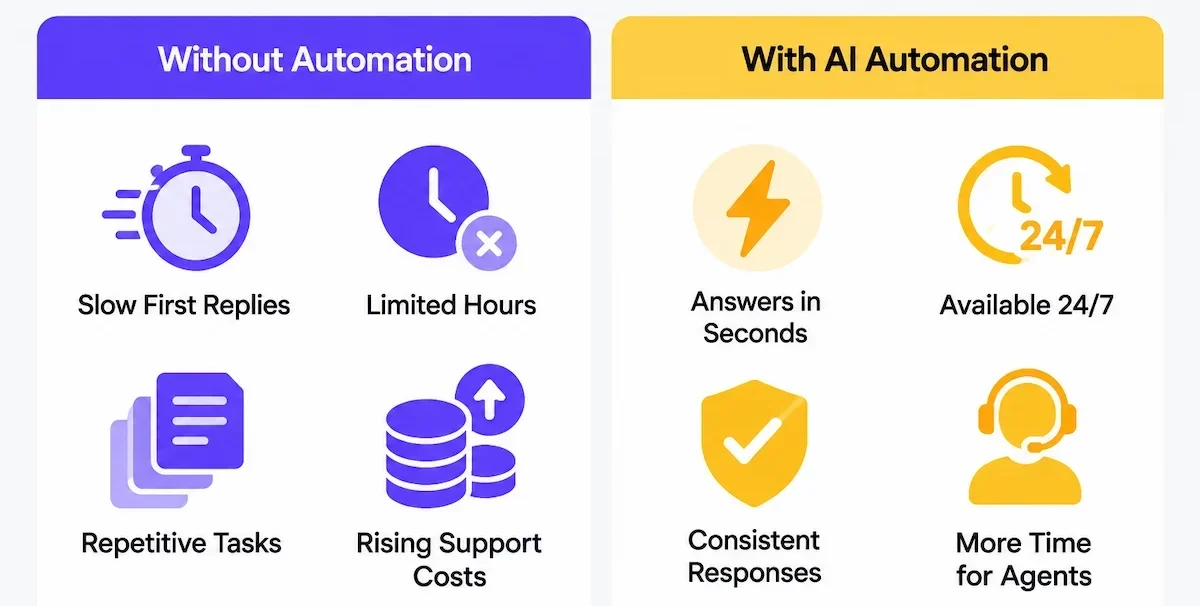
- Speed: routine questions get an answer in seconds, so the first response time drops.
- Availability: support runs around the clock, including holidays and busy seasons.
- Consistency: every customer hears the same policy, in the same tone.
- Lower cost per ticket: repeat questions stop eating agent hours.
- Better work for agents: fewer copy-paste replies and more time for real problems.
The benefit only appears if the answers are correct, so the foundations below matter more than the tool you pick.
What to automate first (and what to leave to people)
The fastest results come from the questions customers ask most often and that have one clear answer. Start there, and keep the sensitive cases with your team.
Best candidates for early automation
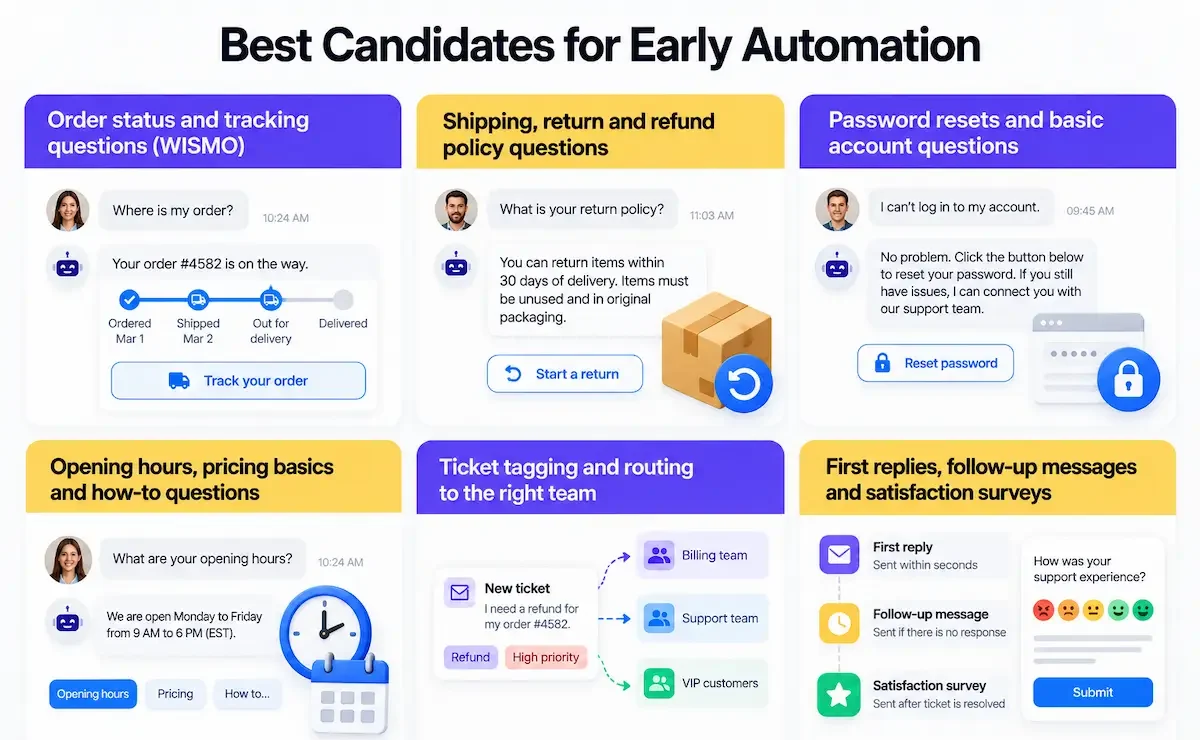
- Order status and tracking questions (WISMO, where is my order).
- Shipping, return and refund policy questions.
- Password resets and basic account questions.
- Opening hours, pricing basics and how-to questions.
- Ticket tagging and routing to the right team.
- First replies, follow-up messages and satisfaction surveys.
Pull a list of the last few hundred tickets and group them by type. If five or six types make up most of the volume, those are your first candidates.
What should stay with a human
Keep complaints, angry customers, high-value accounts, billing disputes, legal or safety issues and anything that needs an exception in the hands of a person. The same goes for emotional situations, where a quick automated answer can feel cold. The goal is to remove repetitive work, not the human touch.
A simple way to prioritize
Score each question type on two things: how many tickets it creates and how risky a wrong answer is. High volume with low risk goes first.
| Volume | Risk of a wrong answer | What to do |
|---|---|---|
| High | Low | Automate first |
| High | High | Let AI draft, a person approves |
| Low | Low | Automate later, when the basics work |
| Low | High | Keep with a human |
Before you turn on AI: the foundations
Most failed projects fail before launch, because the content, the rules and the reports were not ready. Spend time here, and the later steps go faster.
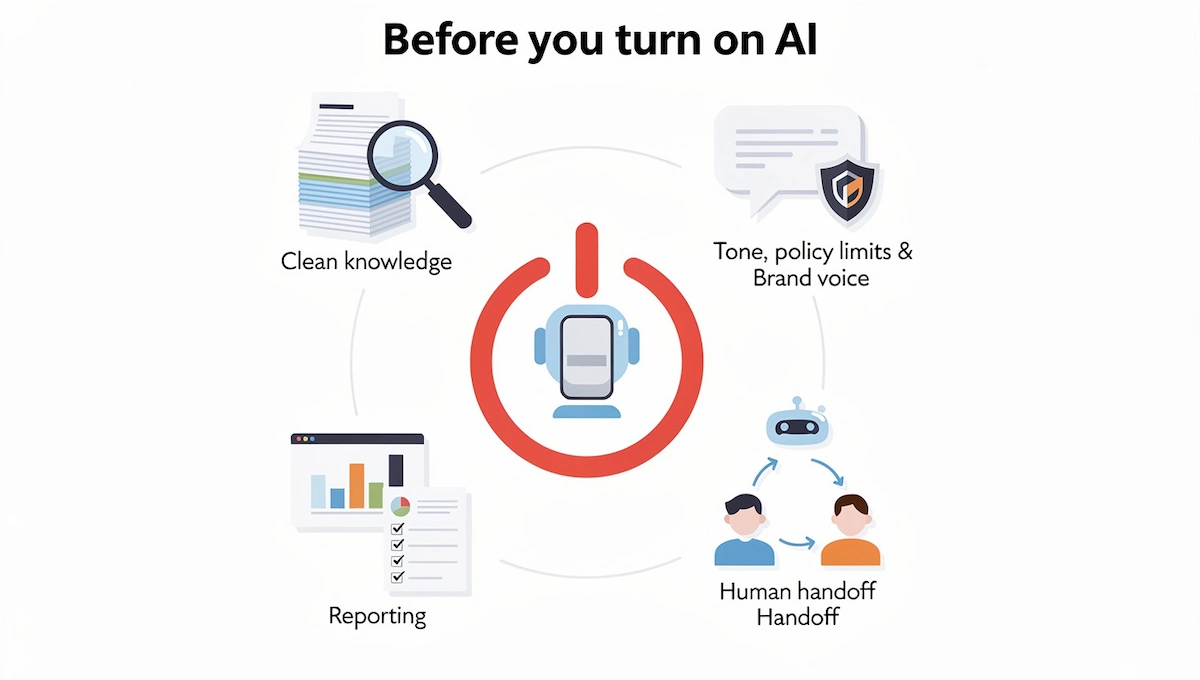
Clean up your knowledge base
The AI answers from what you give it, so a knowledge base with old, duplicated or conflicting articles produces old, duplicated or conflicting answers. Give each question one clear answer, remove outdated policies, write in plain language and check the dates. Add the answers your agents already give in tickets, since those are the questions customers actually ask.
Set tone, policy limits and brand voice
Write down how the bot should sound, what it may promise and what it must never do. Decide the rules for refunds, discounts, delivery dates and any topic where it must hand over to a person. Good instructions make the difference between a bot that sounds like your brand and one that sounds generic, and the guide on prompt engineering for business shows how to write them clearly.
Plan the human handoff
Decide when the bot should pass the conversation to a person: a customer asks for one, the bot fails twice, the topic is sensitive or the customer sounds upset. The human handoff must include the full conversation, so the customer never repeats the problem. Hiding the human option is one of the fastest ways to lose customers.
Prepare reporting before launch
Record the baseline before you start: first response time, resolution time, CSAT, tickets per type and cost per ticket. Without these numbers you cannot tell whether the automation helped.
How to automate customer support with AI step by step
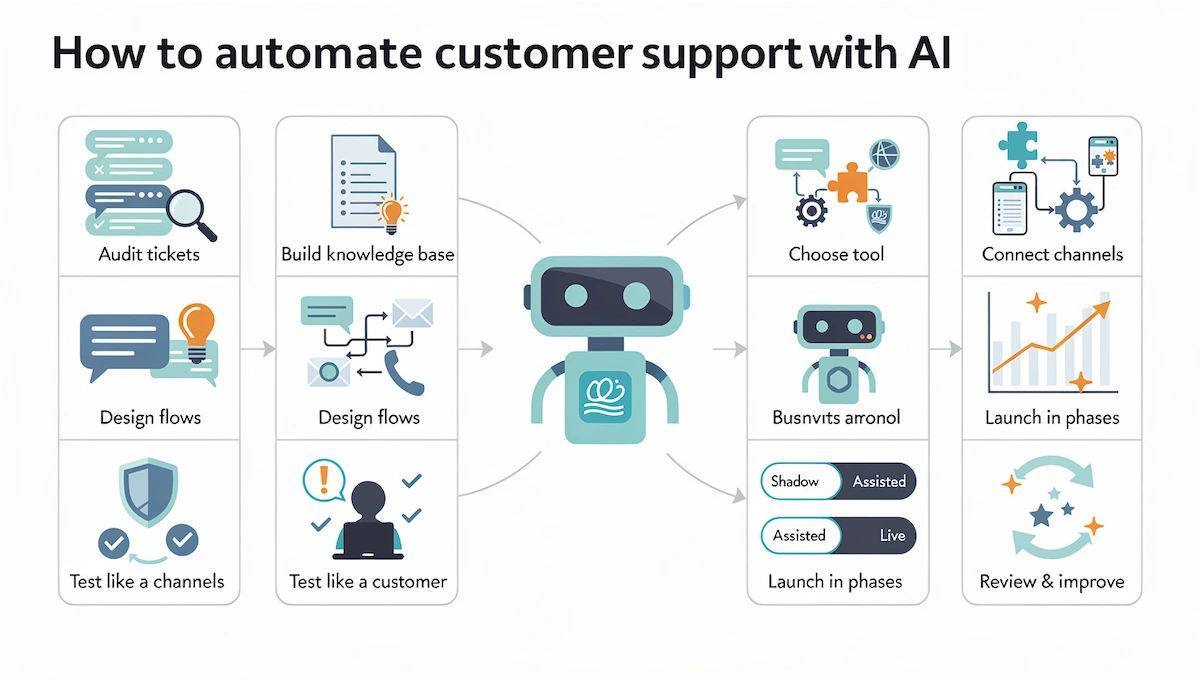
Here is how to automate customer support with AI step by step, in an order that avoids most of the common failures. The short version: audit your tickets, build the knowledge base, choose a tool, design the flows and escalation rules, connect one channel, test like a real customer, launch in phases and review the results every week.
Step 1: Audit your current support demand
Export a few hundred recent tickets and group them by type, channel and outcome. Note which ones are repetitive, which take the longest and which end with an unhappy customer. This gives you a list of intents, which are the reasons customers contact you. Pick your top five intents to start. Record your baseline metrics at the same time.
Step 2: Build your knowledge base
Write or update one clear article for each of your top intents. Use the words customers use, keep each article short and put the answer in the first lines. Connect other sources too, such as your website, product pages, policies and a list of frequent agent replies. The better the knowledge base, the fewer wrong answers you will see later.
Step 3: Choose the right tool
Pick the AI customer support tool that fits your size, channels and systems. A small shop needs an easy chat widget, a growing team needs a help desk with AI built in, and a large company may need an AI agent that connects to orders and accounts. Check setup effort, integrations, how the tool handles a handoff and what it costs when volume grows. The tools section below compares the main types.
Step 4: Design flows and escalation rules
Map what the bot does for each of your top intents: the question it asks, the data it needs, the answer it gives and the point where it hands over. Write escalation rules in plain terms: after two failed answers, when the customer asks for a person, when the topic is billing or a complaint. Add the tone and the limits you defined earlier.
Two settings matter a lot here. The first is a confidence threshold: the bot answers only when it is sure enough, and hands over when it is not. The second is a forbidden list, which is a set of topics the bot never answers on its own, such as legal claims, medical questions, chargebacks and account closures.
Step 5: Connect your channels
Start with one channel, usually website chat or email, and add more after it works. Connect the data the bot needs, such as the order system or customer records, so it can answer account questions and not only general ones. Use a separate flow for each channel, because a good chat answer is not always a good email reply.
Step 6: Test like a real customer
Before launch, ask the bot real questions from your tickets, including badly phrased ones, typos and angry messages. Try to break it: ask about topics it should not answer and check that it hands over. Run the bot on old, already solved tickets as well and compare its answers with what your agents wrote, since this shows real mistakes before any customer sees them. Let teammates test too, and fix every wrong answer by updating the knowledge base, not by patching one reply.
Step 7: Launch in phases
Roll out in stages. In shadow mode, the AI drafts answers that agents see but customers do not, so you can compare them with real replies. In assisted mode, agents approve the drafts before they are sent. After that, let the bot answer the safest intents on its own and widen the list as the results improve. Each phase should last long enough to cover your normal volume, often a couple of weeks.
Step 8: Review weekly and improve
Read a sample of conversations every week, especially the ones that ended in a handoff or a bad rating. Update the knowledge base, add missing intents and adjust the escalation rules. Track resolution, CSAT and tickets per type. Automation that nobody reviews slowly gets worse.
How to automate customer support by channel
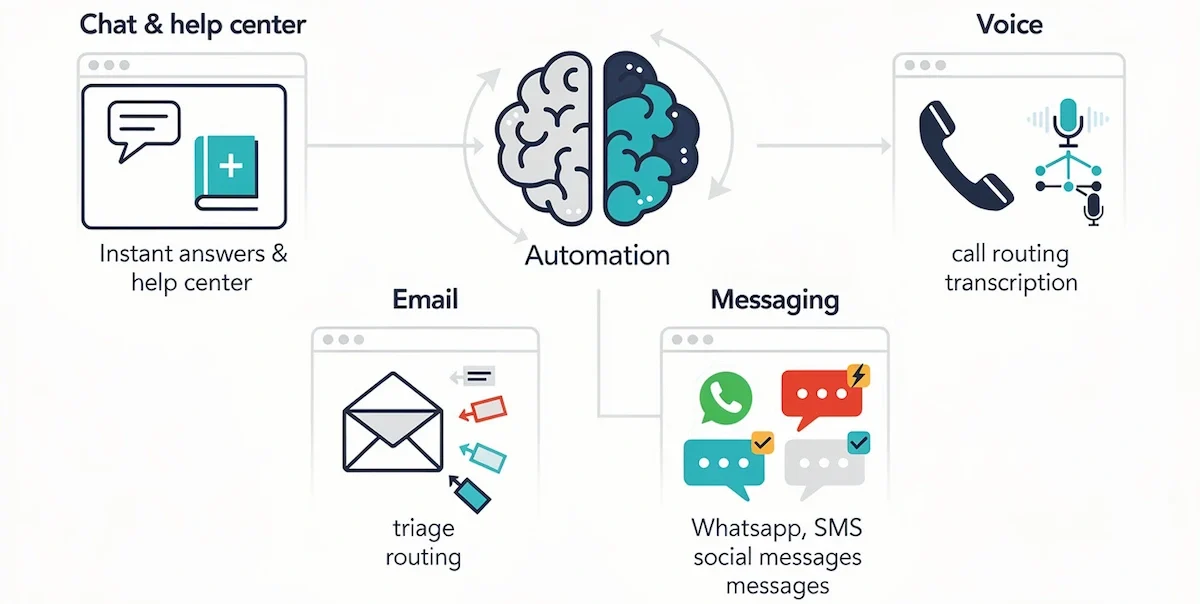
The same setup works across channels, but each one has its own habits. Cover the channel where most of your tickets arrive first.
Website chat and help center
A chat widget gives instant answers while customers are on the page, and a good help center lets them solve the problem without opening a ticket. Let the chatbot answer from the help center articles and show the link to the article it used. Keep a visible button to reach a person.
Email suits AI drafts and triage. The AI can read an incoming message, tag it, route it to the right team and suggest a reply that an agent edits and sends. For simple questions with a clear answer, it can reply directly. Keep the subject lines and signature consistent, and always check long, emotional emails by hand.
WhatsApp, SMS and social messages
Customers expect quick, short replies on messaging channels. Use templates for common cases, such as order updates and appointment reminders, and let AI handle the first answer. Keep messages short, add a clear way to reach a person and respect opt-in rules for any message that is not a direct reply.
Phone and voice AI
Voice AI can answer calls, collect basic details and route the caller, or handle simple requests such as opening hours and order status. It is harder to get right than chat, because speech is messy and callers are often upset. Start with call routing and simple questions, and always offer a way to reach a person. Voice tools also transcribe calls, which feeds your reports and your knowledge base.
The layers of customer support automation
Automation is not one switch. It is a stack of layers, and most teams add them one at a time, from low risk to high risk.
| Layer | What it does | Risk |
|---|---|---|
| 1. Tagging and sentiment | Labels each ticket by topic, urgency and mood | Low |
| 2. Routing and assignment | Sends the ticket to the right team or agent | Low |
| 3. Knowledge base retrieval | Finds the right article for the question | Low |
| 4. Draft replies | Writes a reply that an agent edits and sends | Medium |
| 5. Autonomous resolution | Answers and takes actions without a person | Higher |
| 6. Confidence-based escalation | Hands over when the AI is not sure | Protects the other layers |
If you are unsure where to begin, start with layers one to four. They save time and a person still checks the result.
Tasks you can automate with AI
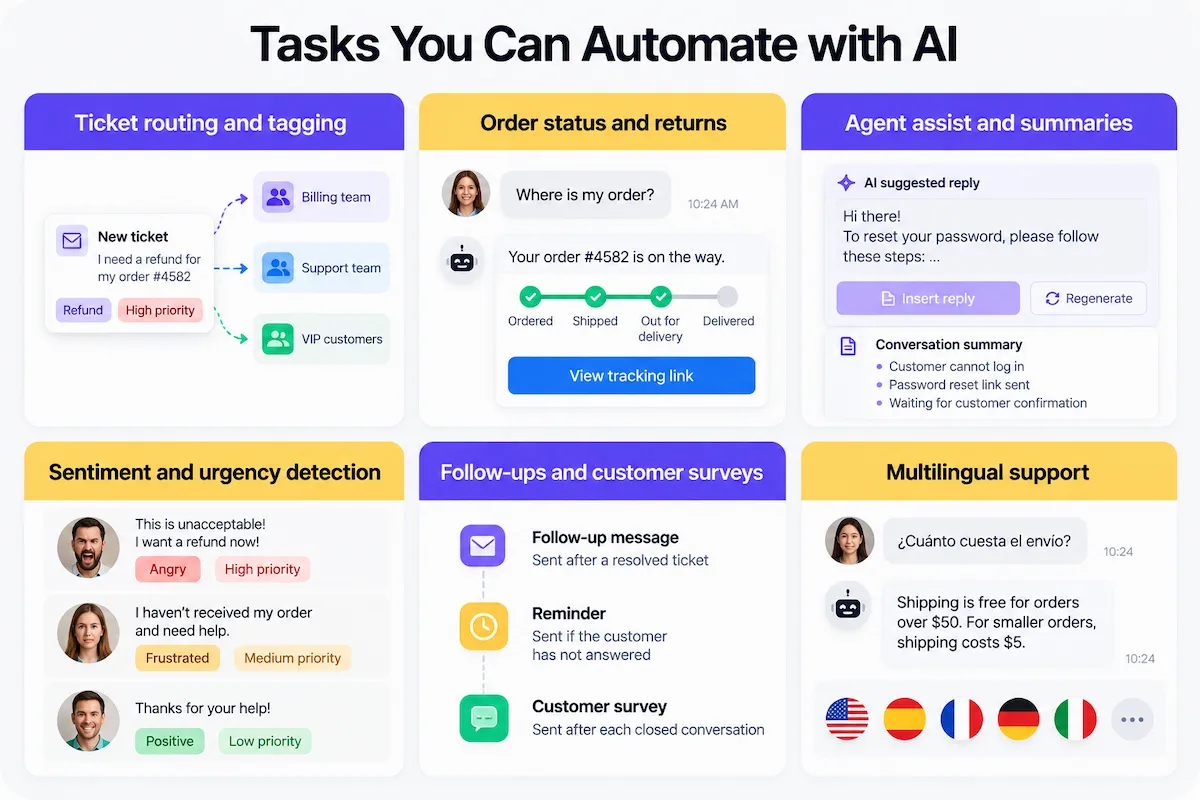
Beyond answering questions, AI can take over many small tasks that slow a support team down. These are the ones that usually pay off first.
Ticket routing and tagging
AI reads each new ticket, tags it by topic and urgency and sends it to the right team or agent. This removes manual sorting and speeds up the first response. Tickets from important customers or about sensitive topics can jump the queue automatically.
Order status and returns
For online stores, order status and returns make up a large share of tickets. Connect the bot to your order system, so it can give a real tracking status and start a return without a person. Set clear limits for refunds and exceptions.
Agent assist and summaries
Agent assist tools suggest replies, pull the right article and summarize a long conversation for the next agent. Agents stay in control and send faster, more consistent answers. This is a low-risk way to start, since a person reviews everything.
Sentiment and urgency detection
AI can read the tone of a message and flag angry, urgent or at-risk customers, so a person sees them first. A message with words like cancel, refund or lawyer can jump the queue. Treat the score as a hint, not a verdict, because sarcasm and short messages are easy to misread.
Follow-ups and customer surveys
Automate the messages that usually get forgotten: a follow-up after a resolved ticket, a reminder when a customer has not answered and a short satisfaction survey after each closed conversation. The survey results give you CSAT data without extra work.
Multilingual support
Many tools translate incoming and outgoing messages in real time, or answer from content in several languages. This lets a small team support customers in more languages. Check the quality for each language you promise, and have a native speaker review the important answers.
Customer support automation examples
These examples show how the pieces fit together in real workflows. None of them needs a full overhaul of your support setup.
Online store
A customer asks where an order is. The bot reads the order number, checks the shipping status in the store system and replies with the tracking link. If the package is late, it offers the return or refund steps from your policy, and passes the case to an agent when the amount is above a set limit.
Software company
A user writes that they cannot log in. The AI tags the ticket as an account issue, answers with the password reset steps from the help center and asks if that worked. If not, it summarizes the problem and sends it to a technical agent with the browser and account details already attached.
Local service business
A customer messages on WhatsApp to ask about prices and free dates. The AI answers from the price list, offers open slots and collects name and phone number. The owner only steps in to confirm the booking, and a reminder goes out the day before.
Best AI tools to automate customer support
Customer support automation tools fall into a few groups by the size of the team and the channels they cover. Prices and plans change often, so check the current plan on the website of each vendor before you decide.
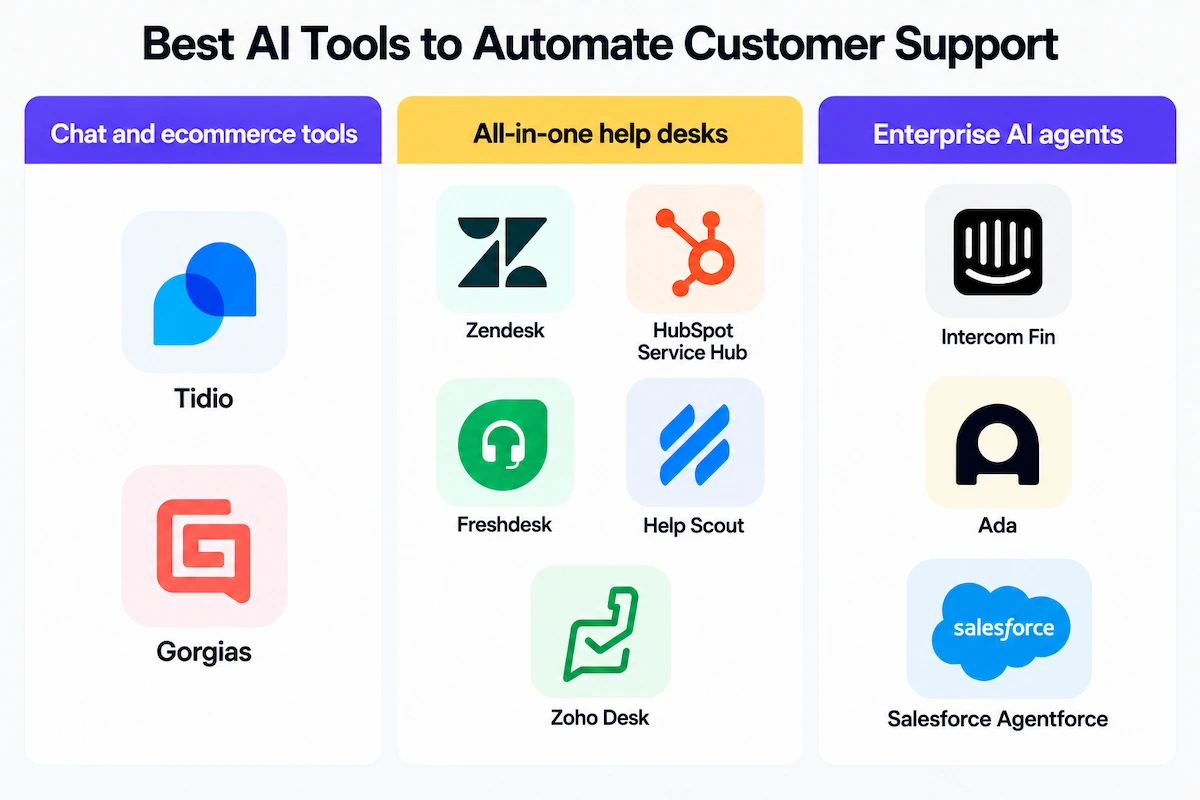
| Type | Examples | Best for |
|---|---|---|
| Chat and ecommerce tools | Tidio, Gorgias | Small and mid-size online stores |
| All-in-one help desks | Zendesk, HubSpot Service Hub, Freshdesk, Help Scout, Zoho Desk | Teams that want tickets, chat and AI in one place |
| Enterprise AI agents | Intercom Fin, Ada, Salesforce Agentforce | Large volumes and complex integrations |
Tools for small teams and ecommerce
Tidio and Gorgias are common picks for online stores. They connect to the store, answer order and shipping questions and offer chat and email in one inbox. They are quick to set up and do not need a developer.
All-in-one help desks
Zendesk, HubSpot Service Hub, Freshdesk, Help Scout and Zoho Desk combine a shared inbox, ticketing, a knowledge base and AI features such as suggested replies, summaries and chatbots. They suit teams that already work in tickets and want AI added to the same system.
Enterprise AI agents
Intercom with its Fin agent, Ada and Salesforce Agentforce focus on AI agents that resolve conversations from your content and connect to your systems. Intercom, for example, lets you train the agent on your content, set tone and policies through guidance, test it in a preview and deploy it on chat and email. These tools suit large volumes and teams with the people to maintain them.
Free and low-cost options
Several customer support automation tools offer a free plan or a trial, which is enough to test your top intents. Check the limits on conversations, channels and AI features, and what happens when you grow. For a wider view of what AI tools cost, see how much AI tools cost.
How to choose a tool
Compare ease of setup, integrations with your store or CRM, handoff quality, languages, reporting and total cost. Run the same ten real questions through two or three tools and see which gives the best answers. The guide on how to choose AI tools for business lists the questions to ask before you commit.
What to ask a vendor before you sign
- Which systems does it connect to: your store, CRM, help desk and payment tool?
- Can the bot take actions, or does it only answer questions?
- How does the handoff work, and does the agent see the whole conversation?
- Can you set a confidence threshold and a list of forbidden topics?
- Where is customer data stored, and is it used to train models?
- How is pricing calculated: per seat, per conversation or per resolution?
- Can you test it on your own past tickets before you pay?
How to automate customer support for a small business
A small business can automate customer support with AI, and run AI customer support for a small business without a developer or a big help desk. The key is to start simple and fix the basics first. The guide to AI for small business shows how the same approach works across other parts of the company.
Start with your website and FAQ page
Before you add any tool, write down which questions eat your time. Then fix them at the source: make your website, contact form and FAQ page answer them clearly. This alone removes many messages, and the same content becomes the knowledge base for your bot.
Add a no-code chat widget
A small business owner does not need an AI customer service agent that costs a lot. A no-code chat widget lets visitors ask questions and get instant answers from your content, and it can collect contact details for questions the bot cannot answer. Set it up on one page first, test it with real questions and add a clear way to reach you. Most tools take an afternoon to configure.
Automate follow-up and email
Set up automatic replies for new messages, a confirmation after a booking or order and a follow-up after the job is done. Keep a small set of templates for the questions you answer every week. If you write these messages with AI, the guide on how to write marketing emails with AI has tips on tone and structure that also work for support replies.
Privacy, GDPR and telling customers about the bot
A bot talks to real people and handles personal data, so privacy and honesty are part of the setup, not an extra. The rules differ by country, so treat the notes below as a general overview and check the rules that apply to you.
Tell customers they are talking to AI
In the EU, Article 50 of the AI Act says that providers must design AI systems that interact directly with people so that those people are informed they are dealing with an AI system, unless this is obvious to a reasonably informed person. Law firm summaries put the start of this duty at 2 August 2026, so check the current status. You can read the text of Article 50 in full. In the United States, the rules vary by state. Utah, for example, requires businesses to disclose AI involvement when a customer asks, and some licensed professions must disclose from the start. The safest habit is to say it at the beginning of every conversation, for example: you are chatting with our AI assistant, and a person can join at any time.
Customer data and GDPR basics
A support bot often collects names, emails and order numbers before it even understands the question. For a small business under GDPR you need a legal basis, a clear privacy notice and an agreement with the vendor that processes the data. Check where the data is stored, how long it is kept and whether it is used to train models. Keep payment details and other sensitive data out of the chat, and set retention limits. For more on this, read the guide to AI data privacy for business.
What the bot must never say or do
Set firm limits: no promises outside your policy, no legal, medical or financial advice, no refunds beyond the rules and no requests for sensitive data. A company is responsible for what its bot says. In 2024, a tribunal in British Columbia ruled that Air Canada was responsible for wrong information its chatbot gave a customer about a bereavement fare, and it rejected the argument that the correct policy was elsewhere on the website. The American Bar Association summary explains the case. Any customer support automation plan should include this lesson: keep the knowledge base accurate and send risky questions to a person.
How to measure whether automation works
Compare the numbers with the baseline you recorded before launch. Look at customer outcomes first and cost second.
Resolution rate vs deflection rate
Deflection counts the conversations the bot closed without a person. Resolution asks a harder question: was the problem actually solved? A customer who gives up and writes again counts as deflected but not resolved. Many vendors now talk about resolution first, and you should too. Track both, plus the share of conversations the bot hands to a person and the re-contact rate.
CSAT, first response time and cost per ticket
CSAT shows how customers rate the experience, first response time shows speed and cost per ticket shows the money side. Compare automated conversations with human ones. If CSAT drops, look at the handoffs and the wrong answers first. To connect support numbers to the business case, read how to calculate the ROI of AI for business.
How to calculate the savings
Take your cost per ticket from the baseline, multiply it by the number of tickets the bot resolved, then subtract the cost of the tool and the time your team spends on the knowledge base and reviews. Count only resolved conversations, not deflected ones. Add the effect on CSAT and re-contact rate, since a cheap answer that brings the customer back is not a saving.
Use benchmarks carefully
Vendors publish high resolution and deflection numbers, but they come from different companies, with different questions and different ways of counting. Your numbers depend on how clean your knowledge base is and what your customers ask. Use outside figures as a rough guide, and judge the result against your own baseline.
How to read transcripts every week
Numbers do not show why a conversation failed. Read a sample every week, with a focus on handoffs, low ratings and conversations where the bot said it did not know. Each one points to a gap in the knowledge base, a missing intent or a rule that needs a change.
Keeping your support content ready for AI search
Customers now ask questions in chat assistants and AI search tools, not only in Google. Those tools pull answers from help centers, FAQ pages and policy pages. Write each article around one question, put the answer in the first sentence, keep policies current and use the same wording on your site and in your bot. The same clean content then serves your customers, your chatbot and search engines.
Common mistakes when you automate customer support
- Automating a broken process instead of fixing it first.
- Training the bot on outdated or conflicting content.
- Hiding the way to reach a human.
- Turning on several channels at once before one works.
- Measuring only the drop in tickets and not resolution or CSAT.
- Launching to everyone with no shadow mode or test.
- Giving the bot no limits on refunds, promises or sensitive topics.
- Never reading the transcripts after launch.
- Leaving help center content unclear for AI search and answer engines.
Troubleshooting common problems
| Problem | How to fix it |
|---|---|
| The bot gives a wrong answer | Fix the knowledge base article, add a rule for that topic and test again |
| Customers cannot reach a person | Add a visible handoff button and trigger it after two failed answers |
| Answers are out of date | Set a review date for every article and remove old policies |
| Customers repeat their problem after a handoff | Send the full conversation and a summary to the agent |
| Many tickets come back | Check resolution, not only deflection, and improve the top intents |
| The tone sounds off | Rewrite the brand voice instructions with examples of good and bad replies |
Will AI replace customer support teams?
No tool removes the need for people in support. AI handles repeat questions, sorting and drafts, but upset customers, exceptions and complex problems still need judgment and care. What changes is the work: fewer repetitive tickets, more time on difficult cases and more time spent on the knowledge base, the rules and the review of conversations. Teams that treat AI as a first line and keep a clear path to a human usually see better results than teams that try to replace agents.
Final checklist before launch
- You grouped tickets and picked your top intents.
- The knowledge base is clean, current and written in plain language.
- Tone, limits and escalation rules are written down.
- The human handoff works and passes the full conversation.
- You tested with real questions, including difficult ones.
- Customers are told they are talking to AI.
- Data, privacy and retention are checked with your vendor.
- Baseline metrics are saved and a weekly review is scheduled.
Where to start
To automate customer support with AI, pick one channel and your five most common questions, write clear answers for them and launch in shadow mode first. Read the results every week, fix the gaps and widen the scope step by step. If you want to apply the same approach to other parts of your company, read how to use AI in business.
Customer support automation FAQ
What does it actually mean to automate customer support?
It means using software to answer repeat questions, sort and route tickets, draft replies and send follow-ups, so agents spend their time on cases that need a person.
How do I automate customer support with AI?
Audit your tickets, build a clean knowledge base, choose a tool, design the flows and escalation rules, test with real questions, launch in phases and review the results every week. Start with one channel and your most common questions.
What is the easiest way to automate customer support?
The easiest start is an AI chat widget or a help desk with built-in AI that answers from your help center. Fix your FAQ page first, then connect a tool and test it on your top questions.
What should I automate first in customer support?
Start with high-volume, low-risk questions, such as order status, shipping and return policy, account basics and opening hours. Ticket tagging and routing are also good early tasks.
Can a small business automate customer support without a developer?
Yes. No-code chat tools and help desks with built-in AI can be set up in an afternoon. Write clear answers for your repeat questions, connect the widget and add a way to reach a person.
How much does customer support automation cost?
Costs vary by tool, volume and features. Many vendors offer a free plan or trial, and some charge per resolved conversation, so check the current pricing and what happens as your volume grows.
How long does it take to automate customer support?
A small setup with a chat widget can go live in a day, but a proper rollout with a clean knowledge base, testing and phases usually takes a few weeks. Larger teams with several systems need longer.
Will automating customer support hurt CSAT?
It can if customers cannot reach a person or get wrong answers. Keep a clear handoff, test before launch, start with low-risk questions and compare CSAT with your baseline.
What if the AI gives a wrong answer?
Fix the knowledge base article that caused it, add a rule for that topic and test again. Limit what the bot may promise, and send risky topics to a person, since the company is responsible for what its bot says.
Do I have to tell customers they are talking to AI?
In the EU, the AI Act requires that people are informed when they interact with an AI system unless it is obvious, and some US states have similar rules. The safe approach is to say it at the start of every conversation.
Can I automate customer support with ChatGPT?
You can use ChatGPT to draft replies and knowledge base articles, but a public chatbot with no controls is risky for live customers. For customer-facing use, choose a support tool that answers from your content, hands over to a person and meets your privacy needs.
What is the difference between a chatbot and an AI agent?
A chatbot answers questions from your content. An AI agent can also take action, such as checking an order, updating a ticket or starting a return, by connecting to your systems.
Which channels should I automate first?
Start with the channel that brings most of your tickets, usually website chat or email. Add WhatsApp, SMS, social messages or voice after the first channel works.
What is a realistic deflection rate?
It depends on your questions and your content, so published numbers are only a rough guide. Measure your own baseline, and judge success by resolution and CSAT, not by deflection alone.
Should I replace live chat with automation?
No, use both. Let the bot answer the routine questions first and keep live chat for complex or sensitive cases, with a clear button to reach a person.
Where should I start if my knowledge base is a mess?
Pull your top five ticket types, write one short, current answer for each and delete the outdated articles. Launch on those five, then grow the knowledge base from real conversations.
What is the fastest way to automate customer support on Zendesk, Freshdesk or Gorgias?
Turn on the built-in AI features of your help desk, such as auto-tagging, routing and suggested replies, connect your help center and test them on past tickets. Then enable the chatbot for your safest question types.
Will AI replace customer support agents?
No. AI takes over repeat questions and sorting, while agents handle complaints, exceptions and complex cases. The work changes, but people stay essential.
Is customer support automation only for ecommerce?
No. Online stores benefit most from order status and returns, but software companies, service businesses and local shops also use it for FAQs, bookings, account questions and ticket routing.